

Description
Check Pincode For WooCommerce Pro adds a powerful delivery serviceability checker to your WooCommerce store. Customers simply enter their pincode (zip code / postal code) on the product page and instantly see whether their area is serviceable, the estimated delivery date, the applicable shipping charge, and whether Cash on Delivery is available at their location.
Stop losing customers to checkout abandonment caused by delivery uncertainty. Give shoppers the confidence they need — right at the moment they need it.
📄 Documentation | 🛒 Demo | 🛍 Get Pro | 💬 Support
💡 WHY YOUR WOOCOMMERCE STORE NEEDS A PINCODE CHECKER
Shoppers across South Asia, Southeast Asia, and many emerging markets expect to verify delivery serviceability before placing an order — the same way leading platforms such as Amazon and Flipkart work. Without a pincode checker, customers assume delivery is unavailable and leave without buying.
Check Pincode For WooCommerce solves this by letting you define exactly which pincodes you serve, how long delivery takes, what the shipping cost is, and whether Cash on Delivery is available — all managed from a single, modern React-powered admin panel.
Whether you run a small boutique or a large multi-category store, this plugin scales with you. Import thousands of serviceable pincodes in seconds using CSV bulk import, or add them one by one manually. Everything is stored in a dedicated, optimised database table for fast lookups — no post meta bloat.
🔑 CORE FEATURES
Pincode Database Management
* Add individual pincodes with city, state, delivery days, shipping amount, and COD status
* Bulk import an unlimited number of pincodes at once via CSV file upload
* Download a ready-to-use sample CSV template directly from the admin panel
* Edit any pincode entry inline without leaving the page
* Delete individual pincodes or wipe the entire list with one click
* Paginated pincode list with configurable entries per page (5 / 10 / 20 / 50 / 100)
* Dashboard stat cards showing total pincodes, COD-enabled count, and total pages at a glance
* Automatic duplicate detection — duplicate pincodes are skipped during import with a full summary report
Product Page Pincode Widget
* Displays a clean pincode input field on WooCommerce single product pages
* Shows estimated delivery date calculated automatically from your per-pincode delivery days setting
* Shows per-pincode Cash on Delivery available or unavailable status
* Displays the matched city and state name for the entered pincode
* Remembers the customer’s pincode via a browser cookie so they never have to re-enter it
* “Change” button lets customers update their pincode instantly without a page reload
* Optionally hide the Add to Cart and Place Order buttons for unserviceable pincodes
Pincode-Based Shipping Fee
* Automatically adds the pincode-specific shipping amount to the WooCommerce cart total
* Each pincode in your database can carry its own unique shipping charge
* Shipping fee is applied at cart calculation time — no manual configuration per product needed
Pincode Popup
* Optional popup that prompts visitors to enter their pincode when they land on any page
* Force popup display to ensure every visitor checks delivery availability before browsing
* Exclude specific pages from triggering the popup
* Fully customisable popup heading, placeholder text, submit button label, availability message, and empty-field error message
Complete Colour Customisation
* Main widget background colour
* Check availability label text colour
* Delivery message text colour and background colour
* Check / Change button text and background colour
* Delivery date text colour
* Cash on Delivery text colour
* Popup background and text colour
* Submit button background and text colour
Full Text and Label Control
* Input field placeholder text
* “Check Availability” button label
* Not-serviceable / unavailable message
* Delivery available confirmation text (supports {city_name} and {state_name} dynamic placeholders)
* Delivery date label text
* COD available and COD not available text
* Popup heading, submit button label, input placeholder, availability message, and empty-field error message
* Customisable delivery date display format
General Settings
* Enable or disable the entire plugin without deactivating it
* Toggle delivery date display on or off
* Toggle Cash on Delivery indicator on or off
* Enable or disable the popup independently of the main widget
Developer and Admin Friendly
* React-powered admin UI with tabbed navigation — no page reloads when saving settings
* REST API-based CRUD for full pincode management (add, get, update, delete, bulk import)
* Custom database table (wp_cpiw_pincode) — dedicated, optimised, no post meta bloat
* Nonce-verified AJAX for all frontend pincode check requests
* WPML support for multilingual WooCommerce stores
* Compatible with all major WooCommerce themes
🚀 HOW IT WORKS
- Install and activate the plugin (WooCommerce must be active).
- Go to Setting Pincodes in the WordPress admin sidebar.
- In the Add Pincode tab, add pincodes manually or bulk-import via CSV.
- Customise colours, widget text, and display options in General Settings and Text & Labels.
- The pincode checker widget appears automatically on WooCommerce product pages — customers can verify delivery serviceability instantly.
📦 CSV IMPORT FORMAT
The CSV must contain the following six columns in order:
Pincode, City, State, Delivery within Days, Shipping Amount, Cash on Delivery
The Cash on Delivery column accepts 1 (available) or 0 (not available). A sample CSV file is available to download directly from the Add Pincode tab.
📌 SHORTCODE
Place the pincode checker widget on any page, post, or widget area:
[cpiw-pincode-checker]
🌍 WHO IS THIS PLUGIN FOR?
- Any global store that needs to restrict orders to specific serviceable zip or postal codes
- Stores offering Cash on Delivery and needing to communicate per-area COD availability
- Businesses that want to reduce failed deliveries and cart abandonment caused by unclear delivery zones
⭐ PRO VERSION FEATURES
The Pro version unlocks the full power of the plugin with advanced features not available in the free edition:
Bulk CSV Import with Duplicate Detection
* Import unlimited pincodes at once via CSV file upload
* Real-time duplicate detection during import — existing pincodes are automatically skipped
* After import, a detailed summary shows exactly how many records were inserted and how many were skipped
* Download a ready-made sample CSV template directly from the admin panel to get started immediately
❓ FREQUENTLY ASKED QUESTIONS
Which countries does this plugin support?
The plugin works with any country. Pincodes, zip codes, and postal codes are stored as plain text, so you can use any format required — Indian pincodes, US zip codes, UK postcodes, Australian postcodes, and more.
How do I add hundreds or thousands of pincodes at once?
Use the Bulk Import via CSV feature in the Add Pincode tab. Download the sample CSV from the same tab and use it as a template. Duplicate pincodes are automatically skipped, and you will see a summary showing how many records were inserted and how many were skipped.
Can different pincodes have different delivery timelines?
Yes, Each pincode has its own delivery days value. The widget calculates and displays the estimated delivery date based on the number of days stored for that specific pincode.
Can I charge different shipping amounts for different pincodes?
Yes, Each pincode entry supports a custom shipping amount. This amount is automatically added to the WooCommerce cart when a customer enters a matching pincode.
What is the popup feature?
The popup automatically appears when a visitor lands on a page and prompts them to enter their pincode before browsing.
Does the plugin remember the customer’s pincode?
Yes, Once a customer checks a pincode, it is stored in a browser cookie for 7 days. On their next visit, the widget shows their previously checked pincode and delivery status automatically.
Can I place the pincode checker widget outside the product page?
Yes, Use the shortcode [cpiw-pincode-checker] to display the widget on any page, post, or widget area.
Does the plugin support Cash on Delivery indicators?
Yes, Each pincode can be marked as COD-available or COD-unavailable. The widget shows the corresponding status message, and both the available and unavailable label text are fully customisable.
Is the delivery date format customisable?
Yes. You can change the delivery date format from the settings panel to match your store’s preferred date presentation.
Can I use this plugin without WooCommerce?
No. This plugin requires WooCommerce to be installed and activated. The pincode checker widget integrates directly with WooCommerce product pages, cart, and checkout.
Screenshots

General Settings Tab — Toggle plugin, delivery date, COD display, and popup on/off. Customise all widget and popup colours from one place. 
Text & Labels Tab — Customise every customer-facing text string: widget labels, delivery messages, COD text, popup text, and error messages. 
Add Pincode Tab — Add a single pincode with city, state, delivery days, shipping amount, and COD status. Includes bulk CSV import and sample file download. 
Pincode List Tab — Paginated table of all serviceable pincodes with a stats dashboard. Edit or delete individual entries, or clear the entire list. 
Product Page — Layout 1 — Inline pincode checker showing delivery date and COD status after a valid pincode is entered. 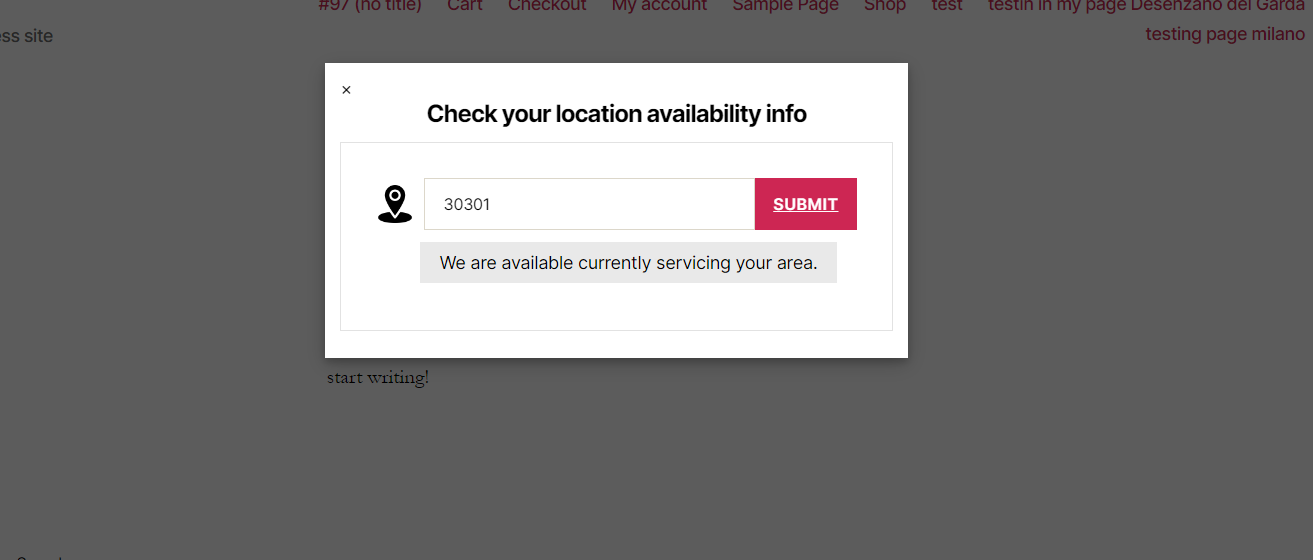
Product Page — Layout 2 — Alternative widget layout on the single product page.
Installation
From the WordPress Dashboard
- Go to Plugins Add New.
- Search for Check Pincode For WooCommerce.
- Click Install Now, then Activate.
Manual Upload
- Download the plugin
.zipfile. - Go to Plugins Add New Upload Plugin.
- Select the
.zipfile and click Install Now. - Click Activate Plugin.
After Activation
- Go to Setting Pincodes in the WordPress admin sidebar.
- Add your first pincode from the Add Pincode tab, or bulk-import using a CSV file.
- Adjust colours, text labels, and display options from the General Settings and Text & Labels tabs.
- Visit any WooCommerce product page to see the pincode checker in action.
Reviews


Contributors & Developers
“Check Pincode For WooCommerce” is open source software. The following people have contributed to this plugin.
Contributors
Translate “Check Pincode For WooCommerce” into your language.
Interested in development?
Browse the code, check out the SVN repository, or subscribe to the development log by RSS.
Changelog
1.0
- Initial release.
- Custom pincode database table (
wp_cpiw_pincode) with full CRUD via REST API. - Add, edit, and delete pincodes individually from the admin panel.
- Bulk CSV import with duplicate detection and detailed import summary.
- Sample CSV template available to download from the admin panel.
- Pincode checker widget on WooCommerce single product pages.
- Estimated delivery date calculation and display per pincode.
- Cash on Delivery available / unavailable indicator per pincode.
- Pincode-based shipping fee added automatically to WooCommerce cart.
- Cookie-based pincode memory (7-day retention) for returning visitors.
- Checkout pincode validation via AJAX.
- Optional pincode check popup with force-display and page-exclusion options.
- Two frontend layout options with configurable product page position.
- Shortcode
[cpiw-pincode-checker]for custom widget placement. - Hide Add to Cart and Place Order buttons for unserviceable pincodes.
- Full colour customisation for all widget and popup elements.
- Complete text and label customisation including dynamic
{city_name}and{state_name}placeholders. - React-powered admin UI with tabbed layout and real-time toast notifications.