

Description
Add Mail SMTP settings for WordPress
Looking to modify the SMTP on your WordPress site?
Our Custom SMTP solution offers you this possibility, allowing you to easily change your WordPress SMTP settings, ensuring your emails consistently land in the recipient’s inbox.
Custom SMTP solves your email deliverability problems by reconfiguring WordPress to use a proper SMTP provider when sending emails.
What’s more, our intuitive settings page and comprehensive documentation will guide you through the process, making the task of modifying your SMTP settings easier than ever.
Custom SMTP is a free tool, packed with all the essential features you need to send your WordPress emails with absolute confidence!
Built for modern WordPress: WordPress 7.0 ready, PHPMailer 7.0.2 compatible, stateless / cloud-ready (Docker, Kubernetes), and fully translated in English and French.
Amazon SES API — keyless sending with IAM roles
Running WordPress on AWS (ECS Fargate, EC2, App Runner)? Custom SMTP can send through the Amazon SES API authenticated entirely by your container or instance IAM role — with no access keys, no secret keys, and no SMTP credentials stored anywhere. The plugin relies on the AWS default credential chain (the ECS task role / EC2 instance role), so your secrets never live in the database or the settings page.
This is the cleanest, most secure way to send from a containerized, 12-factor WordPress:
- Zero stored secrets — authentication comes from the IAM role attached to the task/instance, not from keys pasted into wp-admin.
- Full message fidelity — HTML, attachments, CC/BCC, Reply-To and custom headers are preserved (the message is sent as raw MIME); BCC recipients stay hidden.
- SES Configuration Sets — optional, for bounce/complaint tracking and CloudWatch metrics.
- Environment-driven — region, sender address and configuration set can be injected as environment variables / PHP constants (
SES_REGION/AWS_REGION,SES_FROM_EMAIL,SES_CONFIG_SET), so the same image ships across environments without touching the database. - No extra dependency required — works whether or not the AWS SDK for PHP is present; when it isn’t, a built-in, dependency-free signed API client is used.
- One-click test — send a test email and get back the SES MessageId.
Built-in Email Logging
Never wonder if your emails were sent again. Custom SMTP automatically logs every email sent from your WordPress site – including WooCommerce order notifications, contact form submissions, and password resets. Preview email content directly in wp-admin, debug delivery issues with detailed error messages, and export logs for compliance.
Configuration Options
You can set the following options:
- From Name & Email – Specify the sender name and email address for all outgoing emails
- SMTP Host – Your email provider’s server (e.g., smtp.gmail.com)
- SMTP Port – Common ports: 587 (TLS), 465 (SSL), 25 (None)
- Encryption – Choose between None, SSL, or TLS
- Authentication – Enable/disable SMTP authentication for relay servers
- Username & Password – Your SMTP credentials (password stored encrypted)
- Provider Presets – One-click configuration for Gmail, Outlook, iCloud, SendGrid, AWS SES, and more
- Amazon SES API (IAM role) – Send through the Amazon SES API with no stored credentials, authenticated by your AWS task/instance role
Key Features
SMTP Configuration
* Configure any SMTP server (Gmail, Outlook, SendGrid, Mailgun, AWS SES, etc.)
* Support for SSL/TLS encryption
* Optional SMTP authentication for relay servers
* Test connection without sending emails
* Send test emails to verify configuration
Amazon SES API (keyless, IAM role)
* Send via the Amazon SESv2 API authenticated by your AWS IAM role — no access keys or SMTP credentials stored
* Ideal for AWS ECS/Fargate, EC2 and other containerized, stateless deployments
* Preserves HTML, attachments, CC/BCC, Reply-To and custom headers (raw MIME)
* Optional SES Configuration Set for bounce/complaint/CloudWatch tracking
* Region, sender and configuration set configurable via environment variables or constants
* Works with or without the AWS SDK for PHP (built-in signed API client fallback)
* “Send Test Email” returns the SES MessageId
Email Logging & Debugging
* Zero configuration – Logging works out of the box
* Track all emails sent from WordPress, WooCommerce, Contact Form 7, and any plugin
* View delivery status (sent/failed) with detailed error messages
* Debug wp_mail errors easily – See exactly why emails fail
* Store email headers for advanced troubleshooting
* Search by recipient, subject, or status
* Filter by date range (Today, 7 days, 30 days)
* Export logs to CSV for reporting and compliance
Email Preview & Content
* Preview email body directly from wp-admin – No need to send test emails
* View HTML source code of any logged email
* Outlook-style sidebar for quick preview
* Download any email as HTML file for archiving
* Optional content storage (disabled by default for privacy)
Deliverability
* Cooperates with the automatic Envelope-From / Return-Path behavior introduced in WordPress 6.9 — improves SPF, DKIM and DMARC alignment on strict hosts (AWS SES, Postmark, etc.)
* PHPMailer 7.0.2 compatible (the version bundled in WordPress 7.0)
* UTF-8 and emoji handled end-to-end in subjects, bodies, and headers
Privacy & GDPR-friendly
* SMTP password encrypted at rest (AES-256-CBC)
* Configurable log retention with automatic purge (30 days by default)
* Email content storage can be disabled in one click from the settings
* Email preview rendered in a sandboxed iframe — no JavaScript execution from logged emails
* All data stays in your WordPress database — no third-party calls
Security
* SMTP password encrypted in database (AES-256-CBC)
* All admin actions protected with nonces
* Capability checks on all operations
Stateless & Cloud-Ready
* Fully compatible with stateless WordPress hosting (containers, Kubernetes, AWS ECS/Fargate, etc.)
* Works with Bedrock, Trellis, and other modern WordPress stacks
* Zero filesystem writes – all data stored in the database
* No shared storage (EFS/NFS) required between instances
* Safe to run on read-only filesystems
AI & Workflow Integration (WordPress 6.9+)
* custom-smtp/connection-health — read the current SMTP state (configured, host/port/encryption/auth, log retention) from any tool
* custom-smtp/send-test-email — trigger a test email through your configured SMTP server
* Compatible with MCP-enabled AI assistants, automation tools (n8n, Make), dashboards, and other plugins via the WordPress Abilities API
* Protected by capability checks (manage_options) — same security boundary as the wp-admin interface
Screenshots
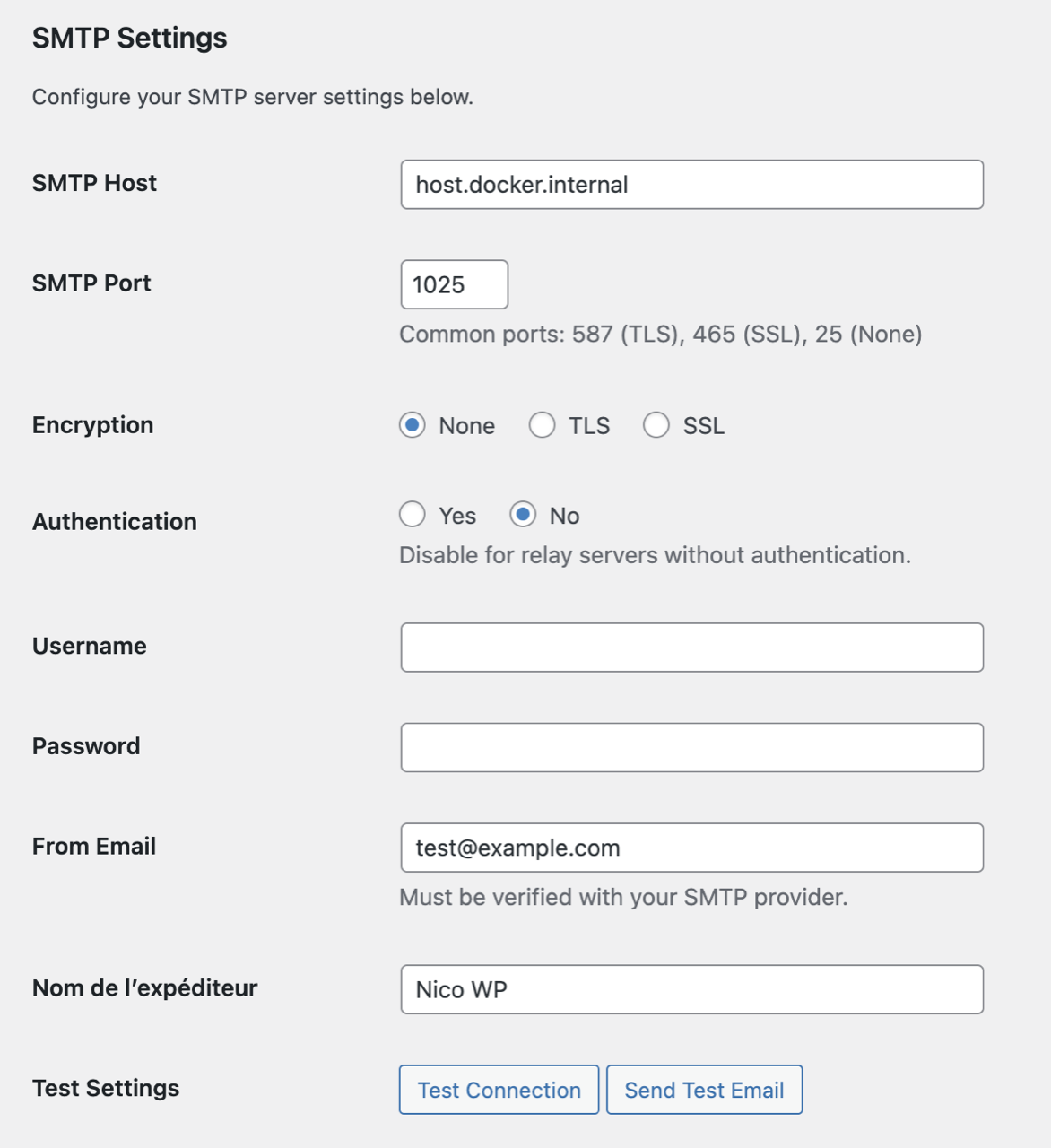
SMTP Settings – Configure your email server with host, port, encryption, and authentication options. 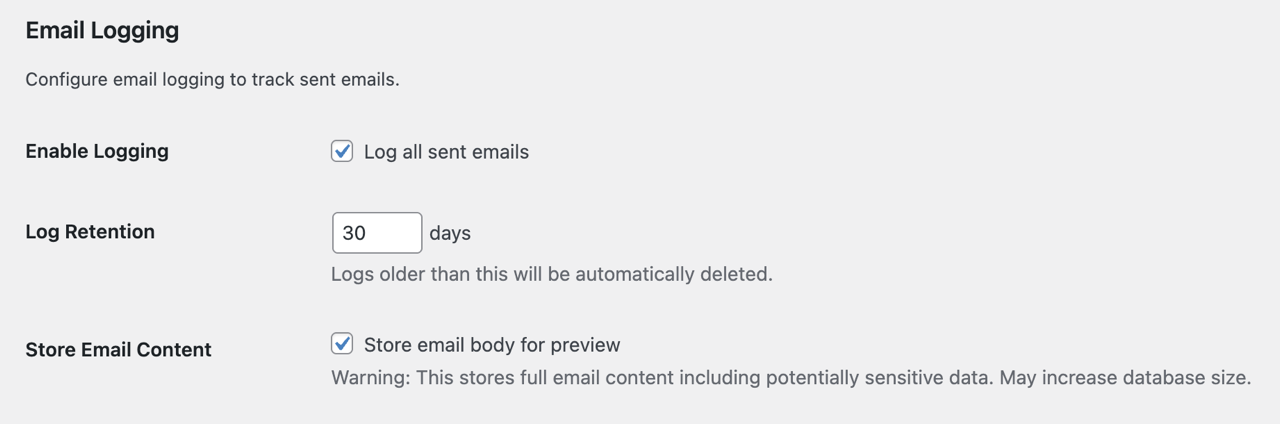
Email Logging Settings – Enable logging, set retention period, and optionally store email content for preview. 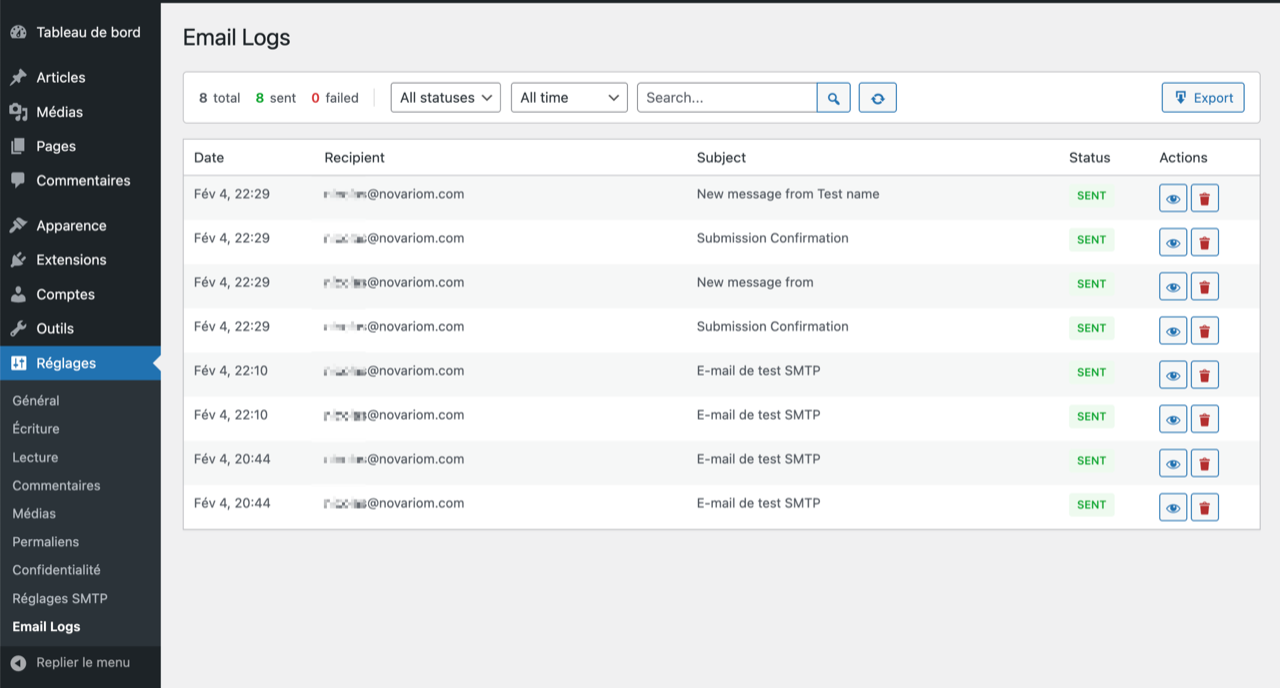
Email Logs – View all sent emails with status, search, and filters. Export to CSV. 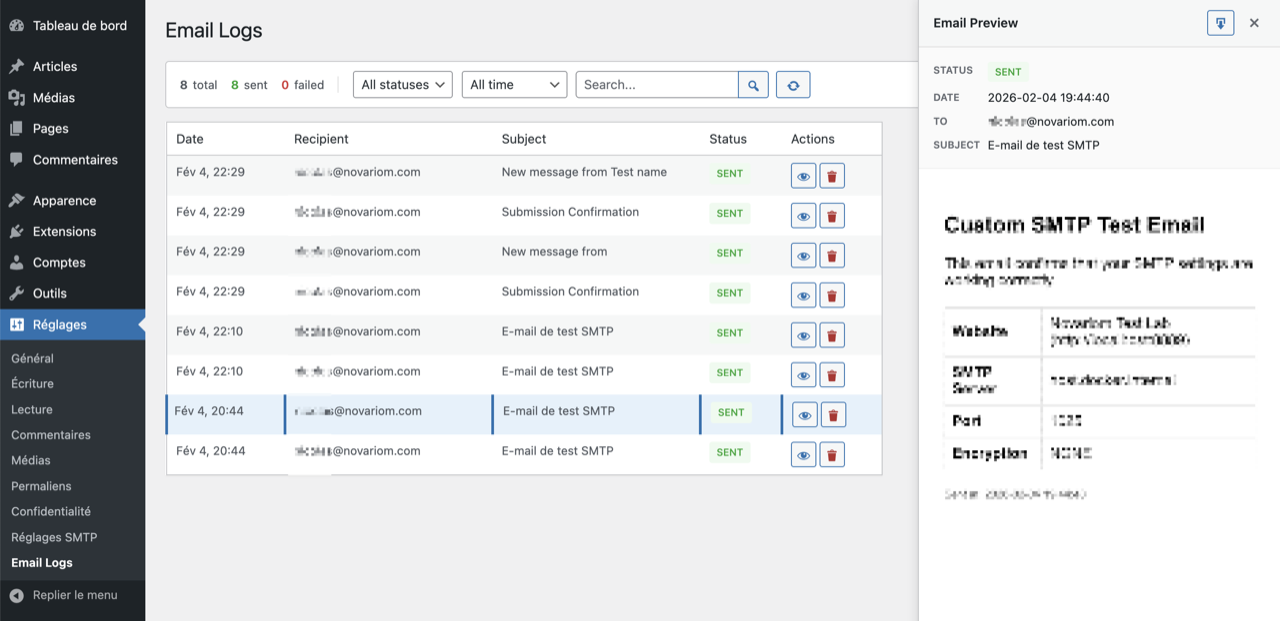
Email Preview – Click any email to preview its content in an Outlook-style sidebar panel.
Installation
- Install Custom SMTP either via the ww.wp.xz.cn plugin repository or by uploading the files to your server.
- Navigate to Settings > Custom SMTP in the WordPress admin.
- Select a provider preset (Gmail, Outlook, AWS SES, SendGrid, Mailgun, Brevo, Postmark, Mailjet, Zoho, Yahoo, iCloud) or pick “Other / Custom” and enter your SMTP details manually.
1, 2, 3: You’re done!
On AWS (ECS/Fargate, EC2)? Choose the Amazon SES (API · IAM role) mailer instead of SMTP to send with no stored credentials — see the SES question in the FAQ.
FAQ
-
What SMTP settings should I use?
-
Custom SMTP includes presets for popular providers (Gmail, Outlook, AWS SES, SendGrid, etc.). Just select your provider and settings are auto-filled.
-
List of SMTP Servers
-
Here’s a reference list of common SMTP servers:
Professional Email Services
* SendGrid: smtp.sendgrid.net – TLS – Port 587
* Mailgun: smtp.mailgun.org – TLS – Port 587
* Amazon SES: email-smtp.[region].amazonaws.com – TLS – Port 587
* Brevo (Sendinblue): smtp-relay.brevo.com – TLS – Port 587
* Postmark: smtp.postmarkapp.com – TLS – Port 587
* Mailjet: in-v3.mailjet.com – TLS – Port 587Consumer Email Providers
* Gmail: smtp.gmail.com – TLS – Port 587
* Outlook/Office365: smtp.office365.com – TLS – Port 587
* Yahoo Mail: smtp.mail.yahoo.com – TLS – Port 587
* iCloud: smtp.mail.me.com – TLS – Port 587
* Zoho: smtp.zoho.com – TLS – Port 587
* AOL: smtp.aol.com – TLS – Port 587
* GMX: smtp.gmx.com – SSL – Port 465ISP Email (Regional)
* Comcast: smtp.comcast.net – Port 587
* Verizon: outgoing.verizon.net – SSL – Port 465
* AT&T: smtp.mail.att.net – SSL – Port 465
* Orange: smtp.orange.net – Port 25
* T-Online: securesmtp.t-online.de – TLS – Port 587
* 1&1 IONOS: smtp.1and1.com – TLS – Port 587Note: Settings may vary. Contact your provider for exact configuration.
-
Does it work with WooCommerce?
-
Yes! Custom SMTP logs all emails sent from WordPress, including WooCommerce order confirmations, shipping notifications, and customer emails.
-
Is it compatible with contact form plugins?
-
Yes, it works with Contact Form 7, WPForms, Gravity Forms, and any plugin that uses WordPress wp_mail() function.
-
Is it compatible with stateless/containerized WordPress?
-
Yes. Custom SMTP is fully stateless-compatible and works on ephemeral infrastructure (Docker, Kubernetes, AWS ECS/Fargate, Google Cloud Run, etc.) without shared storage like EFS or NFS.
The plugin stores all data in the WordPress database:
- Settings in
wp_options - Email logs in a custom database table
- CSV exports streamed directly to the browser (no temp files)
- Log purge scheduled via WP-Cron (database-backed)
It also works with modern WordPress stacks like Bedrock and Trellis, and can run on a read-only filesystem.
Notes for stateless deployments:
- Ensure WordPress salts (
LOGGED_IN_KEY,LOGGED_IN_SALT) are consistent across all instances — the SMTP password encryption depends on them. - If
DISABLE_WP_CRONis set totrue, configure an external cron to triggerwp-cron.phpso automatic log purge runs properly. - On AWS, prefer the Amazon SES (API) mailer with an IAM role (see the SES question below) — it removes the need to store any SMTP credentials at all.
- Settings in
-
Can I send through Amazon SES without storing any credentials?
-
Yes. Custom SMTP includes an Amazon SES (API) mailer that authenticates through your AWS IAM role (the ECS task role or EC2 instance role) using the AWS default credential chain. You never enter or store an access key, secret key, or SMTP credential — ideal for stateless, containerized WordPress on AWS ECS/Fargate.
In Settings > Custom SMTP, choose “Amazon SES (API · IAM role)” as the mailer, set the region and a verified sender address (or inject them as environment variables), and you’re done. You can also provide a SES Configuration Set for bounce/complaint tracking.
The following environment variables / PHP constants take priority over the saved settings, so the same container image works across environments:
SES_REGION(falls back toAWS_REGION) — e.g.eu-west-3SES_FROM_EMAIL— the verified sender addressSES_CONFIG_SET— optional SES configuration set
The message is sent as raw MIME, so HTML, attachments, CC/BCC, Reply-To and custom headers are all preserved. The mailer works whether or not the AWS SDK for PHP is installed (it falls back to a built-in signed API client), and SES sends are logged in the Email Logs like any other email.
This is different from the existing Amazon SES SMTP preset, which uses SMTP credentials — the new mailer uses the SES API and your IAM role instead.
-
Can AI assistants or automation tools manage my SMTP?
-
Yes, on WordPress 6.9+. Custom SMTP registers two abilities with the WordPress Abilities API:
custom-smtp/connection-healthreturns the current SMTP state (configured, host, port, encryption, auth, logging retention) — useful for diagnostics and monitoring.custom-smtp/send-test-emailtriggers a test email through the configured SMTP server.
Both abilities are accessible to MCP-compatible AI clients, automation workflows (n8n, Make), and other plugins. They enforce the same capability check as the wp-admin interface (
manage_options), so unprivileged users or scripts cannot invoke them.
Reviews

Contributors & Developers
“Custom SMTP: Email Deliverability – FREE & Easy-to-use” is open source software. The following people have contributed to this plugin.
Contributors
Translate “Custom SMTP: Email Deliverability – FREE & Easy-to-use” into your language.
Interested in development?
Browse the code, check out the SVN repository, or subscribe to the development log by RSS.
Changelog
2.3.0
New mailer: Amazon SES API with IAM role authentication
New Feature — Amazon SES (API) mailer
* New mailer type that sends through the Amazon SESv2 API instead of SMTP, authenticated exclusively by the server’s AWS IAM role (ECS task role / EC2 instance role) via the AWS default credential chain — no access keys, secret keys, or SMTP credentials are stored or required.
* Built for stateless, containerized WordPress on AWS (ECS/Fargate): no secrets in the database, following 12-factor principles.
* Full message fidelity — HTML, attachments, CC/BCC, Reply-To and custom headers are preserved (sent as raw MIME); BCC recipients are delivered via the SES envelope and stay hidden.
* Optional SES Configuration Set support for bounce/complaint tracking and CloudWatch metrics.
* Region, sender address and configuration set can be injected via environment variables / constants (SES_REGION / AWS_REGION, SES_FROM_EMAIL, SES_CONFIG_SET), overriding the stored settings — so the same image runs across environments.
* Dependency-free — uses the AWS SDK for PHP when present, otherwise a built-in SigV4-signed API client over the WordPress HTTP API (nothing to bundle).
* “Send Test Email” returns the SES MessageId on success.
* SES sends are captured by the Email Logs (status, content preview) just like SMTP sends.
* Note: this is distinct from the existing Amazon SES SMTP preset, which uses SMTP credentials. The new mailer uses the SES API and IAM roles.
2.2.1
Documentation update
- Surfaced the Abilities API integration (shipped in 2.2.0) in the plugin description and FAQ — users can now discover the AI / workflow capabilities directly from the ww.wp.xz.cn plugin page without digging into the changelog.
- Added dedicated Deliverability section highlighting SPF/DKIM alignment, PHPMailer 7.0.2 compatibility, and UTF-8/emoji handling.
- Added dedicated Privacy & GDPR-friendly section listing the existing privacy mitigations (encryption at rest, automatic log purge, opt-out content storage, sandboxed preview).
- Mentioned the English / French translations and the “built for modern WordPress” stance in the intro.
- Fixed the Installation steps: removed an incorrect “by WPForms” mention and refreshed the provider preset list to match the 11 presets actually shipped (Gmail, Outlook, AWS SES, SendGrid, Mailgun, Brevo, Postmark, Mailjet, Zoho, Yahoo, iCloud).
- Refreshed the ww.wp.xz.cn tags (
smtp, email, deliverability, mail logger, email logger) to better reflect the plugin’s positioning. - No functional changes.
2.2.0
WordPress 7 compatibility release
WordPress 7 Compatibility
* Verified compatibility with WordPress 7.0 and PHPMailer 7.0.2 (no code changes required — plugin uses only public PHPMailer properties and methods).
* Cooperates with the automatic Envelope-From / Return-Path behavior introduced in WordPress 6.9, so SPF/DKIM alignment now works correctly on strict hosts without manual configuration.
* Added a contextual note under the From Email field explaining the new envelope sender behavior on WordPress 6.9+.
New Integration
* Abilities API support (WordPress 6.9+): two server-side abilities are now exposed for AI assistants, dashboards, and workflow tools.
* custom-smtp/connection-health — returns whether SMTP is configured, host, port, encryption mode, auth state, and log retention.
* custom-smtp/send-test-email — sends a test email through the configured SMTP server.
Changed Defaults
* Store Email Content is now enabled by default on new installs so the log preview is useful out of the box. Existing installs keep their saved preference. You can still disable it from the Email Logging settings card; with the default log retention of 30 days, stored bodies are automatically purged.
Also Included (from the 2.1.0 line)
* iCloud Mail provider preset.
* Documented stateless and cloud-ready compatibility (Docker, Kubernetes, ECS/Fargate, Cloud Run, Bedrock, Trellis).
* Removed legacy v1.x procedural code; the v2.x OOP architecture is now the single source of truth.
2.1.0
Release Date – May 26, 2026
New Features
* Provider Presets: One-click configuration for Gmail, Outlook, AWS SES, SendGrid, Mailgun, Brevo, Postmark, Mailjet, Zoho, Yahoo, and iCloud.
* Auto-fill settings: Select a provider and Host, Port, Encryption, Authentication are automatically configured.
* Documentation links: Quick access to each provider’s SMTP documentation.
UI Improvements
* Redesigned settings page with card-based layout.
* Status bar showing SMTP configuration state at a glance.
* Collapsible Advanced Settings section.
* Save button in each settings card for quick access.
* Responsive design for mobile admin access.
Documentation
* Documented stateless and cloud-ready compatibility (Docker, Kubernetes, ECS/Fargate, Cloud Run, Bedrock, Trellis).
* Expanded FAQ with the full list of supported SMTP providers.
Maintenance
* Removed legacy v1.x procedural code; the v2.x OOP architecture is now the single source of truth.
2.0.0
Release Date – February 4, 2026
Major Release – Architecture Refactor & Email Logging
New Features
* Email Logging: Track all sent emails with recipient, subject, date/time, and status (success/failed).
* Email Logs Dashboard: View all logged emails with search, filters, and pagination.
* Email Preview Sidebar: View full email content in an Outlook-style sidebar panel.
* Email Content Storage: Optionally store complete email body for later preview (disabled by default for privacy).
* Download Email: Export any logged email as HTML file for archiving or debugging.
* Date Range Filters: Quick filters for Today, Last 7 days, Last 30 days.
* CSV Export: Export email logs to CSV for reporting and analysis.
* Auto-purge: Configurable log retention (default 30 days) with automatic cleanup.
* Statistics Bar: Compact inline stats showing total, sent, failed, and today’s email counts.
* Refresh Button: One-click refresh of email logs.
Architecture
* Complete OOP refactor with PSR-4 namespaces (CustomSMTP\).
* Dependency injection pattern for better testability.
* Separated concerns: Plugin, Settings, Mailer, Logger, Encryption classes.
* Custom database table for email logs.
Security
* Email preview uses sandboxed iframe (no JavaScript execution).
* Email body limited to 500KB to prevent database bloat.
* All AJAX actions protected with nonce verification and capability checks.
Improved
* Cleaner, more maintainable codebase.
* Better separation of admin UI and core functionality.
* Enhanced error handling throughout.
* Responsive design for mobile admin access.
Note
* All v1.x settings are preserved and compatible.
* Email logging is enabled by default (can be disabled in settings).
* Email content storage is disabled by default – enable in settings to use preview feature.
1.9.0
Release Date – December 5, 2025
Security
* SMTP password is now encrypted in the database using AES-256-CBC with WordPress salts.
* Password field no longer displays the stored value (shows placeholder instead).
Added
* New “Test Connection” button to verify SMTP settings without sending an email.
* New “SMTP Authentication” option (Yes/No) to support relay servers without authentication.
* Improved error messages: common PHPMailer errors are now translated to user-friendly messages.
Changed
* Test buttons now show “Test Connection” and “Send Test Email” separately.
* Password field shows “Leave empty to keep current password” when a password is already saved.
Note
* Existing plaintext passwords will continue to work and will be encrypted on next save.
1.8.1
Release Date – December 5, 2025
Fixed
* WordPress 6.9 compatibility: Use wp_mail_from filter instead of setting From in phpmailer_init (fixes “Invalid address” error).
* Fixed test email button not working due to duplicate PHPMailer hooks.
Changed
* Breaking: “Mail From” field moved from Optional to Main settings (now required for WordPress 6.9+).
* Test button now auto-saves settings before sending test email.
* Improved error messages: shows which required fields are missing.
* Disabled SMTPAutoTLS when security is set to “None” (fixes Mailpit/local testing).
1.8.0
Release Date – December 4, 2025
Fixed
* WordPress 6.9 compatibility: Fixed email sending failure with AWS SES and other SMTP providers that require verified sender addresses.
* Added proper Envelope-From (Sender/Return-Path) configuration to comply with WordPress 6.9 PHPMailer changes.
* Test emails now correctly use the configured “Mail From” address as the envelope sender.
Changed
* Minimum WordPress version updated to 6.0.
* Minimum PHP version updated to 7.4.
Note
* Users must configure the “Mail From” field in optional settings with a verified email address (especially important for AWS SES users).
1.7
Release Date – July 5, 2024
Improved
* Improved security of saved options with appropriate validation and sanitization.
* Code optimization by removing unused code comments and adding value checks before use.
* Split the main custom-smtp.php file into several files to improve maintainability and readability.
* Creation of includes/admin, includes/smtp and includes/utils folders to organize code by functionality.
Fixed
* Fixed validation of secure options to ensure they are either none, ssl or tls.
* Translations : Test email.
1.6
Release Date – April 3, 2024
- New optional settings for all emails sent by WordPress:
- Addition of “Reply To” option: This feature allows you to specify an email address that recipients will send replies to, instead of the original sender’s email address. This is useful when the sender does not wish to receive replies directly.
- Addition of “CC” option: “CC” stands for “Carbon Copy”. When you CC an email to someone, you send them a copy of your email. The CC’d person may not be the main recipient of the email, but they are included for their reference. Everyone who receives the email can see who has been CC’d.
- Addition of “BCC” option: “BCC” stands for “Blind Carbon Copy”. This works like CC, but BCC recipients are hidden from the other recipients. This is useful when you want to inform someone without letting others know that they are also receiving the same email.
- Incompatible plugin detection: This feature helps identify any plugins that are not compatible and could potentially cause issues (proactive approach to prevent conflicts). It will alert you if an installed plugin is not compatible with the Custom SMTP plugin, allowing you to take necessary action.
- Comprehensive test email with configuration information
1.5
Release Date – March 14, 2024
- You can test your SMTP settings before saving them.
- Secure SMTP option accept
Noneas value. - Custom CSS for Settings.
1.4
Release Date – March 12, 2024
- Public launch of the plugin!
- Completely translated into English and French.
- All SMTP options are editable.