

Description
This plugin provides an easy way to publish panoramas and object movies created with Garden Gnome Software’s Pano2VR and Object2VR.
You can embed a package via a shortcode like [ggpkg id=12] or a block in the Gutenberg editor.
In the plugin settings, you can restrict .ggpkg uploads to users with a specific WordPress capability. This check is enabled by default and uses upload_ggpkg unless you change it.
Sample packages can be downloaded from our forum.
Shortcode
When you are using a shortcode to embed a package, you can provide additional parameters in the shortcode:
-
width: the width of the player in the page
-
height: the height of the player in the page
-
start_preview: when set to ‘true’, the player will initially show as a preview image with a play button.
-
start_node: if the package is a virtual tour, you can specify the start node. You can find the node ID of each node in the tooltip in the tour browser.
-
start_view: for panoramas and virtual tours, sets the initial view of the first node. The format is ‘pan/tilt/fov/projection’. The projection parameter is optional.
-
url: can be used instead of ID, to embed a package from a specific URL. Like
[ggpkg url='....']. This field needs to be enabled in the settings. -
Remote URL security: when using
url, you can enforce TLS certificate verification and optionally restrict allowed hostnames in the plugin settings.
Example: [ggpkg id=12 width='100%' height='500px' start_preview='true']
If you are using the Gutenberg Editor and want to embed a package via a shortcode, use a Classic Block from the ‘Formatting’ section, and use the Add Media button to add a package from the media library.
Gutenberg Block
You can find the GGPKG Gutenberg Block in the Widgets section.
In the GGPKG Block, you can pick a package from the media library.
In the Inspector panel on the right, you can specify if the package should start with a preview image and a play button, and set the width and height of the player in the page.
Elementor Widget
You can find the Garden Gnome Package Widget in the General section.
In the Widget settings, you can pick a package from the media library, define the height, and select if it should start with a preview image.
Screenshots
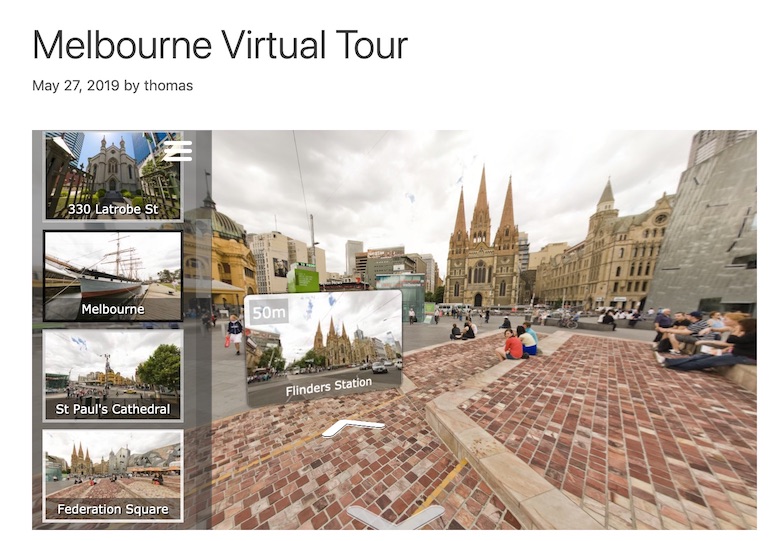
Embedded virtual tour 
Gutenberg block 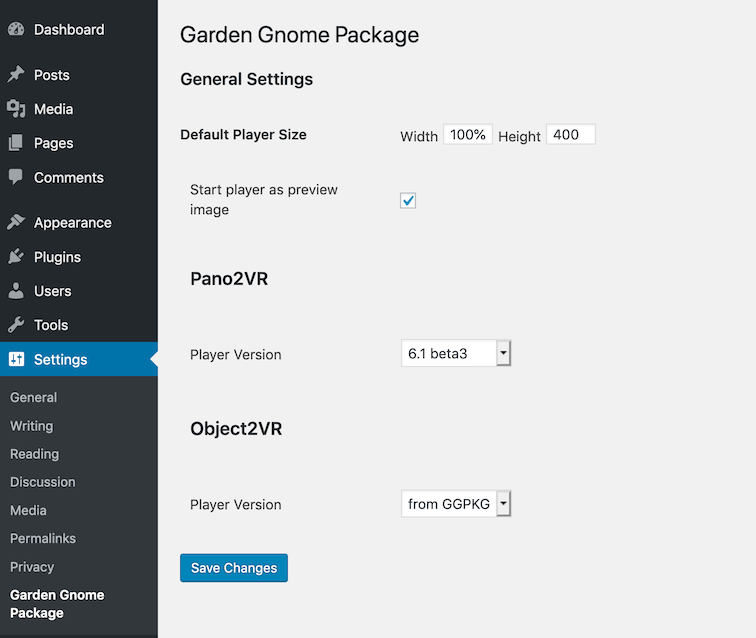
Settings page 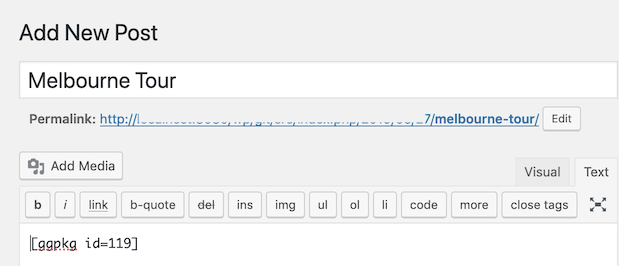
Shortcode in classic editor
Blocks
This plugin provides 1 block.
- GGPKG
Installation
Requirements:
- WordPress 5.0 or higher
- PHP 7.2 or higher
- The zip and libxml PHP module must be installed on your server.
Installation:
- Upload the plugin files to the
/wp-content/plugins/garden-gnome-packagedirectory, or install the plugin through the WordPress plugins screen directly. - Activate the plugin through the ‘Plugins’ screen in WordPress
FAQ
-
What is a Garden Gnome Package?
-
A Garden Gnome Package is a simple ZIP file that contains everything necessary to display a single panorama, virtual tour, or object movie. After uploading the package, the plugin extracts the archive.
-
How can I create a package?
-
Please see the Pano2VR documentation or Object2VR documentation.
-
How can I upload a tour with a large file size?
-
The easiest solution is to install the excellent Big File Uploads plugin.
There are two strategies without an additional plugin:
-
Upload the tour to a folder on a web server and use the shortcode
[ggpkg url="https://example.com/my_tour_folder/"]to point to the tour. -
Upload a small version of the tour (i.e., just the start node) and then replace the files in the extracted folder in the upload directory.
-
-
How can I retry unpacking a package?
-
In the Media Library list view, use the
Re-extract GGPKGrow action on a package attachment. -
Where can I see unpack status and errors?
-
- Admin notices are shown on Media Library screens after upload/re-extract.
- Package attachment details include
GGPKG Unpack StatusandGGPKG Unpack Errors.
-
How can I contribute?
-
Please submit a pull request on GitHub.
Reviews


Contributors & Developers
“Garden Gnome Package” is open source software. The following people have contributed to this plugin.
Contributors
“Garden Gnome Package” has been translated into 1 locale. Thank you to the translators for their contributions.
Translate “Garden Gnome Package” into your language.
Interested in development?
Browse the code, check out the SVN repository, or subscribe to the development log by RSS.
Changelog
2.5.2
- Capability check to for
.ggpkguploads is ignored for admins
2.5.1
- Capability check to for
.ggpkguploads is now on by default
2.5.0
- Added minimum version checks during activation (WordPress 5.0+, PHP 7.2+).
- Added optional capability-based permission setting for
.ggpkguploads (off by default) to address CVE-2026-39683. - Updated Gutenberg block editor and Elementor widget registration APIs for improved forward compatibility.
- Added unpack error reporting in Media Library notices and attachment details.
- Added per-package unpack status metadata and
Re-extract GGPKGmedia action. - Added secure remote URL settings for shortcode mode (strict TLS and allowed host list).
2.4.1
- Added 3d file extensions to the allowed file types for Pano2VR 8 packages.
2.4.0
- Added a list of valid file extensions within a package file for security reasons (CVE-2024-12854).
2.3.0
- Breaking Change: Added an option for the url field in the settings, that is off by default for security reasons.
- Shortcode: Better “url” parameter sanitization
2.2.9
- Fixes for “start_node” parameter sanitization
2.2.8
- Fixes for the plugin settings dialog
2.2.7
- Less strict sanitization to allow complex CSS attributes in short code
2.2.6
- Better input sanitization for the short code attributes
2.2.5
- Fix for Elementor icon and version bump
2.2.4
- Fix for centered preview button
2.2.3
- Fix warnings in JSON parser
2.2.2
- Forces CSS line-height to 1.0 in skins
2.2.2
- Forces CSS line-height to 1.0 in skins
2.2.1
- Fix for uninstall hook and deprecation warning
2.2.0
- New icon
- Added WebXR support
2.1.3
- Fix for copy current package player
- Fix for multiple different skins on a page
- Fix in Gutenberg editor for WordPress 5.4
2.1.2
- Elementor widget is now responsive
- Fix for fullscreen, if the fullscreen API is missing
2.1.1
- Disable ‘sslverify’ for gginfo download, as this causes issues with PHP 7.4
2.1.0
- Added and Elementor widget
- Added a filter for packages in the media library
- Changed div container ids
2.0.1
- Improved CSS reset for images
2.0
- Complete rewrite of the ggpkg-import plugin.