Title: Links2Tabs
Author: Name.ly
Published: July 6, 2011
Last modified: June 12, 2013
---
Search plugins
This plugin **hasn’t been tested with the latest 3 major releases of WordPress**.
It may no longer be maintained or supported and may have compatibility issues when
used with more recent versions of WordPress.

# Links2Tabs
By [Name.ly](https://profiles.wordpress.org/namely/)
[Download](https://downloads.wordpress.org/plugin/links2tabs.zip)
* [Details](https://wordpress.org/plugins/links2tabs/#description)
* [Reviews](https://wordpress.org/plugins/links2tabs/#reviews)
* [Installation](https://wordpress.org/plugins/links2tabs/#installation)
* [Development](https://wordpress.org/plugins/links2tabs/#developers)
[Support](https://wordpress.org/support/plugin/links2tabs/)
## Description
[Links2Tabs](http://links2tabs.com/) plugin automatically generates the list of
references at the bottom of each post and/or page and bundles them into handy links
by Links2Tabs services that open all references with one click.
For installation please see the [corresponding section](https://wordpress.org/extend/plugins/links2tabs/installation/).
It is as trivial as copying the plugin folder in your WordPress.
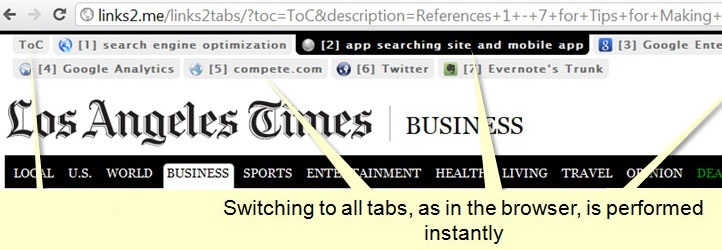
To get the flavour of what the plugin actually does, see the [screenshots](https://wordpress.org/extend/plugins/links2tabs/screenshots/)
and/or a [demo page](http://links2.me/links2tabs/?toc=ToC&title=Links2Tabs+-+What+a+great+tabbing+service!&description=References+1+-+5+for+Info&url1=http%3A%2F%2Fmany.at%2F&caption1=[1]+Many.at&url2=http%3A%2F%2Fbrief.ly%2F&caption2=[2]+Brief.ly&url3=http%3A%2F%2Flinks2.me%2F&caption3=[3]+Links2.Me&url4=http%3A%2F%2Flinks2tabs.com%2Fplugins%2Fwordpress%2F&caption4=[4]+Wordpress&url5=http%3A%2F%2Ffeed2tabs.com%2F&caption5=[5]+Feed2Tabs).
Once installed and activated, the plugin will work automatically. If you would like
to fine-tune some bits, just go to the plugin’s settings page (WP Admin -> Settings-
> Links2Tabs).
The plugin offers the following options.
#### Parsing & Final Finish
* Show on posts
* Show on pages
* Skip double references (If several double references with the same URLs are found,
the title of the first one will be used in the bundle.)
* Include links with images (When set to No, references with images will be skipped)
* Include internal links (Choose whether or not to bundle internal links, i.e.,
those referring to this site’s domain).
* Add reference tags (the plugin can tag each recognised reference with its number.)
* Link reference tags to the bundle (if “Add reference tags” above is `yes`, the
plugin can link each added tag to the result in the page/post bottom.)
* Links per bundle (Select how many references to bundle in one link.)
* Minimum number of links (Set a threshold, so that if the number of references
is less than specified, bundled links will not be shown.)
* Text before one bundle (Text to appear before the link in case there is only
one reference bundle.)
* Text before many bundles (Text to appear before the links in case there are several
bundles.)
* Link target (Where to open the bundled references: new window will set it to `
_blank`.)
* Visibility (Who should be able to see the bundles? When set to Public – it will
be visible to all visitors. When set to Private – to this site’s admins only
When set to Hidden – this will disable the reference bundling completely.)
#### Bundled Tabs
* Open references in tabs (Enables or disables automatic link opening in separate
tabs. Please mind, that if ToC is set to off below, tabs will be enabled anyway.)
* Default reference title (This caption will be used if no valid reference title
is found; default is “Reference”.)
* Reference title format (How to format the reference titles into the tab captions.
It is possible to use `%TITLE%` and `%REF_ID%`. N.B. These titles will be cut
off if longer than 100 characters.)
* Bundle Title (Title of the bundle to apprear on the ToC tab*.)
* Bundle Description (Description of the bundle to apprear on the ToC tab*.)
* Bundle Table of Contents (Caption of the ToC tab. Set to off to hide the ToC*.)
#### Advance Settings
* Custom API base URL (So that the advanced users have extra playground. It is
possible to choose a predefined API base or provide own one**.)
* Plugin Priority (For advanced WordPress users only: priority to use when hooking
on `the_content` filter.)
* Exclude URL keywords (URLs containing these keywords won’t be included in the
bundles.)
#### Hooks
It is possible to use the following hooks:
* Filter `links2tabs_url_in_the_content ( $url_original, $url_bundled )` can be
applied to change the original URLs in the content
* Filter `links2tabs_url_to_bundle ( $url_bundled, $url_original )` can be applied
to change or cancel the URLs in the bundle
* Filter `links2tabs_bundledlink ( $bundledlink )` can be applied to modify the
final bundled URLs
Note 1: * – It is possible to use the following short codes to insert corresponding
credentials in Title, Description, and ToC fields above:
* `%BLOG_NAME%` – site title
* `%BLOG_DESCRIPTION%` – site tagline
* `%POST_TITLE%` – post title
* `%REF_IDS%` – range of references included in the link bundle
Note 2: ** – For those that want to configure custom API base and even map it on
their own domain names, instructions can be found [here](http://name.ly/api/custom-api/).
### Translations
* English – [Name.ly](http://name.ly/)
If you want to translate this plugin, please read [this](http://links2tabs.com/plugins/wordpress#translating).
### Recommendations
Check out the companion plugin: [Feed2Tabs](https://wordpress.org/extend/plugins/feed2tabs/).
They go well together like coffee and doughnuts!
### About Name.ly
Name.ly offers WordPress blogs and many other services allowing to consolidate multiple
sites, pages and profiles.
All on catchy domain names, like sincere.ly, thatis.me, of-cour.se, …
Name.ly/PRO platform allows domain name owners to run similar sites under their
own brand.
[Name.ly/PRO](http://namely.pro/) is most known for being first WordPress driven
product allowing reselling emails and sub-domains.
## Screenshots
* [[
* Settings page
* [[
* List of references added to the post with links
* [[
* All references opened with one click
## Installation
#### As easy, as 1-2-3
1. Upload `links2tabs` folder to the `/wp-content/plugins/` directory
2. Activate the plugin through the ‘Plugins’ menu in WordPress
3. Voila!
#### Usage
Activate the plugin. That’s it!
Advance settings can be accessed via WP Admin -> Settings -> Links2Tabs.
Please see more details in the [Description](https://wordpress.org/extend/plugins/links2tabs/)
section.
## FAQ
Some links in bundles escape the frames and jump to the sites directly. What can
I do about it?
Some yet unknown and untested sites may escape from frames so you may wish to set
option “Open references in tabs” to “No” in order to prevent them from breaking
compilations.
Please also [report the link to us](http://links2tabs.com/about/contact/). We will
make sure, you won’t be bothered by it again.
I would like to change styling and layout of the added references. How can I do
it?
The reference bundles are added within `...
` HTML structure. You can define any styling you like via your theme CSS by
referring either to the element `#links2tabs` or to the class `.links2tabs`.
How can I disable link bundling on specific posts or pages?
Just place a short code in the post / page text `[SkipLinks2Tabs]`. If you are developing
your own theme or platform, you can place the followin PHP code to skip the link
bundling: `if ( ! defined ( 'SKIPLINKS2TABS' ) ) define ( 'SKIPLINKS2TABS', true);`.
How can I access the visitor statistics?
If you would like to see who is viewing your references in tabs, you need to create
a custom base and then either (a) enable stats there, or (b) link it to your Google
Analytics.
Instructions can be found [here](http://name.ly/api/custom-api/) and [here](http://name.ly/help/features/internal-analytics/).
## Reviews
There are no reviews for this plugin.
## Contributors & Developers
“Links2Tabs” is open source software. The following people have contributed to this
plugin.
Contributors
* [ Name.ly ](https://profiles.wordpress.org/namely/)
* [ Namely ](https://profiles.wordpress.org/namely-1/)
[Translate “Links2Tabs” into your language.](https://translate.wordpress.org/projects/wp-plugins/links2tabs)
### Interested in development?
[Browse the code](https://plugins.trac.wordpress.org/browser/links2tabs/), check
out the [SVN repository](https://plugins.svn.wordpress.org/links2tabs/), or subscribe
to the [development log](https://plugins.trac.wordpress.org/log/links2tabs/) by
[RSS](https://plugins.trac.wordpress.org/log/links2tabs/?limit=100&mode=stop_on_copy&format=rss).
## Changelog
#### 0.0.6
* Added possibility to skip bundling on certain pages or posts by calling shortcode`[
SkipLinks2Tabs]` or defining constant `SKIPLINKS2TABS`.
* Added filter hooks: “links2tabs_url_in_the_content”, “links2tabs_url_to_bundle”,
and “links2tabs_bundledlink”
#### 0.0.5
* Added a new option of skipping double references.
#### 0.0.4
* By default, the plugin will now exclude mail and phone references.
* Added a demo page to readme.txt.
#### 0.0.3
* Added a new option of the plugin filter priority.
* Changed the default value of the bundle size from 12 to 10 to make it more intuitive.
* Changed the default value of the threshold links from 2 to 3 to make it more
practical.
* Added a new option allowing to black list some URLs by keyword.
#### 0.0.2
* Support for WP prior to version 3.0.0 (before function get_site_url was introduced).
#### 0.0.1
* Initial version.
* Created and tested.
## Meta
* Version **0.0.6**
* Last updated **13 years ago**
* Active installations **Fewer than 10**
* WordPress version ** 2.8 or higher **
* Tested up to **3.2.1**
* Tags
* [frames](https://wordpress.org/plugins/tags/frames/)[links](https://wordpress.org/plugins/tags/links/)
[references](https://wordpress.org/plugins/tags/references/)[sites](https://wordpress.org/plugins/tags/sites/)
[windows](https://wordpress.org/plugins/tags/windows/)
* [Advanced View](https://wordpress.org/plugins/links2tabs/advanced/)
## Ratings
No reviews have been submitted yet.
[Your review](https://wordpress.org/support/plugin/links2tabs/reviews/#new-post)
[See all reviews](https://wordpress.org/support/plugin/links2tabs/reviews/)
## Contributors
* [ Name.ly ](https://profiles.wordpress.org/namely/)
* [ Namely ](https://profiles.wordpress.org/namely-1/)
## Support
Got something to say? Need help?
[View support forum](https://wordpress.org/support/plugin/links2tabs/)
## Donate
Would you like to support the advancement of this plugin?
[ Donate to this plugin ](http://name.ly/plugins/donations/)