

Description
Most security plugins hand you a dashboard full of alerts and expect you to know what to do next. Shield works differently.
It blocks threats automatically, repairs what it can on its own, and then shows you exactly what still needs your attention — ranked by impact, not volume. Less noise. More action.
🤖 Security That Runs Itself
The most powerful thing Shield does is what it handles without you:
- Automatic IP Blocking — every visitor is quietly scored as they interact with your site. Failed logins, firewall blocks, silentCAPTCHA failures, and other signals accumulate into a reputation score. When a visitor’s score crosses the threshold, Shield blocks them — automatically, without you lifting a finger
- Automatic File Repair — when a file integrity scan finds a changed WordPress core file, Shield pulls the original from ww.wp.xz.cn and restores it. Detected and fixed, without waiting for you to act
- Automatic Bot Recognition — Shield identifies legitimate crawlers (Google, Bing, DuckDuckGo, Yandex, Apple) and known services (ManageWP, Pingdom, Stripe, CloudFlare) and never blocks them. Your SEO and monitoring tools keep working
🧭 Guided Security, Not Just a Dashboard
Shield organises your security into four focused areas so you always know where to look:
- Queue — things that need your attention, ranked by priority. Not everything at once — just what matters right now
- Investigate — dig into blocked IPs, security events, and the specific signals that triggered each one
- Configure — guided setup for each protection area, with clear recommendations matched to your site
- Reports — a clear view of what Shield has blocked, detected, and repaired over time
The goal: guide you quickly towards action, not bury you in data.
🛡️ Free Protection
Bot Blocking & Firewall
silentCAPTCHA— blocks bad bots on login, registration, lost password, and comment forms using passive signals invisible to real visitors. No CAPTCHA keys. No external requests. No JavaScript that breaks your forms. Everything runs on your server (GDPR friendly).- Firewall rules blocking common WordPress attack patterns — SQL injection probes, known exploit signatures, suspicious request parameters
- XML-RPC protection — disable or restrict entirely, including pingbacks and trackbacks
- REST API firewall — block unauthenticated requests
- Fake crawler detection — identifies bots spoofing legitimate search engines
Login & Account Security
- Two-factor authentication (2FA) — email codes, Google Authenticator, or YubiKey OTP for all users
- Brute force protection with configurable login attempt limits and cooldown
- Session locking — tie sessions to a browser or IP to stop account theft after a successful login
- User enumeration blocking — closes off
?author=probes used to harvest usernames before an attack
Scanning & Integrity
- Core file scanning — compares WordPress core against official checksums and repairs changed files automatically
- Suspicious PHP detection — flags PHP files in locations where they have no business being
- Abandoned plugin detection — identifies unmaintained plugins most likely to carry unpatched vulnerabilities
Visibility & Control
- Security Admin PIN — lock Shield’s own settings so other administrators cannot quietly weaken your configuration
- Security activity log — logins, user changes, plugin and theme events, post edits, and suspicious requests: Everything in one clear view
- IP Rules — automatic & manual block and bypass rules, CIDR range support, full per-IP request history
🤝 CrowdSec Integration
Shield is the only WordPress security plugin with a native CrowdSec integration. CrowdSec aggregates threat signals from millions of sites into a shared IP reputation network — your site blocks known attackers before they ever probe you, using intelligence far beyond your own traffic history.
✨ ShieldPRO
- Passkeys — phishing-resistant, passwordless login for users
- Backup login codes — emergency 2FA access when a device is lost
- AI-based malware scanner — detects known and unknown PHP malware
- Plugin & theme file scanning — compares installed files against ww.wp.xz.cn originals, flagging unauthorised changes
- Vulnerability scanning — active checks across all installed plugins and themes
- Broader spam protection — WooCommerce, EDD, Contact Form 7, Ninja Forms, Elementor, and more
- Traffic rate limiting — cap request rates per IP to absorb high-volume bot floods
- User suspension — manual or automatic suspension of idle accounts
- MainWP integration
- White Label — rename and rebrand Shield for client sites
Who It’s For
Shield suits site owners, agencies, and MSPs who want protection that runs itself — not a plugin that demands constant attention to be useful.
If you have been burned by security plugins that generate more noise than protection, or dashboards that tell you everything is wrong without telling you what to fix, Shield was built to be the alternative.
Screenshots
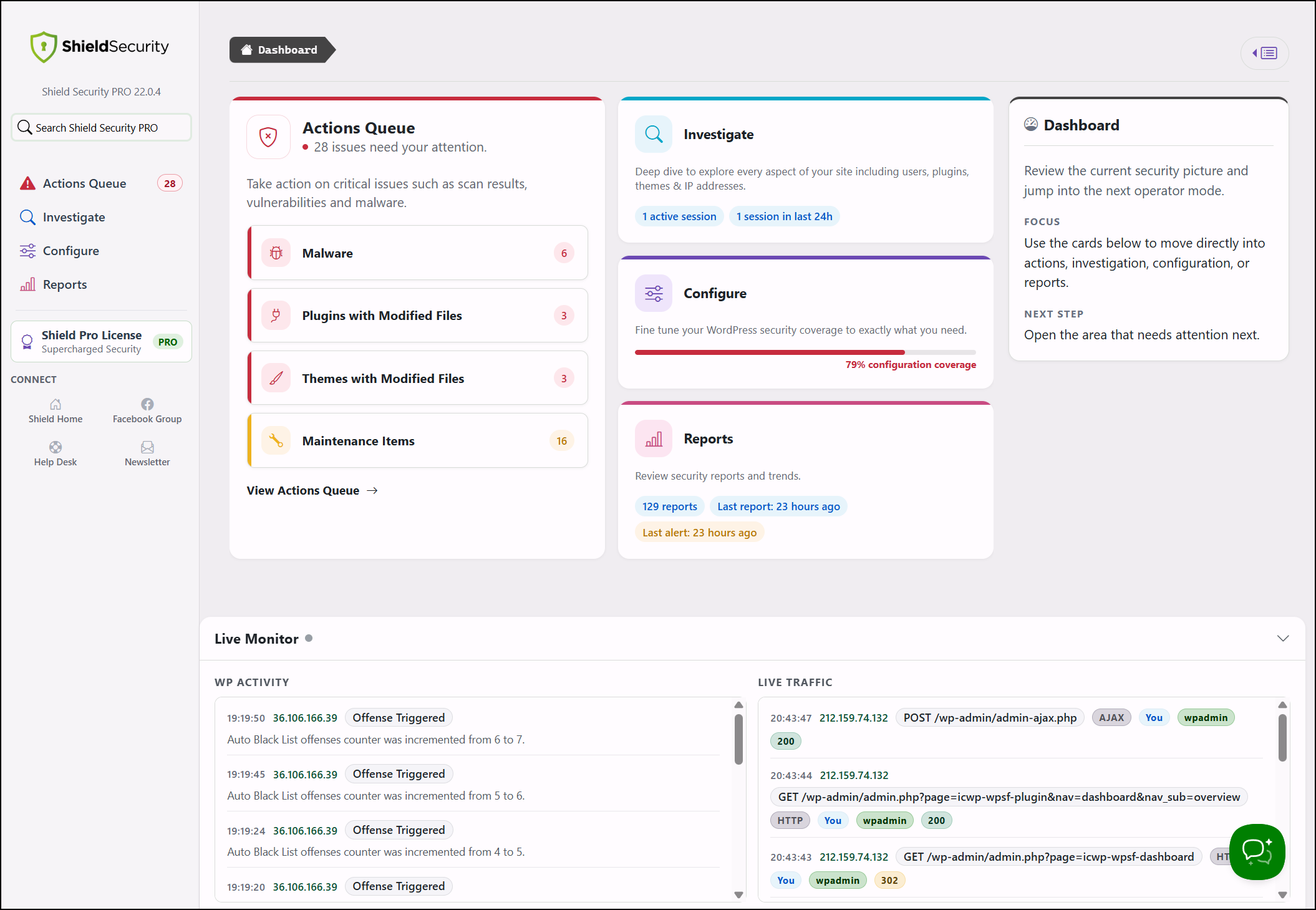
Security overview with current site status, important recommendations, and recent security events.
Installation
- Browse to Plugins -> Add New in your WordPress admin area.
- Search for
Shield Security. - Click Install Now, then Activate.
- Open
Shieldfrom the admin menu and follow the guided setup.
FAQ
Please see the dedicated security help centre for details on features and some FAQs.
-
How does automatic IP blocking work?
-
Shield assigns offense points to visitors who trigger security rules — failed logins, firewall blocks, silentCAPTCHA failures, and other signals. When a visitor’s points reach the configured threshold, they are blocked automatically. You can review blocked IPs, adjust thresholds, or add manual rules from the IP Rules section.
-
How does silentCAPTCHA detect bots without interrupting real visitors?
-
It analyses passive signals — timing, form interaction behaviour, and request characteristics — to distinguish automated requests from genuine visitors. There is no challenge to complete, no external site keys to set up, and no JavaScript that can break your forms. Everything stays on your server.
-
My server already has a firewall. Why do I need Shield too?
-
Your host or network firewall protects the server perimeter. Shield works inside WordPress, where it understands login attempts, user changes, plugin activity, file integrity, and attack patterns specific to WordPress. The two layers solve different problems and complement each other.
-
Can Shield block comment SPAM?
-
Yes.
silentCAPTCHAprotects the WordPress comment form in the free plugin. ShieldPRO extends coverage to Contact Form 7, Ninja Forms, WooCommerce, and a range of other integrations. -
Can I use Shield alongside another security plugin?
-
Generally, no. Running two plugins that control the same login or request flows leads to duplicate blocking, noisier logs, and harder troubleshooting. If you keep another plugin active, disable the areas where they overlap.
-
I’ve locked myself out of my site. What do I do?
-
This usually happens after adding your own IP to the block list, or enabling 2FA when your site cannot deliver email codes.
- Open an FTP or file manager connection to
<your WordPress root>/wp-content/plugins/wp-simple-firewall/. - Create a file in that folder called
forceoff. - Load any page on your site — Shield will switch off.
Delete
forceofffrom the server once you are back in. - Open an FTP or file manager connection to
-
I’m not receiving my 2FA email code.
-
Email delivery depends on your site’s mail configuration, not Shield. If it is unreliable, set up a dedicated transactional email service or switch users to an authenticator app instead.
-
Does the IP bypass list support ranges, and does it take precedence over block rules?
-
Yes to both. Shield supports CIDR notation for IP ranges, and bypass entries always take precedence over block rules.
-
Is White Label available?
-
Yes. ShieldPRO includes White Label controls to rename and rebrand Shield for client sites.
Reviews


Contributors & Developers
“Shield Security – Smart Bot Blocking, Brute-Force Login Protection & File Scanning” is open source software. The following people have contributed to this plugin.
Contributors

“Shield Security – Smart Bot Blocking, Brute-Force Login Protection & File Scanning” has been translated into 8 locales. Thank you to the translators for their contributions.
Interested in development?
Browse the code, check out the SVN repository, or subscribe to the development log by RSS.