Hi @vitovisentini
Which version of our plugin are you running?
Hello sir,
I use the latest versions of the plugin 3.6.1 and wordpress.
On the web preview it says “Kč” correctly, but when the file is emailed to the client, the letter č is not there.
Thank you
If you enable “Extended currency symbol support ” from the plugin General Settings, does it fix the issue?
I’ve tried it and tested it, and it doesn’t do anything. It’s still the same.
I’m not having issues locally. Are you using a custom font?
This reply was modified 2 years, 9 months ago by alexmigf
The writing is basic, it has not changed. Everything is defaulted by you.
Have you tried making an order and then h create a pdf of it and download it?
It’s fine everywhere else, even on the web in the invoice preview.
It only crashes when the invoice is downloaded to pdf
Yes, I did, and everything is fine. Did you tried with other PDF viewer?
Hi @vitovisentini ,
Are you, by any chance, using the Professional extension ? If so, check if you have the Keep PDF on server option enabled, under WooCommerce > PDF Invoices > Documents > Invoice : You could be seeing an old version of the invoice.
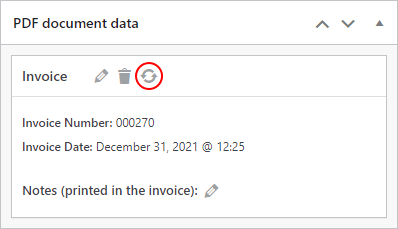
If so, try to regenerate the PDF invoice from the order details, within the PDF document data panel, by clicking on the sync icon:
Hi @vitovisentini ,
Since we haven’t heard back from you in the last two weeks, we’re assuming you solved this issue, so I’ll go ahead and mark this ticket as Resolved .
Feel free to reply to this topic is you still need help with this, or open a new topic if you have any other questions!