Hi Miguel,
I think this is a translation question? I don’t know about translation tables or columns. Is this related to another plugin?
Thanks,
Peter
Hi Peter,
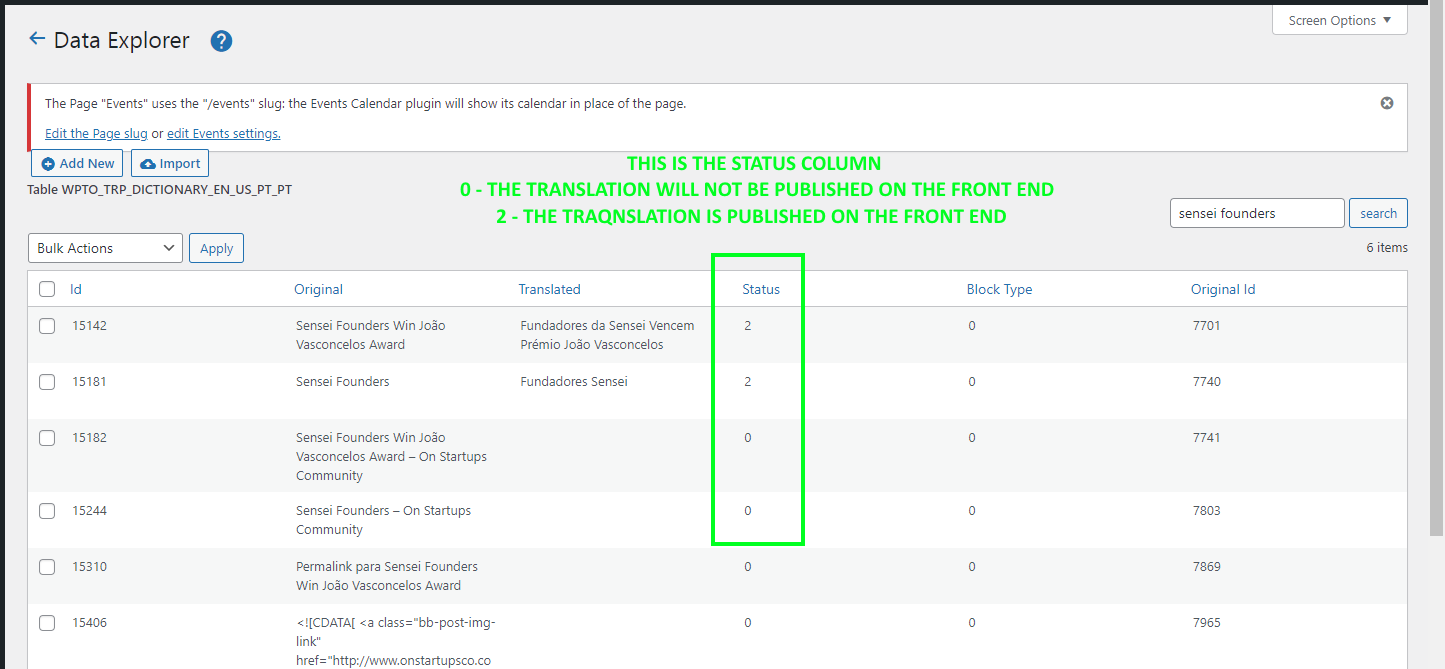
With WP Data Access it’s possible to translate content directly on the “dictionary” file: wpto_trp_dictionary_en_us_pt_pt
It has all the lines of content visible on the front-end.
My question is related to the Status column. Some content has Status=0, other has Status=1 or Status=2. I was trying to understand the meaning of this…
Do you know what this Status means?
Thanks for reaching out, regards,
Miguel
Sorry Miguel, I really have no idea. Anyone else reading this who can help…?
Thanks,
Peter
Hi Peter,
That’s ok.
When the line of content has Status = 0 it does not show on the front-end (in this case the translated strings remain on the original language). If we change the Status to 2, the translation does show on the front-end (we noticed that other strings had Status = 2 and we tested it).
On WP Data Access, each line of the wpto_trp_dictionary_en_us_pt_pt file has the following fields / columns:
Id (key) | Original | Translated | Status | Block Type | Original Id
It’s this Status and Block Type (numeric) fields that we don’t understand.
Thanks again, have a nice week,
Miguel
Can you share the link to the front-end page Miguel?
Thanks,
Peter
Hi Peter,
I cannot do that, because it’s inside WP-Admin, but I took some screenshots.
Please check the following links:
https://snipboard.io/hUQ54r.jpg
https://snipboard.io/OYV8kI.jpg
https://snipboard.io/edwZ9h.jpg
Thanks, have a nice day,
Miguel
Really sorry Miguel, but I have no idea what the meaning these columns is.
Anybody else…?
Thanks,
Peter