Title: Dynamically evaluate a single variable
Last modified: March 11, 2023
---
# Dynamically evaluate a single variable
* Resolved [nealbo](https://wordpress.org/support/users/nealbo/)
* (@nealbo)
* [3 years, 3 months ago](https://wordpress.org/support/topic/dynamically-evaluate-a-single-variable/)
* So I have the setup where I have a calculated field:
* ```wp-block-code
redirectToURL('https://www.somesite.com/search/'+myvar+'+'+fieldname4)
```
* Which is triggered by a “calculate” button. i.e. dynamically evaluate is turned
off in the form settings. “myvar” is a variable that is created in the shortcode(
if that matters).
* This works and it sucessfully redirects to the URL, and evaluates myvar and fieldname4
on button click.
* However, I also need it so that the text on the button itself contains the “myvar”
value, but of course this can’t happen because I’m not dynamically evaluating.
* Is there a way to still make the button redirect to the URL as above, but also
for the button to contain the “myvar” value as soon as the page loads?
Viewing 5 replies - 1 through 5 (of 5 total)
* Plugin Author [codepeople](https://wordpress.org/support/users/codepeople/)
* (@codepeople)
* [3 years, 3 months ago](https://wordpress.org/support/topic/dynamically-evaluate-a-single-variable/#post-16549737)
* Hello [@nealbo](https://wordpress.org/support/users/nealbo/)
* Assuming your button is the fieldname1, you can insert an “HTML Content” field
in the form with the following code as its content:
* ```wp-block-code
```
* Best regards.
* Thread Starter [nealbo](https://wordpress.org/support/users/nealbo/)
* (@nealbo)
* [3 years, 3 months ago](https://wordpress.org/support/topic/dynamically-evaluate-a-single-variable/#post-16549771)
* [@codepeople](https://wordpress.org/support/users/codepeople/) wow thank you
so much for the incredibly fast response on this!
* This worked perfectly and my form is now working exactly as I wanted it to.
* Thanks again!
* Thread Starter [nealbo](https://wordpress.org/support/users/nealbo/)
* (@nealbo)
* [3 years, 3 months ago](https://wordpress.org/support/topic/dynamically-evaluate-a-single-variable/#post-16549887)
* [@codepeople](https://wordpress.org/support/users/codepeople/) I’ve ran into
a problem that I was hoping you could help with.
* I have 2 different forms, with two different variables (set up as above), but
the second form doesn’t have the button text updated using your HTML code. Is
there anyway to make this work for multiple different forms with different variables
ont he same page?
* Thread Starter [nealbo](https://wordpress.org/support/users/nealbo/)
* (@nealbo)
* [3 years, 3 months ago](https://wordpress.org/support/topic/dynamically-evaluate-a-single-variable/#post-16549933)
* ```wp-block-code
```
* I figured it out, when referencing with multiple forms, the second form needs
_2, third needs _3 etc. for the fieldnames even when there’s no overlap. I added
the _1 just for uniformity.
* Thanks again for your help, all working well now!
- This reply was modified 3 years, 3 months ago by [nealbo](https://wordpress.org/support/users/nealbo/).
* Plugin Author [codepeople](https://wordpress.org/support/users/codepeople/)
* (@codepeople)
* [3 years, 3 months ago](https://wordpress.org/support/topic/dynamically-evaluate-a-single-variable/#post-16550076)
* Hello [@nealbo](https://wordpress.org/support/users/nealbo/)
* There is a more elegant method.
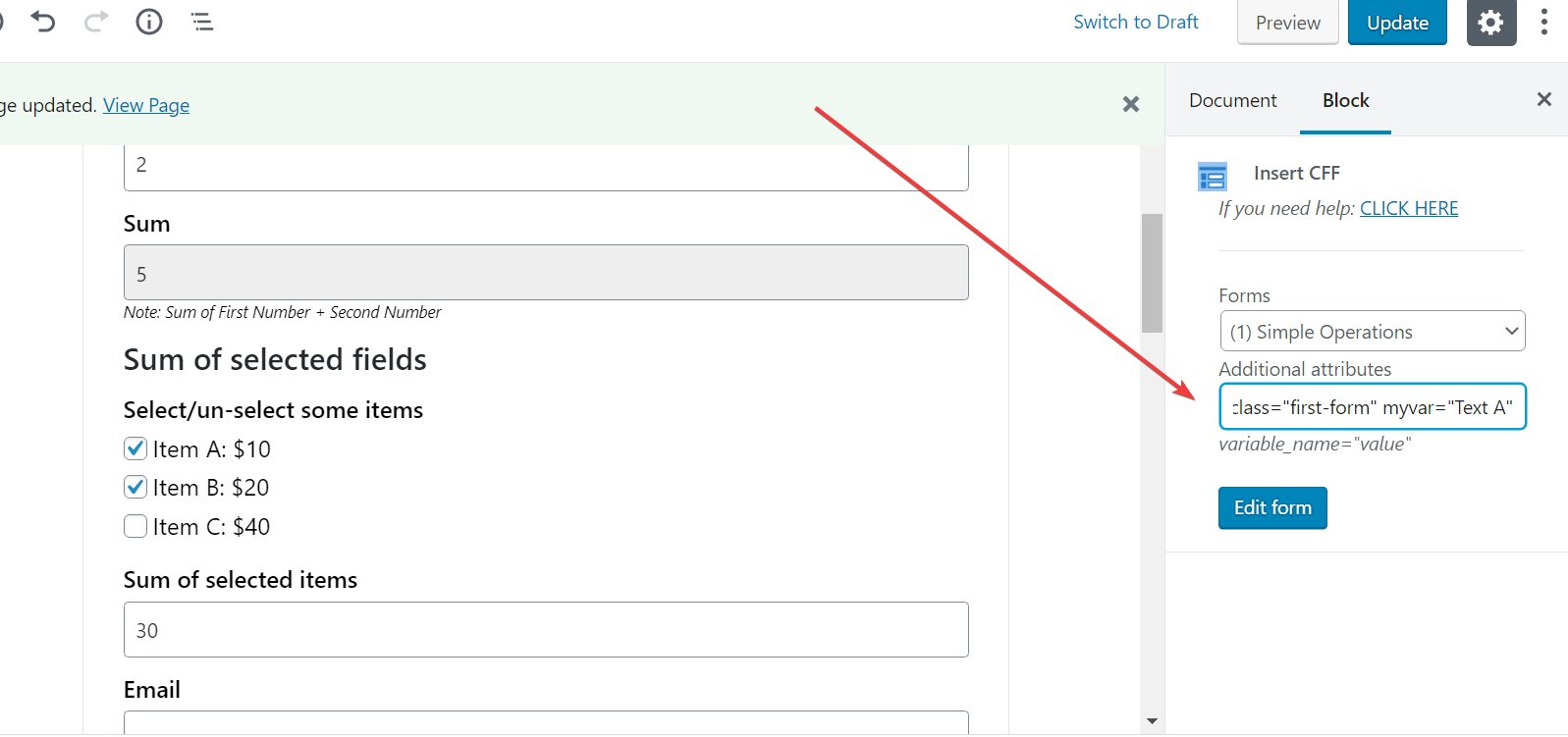
* You can assign class names to the forms via their shortcode codes:
* `[CP_CALCULATED_FIELDS id="1" class="first-form" myvar="Text A"]`
* Or visually:
* 
* And then, you can enter the following piece of code in the content of the HTML
Content field
* ```wp-block-code
```
* If you assign the `second-form` class name to the second form, you can insert
an HTML Content field on it with the code:
* ```wp-block-code
```
* Best regards.
Viewing 5 replies - 1 through 5 (of 5 total)
The topic ‘Dynamically evaluate a single variable’ is closed to new replies.
* 
* [Calculated Fields Form](https://wordpress.org/plugins/calculated-fields-form/)
* [Frequently Asked Questions](https://wordpress.org/plugins/calculated-fields-form/#faq)
* [Support Threads](https://wordpress.org/support/plugin/calculated-fields-form/)
* [Active Topics](https://wordpress.org/support/plugin/calculated-fields-form/active/)
* [Unresolved Topics](https://wordpress.org/support/plugin/calculated-fields-form/unresolved/)
* [Reviews](https://wordpress.org/support/plugin/calculated-fields-form/reviews/)
* 5 replies
* 2 participants
* Last reply from: [codepeople](https://wordpress.org/support/users/codepeople/)
* Last activity: [3 years, 3 months ago](https://wordpress.org/support/topic/dynamically-evaluate-a-single-variable/#post-16550076)
* Status: resolved