Editor looks different from live
-
My editor doesn’t match the look of the live site. The background color in the editor is gray, and the font isn’t showing any styling. To be sure of this, made the default font very large. This is showing correctly on live, but it’s much smaller in the editor. I deactivated all plugins, changed to/from the theme, and emptied my cache, but the issue remains. I’d like the editor to match the live site. Seems like somehow the editor isn’t pulling the CSS?
-
This topic was modified 2 years, 2 months ago by
CAM.
The page I need help with: [log in to see the link]
-
This topic was modified 2 years, 2 months ago by

-
Hello @caitlinmccartan,
Thank you for reaching out,
What editor do you use?
Please provide us with some screenshots or a short video of the errors you faced step by step. You can upload your files to one of the following online services:
https://postimages.org
https://loom.com
https://drive.google.com
https://wetransfer.com
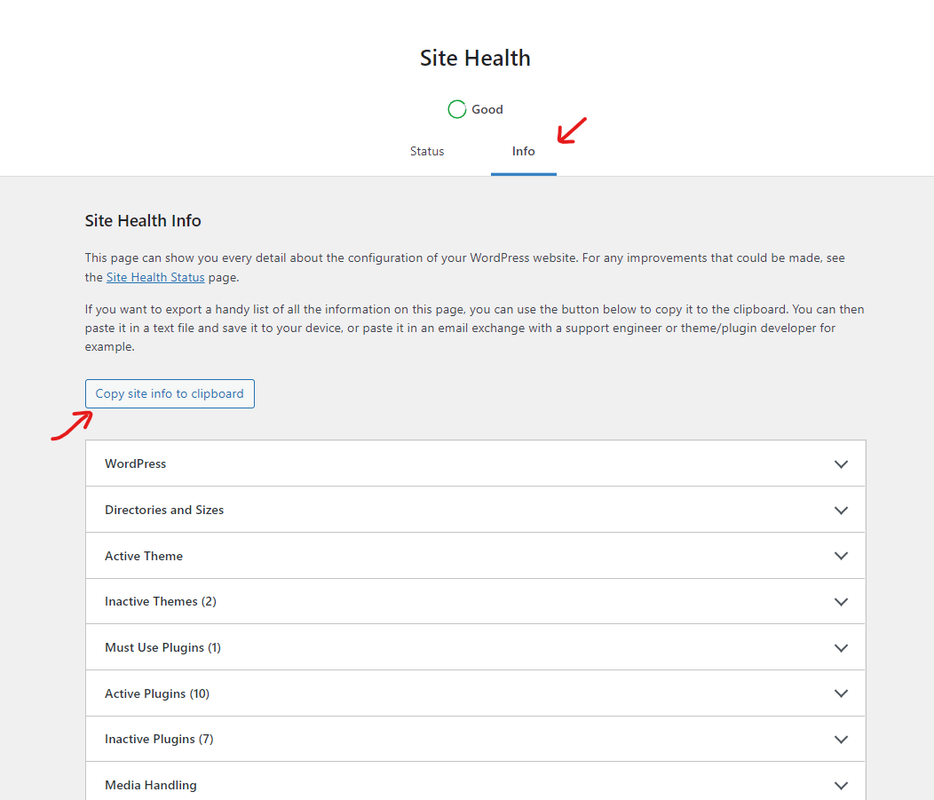
https://dropbox.comAlso, kindly provide us with your system environment information. To do this, please go to WP Dashboard > Tools > Site Health > Info Tab and click on the button Copy site info to clipboard. You can send the information as code here or upload them to http://pastebin.com/ and get an exclusive link: https://i.postimg.cc/fbjtkFyJ/image.png(you can remove your email address from the content).
_____________
For troubleshooting, please do the following steps and let us know the results:
0. Enable the primary theme(if you are using a child theme).
1. Head over to WP Dashboard > Plugins.
2. Deactivate all plugins.
3. Then, first, activate Ocean Extra plugin.
4. Check your issue.
5. Then, activate your plugins one by one
6. After activation of any plugins, check your issueNote 1: You can try troubleshooting on the staging website/or on a fresh installation and ensure that you are using the latest version of the theme and plugins(before updating, please get a full backup from your website).
Note 2: If you have any cache plugin or server cache(CDN / Browser Cache and Cookies and …), you need to clear its cache contents or disable them to see your changes. Also, remember to click on the regenerate all assets file and data in Elementor > Tools(if you have Elementor).
Thank you,
Best RegardsThanks, please note that I tried deactivating all plugins, purging browser cache, and flushing cache through my hosting service.
Screen recording of the issue: https://www.dropbox.com/scl/fi/mxa0yh7m8w0n0fze380n3/Screen-Recording-2024-03-26-at-12.46.21-PM.mov?rlkey=ydh3hqwsmod4qgmuuchzwlym2&dl=0
Environment Information:
` wp-core

version: 6.4.3
site_language: en_US
user_language: en_US
timezone: +00:00
permalink: /%postname%/
https_status: true
multisite: false
user_registration: 0
blog_public: 1
default_comment_status: open
environment_type: staging
user_count: 1
dotorg_communication: true wp-paths-sizes

wordpress_path: /home/customer/www/staging2.zoonomics.org/public_html
wordpress_size: 54.22 MB (56853375 bytes)
uploads_path: /home/customer/www/staging2.zoonomics.org/public_html/wp-content/uploads
uploads_size: 40.16 MB (42111390 bytes)
themes_path: /home/customer/www/staging2.zoonomics.org/public_html/wp-content/themes
themes_size: 62.26 MB (65283955 bytes)
plugins_path: /home/customer/www/staging2.zoonomics.org/public_html/wp-content/plugins
plugins_size: 44.54 MB (46699193 bytes)
database_size: 31.73 MB (33275904 bytes)
total_size: 232.91 MB (244223817 bytes) wp-active-theme

name: OceanWP (oceanwp)
version: 3.5.4
author: OceanWP
author_website: https://oceanwp.org/about-oceanwp/
parent_theme: none
theme_features: core-block-patterns, widgets-block-editor, align-wide, wp-block-styles, responsive-embeds, editor-styles, editor-style, menus, post-formats, title-tag, automatic-feed-links, post-thumbnails, custom-header, custom-logo, html5, woocommerce, wc-product-gallery-zoom, wc-product-gallery-lightbox, wc-product-gallery-slider, customize-selective-refresh-widgets, widgets
theme_path: /home/customer/www/staging2.zoonomics.org/public_html/wp-content/themes/oceanwp
auto_update: Disabled wp-themes-inactive (5)

Astra: version: 4.6.8, author: Brainstorm Force (latest version: 4.6.9), Auto-updates disabled
Neve: version: 3.8.3, author: ThemeIsle, Auto-updates disabled
Twenty Twenty-Four: version: 1.0, author: the WordPress team, Auto-updates disabled
Twenty Twenty-Three: version: 1.3, author: the WordPress team, Auto-updates disabled
Twenty Twenty-Two: version: 1.6, author: the WordPress team, Auto-updates disabled wp-plugins-active (1)

Ocean Extra: version: 2.2.6, author: OceanWP, Auto-updates disabled wp-plugins-inactive (5)

Kadence Blocks – Gutenberg Blocks for Page Builder Features: version: 3.2.30, author: Kadence WP, Auto-updates disabled
Security Optimizer: version: 1.4.12, author: SiteGround, Auto-updates disabled
SiteGround Central: version: 3.0.2, author: SiteGround, Auto-updates disabled
Speed Optimizer: version: 7.5.0, author: SiteGround, Auto-updates disabled
WordPress Importer: version: 0.8.2, author: wordpressdotorg, Auto-updates disabled wp-media

image_editor: WP_Image_Editor_GD
imagick_module_version: Not available
imagemagick_version: Not available
imagick_version: Not available
file_uploads: 1
post_max_size: 256M
upload_max_filesize: 256M
max_effective_size: 256 MB
max_file_uploads: 20
gd_version: 2.3.3
gd_formats: GIF, JPEG, PNG, WebP, BMP, XPM
ghostscript_version: 10.02.1 wp-server

server_architecture: Linux 6.6.21-MCIclouder470 x86_64
httpd_software: Apache
php_version: 7.4.33 64bit
php_sapi: cgi-fcgi
max_input_variables: 3000
time_limit: 120
memory_limit: 768M
max_input_time: 120
upload_max_filesize: 256M
php_post_max_size: 256M
curl_version: 8.2.1 OpenSSL/3.1.1
suhosin: false
imagick_availability: false
pretty_permalinks: true
htaccess_extra_rules: true
current: 2024-03-26T16:54:03+00:00
utc-time: Tuesday, 26-Mar-24 16:54:03 UTC
server-time: 2024-03-26T16:54:03+00:00 wp-database

extension: mysqli
server_version: 5.7.44-48-log
client_version: mysqlnd 7.4.33
max_allowed_packet: 33554432
max_connections: 500 wp-constants

WP_HOME: undefined
WP_SITEURL: undefined
WP_CONTENT_DIR: /home/customer/www/staging2.zoonomics.org/public_html/wp-content
WP_PLUGIN_DIR: /home/customer/www/staging2.zoonomics.org/public_html/wp-content/plugins
WP_MEMORY_LIMIT: 256M
WP_MAX_MEMORY_LIMIT: 768M
WP_DEBUG: false
WP_DEBUG_DISPLAY: true
WP_DEBUG_LOG: false
SCRIPT_DEBUG: false
WP_CACHE: false
CONCATENATE_SCRIPTS: undefined
COMPRESS_SCRIPTS: undefined
COMPRESS_CSS: undefined
WP_ENVIRONMENT_TYPE: staging
WP_DEVELOPMENT_MODE: undefined
DB_CHARSET: utf8
DB_COLLATE: undefined wp-filesystem

wordpress: writable
wp-content: writable
uploads: writable
plugins: writable
themes: writableHello @caitlinmccartan,
Thanks for your feedback.
This topic has been forwarded to the developer team, and we’ll get back to you with the information once it is available.
Thank you for using OceanWP, and I appreciate your patience.
Best Regards

The topic ‘Editor looks different from live’ is closed to new replies.