Andrew Nevins
(@anevins)
WCLDN 2018 Contributor | Volunteer support
Are you using a Child Theme or Custom CSS/Styles plugin?
Im using… What?. Im really a newbie to WP, sorry 🙂
Andrew Nevins
(@anevins)
WCLDN 2018 Contributor | Volunteer support
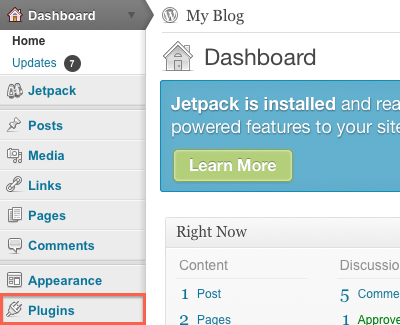
Look at the plugins area of the dashboard. Anything relevant in there?
Andrew Nevins
(@anevins)
WCLDN 2018 Contributor | Volunteer support
How about a plugin named Jetpack?
hmm.. no, it is the standard plugins. I havent touched anything yet
Andrew Nevins
(@anevins)
WCLDN 2018 Contributor | Volunteer support
Which page do you want full width?
Can you link the website in question?
Try downloading and installing the plugin, Jetpack and use its Custom CSS option to add your own styles.
Andrew, i want the full width in the contact page for example and i got my wp site on localhost 🙂
Okay, i have downloaded the Jetpack plugin.
Andrew Nevins
(@anevins)
WCLDN 2018 Contributor | Volunteer support
Can you use PasteBin to hold your HTML and CSS code for that Contact page, then link us the PasteBin page(s)?
Do you mean the style.css code? and what kind of html do you need?
Andrew Nevins
(@anevins)
WCLDN 2018 Contributor | Volunteer support
Yes, the style.css code would be the CSS.
The HTML is found by viewing your (Contact) webpage, right clicking where applicable and selecting ‘View source’. The subsequent pop-up window will contain your HTML.
I uploaded the WordPress on my brothers site now.
Well.
The Css: http://pastebin.com/3yyBv5cZ
The HTML: http://pastebin.com/g9X1rpZh
using and creating page templates is not that complicated:
http://codex.ww.wp.xz.cn/Pages#Creating_Your_Own_Page_Templates
for instance, start with a copy of page.php, save it as fullwidth-page.php;
edit the section at the top to:
<?php
/**
 * Template Name: Fullwidth Page
 */
get_header();
?>
to stretch the content over the full space, edit this section:
<div class="grid_24">
            <div class="content-main">
                <div class="grid_16 alpha">
and remove grid_16 so it looks like:
<div class="grid_24">
            <div class="content-main">
                <div class="alpha">
remove this section:
<!--Start Sidebar-->
<?php get_sidebar(); ?>
                <!--End Sidebar-->
then add this to style.css:
.page-template-fullwidth-page-php .content-wrapper { margin-right: 0; }
full code of fullwidth-page.php: http://pastebin.com/VYzwW5vB
now you can use this new page template under: ‘page attribute – template’ when you edit the ‘contact’ page or any static page.
ideally all in a child theme; http://codex.ww.wp.xz.cn/Child_Themes
Hi alchymyth… Thats really nice, It worked.!!!
But when i did the changes, the whole template changed to fullwidth.
How can I only use fullwidth on the contact page?