Title: HTTP error
Last modified: November 14, 2016
---
# HTTP error
* Resolved [setevoy](https://wordpress.org/support/users/setevoy/)
* (@setevoy)
* [9 years, 7 months ago](https://wordpress.org/support/topic/http-error-99/)
* Hi.
* We use this plugin for our Stage and Prod environments hosted on Azure as WebApps.
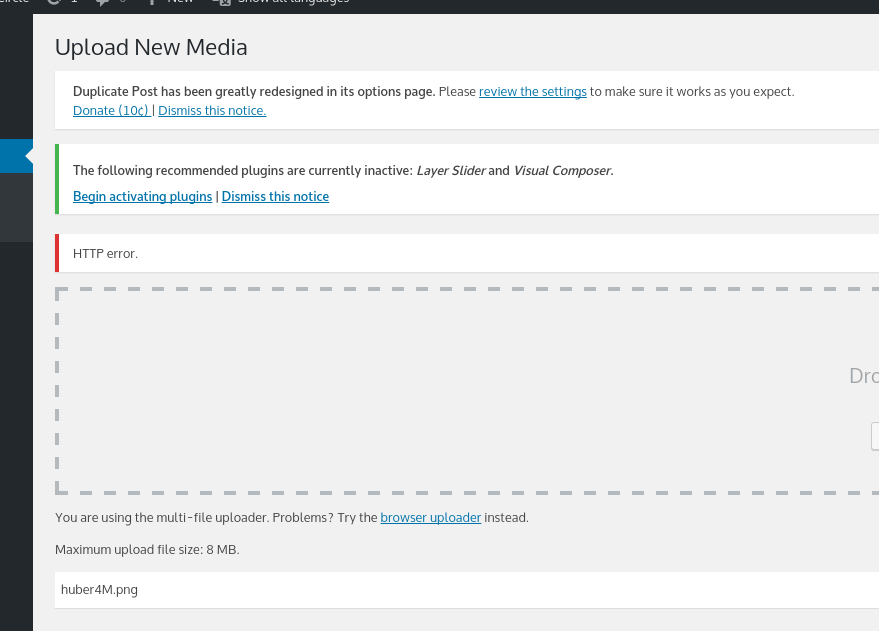
* A problem is – on Prod after new image uploaded – WP says “HTTP error”:
* 
* But on Stage, which use same Storage Account with same settings – everything
works just fine.
* What can be a reason?
* Thanks.
Viewing 12 replies - 16 through 27 (of 27 total)
[←](https://wordpress.org/support/topic/http-error-99/?output_format=md) [1](https://wordpress.org/support/topic/http-error-99/?output_format=md)
2
* Thread Starter [setevoy](https://wordpress.org/support/users/setevoy/)
* (@setevoy)
* [9 years, 6 months ago](https://wordpress.org/support/topic/http-error-99/page/2/#post-8454177)
* Hi, [@tott](https://wordpress.org/support/users/tott/).
* Seems we (with Azure Support assist) found a way to change this value, I’ll try
to make it on Monday and will let you know results, OK?
* Thanks and have a nice weekend.
* Thread Starter [setevoy](https://wordpress.org/support/users/setevoy/)
* (@setevoy)
* [9 years, 6 months ago](https://wordpress.org/support/topic/http-error-99/page/2/#post-8463058)
* Hi, [@tott](https://wordpress.org/support/users/tott/).
* I added next lines:
* ```
```
* To our `web.config` file, so now it’s looks like:
* ```
```
* Unfortunately – still have the same error.
* Plugin Support [Thorsten Ott](https://wordpress.org/support/users/tott/)
* (@tott)
* [9 years, 6 months ago](https://wordpress.org/support/topic/http-error-99/page/2/#post-8463081)
* Hi [@setevoy](https://wordpress.org/support/users/setevoy/),
* thanks for testing this out. Are the changes reflected in your settings after
you reload the webserver? I’m a little bit worried as you have two system.webServer
sections now and I’m not 100% sure if this is a supported format for IIS
* Best
Thorsten
* Thread Starter [setevoy](https://wordpress.org/support/users/setevoy/)
* (@setevoy)
* [9 years, 6 months ago](https://wordpress.org/support/topic/http-error-99/page/2/#post-8463113)
* Hi, [@tott](https://wordpress.org/support/users/tott/).
* Yeah, you are right about nested `system.webServer` – moved to one:
* ```
...
```
* Will restart WebApp soon (need to get approve from a customer, as this is Prod).
Will add UPD here then.
* Thread Starter [setevoy](https://wordpress.org/support/users/setevoy/)
* (@setevoy)
* [9 years, 6 months ago](https://wordpress.org/support/topic/http-error-99/page/2/#post-8464387)
* [@tott](https://wordpress.org/support/users/tott/) I made some changes – removed
lines from the `web.config` and created file `applicationHost.xdt` instead with:
* ```
```
* Unfortunately – still have no an approve to restart WebApp. Will post once will
do it.
* Thread Starter [setevoy](https://wordpress.org/support/users/setevoy/)
* (@setevoy)
* [9 years, 6 months ago](https://wordpress.org/support/topic/http-error-99/page/2/#post-8476362)
* Hi, [@tott](https://wordpress.org/support/users/tott/), [@ritteshpatel](https://wordpress.org/support/users/ritteshpatel/).
* My apologies, but a customer will move an application to the own hosting solution
instead of Azure, thus – current issue is not valuable anymore.
* Thanks for the help.
* Plugin Support [Thorsten Ott](https://wordpress.org/support/users/tott/)
* (@tott)
* [9 years, 6 months ago](https://wordpress.org/support/topic/http-error-99/page/2/#post-8476552)
* Hi [@setevoy](https://wordpress.org/support/users/setevoy/),
* I’m sorry to hear this. Is there anything we can do to have your client change
his mind?
* Best
Thorsten
* Thread Starter [setevoy](https://wordpress.org/support/users/setevoy/)
* (@setevoy)
* [9 years, 6 months ago](https://wordpress.org/support/topic/http-error-99/page/2/#post-8476609)
* Hi, [@tott](https://wordpress.org/support/users/tott/).
* Thanks – but no, they (we) had unfortunately too many issues with Azure (ClearDB,
MySQL InApp, pure WebApps performance etc) and the current issue was just last
one in this chain.
* I suggested to move them from Azure WebApp to Linux Virtual machine (we already
moved MySQL to dedicated VM instead of ClearDB and MySQL InApp), and we started
work about this migration – but… 🙂
* Plugin Support [Thorsten Ott](https://wordpress.org/support/users/tott/)
* (@tott)
* [9 years, 6 months ago](https://wordpress.org/support/topic/http-error-99/page/2/#post-8476618)
* Hi [@setevoy](https://wordpress.org/support/users/setevoy/),
* thanks for letting us know and thanks for all the help troubleshooting. We will
be happy to help in case you have any other use of this plugin.
* Best
Thorsten
* Thread Starter [setevoy](https://wordpress.org/support/users/setevoy/)
* (@setevoy)
* [9 years, 6 months ago](https://wordpress.org/support/topic/http-error-99/page/2/#post-8492439)
* Hi, [@tott](https://wordpress.org/support/users/tott/).
* Suddenly – we got update with that 🙂
* So – customer went away from Azure to own server, with some Linux and Apache
2.4. And – faced with the same issue – “HTTP error”.
* We also got another one issue with 413 error on this new host – “_Entity body
too large_“. As traffic goes via our NGINX as Proxy to their host with Apache–
I updated our NGINX and added:
* `client_max_body_size 64M;`
* And – that fixed not only 413 – but the “HTTP error” as well.
* Thanks for your assist 🙂
* Plugin Support [Thorsten Ott](https://wordpress.org/support/users/tott/)
* (@tott)
* [9 years, 6 months ago](https://wordpress.org/support/topic/http-error-99/page/2/#post-8492444)
* Hi [@setevoy](https://wordpress.org/support/users/setevoy/),
* that’s great news. The proxy surely is a little detail we were missing in our
investigation 🙂
* Glad you got this worked out.
* Thorsten
* Thread Starter [setevoy](https://wordpress.org/support/users/setevoy/)
* (@setevoy)
* [9 years, 6 months ago](https://wordpress.org/support/topic/http-error-99/page/2/#post-8492805)
* Proxy came here just now, after migration, so previously – it was something about
IIS/Azure directly.
Viewing 12 replies - 16 through 27 (of 27 total)
[←](https://wordpress.org/support/topic/http-error-99/?output_format=md) [1](https://wordpress.org/support/topic/http-error-99/?output_format=md)
2
The topic ‘HTTP error’ is closed to new replies.
* 
* [Microsoft Azure Storage for WordPress](https://wordpress.org/plugins/windows-azure-storage/)
* [Support Threads](https://wordpress.org/support/plugin/windows-azure-storage/)
* [Active Topics](https://wordpress.org/support/plugin/windows-azure-storage/active/)
* [Unresolved Topics](https://wordpress.org/support/plugin/windows-azure-storage/unresolved/)
* [Reviews](https://wordpress.org/support/plugin/windows-azure-storage/reviews/)
* 27 replies
* 3 participants
* Last reply from: [setevoy](https://wordpress.org/support/users/setevoy/)
* Last activity: [9 years, 6 months ago](https://wordpress.org/support/topic/http-error-99/page/2/#post-8492805)
* Status: resolved