Loading issue with ocean extra
-
Hi,
it seems that the Ocean extra plugin occur some speed issues on my website. I tested this by deactivate/ activate all plugins. I enable also the debug log in and there was following degug line:
[01-Nov-2024 09:53:43 UTC] PHP Warning: Array to string conversion in /home/www/public/wp-includes/formatting.php on line 1096
Yesterday it works fine, I did not change anything. Maybe anybody have an indea for this issue.
Thanks in advance
Matthias
The page I need help with: [log in to see the link]

-
Hello @passimatze,
Thank you for reaching out,
Actually, it’s just a warning and it does not hurt your website.
Also, this log is not showing the path of our products[01-Nov-2024 09:53:43 UTC] PHP Warning: Array to string conversion in /home/www/public/wp-includes/formatting.php on line 1096Ocean Extra is in /wp-content/plugins/; however, it could be something else is the cause of this warning.Regarding the speed and performance of the website, I’ve checked your URL and saw some issues, so I’ve listed them in the following:
Screenshot: https://postimg.cc/t13Jv3Dj
1. Server Optimization: TTFB; This is related to the host configurations, and users should use the compatible host with WordPress. https://en.wikipedia.org/wiki/Time_to_first_byte#:~:text=Time%20to%20first%20byte%20(TTFB,received%20by%20the%20client’s%20browser. After the above steps: You have to solve a series of problems that, for example, GTMetrix suggests, and please check the “Performance” tab.
2. Top Issues: To access the top issues, click on this link https://gtmetrix.com/reports/getyourinspiration.de/LxAZN3FS/ and then open each one. Click the “Learn how to improve this” button for detailed information on each tab.
3.1. Page Details: It shouldn’t have many heavy files, so sometimes “1.29MB” may be a large number, like this one; I’ll suggest reducing file sizes!
3.2. Minifying Assets: To reduce all assets files on websites, using minified tools, combine tools and cache plugins and do all of them in one package. They should upload all images lighter.
Note 1: I always recommend the users use the CDN so that the issue is fixed automatically! Mostly more than 80% in performance.
Note 2: Please don’t forget to read this article: https://web.dev/fast/. also, you can use this link: https://pagespeed.web.dev/ and check the “PageSpeed Insights” suggestions to find solutions for specific issues.
I hope it helps.
Best RegardsHi @skalanter,
hank you for your quick feedback. I will try to improve these steps.
Maybe to make the topic more clear for me. Yesterday I had now performance issue for this website. Today there are an issue, but when I disable the plug in, they are disappear. I changed nothing else. This mentioned issues from your post is related to the plugin performance itself?
Best regards
Matthias
Hi,
please have a log to my recorded screen. I activate/ deactivate the WP ocean extra plugin. There is a difference about 34s.
BR
Matthias
Hello @passimatze,
Thank you for reaching out,
We don’t have this issue on any of our sites, nor have we received any similar reports. Do you know how we might reproduce the issue on a completely fresh WordPress installation?
Activating the Ocean Extra plugin and seeing a decrease in load speed doesn’t necessarily mean there’s an issue with the plugin. This plugin is the core of the OceanWP theme and adds settings to your site, so we need to know what settings you’ve configured in it. To help us understand, please export your settings from the path below and send us the file: WP Dashboard > OceanWP > OceanWP Panel > Customizer > Export Customizer Styling.
Also, if you’re using a child theme, temporarily deactivate it and perform the test as shown in the video.
For example, let’s say you uploaded a font to your site and want to load it locally. If a TTFB (Time to First Byte) issue occurs on your server, it would show up in Ocean Extra because it’s loaded from there, but the real issue could be with the link. So, what you showed in the video doesn’t necessarily pinpoint the problem. To help us investigate further, please also send us your system information so we can identify the root cause.
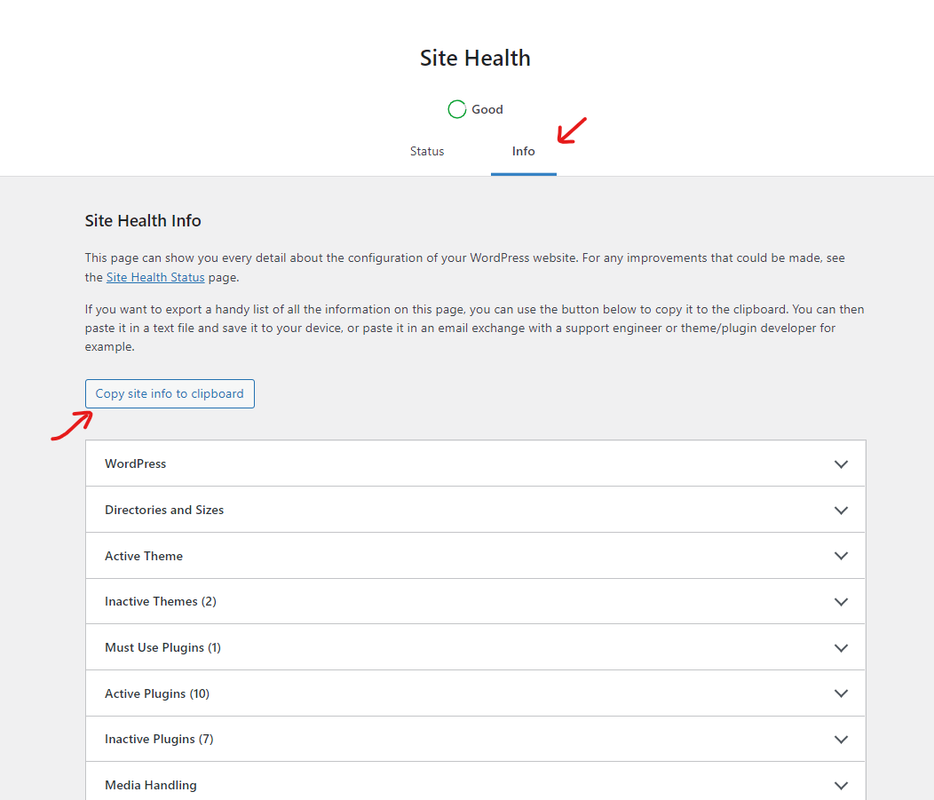
Kindly provide us with your system environment information. To do this, please go to WP Dashboard > Tools > Site Health > Info Tab and click on the button Copy site info to clipboard. You can send the information as code here or upload them to http://pastebin.com/ or https://gist.github.com/ and get an exclusive link: https://i.postimg.cc/fbjtkFyJ/image.png (you can remove your email address from the content).
Please keep us posted.
Thank you,I hope it helps.
Best RegardsHi @skalanter ,
I added the information to this page: https://pastebin.com/fBvqJUWq
My initial idea was, that the WP plugin communicate with a external service, which was not working, because this happens without any update of the website or the plugin. Maybe you can find the reason.
By the way, now I activated both plugin again and it seems it is working well now. I do not know, why 🙂
Best regards
Matthias
Hi @passimatze,
Thank you for reaching out,
As you mentioned, there don’t seem to be any issues related to Ocean Extra. If it were in any plugin, the issue would persist. Based on the information I’ve seen from your site, it seems likely that the problems are related to your hosting. So, please increase your host resources and recheck the issue.
Host configurations: To access these fields, please edit the “php.ini” file, which is located in the host (if you can’t find it, then contact your host service provider).
upload_max_filesize = 32M
post_max_size = 48M
memory_limit = 512M
max_execution_time = 800
max_input_vars = 10000
max_input_time = 800
WordPress Configurations:
https://ww.wp.xz.cn/documentation/article/editing-wp-config-php/
https://developer.ww.wp.xz.cn/apis/wp-config-php/#increasing-memory-allocated-to-phpReference: https://ww.wp.xz.cn/about/requirements/
Please keep us posted if it happens again.
I hope it helps.
Best RegardsThanks for your support.
Best regards
Despite reinstalling the Ocean Extra plugin and adding it from the official OceanWP website, the plugin doesn’t seem to work. When I click to enable the plugin, it activates, but nothing happens beyond that. No logo, no features are displayed, and the plugin doesn’t show any content or options. I’ve followed all the steps, but the issue persists
Hi @hubinr4,
Thank you for reaching out,
Please try deleting the plugin via FTP/sFTP, then reinstall the plugin and check if the issue persists. There should be no issue with the plugin, as it is running on thousands of sites without problems.
If still an issue persists, please enable WordPress debugger and check the debug.log file; send the errors here: https://developer.ww.wp.xz.cn/advanced-administration/debug/debug-wordpress/
I hope this helps,
Please keep us posted.
Best regards,hi @skalanter
Despite deactivating all other plugins and enabling debugging, the Ocean ExtraWP plugin still isn’t working. I have also reinstalled it, but the issue persists.
“[04-Dec-2024 20:17:41 UTC] PHP Deprecated: The function wp_update_https_detection_errors is deprecated since version 6.4.0 and has no alternative. in C:\xampp\htdocs\wordpress\wp-includes\functions.php on line 6114″
Hello @hubinr4,
Thank you for reaching out,
Although the “deprecated” message doesn’t cause Ocean Extra to stop working, however, I doubt this issue is related to Ocean Extra plugin.
Please explain to us step by step how we can reproduce the issue so we can recreate it somewhere other than your website.
Also, share these details: Click Here.
Please keep us posted.
Best Regards


The topic ‘Loading issue with ocean extra’ is closed to new replies.