Plugin Contributor
 webnus
(@webnus)
Hello @wengles,
Please head over to MEC Settings > General > Multiple Day Events Show and set it on the First day on all skins.
For more information about this option, please read this article:
https://webnus.net/dox/modern-events-calendar/general-options/
Best Regards
Amazing – thank you so much!!
And thank you for this beautiful and well-performing plugin!!
Actually, I have one other issue – how do I resolve this?
Screenshot: https://prnt.sc/1wgynqa
As you can see, the first date says Thursday – Thurday.
1. It should say Thursday – Saturday
2. The second dates says Sunday – Thurday, but it should be spelled Thursday, with an s.
Thanks,
Plugin Contributor
webnus
(@webnus)
Hello @wengles,
You are most welcome and thank you for your feedback.
1- Regarding the week-day issue, please use the latest version of MEC. We’ve fixed it on the latest version of MEC 6.0.0: https://ww.wp.xz.cn/plugins/modern-events-calendar-lite/#developers. After updating, you will see just the first week-day.
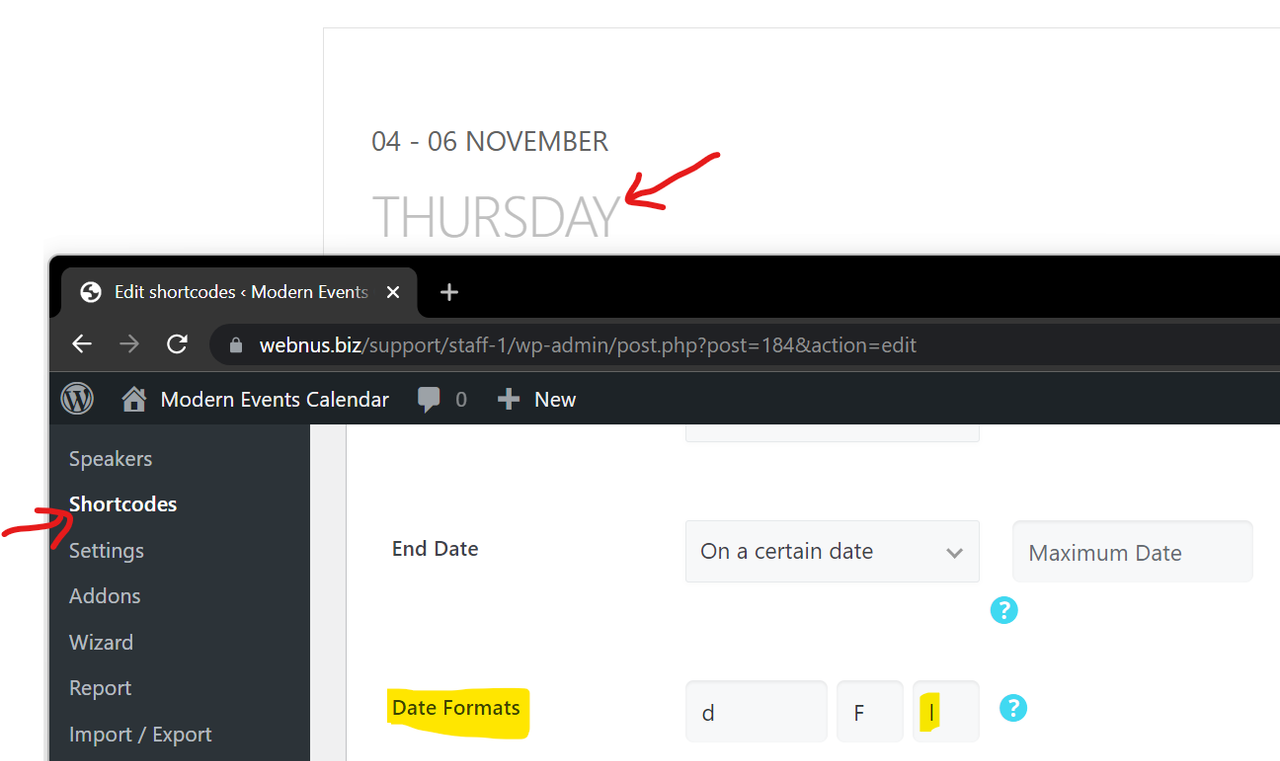
2- Regarding the week-day spelling, you can use another date format on your shortcode page. Please check all PHP date formats here: https://webnus.net/dox/modern-events-calendar/all-date-formats/. Like this one: https://i.postimg.cc/HnvJ6D4w/image.png (l (lowercase ‘L’)).
Best Regards
Hi,
is it possible to show not only the first day label – like “Monday” but also the last day?
So if I have event from 17.-18. january and as label for day it is now only “Monday”, but I would like to have Monday – Tuesday – is it possible to set somehow? I tried some options and I know I can set to have event shown “multiplied” for both days, but it is not ideal.
Thank you for this great plugin!
-
This reply was modified 4 years, 4 months ago by
 petrj.
Plugin Contributor
webnus
(@webnus)