No data on Posts and Pages
-
all data showing on dashboard for pages but all zeros on every single page and post even though there is plenty of traffic and the #s appear on the dashboard.
https://ww.wp.xz.cn/plugins/google-analytics-dashboard-for-wp/

-
Same with me.
No indiviual data showing for pages, posts or custom post types.
All show zero for every measure and every date range.
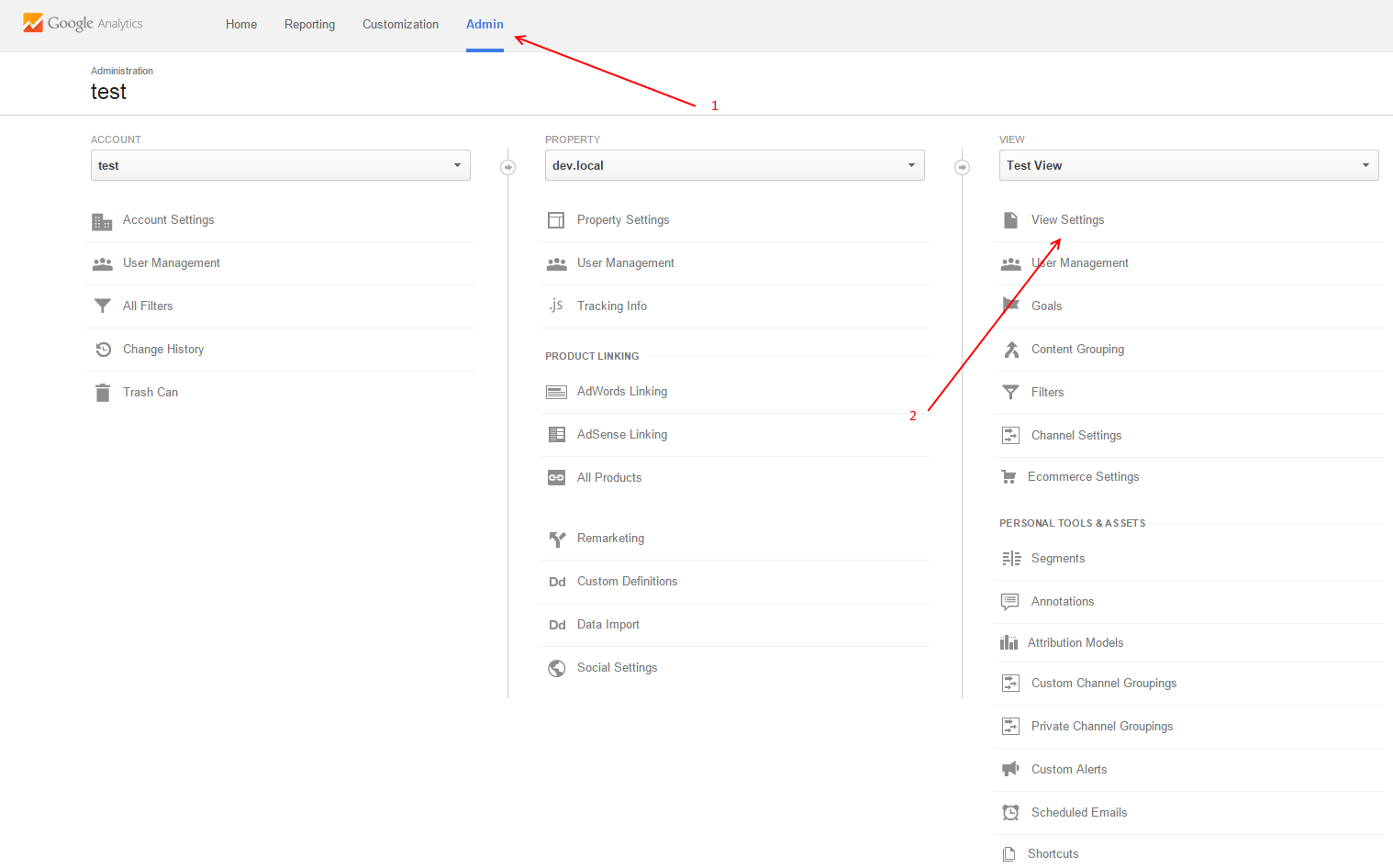
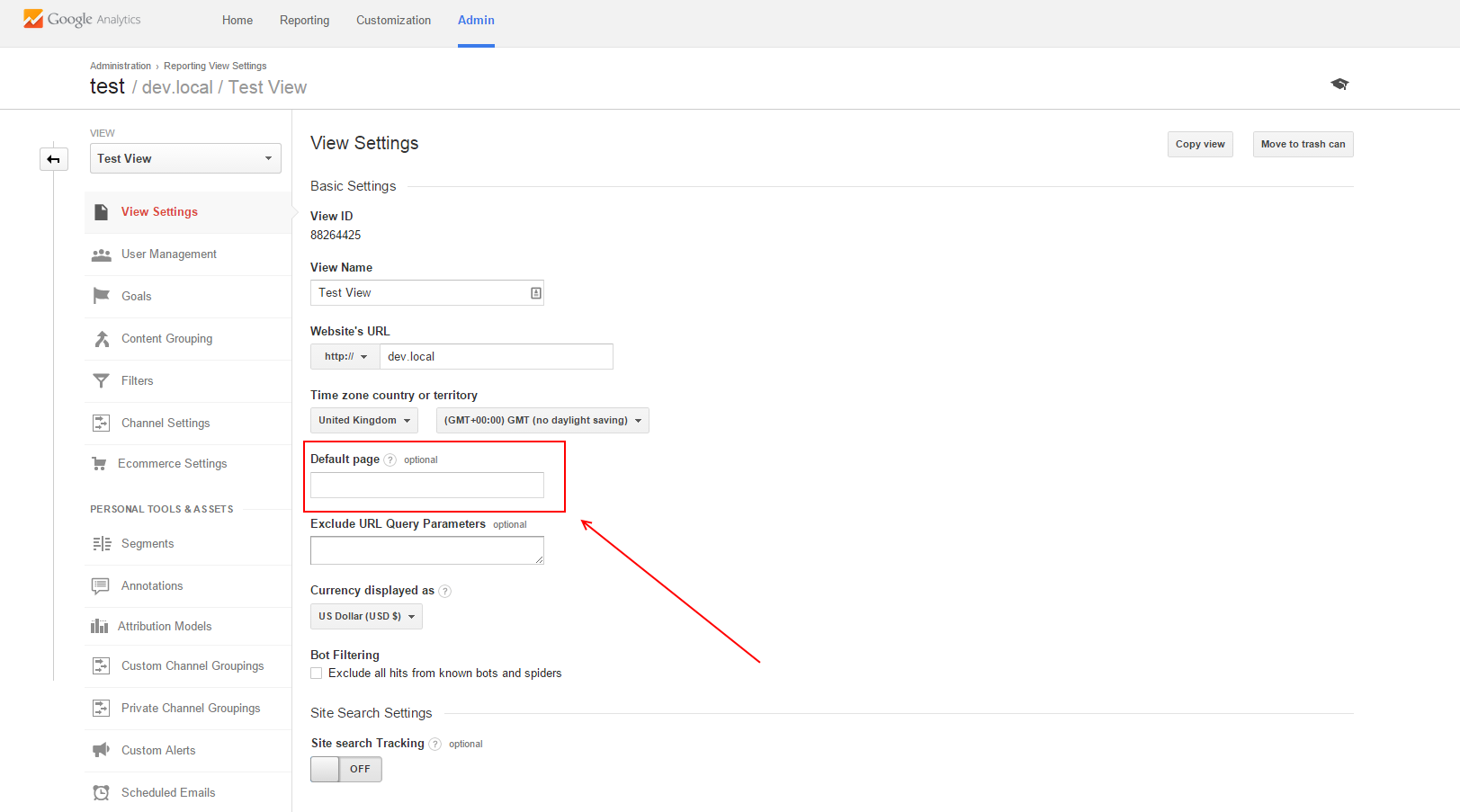
And there HAS been traffic.Log into your Google Analytics account, select the right property, select Admin (from the top bar) and then select View Settings (from View column). Is there anything entered in the Default Page field?
And next time, please try to give as much details as possible, saying it doesn’t work for me or same with me, or I know I had traffic won’t help you and for sure doesn’t give any clues to others in order to help you.
What details do you expect me to give?
Zero data is zero data is zero data is zero data.
You are not expecting me to debug myself, do you?default shows the domain used
Okay, that should be empty or having a default page. Most probably, that domain gets added at the end of each page path, see: https://deconf.com/ask/question/post-icon-for-analytics-always-show-cero/#comment-802
I don’t expect you to debug anything, but I do expect things like:
– I’ve seen this other answer and didn’t help
– My dashboard widget reports properly but there is nothing in my per page and per post reports
– I followed the documentation, the video, other people’s tutorial, read your FAQ page
– My account is new, old …and things like the above.
Alin,
I am having the same problem. In the dashboard, I see real-time data when someone is on a particular page but the stats for pages and posts are all zero zilch nada nothing.
In google analytics settings, I cannot find anything called “default page” – there is a “default URL” and it’s set to http://www.storytrading.com
I’d like to reiterate that GA can “see” the page because I see the data in the dashboard… it’s just not populating at all on the charts for pages and posts.
Please help.
Ben
by the way just checked google analytics and I can confirm it does have all the data for pages and posts – just the app in wordpress that isn’t showing the data
Here’s a screenshot with the settings you need to check. Follow those two steps and you should be able to see the Default Page option there:
https://cldup.com/wW-tW0-n7J.png
https://cldup.com/U631rLdTdo.png
From next version the plugin will try to match these situations and adjust the filter accordingly, but for those using a trailing slash at the end of the URL I strongly recommend leaving that option blank or using a default page only when that’s a particular requirement of their setup.
Hi Alin,
Checked this out per your instructions.
Default Page was already set to blank. Something else is amiss…
Ben
Hi,
Use this template: https://www.google.com/analytics/web/template?uid=p-dbKLugQEOhXbixPo8pOw
and post some page path samples from there. The sessions are not important, just the paths.
I’m not sure what you want me to put in there? Landing page path? You want sample URLs that are not showing the data?
for example:
/pieris-pharmaceuticals-undiscovered-immunotherapy-play/
How many of these configurations do I import? Can you provide a bit more detail please?
Ben
I want a sample from your Google Analytics account. If you use the template above it will generate a new dashboard with a single widget containing the page paths I need. Post the top 3 or 4 paths here. If you don’t know how to use templates, you can also find them in your Google Analytics account under Behavior -> Site Content -> All Pages report.
okay I think I did it. Now what should I do?
Post a few rows from the first column of the table.
/
1,475
/blog/
480
/rgse-secondary-and-prospectus-4-new-level-needed-for-nasdaq-compliance/
260
/rgse-time-to-buy-at-2-after-60-drop/
215


The topic ‘No data on Posts and Pages’ is closed to new replies.