I just can’t figure out why I receive no E-mail notifications when the form I’ve created is filled in by someone. I have tested several times, but never receive any E-mail.
Please help:-)
The page I need help with: [log in to see the link]
Thank you so much for using our plugin. The issue with the notification emails has two possible causes: the form is misconfigured, or your server has deactivated the send emails feature.
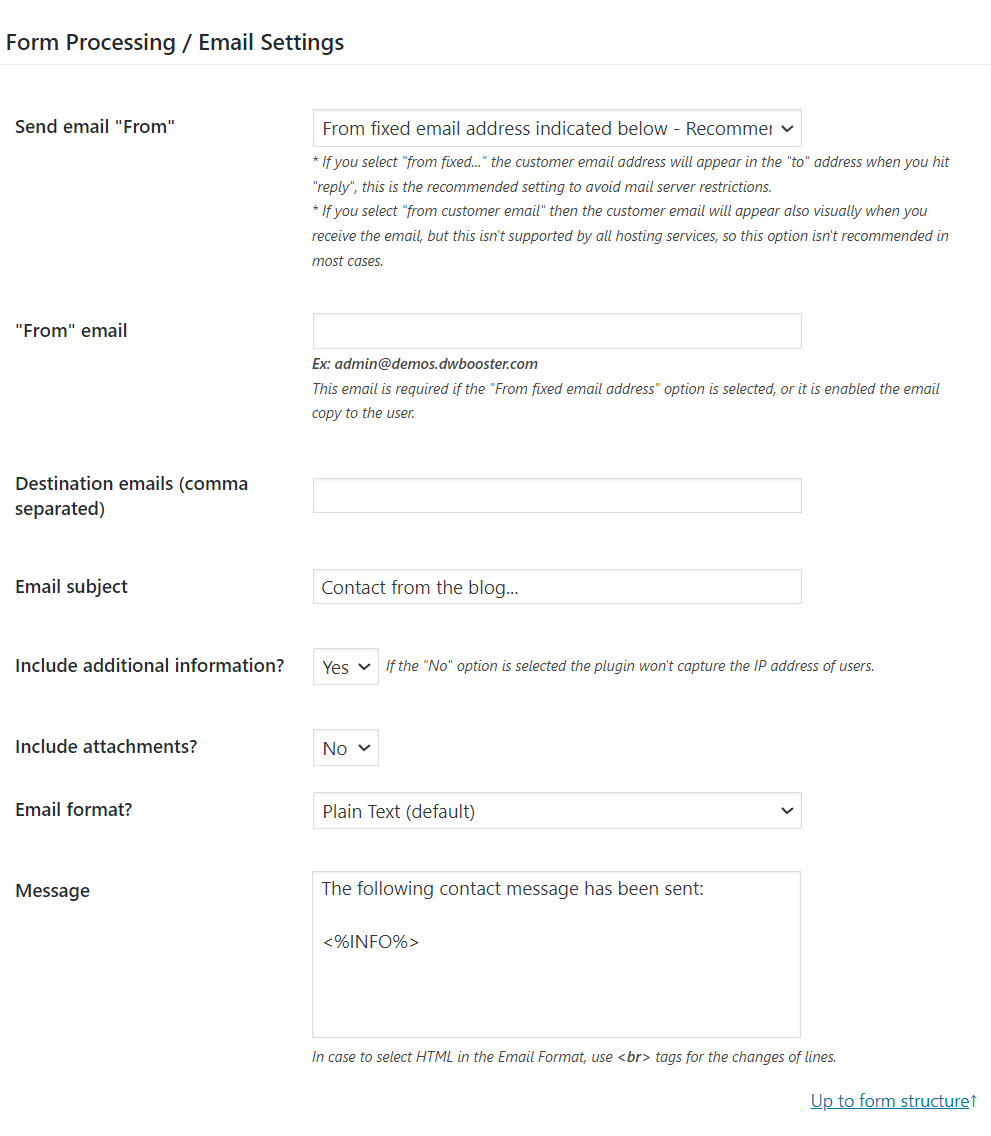
The form settings includes the following section for configuring the notification emails:
Note: If you are using the free plugin distribution, the “Send email from” attribute is not present in your plugin copy.
Please configure it as follows:
Enter an email address belonging to your website’s domain (E.g., [email protected]) through the “From” attribute. Or if you have installed an SMTP connection plugin, enter the email address you used with the SMTP connection plugin.
If you enter an email address belonging to a different website’s domain through the “From” attribute, and you are not using an SMTP connection plugin, your emails might be classified as phishing emails.
Enter the email address where you want to receive the notification emails through the “Destination” email. Ensure it is a valid email address. Please check the spam folder in your email application to ensure the emails received from your email were not classified as spam.
Enter the <%INFO%> tag as part of the email content to ensure the email will include a summary of the information collected by the form.
Please provide a screenshot for this section to check if the form was configured correctly. If you don’t want to include the screenshot here, you can contact us directly through the plugin website: Contact Us.
The second possible <span style=”box-sizing: border-box; margin: 0px; padding: 0px;”>c</span>ause of the issue is related to your server configuration. Our plugin does not send emails itself. It calls the wp_mail WordPress function and lets WordPress decide how to deliver the email.
If you have installed and configured an SMTP connection plugin on your website, WordPress will send the emails via SMTP. Otherwise, it will try to send the emails using the PHPMailer module on the web server.
Suppose your server has the PHPMailer module deactivated. In that case, you need to install any of the SMTP connection plugins distribution for free in the WordPress directory (https://ww.wp.xz.cn/plugins/search/SMTP/), and configure it to use the SMTP server provided by your hosting.
Note that WordPress includes some plugins, like email-log, that allow you to debug when the problem with the emails occurs.
My final recommendation are:
Install any of the SMTP connection plugins.
Configure it to use the SMTP server in your hosting provider (most SMTP connection plugins include an area for sending test emails to check if the connection was configured correctly).
Enter the email address configured in the SMTP connection plugin through the “From” attribute of the form settings.
Enter the email address where you want to receive the notification emails in the “Destination” attribute of the form settings (Enter the email address configured in the “From” attribute in your contacts list to ensure the emails are not classified as spam).
Enter the <%INFO%> tag as part of the email content.
Best regards.
Viewing 1 replies (of 1 total)
The topic ‘No E-mail notification’ is closed to new replies.