Not receiving notifications
-
Hello,
people are getting the appointment confirmation email, but i dont receive the email stating an appointments been made. Or a email notification.
The page I need help with: [log in to see the link]

-
Hi,
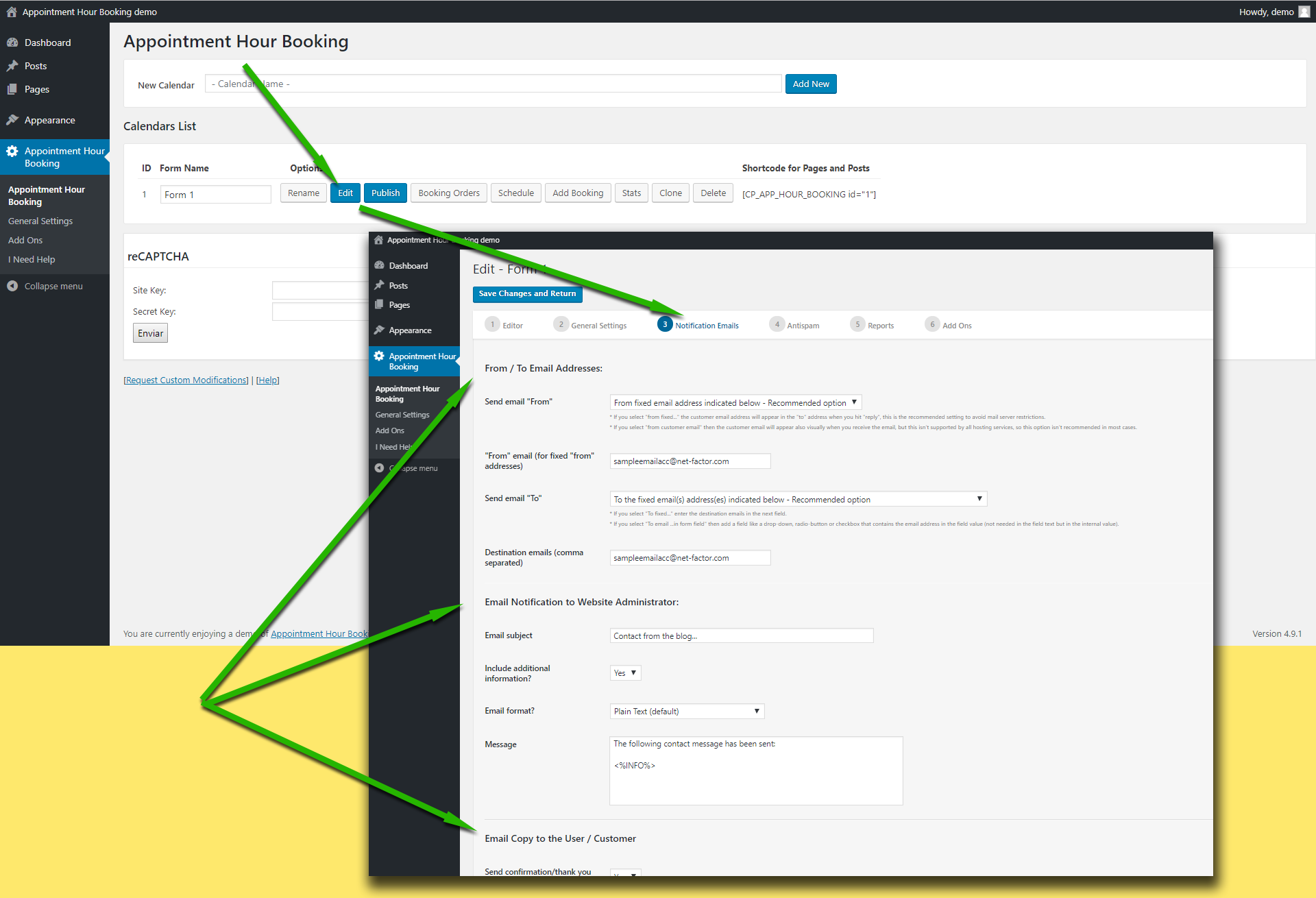
Please check the “from” and “to” addresses in the email settings area:
https://apphourbooking.dwbooster.com/customdownloads/email-settings.png
Please check the “from” email address used in the settings. Note that if you use a “from” email from a public email service like “@hotmail.com”, “@aol.com”, “@outlook.com”, “@gmail.com”, … it will be filtered by most antispam systems since the email will be identified as “not originated at the expected server”.
Try using a “from” address that belongs to the website domain.
Thank you for using the plugin!
The customer receives the notification. I dont receive anything when someone fills out the form. The person fills out the form and gets the confirmation email, i dont receive anything letting me know they have filled out the form
I am also having the same problem of getting no confirmation email,
Hi,
@cjbellorin13, if the email to customer is selected then the email delivery from the website is working and the problem will be in the “from” or “to” addresses used for the notification to the administrator. Please check that and check also the anti-spam filter of the email setup to receive the notification.
@directlocalonline, if no email is being sent at all, try first using a “from” email address that belongs to your website domain, this is the most common restriction applied in most hosting services.
If that doesn’t work please check if your hosting service requires some specific configuration to send emails from PHP/WordPress websites. The plugin uses the settings specified into the WordPress website to deliver the emails, if your hosting has some specific requirements like a fixed “from” address or a custom “SMTP” server those settings must be configured into the WordPress website.
Thank you!
Both customer and admin notifications are going to the customer.
In 5
The email notification form. There is no configuration to set to email for the admin. Eventually the notification reaches the customerHi @akoham,
Please check the “Destination email” settings field, do you have it empty or with a non valid email address?:
https://apphourbooking.dwbooster.com/customdownloads/email-settings.png
Thank you for using the plugin!
Hi guys, first of all, great plugin.
However I’m having the same problem that @akoham reports.
And I dont have empty the destination email field.
Hope you can help us.
Thanks!
Do you mean that both customer and admin notifications are going to the customer? Could you provide a screenshot of the email settings area? Important: Since this is a public forum and isn’t recommended to reveal an email address here you can send the screenshot at the following private contact form: https://apphourbooking.dwbooster.com/contact-us
Thank you!
Hi @codepeople,
Yes, that’s correct, the problem is basically that both, customer and admin notifications are going to the customer.
I sent the screenshot but didn’t get an aswer yet.
Hope you guys can hel me.
Thanks.
Hi,
Did you see the answer? We sent the reply a few days ago. It was about the use of the settings field ‘Send Email “To”‘.
Thank you!
Hi @codepeople
Sorry but I still have the problem
This is the settings that I’m using:
Hope you guys can help me, I really like the plugin and I don’t want to change it.
Thanks.
Hi,
OK, I see you have the settings in Spanish, this is the answer previously sent:
En el campo “Enviar correo electrónico a” del “Appointment Hour Booking” cambie esa opción a “A la (s) dirección (es) de correo electrónico fija indicada a continuación”, lo cual hará que aparezca otro campo donde debe indicar la dirección del administrador que debe recibir la notificación.
Please correct that settings field.
Thank you!


The topic ‘Not receiving notifications’ is closed to new replies.