Hi @kentaguero,
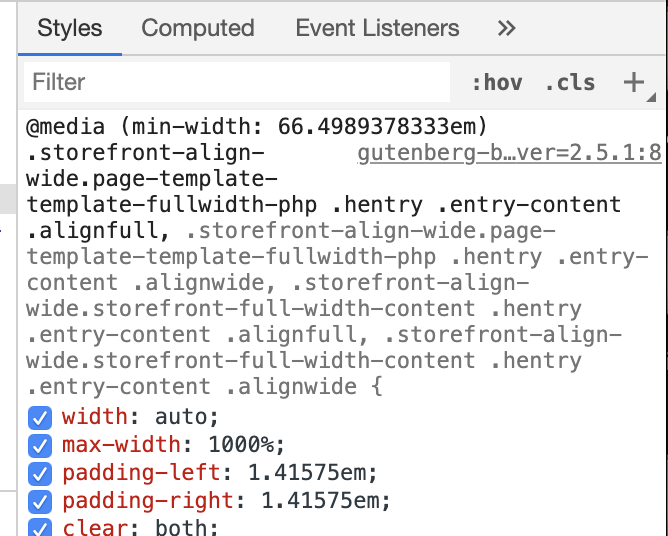
It looks like that padding is coming specifically from your theme, Storefront, and the page template that you are using. Please see the following screenshot: https://cldup.com/vyF5c3tmMU.png
As you can see in the screenshot, the CSS selector .storefront-align-wide.page-template-template-fullwidth-php .hentry .entry-content .alignfull has a padding-left, and padding-right of 1.41575em.
Thank you for the prompt reply.
It is strange that the other blocks are not conflicting. we like yours the best, but it may have to be adjusted on css
@kentaguero Which other blocks? I only see the hero block on that one page. I’m guessing if you set other blocks to full width alignment, you will also see a similar issue with other blocks. Especially if they are in the main content area of your site (.entry-content)
Sorry, I meant other block plugins we are trying. it must be a common compatibility issue. Seems like some plugins don’t get affected or overwrite the template. We are using storefront for this woocommerce site.
Is there a css you can provide to fix the issue? my staff is not working today and I’m trying to finish this website before kickoff tomorrow.
Many thanks in advance!
@kentaguero
If you specifically want to just fix that one page and hero, you can do the following and it should have no adverse effect on the other parts of your site:
body.page-id-96335.storefront-align-wide.page-template-template-fullwidth-php .hentry .entry-content .wp-block-coblocks-hero.alignfull {
  padding: 0;
}
You can take that and drop it right into the ‘Additional CSS’ section of the customizer, which you can get to from the dashboard by going to ‘Appearance > Customize > Additional CSS’.
Let me know if that helps.
Great. would like it for the whole site actually, as we’re using your elements in all the pages with a Hero header. much appreciated.
@kentaguero
The following should work.
.storefront-align-wide.page-template-template-fullwidth-php .hentry .entry-content .wp-block-coblocks-hero.alignfull {
  padding: 0;
}
I’d recommend giving things a test before pushing everything live 🙂
@kentaguero No problem at all – have a wonderful rest of your Sunday. If you have any other questions, concerns or run into any issues, please don’t hesitate to reach back out.