Please can you add a CSS class for the heading of the ‘account details’ link and unlink section (highlighted in red below) so I can apply custom CSS to it.
Since in that case, that heading is added with a h2 tag, located inside the element with the “nsl-container” class, so you could target it simply like this:
div.nsl-container > h2 {
    background-color: red;
}
If you meant something else, then please send us the link of the page where these buttons appear, so we can take a look. If you don’t want to share the URL of your site on this public forum, then feel free to get in touch with us directly over the ticket system:
This is not from using the shortcode no, this is added via the account details section in the global settings that display the buttons on the following page of a user account: /my-account/edit-account/
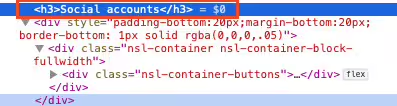
Unless I’m being totally blind (possible), I cannot find a class for the heading, it just has a h3 tag and is outside of the nsl-container class underneath.
If you need more details let me know and I’ll drop a ticket.
Thank you @nanasflowers , I see what you mean now. According to your screenshot you are using the WooCommerce “Account details” form integration and the heading is coming from that. That element is located outside of our container indeed.
However this feature is available only in Nextend Social Login – Pro Addon, and as per the forum guidelines: