• Resolved aj4h

    (@aj4h)


    Only a few weeks ago, WordPress Popular Post widget stop rendering thumbnails associated with some posts. Many of the thumbnails appear properly, as they did before, but a few others are blank where an image should appear. When I change the widget setting to a larger thumbnail that is associated with the theme, the thumbnails appear properly. When I again reduce the thumbnail size to 45×45, or other small sizes, the same thumbnails remain missing. Again, this was not a problem just a few weeks ago. I am not convinced it is the Popular Post Plugin, but the widget is the only place where this problem is evidenced. Let me know if you have any questions. I appreciate your help.

    The page I need help with: [log in to see the link]

Viewing 4 replies - 1 through 4 (of 4 total)
  • Plugin Author Hector Cabrera

    (@hcabrera)

    Hi @aj4h,

    Just checked your website and some of the images are being loaded via http instead of https. I believe that’s the reason why they’re not being loaded: the browser seems to be blocking non-https resources, hence some thumbnails appear as broken. This leads me to think that your site isn’t properly configured to use https.

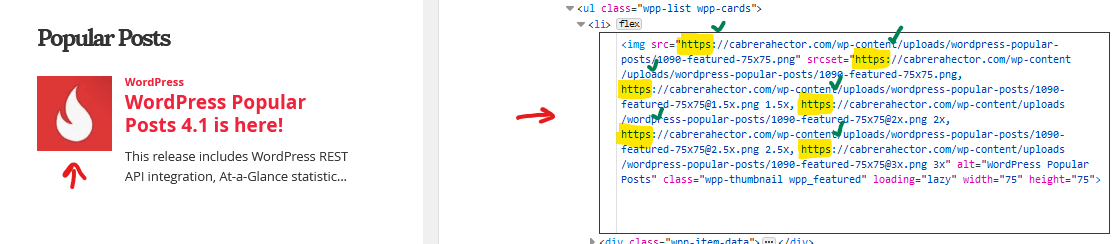
    This is how your thumbnail’s HTML code should look like when your site is properly configured to use SSL/HTTPS:

    Screenshot of thumbnail loading via https

    This article from WPBeginner explains how to fix this kind of issues: How to Fix Common SSL Issues in WordPress (Beginner’s Guide). Before you do anything though please make sure to get a full backup of your website (files and database) first, then read from “2. Fix Mixed Content Errors After Moving WordPress to SSL / HTTPS” and on.

    If you have any further questions don’t hesitate to ask, alright?

    Plugin Author Hector Cabrera

    (@hcabrera)

    Hi @aj4h,

    So I gave this a bit more thought and I think I have a solution that will work even if SSL/HTTPS isn’t properly configured on a given site (like yours for example).

    Please give this a try and report back your results:

    1. Optional but highly recommended: create a full backup of your website (database and files) so you can rollback these changes if needed.
    2. Go to Plugins > Plugin Editor and select WordPress Popular Posts using the dropdown at the right of your screen.
    3. Click on src/Image.php to edit this file.
    4. Replace its contents with this version, then scroll down and click on Update File to save changes.
    5. If you have a caching plugin installed on your website (or if your hosting company provides some sort of caching mechanism) clear your site’s cache for these changes to take effect.
    Thread Starter aj4h

    (@aj4h)

    I should first of all thank you for your initial response. That was sent to me just as we prepared to travel internationally; and so, I was only able to briefly look into the issues that you raised. I did think that I had SSL/HTTPS properly configured, which left me confused as to the cause of my most recent problems. That said, some recent changes to the website may have reversed the previous and proper configuration. I will have to try and re-establish the proper SSL configuration soon.

    That said, I just integrated the changes that you forwarded to me, and that seems to have worked properly as a solution. I am grateful for your willingness to consider and then re-consider my case. Thank you very much.

    Plugin Author Hector Cabrera

    (@hcabrera)

    Thanks for the feedback, @aj4h. Did you remember to clear WP-Optimize’s cache though? I still see images not loading on your website.

Viewing 4 replies - 1 through 4 (of 4 total)

The topic ‘some thumbnail not loading’ is closed to new replies.