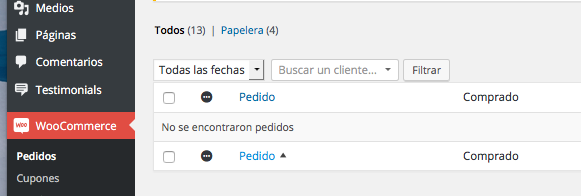
Do you have some in the trash? Can I see the whole row like this: http://cld.wthms.co/1bKzy/2wYLnICv ?
You can delete all WooCommerce data by going to WooCommerce > System Status > Tools and enabling this option: http://cld.wthms.co/1dAaq/2xK8Ff6v. Then deactivate and delete the WooCommerce plugin. All your orders, WooCommerce settings, and products will be deleted from the database.
Thread Starter
 Tize
Tize
(@tize)
Hello Caleb, thank you very much for your message and for your time.
I did not want it was to lose all settings that I have currently applied in the store.
But if it is the only option I aré.
Here I show you a picture where you can see I have 13 orders.
And other three test just deleted and those 13 can not be erased.
Meanwhile, I’ll try your option to delete without removing the Woocommercer to see if it works.
Thank you very much.
http://u.cubeupload.com/Tize/Capturadepantalla201.png
Must be something weird going on. Did you have custom order statuses maybe? Removing all WooCommerce data should solve the issue.
If it happens again, then I’m guessing another plugin or your theme is causing a conflict.
Thread Starter
Tize
(@tize)
Hello, I have followed your footsteps and has now resolved all starts again.
Really thank you very much for your help and for your time.
I’m setting everything goes well as before.
Thank you very much.
P.S. The problem has been reset plug the sales counters.