brough

Forum Replies Created
-
Forum: Plugins
In reply to: [Rename wp-login.php] 'Unable to parse URL' errorsI am having a very similar problem, I think on two sites (possibly more, have not checked all logs)
[03-Oct-2014 07:11:30] PHP Warning: parse_url(/https://plus.google.com/+xxxarah) [function.parse-url]: Unable to parse URL in /home/xxx/public_html/wp-content/plugins/rename-wp-login/rename-wp-login.php on line 412
[03-Oct-2014 07:11:30] PHP Warning: parse_url(/https://plus.google.com/+xxxarah) [function.parse-url]: Unable to parse URL in /home/xxx/public_html/wp-content/plugins/rename-wp-login/rename-wp-login.php on line 449[03-Oct-2014 09:17:18] PHP Warning: parse_url(/https:/www.facebook.com/xxxding) [function.parse-url]: Unable to parse URL in /home/xxx/public_html/wp-content/plugins/rename-wp-login/rename-wp-login.php on line 412
[03-Oct-2014 09:17:18] PHP Warning: parse_url(/https:/www.facebook.com/xxxding) [function.parse-url]: Unable to parse URL in /home/xxx/public_html/wp-content/plugins/rename-wp-login/rename-wp-login.php on line 449I too would very much like a solution to this. I’m cooperating on a blog which is quite active, sending 10 or more notifications a day – for many, this would be too many.
I enabled Nextgen in Plugin Organizer global settings. Looks like that may have solved the problem….
Looks like it’s Plugin Organizer causing the problem.
Plug conflict. Disabled everything and now uploads complete.
I have a very similar issue. I can upload to a new gallery with FTP but the thumbs will not create. If I drop the images into the uploader, they fail to upload. Have deleted Nextgen and reinstalled. Changed to different admin login. Cannot upload to existing gallery, nor to newly created gallery.
PHP 5.2 or thereabouts. Have nextgen on several other sites, same server, no problem (or I hope not, have not checked them for a couple of days).
Forum: Plugins
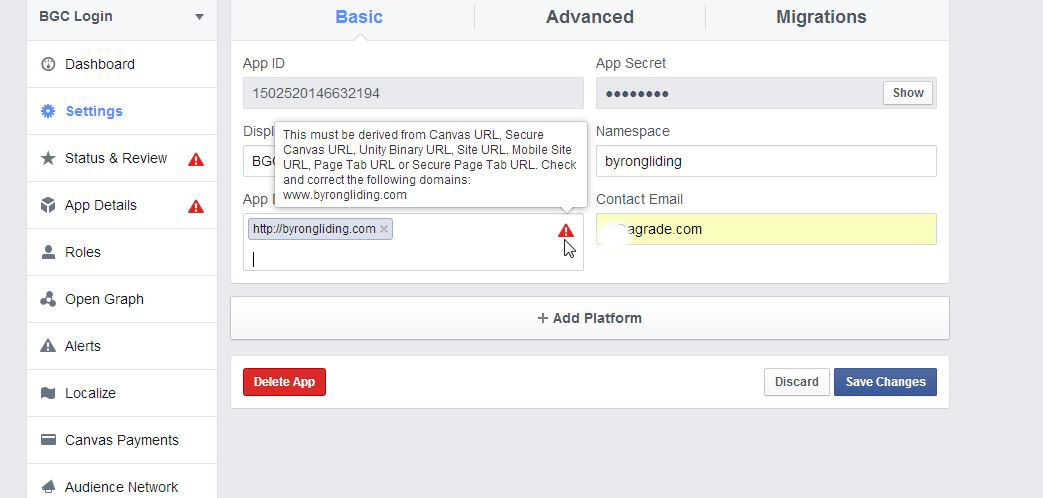
In reply to: [Facebook Login Widget] App setup errorTried again, this time using all possible combinations of the url including http://www http://domain and domain.com, and several different email addresses including the main FB login addy. No deal.
Screenshot here:
http://byrongliding.com/images/BGC-Login.jpgForum: Plugins
In reply to: [Facebook Login Widget] App setup errorHmm… I notice that my horrible gravatar has not changed, and yet I changed it the other night and the new one is showing when I got back to the Gravatar site. I think perhaps I’m using two different email addresses – I cannot see how that would possibly affect the FB API settings, but I’ll look into it.
Forum: Plugins
In reply to: [Facebook Login Widget] App setup errorThanks, but I tried that several times and each time it was rejected. The instructions on that popup are not very clear, but looking at others I’d set up it should be http://domain.com – I did not try http://www.domain.com as it’s not set up that way.
I possibly posted on this forum before I went back and tried again, can’t recall now, but I spent well over an hour, possibly two, trying to figure out the problem.
The problem is related to the limits imposed by your server, most likely. Default post limit is usually 1000, and each menu item uses roughly 10 fields. Read this post: http://ww.wp.xz.cn/support/topic/menu-size-limit
Forum: Plugins
In reply to: [WP Photo Album Plus] Superview Basic SetupOk I have the lightbox working. I understand now that superview and lightbox are two different functions.
Here are the settings I’ve used to make it work.
VI-B5a,,c,d set to “Lightbox”.
and
VI-B 2a,b,c,d Set this to lightboxthis worked, but lightbox does not show full IPTC and is black.
I imagine if I dig around I’ll find settings for the lightbox colours. Are there separate settings for the Lightbox IPTC as well?
Thanks so much for all your help thus far, really appreciate it.
Forum: Plugins
In reply to: [WP Photo Album Plus] Superview Basic SetupAnother page suggests “I had VI-8 (“Slideshow fullsize link”) set to “No link at all” and it needed to be set to “Lightbox”
The location of that setting is now VI-B5a,,c,d but changing that to lightbox had no effect on the superview galleries or the existing galleries.
Forum: Plugins
In reply to: [WP Photo Album Plus] Superview Basic SetupTable IX J3 says Lightbox keyname The identifier of lightbox.
Still not obvious what to do.Forum: Plugins
In reply to: [WP Photo Album Plus] Superview Basic SetupI may have found the answer elsewhere on the forums:
If you install the current version (4.6) lightbox is included in the plugin. You only need to set the lightbox keyname to wppa IX-A6
Forum: Plugins
In reply to: [WP Photo Album Plus] Superview Basic SetupI was hoping to get a result like this:
http://needlenook.com.au/superview-popup.jpgCan only assume I’ve got the wrong impression of what superview is designed to do. How is the lightbox style image created in the screenshot I’ve linked to, can you tell me?
Regards,
Russell.