codepeople

Forum Replies Created
-
Forum: Plugins
In reply to: [Appointment Hour Booking - Booking Calendar] Date jumps backHi,
I tried to check the page but it isn’t public. Do you have the booking form in some public page?
Note: Please note that the answers in this support forum are public. Do not share access information or private information here.
Thank you!
Forum: Reviews
In reply to: [Appointment Hour Booking - Booking Calendar] Идеальный плагинThank you very much for the review!
Best regards.
Forum: Plugins
In reply to: [WP Time Slots Booking Form] Rename time slotsHi,
If you need to manage time-slots of different-defined duration then we have another similar plugin that matches better this requirements, the Appointment Hour Booking plugin. It is services-oriented and you can setup services of different duration into it.
Thank you for using the plugin!
Forum: Plugins
In reply to: [WP Time Slots Booking Form] Hooks to add things before/after a formHi,
There is another one named
cptslotsb_pre_formjust before rendering the form.Thank you for the feedback!
Forum: Plugins
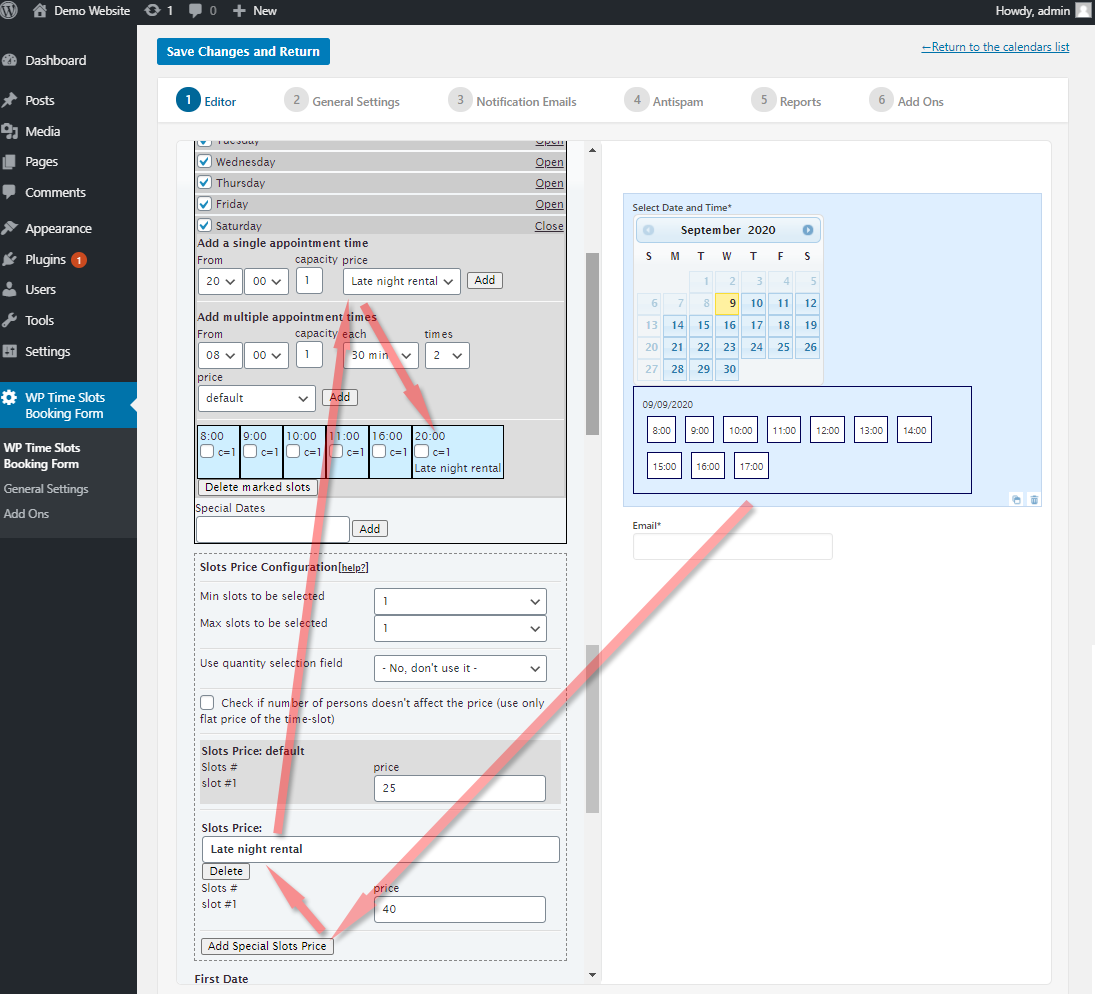
In reply to: [WP Time Slots Booking Form] Different prices for each time slotHi,
Good to hear you already found the solution. It’s the following settings area:

https://wptimeslot.dwbooster.com/images/articles/defining-special-prices.png
Thank you for using the plugin!
Hi,
That content isn’t posted back to the server as part of the booking, so it cannot be added that way in the confirmation emails. Consider adding other field for that content (it can be a hidden field) if you want to make it available in the confirmation emails or other server side actions.
Thank you for using the plugin!
Forum: Plugins
In reply to: [WP Time Slots Booking Form] Limit bookings to consecutive days/hoursHi,
The feature you refer (limiting bookings to consecutive time-slots) isn’t available for this version of the plugin.
Thank you for using the plugin!
Hi!
Good to hear you already found and alternative solution.
Regarding to your original message, please note that we’d like to help but we can’t reply about the commercial versions of the plugin in this forum. Commercial products are not supported in these forums. We will happily answer this and any other questions you can have on our own site.
For pro or commercial product support please contact us directly on our site. This includes any pre-sales topics as well.
Thank you for the feedback!
Forum: Plugins
In reply to: [Appointment Booking Calendar] Plugin not workingHi,
That screenshot and that version number is from the listing in the WordPress directory, but the one installed in the “Plugins” menu of your website is a different version number.
Check in your website the version number that appears exactly in this area:
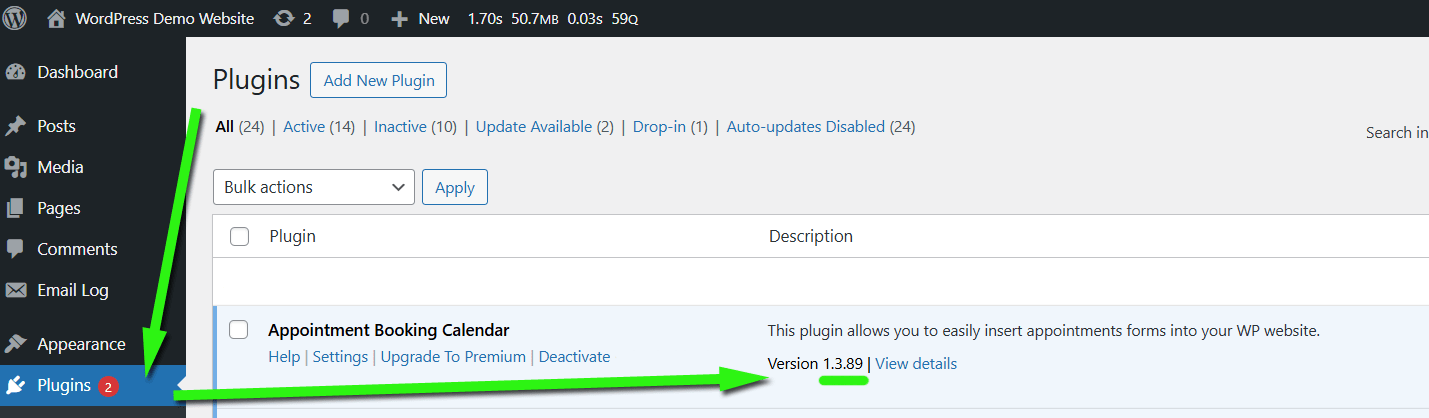
https://abc.dwbooster.com/images/articles/plugin-version.png
Please check that and confirm.
Thank you.
Hi,
You can also send a message and later attach a file through this page. Make a reference to this support thread in the message.
Thank you.
Forum: Reviews
In reply to: [WP Time Slots Booking Form] Great pluginThank you very much for the review!
Best regards.
Forum: Plugins
In reply to: [WP Time Slots Booking Form] .nonavailableslots CSS class is not appliedHi,
Yes, that style doesn’t apply if that option is checked.
Thank you for using the plugin!
Forum: Plugins
In reply to: [WP Time Slots Booking Form] Some non-internationalized stringsHi,
We have published a new update related to the translations.
Thank you for the feedback!
Forum: Plugins
In reply to: [CP Multi View Events Calendar] Form field missing labelHi,
We have just made an update that includes a label field readable by screen readers while keeping the same appearance in the browser.
Thank you for the feedback!
Forum: Plugins
In reply to: [Appointment Booking Calendar] Plugin not workingHi,
Please double check the version number of the plugin you are using (version number that appears in the Plugins menu). According to the description of the error, you may be using an outdated copy of a commercial version plugin.
Check the version number in the following area:
https://abc.dwbooster.com/images/articles/plugin-version.png
Thank you for using the plugin!