BeeCee

Forum Replies Created
-
Thanks a lot, I have tried this.
But there are still problems:
I have some already existing links, where since months, the “coming soon”-image is shown and “Use Thumbshots.org for dynamic link images” is enabled in the plugin’s settings:
If I let this enabled and add in the link editor my own image, then the image is only shown in the link editor, but not at the website. At the frontend/website is still the “coming soon” image from “thumbshots.org”.
It seems, that at existing links always the use of the thumbshots.org-thumbnails have priority, no matter, if an own image has been uploaded.
However, if I have enabled “Use Thumbshots.org for dynamic link images” in the plugin’s settings and add a complete new link with an own image, then my new image is shown and correctly in thumbnail size.
But if I now disable “Use Thumbshots.org for dynamic link images” in the plugin’s settings and upload my own image (800×600 px for example), the image is shown in backend and at the website, but it is not resized to a thumbnail size.
Do you have any idea, how to add an own image, no matter what size, and that this is then resized to a certain thumbnail size?
And how to add afterwards to existing links an own image, where the “coming soon”-image is still there?
Thanks.
Hi Yannick,
thanks, but could you please let me know, where and how I can allocate my own thumbnail images at my server to the links?
Thanks.
Thanks,
but I have not econtact.php-file within the dmsguestbook-folder.
?
No one an idea how to get a slideshow working at multiblog?
And another info:
I use domain mapping:
http://my-name.de/blog1/is mapped tohttp://blog1.my-name.de!Maybe this is important, because Firebug gets an error message, when I try to analyze the page:
Screenshot:
http://i55.tinypic.com/2873s5j.jpgAnd another info:
I use domain mapping:
http://my-name.de/blog1/ is mapped to http://blog1.my-name.de!
Maybe this is important, because Firebug gets an error message, when I try to analyze the page:
Screenshot:
http://i55.tinypic.com/2873s5j.jpgBy the way:
NextGen Plugin is activate multisite wide and I use version 1.6.2
Forum: Plugins
In reply to: [WP-SimpleViewer] [Plugin: WP-SimpleViewer] Gallery XML not foundI have the same problem, too!
Anybody an idea? Thanks.
Forum: Plugins
In reply to: [Link Library] Link Library Version 4.2.6 problem!I have this, too:
 Warning: Cannot modify header information - headers already sent by (output started at /homepages/25/d13574424/htdocs/multisites/wp-content/plugins/link-library/link-library.php:1) in /homepages/25/d13574424/htdocs/multisites/wp-includes/pluggable.php on line 690 Warning: Cannot modify header information - headers already sent by (output started at /homepages/25/d13574424/htdocs/multisites/wp-content/plugins/link-library/link-library.php:1) in /homepages/25/d13574424/htdocs/multisites/wp-includes/pluggable.php on line 691 Warning: Cannot modify header information - headers already sent by (output started at /homepages/25/d13574424/htdocs/multisites/wp-content/plugins/link-library/link-library.php:1) in /homepages/25/d13574424/htdocs/multisites/wp-includes/pluggable.php on line 692 Warning: Cannot modify header information - headers already sent by (output started at /homepages/25/d13574424/htdocs/multisites/wp-content/plugins/link-library/link-library.php:1) in /homepages/25/d13574424/htdocs/multisites/wp-includes/pluggable.php on line 890Forum: Networking WordPress
In reply to: Multiblog with mapped domains: now new blogs cannot be createdoh yes, Andrea, thanks for that hint! I had some plugins enabled. I disabled them all and then I could create new blogs like before the mapping.
Forum: Networking WordPress
In reply to: Multiblog with mapped domains: now new blogs cannot be createdok, now I’ve figured out, that the only problem is, that the sub-blog, that is created AFTER the installing of the domain mapping, is NOT created in database.
I have now go to my PHPmyAdmin and have there duplicated the tables of an existing old sub-blog, gave them the ID of the new sub-blog, changed the blog name and folder within the tables.
And when I go now in superadmin -> blogs, then the new created sub-blog has its own admin area and can be called fine.
So the only problem is, that the tables of the new sub-blog are not created in database, when creating the blog in the super admin area.
Has anyone an idea, why and how to get a better solution than copying in phpMyAdmin tables?
Thanks.
I’ve got it!
The problem and the only problem was, that at my Provider the subdomain directs to the root of the server, but the main installation of WordPress was in an subfolder (where the main domain points to it, too).
I just point the subdomain to this directory at the server and then follow the tutorial of Otto:
http://ottopress.com/2010/wordpress-3-0-multisite-domain-mapping-tutorial/
using the server IP and no CNAME. The server IP can be pinged by Windows with START -> EXECUTE (don’t know the English name for this menu) -> CMD -> and then
ping http://your-domain.de.Then the installation goes like Otto said. For all Germans, who have this problem, too, is there a very good tutorial video at Youtube:
http://www.youtube.com/watch?v=4jN4kEzkE4U&feature=related
or a tutorial with step-by-step at the German WP forum here:
It works now very fine for me. Thanks to Andrea, too, for your patience and help 🙂
It is really a desperate fight with this domain mapping 🙁
I don’t get it to work any more …Using the IP, that is mentioned at my hoster’s account (same for subdomain as for main domain) causes a “server not found”, too, if I add it in the domain mapping config area, and set in my blog’s tools -> domain mapping area the subdomain’s name “testblog.my-domain.de”.
I really don’t have any idea how to cope with it.
It is very hard for me to understand, because my English is not so good, what do you exactly mean by “using a subdomain with a CNAME record to map it to the install”?
If I have understand you right, I only look at my hoster’s account for the A-RECORD-IP for this subdomain, right?
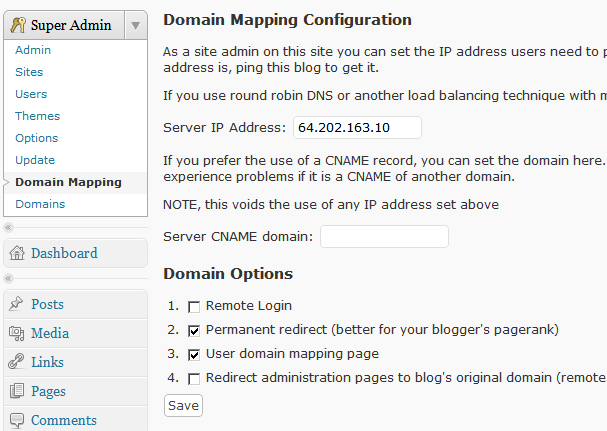
And this IP do I put into “Domain Mapping Configuration” –> “Server IP adress” line here:
http://ottopress.com/files/2010/06/domainmapping3.png
?
Sorry, but I really have now fear, to block my site again 🙁
Thanks, Andrea.But in your first post you wrote “use a CNAME to map the subdomain.”?
ok, I should put the IP of this subdomain in
“Domain Mapping Configuration” –> “Server IP adress”
and not
“Domain Mapping Configuration” –> “Server CNAME domain”
?
And don’t set a CNAME at the hoster?