DAEXT

Forum Replies Created
-
Forum: Plugins
In reply to: [Autolinks Manager - SEO Auto Linker] Autolinks in RSS feeds?Hello Rolf,
I just added a ticket for this. An option to include the automatic links in the RSS feed will be considered for the next plugin.
Let me know if you have other questions.
Forum: Plugins
In reply to: [Autolinks Manager - SEO Auto Linker] Word with & symbolHello luqmanzulkiply,
if the post content includes the HTML entities you have to use these entities in the keywords.
For example you can use the HTML entity for & instead of
&.P.S. This forum doesn’t allow me to include HTML entities so I have to link an external document with the entity.
Let me know if you have any questions.
Forum: Plugins
In reply to: [Autolinks Manager - SEO Auto Linker] disable autolinks in one pageHello Martijn,
Awesome plugin!
Thank you very much. If you like this plugin please remember to rate it on the reviews area. This helps the plugin downloads and its future development.
Here’s one thing I struggle with, can I disable autolinks on one specific page? And keep it on all other pages and blogs?
With the Gutenberg editor there is a link icon in the top right section of the editor. After opening this icon you have to set the Enable Autolinks selector to “No”.
Apply this change only in the pages where you want to disable the automatic links.
Please see: https://ps.w.org/daext-autolinks-manager/assets/screenshot-10.png?rev=2397200
With the Gutenberg editor disabled there is a meta box named Autolinks Manager to achieve the same purpose.
Hope this helps. Let me know if you have any questions.
- This reply was modified 4 years, 11 months ago by DAEXT.
Forum: Plugins
In reply to: [Autolinks Manager - SEO Auto Linker] Some code not hiddenHello luqmanzulkiply,
can you please verify your links with the examples and add more details?
Because I can only see a login form in the first screenshot and a div container with text in the second.
Thank you.
Forum: Plugins
In reply to: [Autolinks Manager - SEO Auto Linker] Cache of the Hyperlinks?Hello Hitesh Bhasin,
So this plugin is generating links on the fly. But the issue is – on a large site having 100s of Auto links, wouldn’t this just slow down the site?
The plugin uses regular expressions to find and replace the keywords. A high number of defined keywords means that more regular expressions should run to perform these replacements.
The time required to apply the auto links depends on the number of defined keywords, on the content length of the post, and on the CPU performance of the server.
I confirm that with hundreds of keywords there might be a difference in the time required by PHP to respond.
Caching Plugins
With a caching plugin the auto links are applied only one time, when the cached page is generated, so you can easily solve the problem.
Cant there be a premium add on wherein changes are made in the actual page itself.
Applying auto links on the fly is a design decision.
There are three problems with hardcoding the links on the posts:
- The HTML code generated with shortcodes, with visual editors or with filter is not available in the post content and this part of HTML can’t be parsed by the plugin.
- You would have to hardcode the auto links each time keywords are added or new posts are published.
- With a wrong plugin configuration you can damage the post HTML.
Hope this helps. Let me know if you have any questions.
Forum: Plugins
In reply to: [Autolinks Manager - SEO Auto Linker] Multiple keyword in one wordHello luqmanzulkiply,
Great works on Autolink. Appreciate your effort on getting this plug in.
Thank you for this, if you like this plugin please rate it the reviews section of the plugin. This help the plugin downloads, the premium version sales, and its future development.
1) I put autolink for Aemulus and Aem
– For Aem it detects well
– For Aemulus it does not detect as Aemulus but rather it detects as Aem (the 1st 3 letters of Aemulus)You can handle this situation with the following changes:
- By increasing the Priority value (available in the Advanced Match section of the autolink) of the longest keyword.
- By changing the boundary of the shortest keyword. In your case you can set “White Space” or “Generic” for the “Aem” keyword.
.
2) I put link for Parlo, PA, and RL
– For PA and RL the system detects well
– For Parlo, unable detects but rather the system detect two Autolink there (PA and RL) instead of recognising it as one word (Parlo)You can solve with the method explained in the answer to the first question.
The priority of the keyword “Parlo” should be higher than the ones of the keyword “PA” and “RL”. Alternatively you can set the “White Space” or “Generic” boundaries for the “PA” and “RL” keywords.
Hope this helps.
Thank you for all the details.
Hello chillybang,
the plugin currently has only options to exclude certain sections of the post, which are the Advanced -> Protected Blocks option and the Advanced -> Protected Tags option.
We are planning to include options to include only certain parts of the post but I can’t provide you a release data or details on this feature at the moment.
Let me know if you have other questions.
Forum: Plugins
In reply to: [Autolinks Manager - SEO Auto Linker] Doesn’t Work on WPZOOM Recipe BlocksI tested the plugin with the “Recipe Card Block” of the Recipe Card Blocks by WPZOOM plugin and in my case was enough to set the Advanced -> Filter Priority option to “2147483646” and remove the
oland ultagsfrom the Advanced -> Protected Blocks option. Please note that you have to clear the server cache, if present, to reflect your changes in the front-end.If you can’t solve please indicate the exact section of the block where you can’t apply the automatic links so I can reproduce the behavior.
Forum: Plugins
In reply to: [Autolinks Manager - SEO Auto Linker] Import linksHello rezocom,
if you can please open a new topic and include the information about your WordPress environment available in the Site Health -> Info. So I can provide you a precise answer.
You can also send an email privately to [email protected] if you prefer.Forum: Plugins
In reply to: [Autolinks Manager - SEO Auto Linker] Import linksThanks to you for using the plugin. If you like it please remember to rate it on the reviews area. This helps the plugin downloads and its future development.
Forum: Plugins
In reply to: [Autolinks Manager - SEO Auto Linker] Import linksHello rezocom,
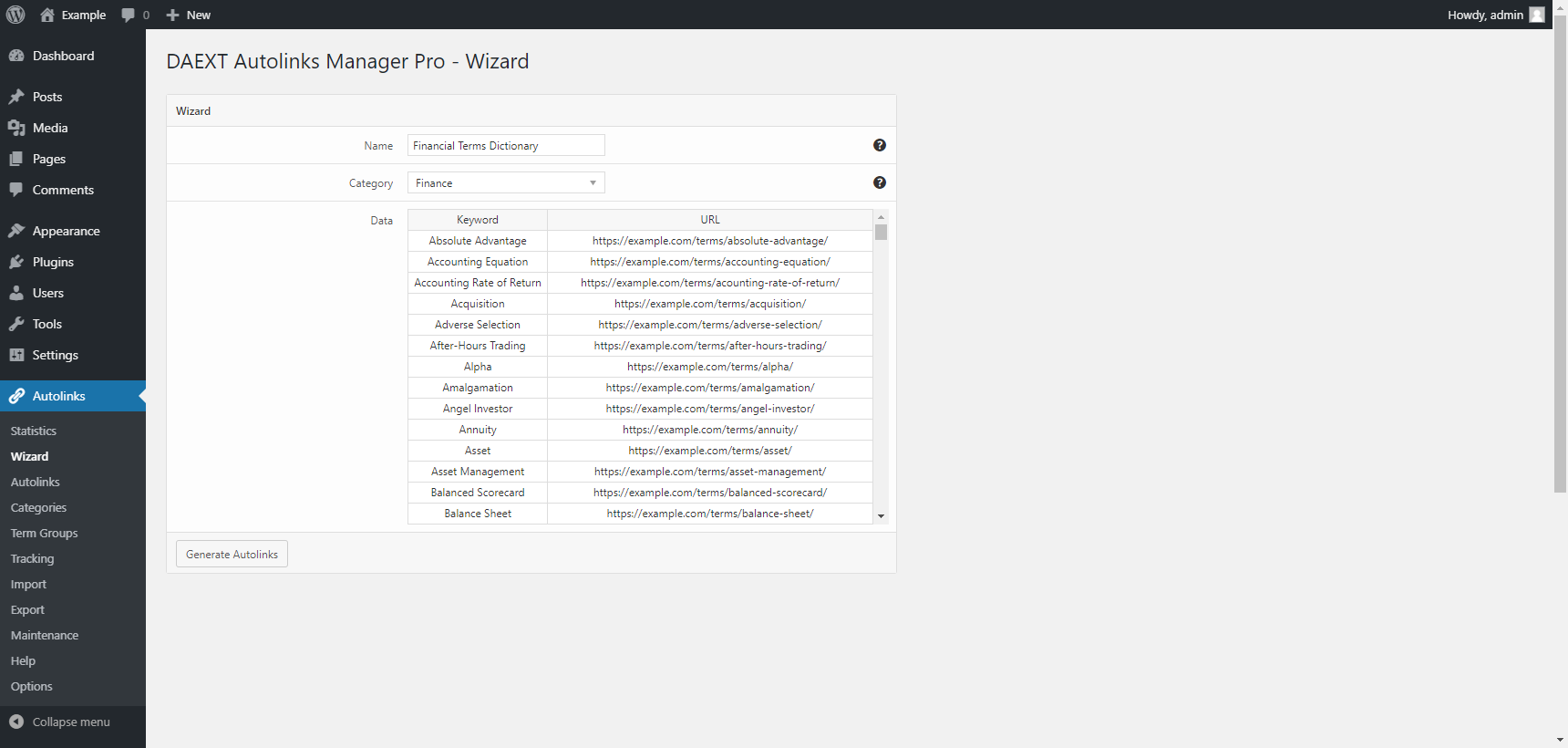
a menu to bulk update keywords and related links is available in the Pro version.
A screenshot of the menu:
https://daext.com/wp-content/uploads/2020/10/02-amp-wizard-menu.png
The plugin doesn’t have this kind of issues and the problem is certainly associated with the way it’s used. if you a interested in using the plugin please consider reading the plugin manual, asking in the support section, or contacting the developers at [email protected] with your support questions.
Forum: Plugins
In reply to: [Import Markdown - Versatile Markdown Importer] Frontmatter and MDXMarked as solved.
Hello gavosul,
thank you for the appreciation and for all the details. The plugin currently uses the sanitize_text_field() function to sanitize the URL field submitted in the Autolinks -> Autolinks menu.
The URL encoded elements are removed by this function. I recommend you to remove this sanitization function in order to support URLs in that format. Replace line 20 of the daext-autolinks-manager/admin/view/autolinks.php file:
$url = sanitize_text_field( $_POST['url'] );with this line:
$url = $_POST['url'];I’ve also created a ticket in our issue tracker so that a different sanitization function will be used in future plugin versions.
Hope this helps. Let me know if you have other questions.