earrame

Forum Replies Created
-
Forum: Fixing WordPress
In reply to: Block editor and classic editor not working in IEThanks for the reply. I am not sure what version my client is using but I tested it in IE 11 and I was able to replicate the issue. I just tested in Edge and it looks ok with the block editor and the classic editor. It has been so long since I have used microsoft products that I didn’t think to look at edge. I will recommend that they upgrade.
Forum: Fixing WordPress
In reply to: Block editor and classic editor not working in IEThe problem with the block editor seems to be with the Advanced Panels that are covering up the block area. As long as I uncheck them the blocks are all visible.
Forum: Plugins
In reply to: [Contact Form 7] Omit Badge on Non CF PagesI just found this at https://developers.google.com/recaptcha/docs/faq
***I’d like to hide the reCAPTCHA v3 badge. What is allowed?
You are allowed to hide the badge as long as you include the reCAPTCHA branding visibly in the user flow. Please include the following text:
`This site is protected by reCAPTCHA and the Google
<a href=”https://policies.google.com/privacy”>Privacy Policy</a> and
<a href=”https://policies.google.com/terms”>Terms of Service</a> apply.`- This reply was modified 7 years, 5 months ago by earrame.
Forum: Plugins
In reply to: [Contact Form 7] reCATCHA V3I will add my voice to the V3 is bad crowd. Not only is the badge intrusive and ugly, I found that on some IPad browsers, it breaks the form. You get the yellow box that says you should try again later, but the mail sends anyway. It is fixed if I remove the v3 key.
Edit: I just found this on https://developers.google.com/recaptcha/docs/faq:
***I’d like to hide the reCAPTCHA v3 badge. What is allowed?
You are allowed to hide the badge as long as you include the reCAPTCHA branding visibly in the user flow. Please include the following text:
` This site is protected by reCAPTCHA and the Google
<a href=”https://policies.google.com/privacy”>Privacy Policy</a> and
<a href=”https://policies.google.com/terms”>Terms of Service</a> apply.`Forum: Plugins
In reply to: [SpiderCalendar] Month view not displaying for 2019 datesOddly enough, December 2019 is displaying correctly and so is all of 2020. I thought that it might be an odd character put in a title or in the notes, but I went through and removed quotes and ampersands and still see the issue.
That worked. Thank you very much!
Jet pack is the plugin that is providing the visibility function.
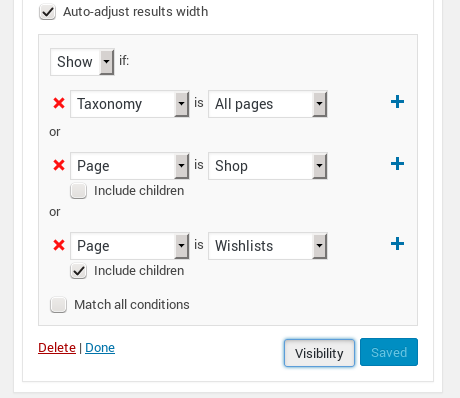
Hello, I have created a widget area that is at the top of the content area. I have set the ‘Product Search Field’ widget to be visible on taxonomy > all pages, Pages > Shop, and page > Wishlist:
https://snag.gy/k6dje1.jpgIt is showing on the category pages and the wishlist:
https://snag.gy/1ApMWh.jpgBut it is not showing on the shop page unless I remove the Genesis connection plugin.
It is specifically if I select it to be shown on Page > Shop. If I do not set visibility rules, a widget will show on the shop page in that location.
I do not see any other way to target that page specifically and I would really like it to work with the Genesis Connect for WooCommerce plugin.
That seemed to work! Thank you very much!
Forum: Plugins
In reply to: [Code Snippets] Adding a widget area keeps breaking my siteThank you very much! That worked perfectly!
Forum: Plugins
In reply to: [Code Snippets] Adding a widget area keeps breaking my siteI have narrowed it down to the register section and fixed one issue with it, but it is still crashing the site. If I put this in a snippet and save it, the site goes gray.
genesis_register_sidebar( array(
‘id’ => ‘after-header’,
‘name’ => __( ‘After – Header’, ‘daily-dish-pro’ ),
‘description’ => __( ‘After Header Widget Area’, ‘daily-dish-pro’ ),
) );Forum: Plugins
In reply to: [Restaurant Menu and Food Ordering] descriptions in items viewI had to add the description in the excerpt section of the menu item edit page.
Forum: Plugins
In reply to: [Contact Form 7] epic failureyou are correct. he had both plugins active and I was editing the wrong one. Thank you.
I think I figured it out. I had this setting image_stack_animation=yes and I changed it to no and now the problem isn’t happening. It just took me typing it all out I guess.