Ellsinore

Forum Replies Created
-
Forum: Requests and Feedback
In reply to: The new editor is nonintuitiveI went to do a “quick” blog post after my site was updated, took one look, and left. It’s several weeks later and I’m trying again, but frankly I just don’t have the time to learn how to use blocks. And I’m really tired of the people who make these decisions (not just WordPress) messing things up but trying to sell it to me with platitudes and sales pitches like, “Welcome to the wonderful world of blocks!” Telling me it is true does not make it so, and it is not so!
I am so relieved that I can go back to the old editor, but do I see that IT is also on it’s way out?
It’s times like these that I’m really glad I’m very old and won’t have to deal with this stuff much longer.
Forum: Plugins
In reply to: [Media Library Assistant] Create a feed out of the media libraryHi, David!
I was so excited to see this topic come through my email notifications and I couldn’t wait to get some time to implement it. It doesn’t make sense for me to create a new WP post every time I upload a media item, and this is the perfect solution!
Unfortunately — surprise! — I can’t figure it out! I’m getting exactly what I DON’T want, and old ones, too, not the new media library items I just uploaded, for instance, tonight. 😀
Here’s my site link:
http://cousin-collector.com/blog/?page_id=690
I don’t understand how to enter the parameters so I get just category “Media Library” and tag “Public”
I was able to use “/?feed=mlafeed&mla-term=public” and retrieve the list with those items, but they were from back in April?
Thanks!
Kris
- This reply was modified 8 years, 8 months ago by Ellsinore.
Forum: Plugins
In reply to: [Media Library Assistant] ThumbnailsHi, David!
Thank you so much for the help on this. I was able to “clean up” my media library in a matter of hours, rather than days, thanks to your attention to this special problem.
You rock! Thanks! 🙂
Forum: Plugins
In reply to: [Media Library Assistant] ThumbnailsHi, David — Last update for the night. 🙂
I’ve messed up a setting somewhere. I tried to generate a new thumbnail and did get the notification that the thumbnail was generated, but still the [X] rather than an image. I’m kind of lost at this point. It *did* work and now it’s not.
Thanks!
Kris
Forum: Plugins
In reply to: [Media Library Assistant] ThumbnailsHi, David!
Well, now I’m having a real problem. 😀
I get “Item 1017, has native thumbnail.” when I try to generate thumbnails. I’m guessing this error was appearing earlier, but I didn’t see it.
Now they’re mostly all gone. I don’t see any thumbnails in the directory where the PDFs reside — is there another directory I should be looking?
Thanks!
Kris
Forum: Plugins
In reply to: [Media Library Assistant] ThumbnailsHi, David!
I did kind of make a mess of that, didn’t I? 🙂
Yes, I do still have the missing thumbnails and re-running the generation process doesn’t fix it. It worked on the newer ones, but not the older ones for some reason.
I’m having to re-upload the missing-thumbnail PDFs anyway. So if you want to take a peek and see if you know what’s up, that would be great. If you don’t get a chance, no worries! 🙂
Here’s the page: http://cousin-collector.com/blog/?page_id=690
And here’s one of the items: http://cousin-collector.com/blog/?attachment_id=940
Thanks!
Kris
Forum: Plugins
In reply to: [Media Library Assistant] ThumbnailsHi, David!
Thanks for the prompt response! I am glad I asked — I never would have found that by myself. 🙂
I did as instructed and the thumbnails were generated for some of the files, but others show the dreaded [X] where the image should be. I can’t see a correlation for those that didn’t seem to work.
I thought it might have something to do with those that were uploaded recently and those that were uploaded while I was still trying to figure out the IPTC import process, etc., and that *almost* seems to be the case, with the exception of one document.
Thanks!
Kris
Edited to Add: In going over those PDFs, I’m remembering now that I needed to go back and clean up all the inconsistencies in those uploads. I’m doing that now, and the thumbnail functionality is working just fine. Thank you! 🙂
- This reply was modified 9 years ago by Ellsinore.
Forum: Plugins
In reply to: [Media Library Assistant] Show Post Kicker in Media LibraryHi, David!
The information you provided was very helpful, and is working great. Unfortunately, I haven’t been able to figure out how to get the tags and categories to be links, but that’s an issue with me and my template and not with MLA. So I’m marking this topic resolved!
Thanks for the help! 🙂
Kris
Forum: Plugins
In reply to: [Media Library Assistant] Show Post Kicker in Media LibraryHi, David!
Sorry it took me so long to get back to this. I used the code you provided above and it displays the “post-kicker” just fine — but I do want the tags and categories to be links. I’ll try to play with this some more soon, but it will probably be a week or two.
Thanks!
Kris
Forum: Plugins
In reply to: [Media Library Assistant] Show Post Kicker in Media LibraryHi, David!
I probably over-complicated things, but I used two methods to accomplish my goal.
Actually, the first problem just came up recently: No Posts for Archive Pages Att. Tags & Att. Categories. The tag and category links for the media attachments didn’t work, so I created archive.php to process and display the items thus:
<?php
if (strpos($url, 'tag') !== false) {
if ( class_exists( 'MLAShortcodes' ) ):
	echo do_shortcode('[mla_gallery post_tag="' . $page_tag . ',public" tax_operator=AND post_parent=all orderby=title post_mime_type=application/pdf,image/jpeg columns=0 mla_style=theme mla_caption="{+template:<strong><a class=\'title-link\' href=\'{+pagelink_url+}\'>{+caption+}</a></strong><br />{+description+}<br /><strong>Uploaded:</strong>   {+date,date(\'j F Y\')+} <strong>Modified:</strong> {+modified,date(\'j F Y\')+} \\({+file_size,kbmb(m)+}\\)+}"]');
endif;

}
if (strpos($url, 'cat') !== false) {
if ( class_exists( 'MLAShortcodes' ) ):
	echo do_shortcode('[mla_gallery category="' . $cat_slug . '" post_tag=public tax_relation=AND post_parent=all orderby=title post_mime_type=application/pdf,image/jpeg columns=0 mla_style=theme mla_caption="{+template:<strong><a class=\'title-link\' href=\'{+pagelink_url+}\'>{+caption+}</a></strong><br />{+description+}<br /><strong>Uploaded:</strong>   {+date,date(\'j F Y\')+} <strong>Modified:</strong> {+modified,date(\'j F Y\')+} \\({+file_size,kbmb(m)+}\\)+}"]');
endif;
}
?>
The archive.php page result for clicking on a tag.
The archive.php page result for clicking on a category.
When I did the archive.php page, I couldn’t figure out then, either, how to include the “post kicker” in my code, so it’s not there for the media.
The Media Library link is a WP page with MLA code:
[mla_gallery category=media-library post_tag=public post_parent=all orderby=title post_mime_type=application/pdf,image/jpeg columns=0 link=file mla_style=theme mla_caption="{+template:<strong><a class='title-link' href='{+pagelink_url+}'>{+caption+}</a></strong><br />{+description+}<br /><strong>Uploaded:</strong> {+date,date('j F Y')+} <strong>Modified:</strong> {+modified,date('j F Y')+} \\({+file_size,kbmb( 1024 , ' KB', ' MB', 1 )+}\\)+}"]I believe you could use the MLA Custom Markup Template features to eliminate the need for custom PHP code and raw HTML. Have you investigated that approach for your application?
No, I haven’t! But it looks like I should! It would be great if it could simplify the process. 🙂
Thanks!
Kris
Forum: Plugins
In reply to: [Media Library Assistant] Code for WP “file size” FieldHi, David!
Just for archival purposes, yes, this is where I’m finding the size information in the WP media admin screen:
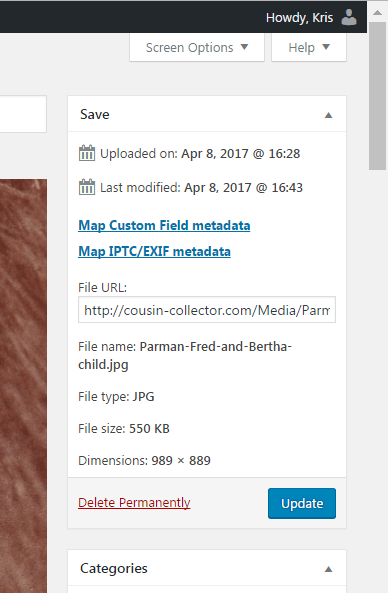
If
filesize()is good enough for WP, it’s good enough for me.Thanks! 🙂
Kris
Forum: Plugins
In reply to: [Media Library Assistant] Show Post Kicker in Media LibraryHi, David!
Thanks for getting back to me so quickly!
You may have seen this earlier topic when you were digging around:
Displaying title, description and attachment category
That doesn’t look familiar, but it does give me an idea that I could do what I’m wanting by using CSS. I’ll play with that a bit!
That topic used the mla_caption parameter to enhance the caption. Your current “Media Library” page displays the document Title as a hyperlink, followed by “Credit:”, “Source:” “Uploaded:” and “Modified:” to the right of each document thumbnail. Are you using a custom template to arrange the display? How are you adding “Credit:”, etc. to the entries?
I’m actually using the IPTC metadata for the photos to populate those fields when the file is uploaded — thanks to your help! 😉
It looks like adding the “post kicker” simply means adding a few more fields to the information already there. Is that right? The only complication I can see is that you might want the “Tags:” and “Category:” terms to be active links to their respective archive pages. Is that the issue?
The keywords (tags) and categories are already part of the IPTC I’m using, so the info is already there. Figuring out how to link it shouldn’t be a problem if I go with the CSS from the post you found for me.
I probably should have included this link in my original post:
http://cousin-collector.com/blog/?tag=parman-surname
This is the tag page for the “Parman Surname” tag on the photo and recent blog post about it. The first item is, of course, the information about the media item — the photo. The second item — which I see now is hard to distinguish and I should probably throw a horizontal rule in there — is the blog post item, which has the same tag.
The “post kicker” is the information with the grey background. Ideally, I’d like that information to appear on the Media Library page (http://cousin-collector.com/blog/?page_id=690) under each item, and eliminate the separate link to the attachment page to access those tags and categories.
The Media Library page is all MLA code in the page, so I’m fairly confident I can use CSS there. The tag and category pages, though, I created a new PHP page for those and I had some difficulty adding more than the most rudimentary HTML to the MLA code for that, so I’m not sure I’ll be able to pull that off. 🙂
I’ll probably get some time to play with this over the weekend! Thank you! 🙂
Kris
Forum: Plugins
In reply to: [Media Library Assistant] All Category Links Working But OneIf I switched the attachments to “Att.” Categories and Tags, this wouldn’t be necessary?
Oops! Never mind. That created a whole new laundry list of troubles. 😀
Forum: Plugins
In reply to: [Media Library Assistant] All Category Links Working But OneHi, David!
It would be straightforward to write some PHP code to hook the mapping rules and perform this function. Would that be an acceptable solution?
If I switched the attachments to “Att.” Categories and Tags, this wouldn’t be necessary?
Kris
Forum: Plugins
In reply to: [Media Library Assistant] All Category Links Working But OneHi, David!
Try replacing your tax_operator=AND parameter with tax_relation=AND. That parameter means that items must match the terms named in both of the taxonomy parameters.
That was it! I get it now. Thanks!
It would be straightforward to write some PHP code to hook the mapping rules and perform this function. Would that be an acceptable solution?
That would be awesome, as my goal has been to automate the upload process as much as possible. With the exception of that one thing — going in to the media library to click the “Research Log” box — it’s totally working! 🙂
Thanks, David!