Glen Don Mongaya

Forum Replies Created
-
Hello @jordanwinston ,
Can you send the link to your website?
Maybe your server doesn’t allow PDF file or there’s some kind of restrictions.
Glen
@jordanwinston , if you like my plugin and assistance. I would appreciate if you leave a review here – https://ww.wp.xz.cn/support/plugin/drag-and-drop-multiple-file-upload-contact-form-7/reviews/#new-post
@jordanwinston , yes just add this in your wp-config.php
define(‘wpcf7_dnd_dir’, ‘change_to_folder_name_you_want’);
To group files.
Let’s say for example you have these fields.
[mfile tax-form]
[mfile w2forms]
[mfile loanapp]In you email body text.
[tax-form]
[w2forms]
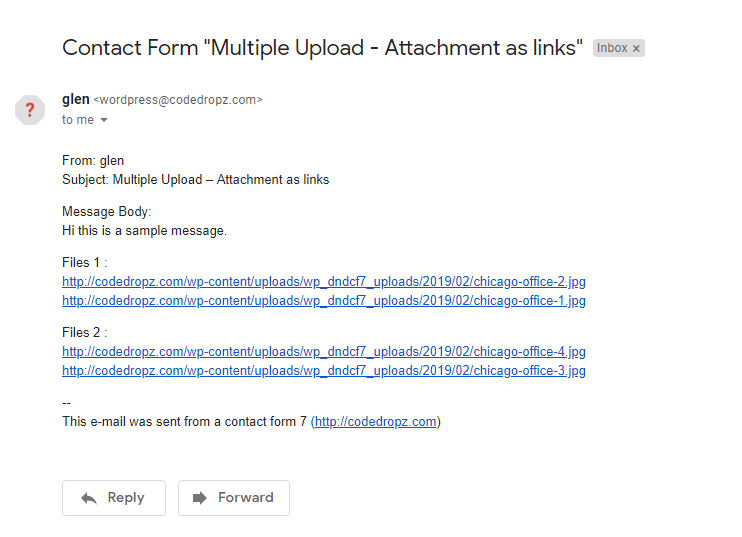
[loadnapp]In your email it will look like this – https://ps.w.org/drag-and-drop-multiple-file-upload-contact-form-7/assets/screenshot-5.jpg?rev=2032958
For the security you need to add password security on the Folder you want to store your files, there are plugin out there that you can use.
Glen
Sure, no problem.
Hello,
The File Attachments cannot be organized in email since we don’t have control about it.
I would suggest to use “Send as link” option under “Contact -> Drag & Drop Upload ->”Send Attachment as links?”, this will display links in your email instead of attachment files. You can also group your files according to their name.
Glen
Hello,
Try to change the limit:400mb to limit:419430400 it should be in bytes format without the word mb.
Also check your server configuration and make sure your max upload size limit will allow 400MB.
Glen
Forum: Plugins
In reply to: [Drag and Drop Multiple File Upload for Contact Form 7] how to beginSure, you will find a demo or instruction here – https://ww.wp.xz.cn/support/topic/file-attachments-or-send-links-to-email/
Cool, thanks for letting me know.
If you like my assistance feel free to leave your feedback/review here – https://ww.wp.xz.cn/support/plugin/drag-and-drop-multiple-file-upload-contact-form-7/reviews/#new-post
Thanks.
Change “Chier Joints” to [upload-file-363]
I should match from [mfile] code, there’s no [your-file] & [upload-file] field you need to change it.
I tried and it’s working, can you check your email and see if you received my submission?
Also check & make sure to add [upload-file] code in File attachment field under Mail tab.
Hello,
Try to remove the WPCF7_LOAD_CSS & WPCF7_LOAD_JS in wp-config.php.
Also, please provide screenshot of the error.
I tried today and it seems fin (see: https://snipboard.io/tLakZf.jpg)
Thanks,
GlenThanks @sterndata
Hello,
Are you using the Pro version?
If yes, please open support here – https://www.codedropz.com/support/
Please also include several screenshots (forms, mail settings) and link to your site.
Glen
Hello,
You need to add limit on [mfile] shortocde.
Example:
[mfile* upload-file-432 limit:104857600]
104857600 = is equivalent to 100MB
Please take note that your WordPress -> Media Library will also allow 100MB max upload limit.
Glen