jetsystemservices

Forum Replies Created
-
Forum: Themes and Templates
In reply to: [Twenty Twenty-Three] Move current template parts inside a coverYes. I have a Page picture as background, but I need to have a white background to the content over the page background. The problem is adding the white background to the Reply section over the page picture/background. That is why I want to hide the Reply section but still keep them enabled OR add the white background to it.
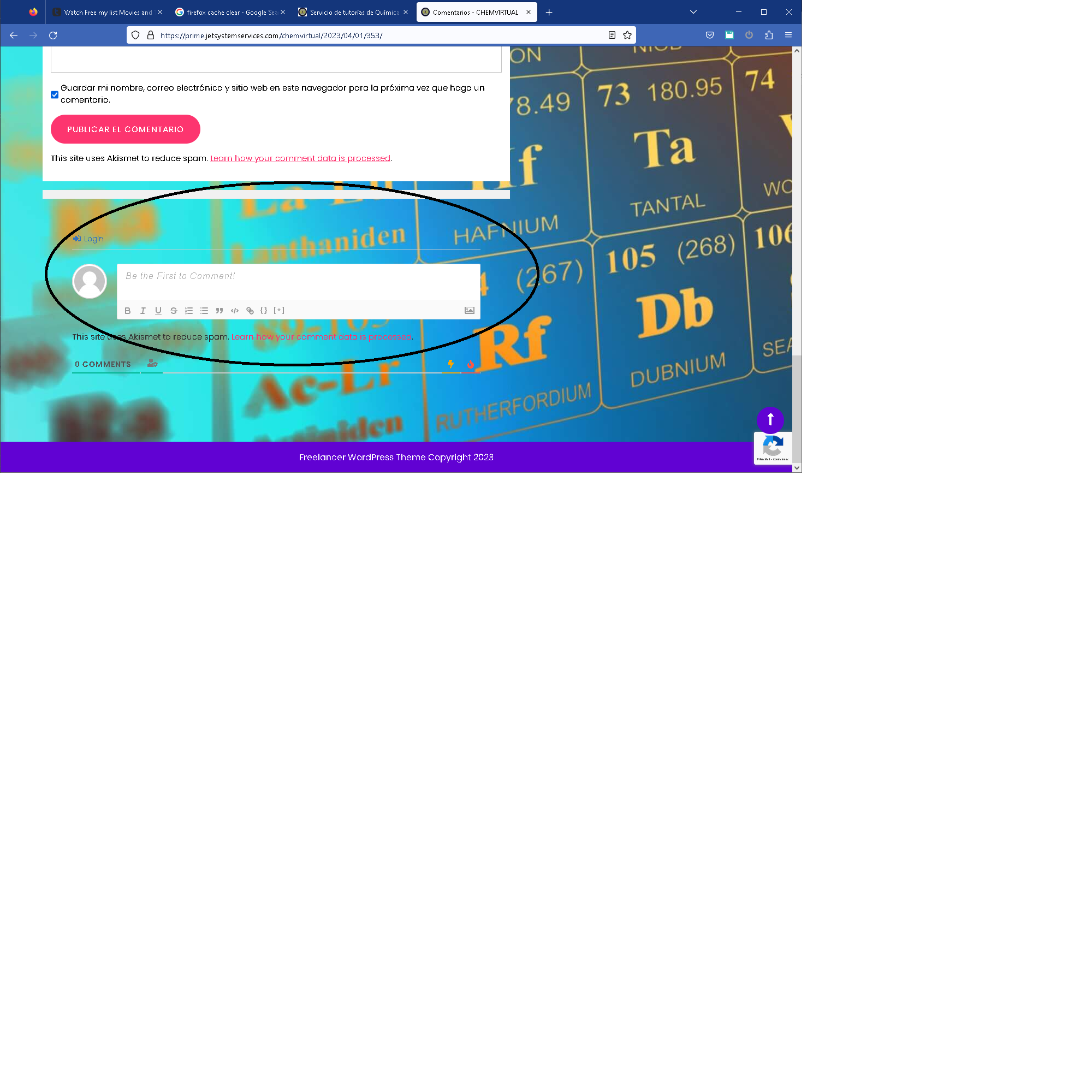
This is link to a screen shot. The circled area is the default reply area/section. I added a reply section to the content. I would like to hide the default reply section or add a white background to the default reply section and the I will remove the one in the content.
Forum: Themes and Templates
In reply to: [Twenty Twenty-Three] Move current template parts inside a coverCorrected link You will see two Reply sections. One inside the content and other below it. If I could place the below section over a white background, I would removed the one with the content. Or if I could hide the lower section that may work also.
Hello.
I think you misunderstood me. The error I am talking about is that these WordPress support post I repeat it on error. I created these post as a duplicate post.
But you may help me on the real question:
I will like to hide the default comments section but keep them enabled/allowed, so I can add them to the comment page.
https://prime.jetsystemservices.com/chemvirtual/?p=69
The Reply section as you would see it falls outside of my Content as expected but then I can’t add a background to the section as I did to the Content.
Please advice.
Forum: Plugins
In reply to: [Comments - wpDiscuz] wpdiscuz allow guests to view comments not workingOK. I guess will do that.
Forum: Themes and Templates
In reply to: [Twenty Twenty-Three] Move current template parts inside a coverHello Katherine:
I want to include all. I manage to add the Comment with a background by using a builder plugin, but the Reply section is out of my control. It is shown outside of my Content, bellowed.
Here is a new link to the comment page.
Sorry, duplicate post. When created the first one it give me a timeout error so I though it failed to create it.
I don’t know how to delete the post so I am just notifying it in here
Forum: Plugins
In reply to: [Comments - wpDiscuz] wpdiscuz allow guests to view comments not workingI change the Theme to the Twenty-Tewnty-two and it showed correctly, but this Theme does not work for my other requirements. What can I change in the Theme for it to show the comments correctly?
Forum: Plugins
In reply to: [Comments - wpDiscuz] wpdiscuz allow guests to view comments not workingI noticed that it is not shown after a refresh, it does not have to be approved to disappear.
I found a work around for my problem. Rename the child site from its domain to be a folder of the multisite domain.
Lost site: example3.com Rename in WP network sites: example3.com -> example2.com/example3
This will make the child site and data reachable; from there you can export the site and its data. (Might be posible to recreate the child site in example3.com)
In the real domain names: linuslearningsolution.com -> jetsystemservices.com/linus
I beginning to think what I need is an .htaccess file in the linus…com folder with some rule directing to the path that were will find it. But I do not know how to do that rule. I use WP so I don’t have to code.
- This reply was modified 5 years, 5 months ago by jetsystemservices. Reason: typo error fix
Any way the WP sites are not in that domain path they are in Usercode/domains/jetsystemservices.com/public_html/main and WP database is also pointing to the same.
Multisite Admin Dashboard
This is password protectedThe problem is accessing linuslearningsolution.com page and its Dashboard because the data is not in folder path the domain points to is in the structure folder path of the Multisite which is under main.jetsystemservices.com
Yes I know, that is one reason I made the changes. But that is not the problem. It was working fine everything when the primary domain was the jetsms.esy.es. The jetsystemservices.com and linuslearningsolution.com where working good even though the primary was not register since the WP was assigned and its DB to the parked domains.
Ok. Since here I can use the real domain name I will change the details to the actual names instead of the generic names.
I had primary domain (jersms.esy.es) in Usercode/public_html. I had WordPress multisite under parked domain (jetsystemservices.com) in Usercode/public_html. I had child sites under jetsystemservices.com/mobile, jetsystemservices.com.com/cp, and linuslearningsolution.com (parked domain of jetsms.esy.es)
The linus…com site was also in Usercode/public_html, but mixed with the other sites, so I cant separate the site data and structure files.
Then I did many changes that made the domains be on separare paths so now the linus…com is unreachable to its data that is on a different path.
linus…com is looking folder Usercode/domains/linus…com/public_html which is empty while its data is in Usercode/domains/jetsys…com/public_html/main.What I need is to make some file or change some file to make the linus…com to look in the correct path where its data is located.
I already tried that, the last log was for plugins only job. I guess will have to split in two plugins jobs, and uploads have two jobs also.