JohnStaples

Forum Replies Created
-
Thank you Daniel! That is great news!! So, WCAG Version 2.1 Level AA?
Also, I will be purchasing the pro version. Is it also WCAG Version 2.1 Level AA compliant?
Really awesome plugin!
marking as resolved
Nevermind! I found that this is an issue with Yoast Duplicate Post. It appears to have a conflict with another plugin on my site. So I have decided to replace it with Post Duplicator which is open source and works perfectly with Popup Maker.
THANK YOU @kimmyx !!!
That works perfectly!!!
Forum: Plugins
In reply to: [WPvivid — Backup, Migration & Staging] Restoring ManuallyThank you! That sounds like a great solution that will suffice most of the time.
BUT, for security and legal reasons some of my customers require our stored backups to be plugin-independent. In the unlikely event that WPvivid became unavailable or unusable for some reason, it would not be acceptable for saved backups to be unusable.
When I examine the files created by WPvivid, they appear to be the same as what I would get if I simply downloaded a full set of files using FTP along with an export of mysql using phpadmin. But it seems you are saying this is not the case and this set of files is NOT usable to restore a website without using WPvivid for the restore. Is that correct?
Regardless, I love WPvivid and plan to use it for most of my sites! But it sure would be nice if I could use it on all my sites! 🙂
Thank you for creating and supporting such an essential WordPress plugin!
Forum: Plugins
In reply to: [Pretty Google Calendar] Confused About Styling!Thanks for your response! When you said “Without being able to see the site it’s hard to tell what’s going on.” I thought you might help if I showed you the issue on a perfectly clean installation. But given the recent improvements to the Google calendar I guess this plugin won’t provide any significant improvements for our project anyway. Thanks again!
- This reply was modified 1 year, 2 months ago by JohnStaples.
Forum: Plugins
In reply to: [Pretty Google Calendar] Confused About Styling!Any chance of further support on this? If not, that’s cool. But I’d like to be sure I’m using the plugin correctly.
Forum: Plugins
In reply to: [Pretty Google Calendar] Confused About Styling!Hi! Thanks again!! To make this easier I put the Pretty Google Calendar on a simple site that has only 2 basic plugins, no custom styling and no content!
https://petrichoric.com/pretty-google-calendar-test/
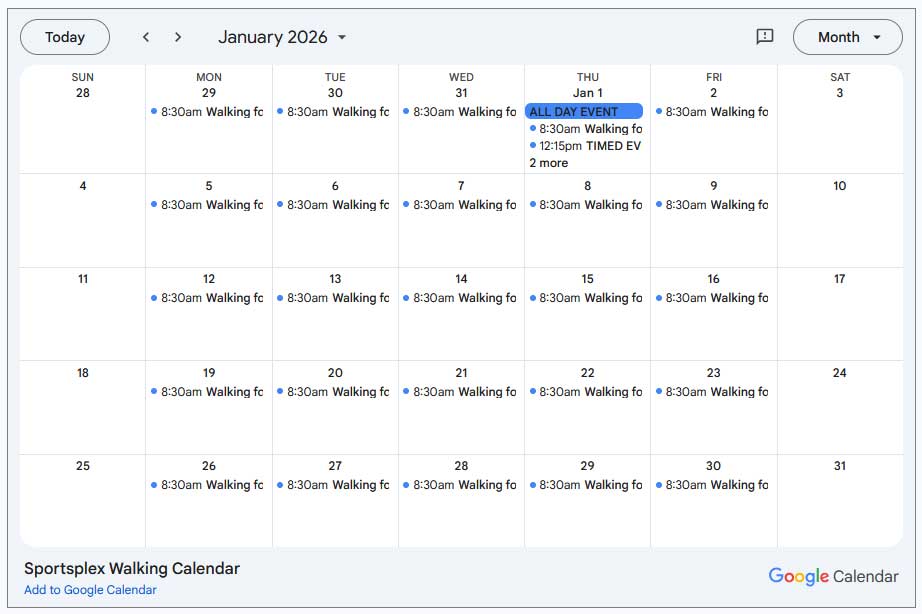
It seems to still be formatted as I showed you before. The dots are there but not the colors of the embedded Google calendar (as shown in the screenshot below). And the text does not look like Google or Full Calendar. Could this be as simply as the font site and/or title length?
Here is how this looks on an embedded Google calendar,
 Forum: Plugins
In reply to: [Pretty Google Calendar] Confused About Styling!Thank you for that help! Both of those tips worked.
However, I am still not getting the look of the Full Calendar month grid which has a colored dot to the left of each timed event and the time and title on the same line. Pretty Google Calendar seems to be doing 2 columns and other formatting. Is it possible to get it to display like Full Calendar? Thanks for your assistance!!
 Forum: Plugins
In reply to: [Pretty Google Calendar] Confused About Styling!Hmmm, after posting this I revisited the demos over at FullCalendar and I see both of the issues I mentioned above seem to be working as expected (as compared to Google calendar) so I am hoping this is just me not knowing how to set up these properties yet!
Hi @williampatton !
I am about ready to try and tackle this problem again because I *really* want this tool to work for me! I just finished doing remediation on one of my sites and this tool was incredibly helpful. So helpful, in fact, that I will be upgrading to the pro version to get the full site scan feature. (I just need to get it working on the current site so I can justify the Small Business version while the Black Friday sale is in effect!)
So, to just summarize…
- I have a live site installed on a shared hosting account where I wish to use your tool
- I have an exact duplicate of that site on my staging server which is on the same exact hosting server. (FYI, I reinstalled the dupe on my staging server just this week to try and get a fresh start.)
- on the live site, with the latest EDAC installed, the backend appears to be working when I examine any page in the editor BUT the frontend does not appear at all. No EDAC icon to click. No markup. Nothing to indicate EDAC is running.
- on the staged site, with the latest EDAC installed, both backend and frontend behave normally.
- the live site backend scoring and details appears to match the backend scoring and details on the staged site. (as I noted previously in this thread I was previously seeing a different result on the backend between live and staged sites but that appears to not be the case with the current version of EDAC)
- my hosting support went in and looked at everything and they could not find anything set up differently between the two accounts. (after several rounds of back and forth they finally suggested the only thing they knew to do was ask again for help from plugin dev)
I am hoping you can help me resolve this so I can get back to work on accessibility (using EDAC!)
BTW, I have been in conversation with both Amber and Chris and I must say everyone I have interfaced with at Equalize Digital has been super nice and helpful and smart! I am really impressed with the company as well as the tool!
- This reply was modified 1 year, 6 months ago by JohnStaples.
I had this exact same issue today! The staged copy of my site would load the frontend piece but get stuck saying “Loading”. Then, after a few times of trying it finally resolved itself and seems to be working consistently now.
Hey Amber Hinds @alh0319 !
Thank you so much for your informative and helpful response! I will check out the resources you provided and then purchase the Pro version to fully try it out on one of my sites.
In addition to your Accessibility Checker being a very impressive tool I can also say that your support, even for the free version, is quite impressive!
I will submit any followup questions to your sales department as you suggested.
Rgds,
JohnThank you for your detailed response, Amber!
Well, after using this for a day I have come to realize that using the Clear Issues button has undesired consequences! I had gone through the errors and warnings on my page and marked several as Ignored since they did not apply to my situation. But after clicking Clear Issues I found those Ignores had been reset too so I lost that work! So, for me, updating the page is the only viable option to refresh the score.
Generally I am finding this very cumbersome. Each time I make a change I have to resave all pages in order to see the effect on the score. Where this really slows me down is when I apply a global change to functions.php or styles.css and then simply opening pages will not show the effect of those changes. Instead I must go to each page, open it for editing and save it again (even though nothing on the page was changed) just to see the new score. Maybe there is a better way I have just not discovered yet? I hope so!
I remain impressed with this tool and I was ready to buy the pro version but if it works this way too I may need to rethink that decision.