Kazerad

Forum Replies Created
-
Forum: Fixing WordPress
In reply to: Spambots using exploit?Yup, spam waves are now mitigated. Trackbacks remain disabled, but I wasn’t really using them much anyway. Thanks a bunch, Roy and Mark, for helping identify and fix the problem!
Forum: Fixing WordPress
In reply to: Spambots using exploit?That’s onle for NEW posts. The rest you have to change manually, or perhaps there’s a plugin.
Aha! That would certainly explain it; I had assumed the default discussion settings for each post told it to use the default settings, rather than simply being set to whatever the default was at the time of posting. Lemme switch these old posts, then I’ll report whether it solves the problem.
Forum: Fixing WordPress
In reply to: Spambots using exploit?I’ve unchecked pingbacks in the discussion options and it hasn’t had any effect. Is there something else I have to do to keep pingbacks from appearing?
Up until a few days ago, I was kept entirely spam-free by a simple quiz question until the spambots found a way around it. Given the fact that they can still post when I set it to require an actual password to post comments, I think it’s safe to assume they aren’t actually answering the quiz, just bypassing it. The same bots post when I use Comment Quiz, ReCaptcha, or even Cookies for Comments, so it seems as though they are somehow bypassing all comment requirements.
Forum: Fixing WordPress
In reply to: Spambots using exploit?I have no doubt that with enough spam-identification plugins, I could have most my spam automatically identified and sent to my spambox. My concern, though, is that this latest wave of spambots seems to by bypassing my posting requirements. Preventative measures such as ReCaptcha and Comment Quiz have been having no effect, and the spam continued to come through even when I temporarily required a 56 character password to post comments. Even if they were using human labor to read ReCaptcha entries, it be impossible for them to guess a 56 character password.
All the plugins I have installed right now are pretty tame things directly from the WordPress site (Google Analytics, NexGen Gallery, Cookies for Comments, WP Super Cache, etc) and nothing new was installed prior to the latest bot wave. I am using Suffusion version 3.8.1, which is one version behind, but as far as I know this shouldn’t affect the internal mechanics of the comment box.
Forum: Fixing WordPress
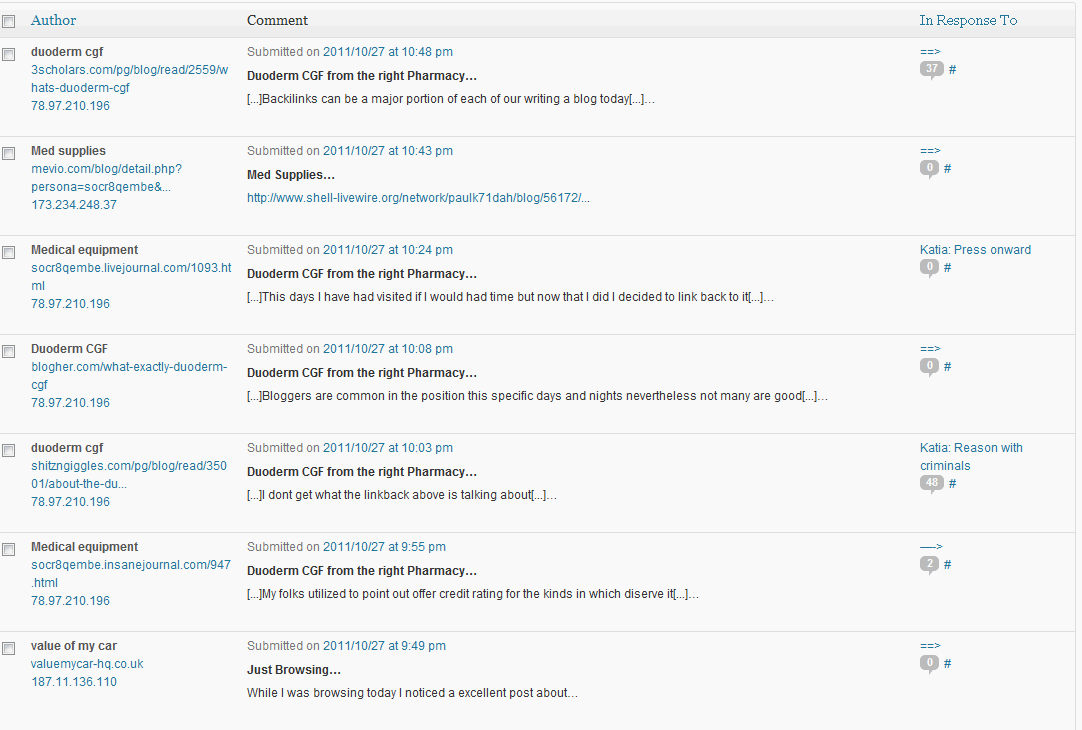
In reply to: Spambots using exploit?They might be trackbacks, I’m not sure I understand trackbacks enough to tell. Some of them follow the “teaser excerpt” format, some don’t. Picture below:
http://foxmage.com/trackbackmaybe.gif
I unchecked “pingbacks and trackbacks” in the Discussion settings, and the spam is still coming in, and with the same format. I also installed the plugin suggested by Rev. Voodoo, and am still getting spam (all it has caught so far was one legitimate comment).
Forum: Fixing WordPress
In reply to: Spambots using exploit?That’s the thing though, I’ve ascertained that it’s not due to the questions themselves. I literally had a blank question, a string of 56 random characters as the answer, tested it to make sure comments would only be posted if the 56 character answer was given, and the spam still came through. No human labor could do that (since I gave no hints as to what the answer was), and it would take ages for a machine to brute force it. Not just that, but it was the same spam that was coming through when I was using ReCaptcha.
I’m not an expert at using WordPress, but the evidence I’ve found seems to suggest that whatever is posting the comment spam is somehow bypassing all of the captcha/quiz mechanisms entirely.
Forum: Fixing WordPress
In reply to: Putting "next post" link in post contentNevermind, solved that too! I needed span tags with “xx-large” instead of a numerical font size.
I’ll set this to resolved.
Forum: Fixing WordPress
In reply to: Putting "next post" link in post contentOkay, just an update: I mostly solved this myself by adding this code to the theme’s single.php file:
<?php next_post_link('%link', '<font color="blue">%title</font>') ?>Now I’m just trying to find a way to make the link larger. Normal HTML font size tags don’t seem to be working.