microscan5ep

Forum Replies Created
-
Any thoughts on this?
Apologies for the late reply – I did not receive a notification that anyone had replied and I hadn’t been checking over the holiday period.
So I deleted the plugin again, then re-installed it from scratch again, it failed the setup test with the same error (authentication failed). I then turned debugging on and sent a test email, which failed again with the same error, below is the debug output (with hostnames redacted) followed by a screenshot of the SMTP settings where you can see that authentication is definitely switched off.
So why is the plugin still trying to authenticate? FYI the SMTP server doesn’t need authentication as it has the senders IP address whitelisted.
Versions:
WordPress: 6.9
WordPress MS: No
PHP: 8.4.16
WP Mail SMTP: 4.7.1

Params:
Mailer: smtp
Constants: No
ErrorInfo: SMTP Error: Could not authenticate.
Host: smtp.xxxxx.net
Port: 587
SMTPSecure: tls
SMTPAutoTLS: bool(true)
SMTPAuth: bool(true)

Server:
OpenSSL: OpenSSL 3.5.4 30 Sep 2025

Debug:
Email Source: WP Mail SMTP Mailer: Other SMTP SMTP Error: Could not authenticate.

SMTP Debug:
2026-01-02 20:14:06 Connection: opening to smtp.xxxxx.net:587, timeout=30, options=array()
2026-01-02 20:14:06 Connection: opened
2026-01-02 20:14:07 SERVER -> CLIENT: 220 smtp.xxxxx.net ESMTP
2026-01-02 20:14:07 CLIENT -> SERVER: EHLO www.yyyyy.co.uk
2026-01-02 20:14:07 SERVER -> CLIENT: 250-smtp.xxxxx.net250-PIPELINING250-SIZE 52428800250-ETRN250-STARTTLS250-AUTH PLAIN LOGIN250-AUTH=PLAIN LOGIN250-ENHANCEDSTATUSCODES250-8BITMIME250-DSN250-SMTPUTF8250 CHUNKING
2026-01-02 20:14:07 CLIENT -> SERVER: STARTTLS
2026-01-02 20:14:07 SERVER -> CLIENT: 220 2.0.0 Ready to start TLS
2026-01-02 20:14:07 CLIENT -> SERVER: EHLO www.yyyyy.co.uk
2026-01-02 20:14:07 SERVER -> CLIENT: 250-smtp.xxxxx.net250-PIPELINING250-SIZE 52428800250-ETRN250-AUTH PLAIN LOGIN250-AUTH=PLAIN LOGIN250-ENHANCEDSTATUSCODES250-8BITMIME250-DSN250-SMTPUTF8250 CHUNKING
2026-01-02 20:14:07 CLIENT -> SERVER: AUTH LOGIN
2026-01-02 20:14:07 SERVER -> CLIENT: 334 VXNlcm5hbWU6
2026-01-02 20:14:07 CLIENT -> SERVER: [credentials hidden]
2026-01-02 20:14:09 SERVER -> CLIENT: 535 5.7.8 Error: authentication failed: (reason unavailable)
2026-01-02 20:14:09 SMTP ERROR: Username command failed: 535 5.7.8 Error: authentication failed: (reason unavailable)
SMTP Error: Could not authenticate.
2026-01-02 20:14:09 CLIENT -> SERVER: QUIT
2026-01-02 20:14:09 SERVER -> CLIENT: 221 2.0.0 Bye
2026-01-02 20:14:09 Connection: closed
SMTP Error: Could not authenticate.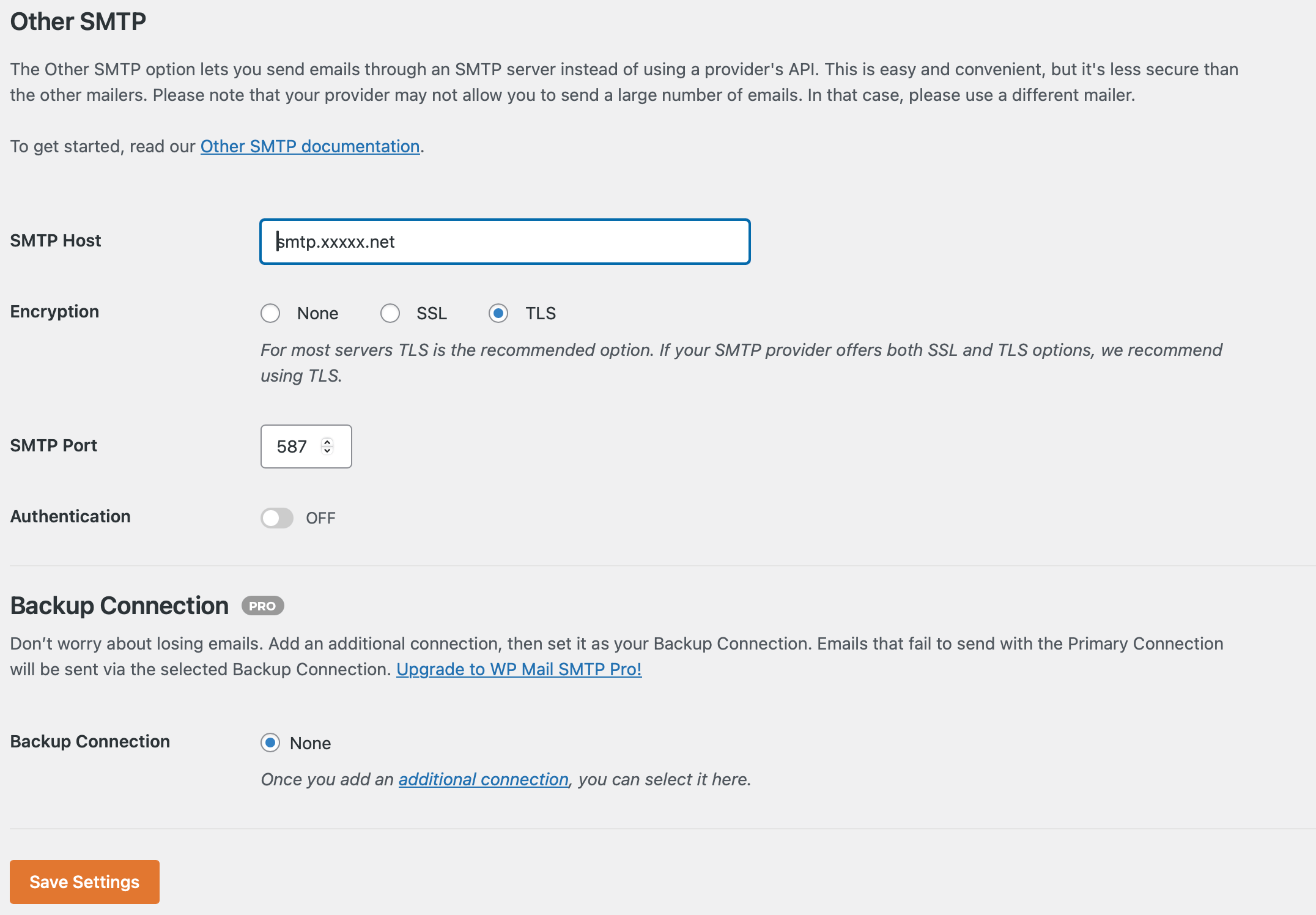
Thanks for your reply, but as I stated in my first post authentication *is* turned off. That is why I am asking for help, because even though authentication is turned off, the plugin is attempting to authenticate!! I guess it must be a bug.
FYI, I have tried uninstalling the plugin after first turning on the option to delete all setting on deactivation, then re-installing – same result.
Hello,
Thanks for the reply.
The SMTP server is ours and although it can accept authentication, it does not require it from IPs that are on it’s whitelist, which the web server hosting this site is on. The plugin appears to be attempting to authenticate even though I turned off authentication.
Thanks for the reply Peter. Maybe you could have the current password checks on by default, but provide an advanced setting where they can be turned off individually?
Absolutely agree with your comment re. 2FA, although I’m not a big fan of reCAPTCHA personally.
Regards
Yep, that was the culprit!
Thanks,
Chris