peteratomic

Forum Replies Created
-
Forum: Themes and Templates
In reply to: [Rebalance] GDPR problem with google fontsBeen a week! Anyone from Automattic observing forums for the themes you’ve released into the wordpress wilds?
Forum: Plugins
In reply to: [Compliance by Hu-manity.co] PHP Warning cookie notice line 293Same error for me. Happened when switching to PHP 8.
Ok seeing that wpcode_edit_snippets is checked.
Am able to access the settings now. Thanks!!
Can you please check that the user role of the user with which you are trying to access the WPCode settings has the “wpcode_edit_snippets” capability?
Where? In the User Roles plugin? I don’t see that listed anywhere.
Tried the User Role Editor plugin to see if anything was unchecked but everything for the admin role was enabled.
We have ultimate member installed but I deactivated that and still couldn’t access the settings.
Not seeing your plugin listed under the settings menu.
This is the link I’m trying to access, found on the plugins page: admin.php?page=wpcode
Solved it by uploading to Google Sheets then redownloading as a new CSV.
Have tried about four or five times now, including with other plugins off and its always the same.
WP 5.9.3
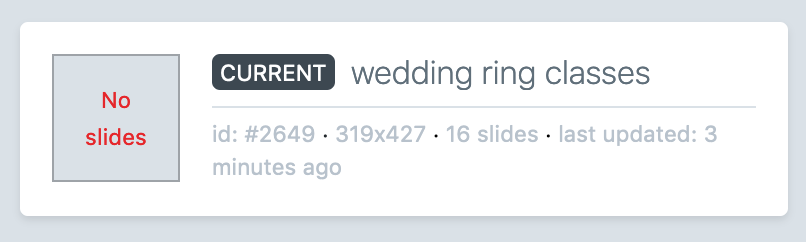
PHP 7.4.29By “blank” I mean that the settings get duplicated (such as width and height and slider type) but that no slides are duplicated. Screen looks identical to creating a new slider.
I turned on debug mode and refreshed the duplicated slider and no errors are visible.
Can see a screenshot here. Shows both that there ARE 16 slides and also no slides. Some of the settings were copied but there are no actual slides in the duplicated slideshow.
https://goldprodukt.de/wp-content/uploads/2022/05/Screen-Shot-2022-05-19-at-1.56.33-PM.png
Worked! Thanks!
Forum: Plugins
In reply to: [Object Sync for Salesforce] syncing issuesHere’s the snippet in case that’s relevant:
// syncing data from salesforce -- changes default to publish
add_filter( 'object_sync_for_salesforce_pull_params_modify', 'change_pull_params', 10, 6 );
function change_pull_params( $params, $mapping, $object, $sf_sync_trigger, $use_soap, $is_new ) {
	$params['post_status'] = array(
		'value' => 'publish',
		'method_modify' => 'wp_update_post',
		'method_read' => 'get_post',
	);
	return $params;
}
Forum: Plugins
In reply to: [Object Sync for Salesforce] syncing issuesTried unchecking the “pull to drafts” setting, as I remembered that I used one of the snippets in our functions file for automatically saving as published and may not have had that setting checked as a result. However, it didn’t matter as its still creating an additional post with every edit.
Forum: Plugins
In reply to: [Object Sync for Salesforce] syncing issuesOk, downloading the data tables to test as you describe.
But what about this new issue of a second post being created, rather than the plugin editing the existing one? Thought you had it designed that it was locked in place that one asset in SF was assigned to a single post, which is why I couldn’t update after deleting all the posts.
Tested again and another minor edit is creating an additional post, leaving us with three versions of the same item. I have “pull to drafts” selected: “If selected, WordPress will check for matches against existing drafts of this object type, and will also update existing drafts.” That’s clearly not happening. Would seem that this issue needs to be resolved, as there’s no way to check what’s happening with edits on an existing post when new ones are being created every time.
Forum: Plugins
In reply to: [Object Sync for Salesforce] syncing issuesAssumed it was the multisite thing, so I went ahead and deleted the object_sync_sf_object_map table and am now seeing the last two edits syncing.
I can see both of those newly synced posts in the database in wp_posts. Both marked there and in WP backend as published. I can also see all of the data from SF in the postmeta table in my ACF fields, as well as in the backend when editing the post.
And yet, even with all of this, nothing is “live” until I manually click UPDATE.
Next I try to make a text change in SF and rather than updating the existing post, a new one is created rather than updating the existing post.
So… any ideas from the above info?