prismtechstudios

Forum Replies Created
-
Forum: Plugins
In reply to: [Modern Footnotes] CSS placing footnote at sideThe Modern Footnotes plugin does not use the
sidenoteclass, so you could use this code alongside the plugin without it causing any issues.Are you trying to change the styling of Modern Footnotes? If so, you’d need to target the CSS classes used by Modern Footnotes. See the question “Can I customize the styles of footnotes?” on the plugin’s homepage for more details of what those are.
Forum: Plugins
In reply to: [Modern Footnotes] HTML formatted footnoteYes, the plugin allows HTML to be used in footnotes. For bold/italic you could use the formatting tools in the Gutenberg editor while editing a post or page. If you want other custom HTML, you can edit the post/page as HTML and wrap the footnote content in the [mfn] shortcode.
As an example:
A footnote would be after this text[mfn]This is the footnote content, and this <b>would be bold</b> and this <span style="font-family:serif">would be a different font</span>[/mfn]Forum: Plugins
In reply to: [Modern Footnotes] Undefined index: modern_footnotes_active_queryThank you for catching that, @davewp196 ! I just updated the plugin with this fix.
Forum: Plugins
In reply to: [Modern Footnotes] Footnote disappearsHi @skeeterz71,
Could you provide a screenshot of the issue? I tried to reproduce the issue but have not been able to.
Forum: Plugins
In reply to: [Modern Footnotes] Display list of all footnotes on page@danvaulter This feature is now built. There’s an option in the Modern Footnotes settings page to display all footnotes at the bottom of a page/post, or you can also use the [mfn_list] shortcode to list out all footnotes.
Forum: Plugins
In reply to: [Modern Footnotes] Scrollback to footnoteThanks for pointing out this issue. I just released a new version of the plugin that should resolve this issue. Previously, the “x” buttons on mobile would close all footnotes. Now, it only closes the footnote that the “x” button belongs to. This should prevent any weird jumps in the scroll position. Please let me know if you’re still seeing issues after updating the plugin.
Forum: Plugins
In reply to: [Modern Footnotes] Footnote numbers restartingHi @bk2085,
I just released a new version of the plugin that cleans up some issues where numbering was getting reset when it shouldn’t. Could you update the plugin and see if the issue is resolved?
Forum: Plugins
In reply to: [Modern Footnotes] Reference numbers reset after other shortcodes@pzod5 This issue should be fixed with the latest release of Modern Footnotes. Could you update the plugin and let me know if it’s fixed on your site now?
Forum: Plugins
In reply to: [Modern Footnotes] Footnote numbering resetsHi @sswanseen – I’ve released a new version of the plugin that has a fix for an issue similar to this. Could you update the plugin and see if you are still getting the issue?
Forum: Plugins
In reply to: [Modern Footnotes] Prevent loading on home page@arutha176 Sounds good! I’ll get this in as a future improvement then. Thanks for the good feedback!
Forum: Plugins
In reply to: [Modern Footnotes] Prevent loading on home pageHi @arutha176! Thanks, I hope all is well with you too.
That’s not possible with plugin options right now, but it’s something that’s been requested in the past so I’ll add that to the list of future improvements. Normally I’d say the CSS and JS files are so small that it wouldn’t be an issue, but your homepage is really optimized for a WordPress site so I see why you’d want to prevent Modern Footnotes from loading there! If there was a way to prevent it from loading that required some custom code (eg, modifying your theme functions.php file), would that work for you? If it does, I’ll get a solution together for that since adding a plugin option for it is probably a ways off.
Forum: Plugins
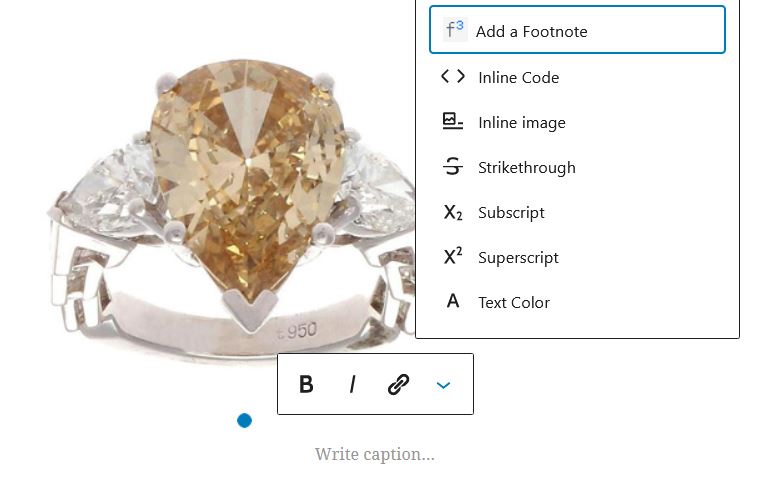
In reply to: [Modern Footnotes] Footnotes for images, quotes etcHi! You should be able to add footnotes to other blocks as well. Here is a screenshot of the “Add a footnote” option in the menu for an image caption: http://prismtechstudios.com/modern-footnotes/support-screenshots/add-footnote-in-image-caption.jpg
If for some reason you aren’t seeing the option, you can always use the [mfn] shortcode to add a footnote as well. To use it, you would[mfn]wrap the footnote text with an “mfn” shortcode, like this[/mfn].
- This reply was modified 5 years, 4 months ago by prismtechstudios.
Forum: Plugins
In reply to: [Modern Footnotes] About list of notes on the end of page, an ideaThanks for these details @arutha176, they are quite helpful as always! You’re right that a shortcode is a good way to go in order to handle where to place the list.
Forum: Plugins
In reply to: [Modern Footnotes] Footnotes not in line with page content@jposti glad that it’s working for you! To make the footnotes wider, you can add this custom CSS under the Modern Footnotes settings:
.modern-footnotes-footnote__note--tooltip {
    max-width: 600px;
}
Footnotes are 300 pixels wide, max, by default. This would make the footnotes up to 600 pixels wide. You can set the max-width value according to what you’d like for your page.
Forum: Plugins
In reply to: [Modern Footnotes] Footnotes not in line with page content@jposti Could you send me a link to a page where this is happening? This is likely an issue where the CSS with the DIVI theme is interfering with the Modern Footnotes CSS.