prismtechstudios

Forum Replies Created
-
Forum: Plugins
In reply to: [Modern Footnotes] Possible to add image into mfn (block editor)?Hi @dummyt ,
I was able to add an image into a footnote with these steps:
1. In Block Editor, click the down arrow on the toolbar to show more options. Choose “Add a Footnote”
2. Start typing to insert footnote content. The footnote content will appear highlighted in gray.
3. Click the down arrow on the toolbar and choose the “Inline Image” option to add an image.Can you give that a try and see if that works for you?
Best,
SeanForum: Plugins
In reply to: [Modern Footnotes] Java script void — footnotes not workingHi @smilkova ,
Does the footnote appear when you click on the footnote link? The plugin is only set up to show footnotes when you click on the link and doesn’t show them on hover. If the footnote is not showing on click, could you look in the “Step 3: Diagnosis” section from https://ww.wp.xz.cn/support/article/using-your-browser-to-diagnose-javascript-errors/#step-3-diagnosis and see if you are getting any JavaScript errors?
Best,
SeanForum: Plugins
In reply to: [Modern Footnotes] Javascript:void(0)Hi @smilkova ,
You’d have to post the URL for me to take a look. The most likely issue is that there is a JavaScript error being caused by another plugin or the theme that you are using.
Best,
SeanForum: Plugins
In reply to: [Modern Footnotes] Javascript:void(0)Hi @maxoen ,
So, to confirm, have you used the Health Check & Troubleshooting plugin’s “Troubleshoot” link to make only Modern Footnotes active, without any other plugins running? If that’s the case, can you preview your site in the default twenty twenty WordPress theme to see if the footnotes work then? That will isolate whether there’s an issue with the theme.
Best,
SeanForum: Plugins
In reply to: [Modern Footnotes] Javascript:void(0)@maxoen Thanks! It seems that the JavaScript file for Modern Footnotes isn’t being written out to the page at all. Do you have any plugins that would be suppressing the JavaScript that gets written out to the page, such as plugins that consolidate JavaScript for page speed purposes?
Forum: Plugins
In reply to: [Modern Footnotes] Javascript:void(0)Hi @maxoen ,
I checked the page that you referenced and the footnotes are working for me. I imagine that’s because of the manual triggering code that you added, though. Would it be possible to provide a link without that code?
Typically, the error you’re describing would happen because a JavaScript error in another plugin prevents the Modern Footnotes JavaScript from executing.
Best,
SeanForum: Plugins
In reply to: [Modern Footnotes] footnotes on Thrive ArchitectHi @wordpress2020starter ! I’m not very familiar with Thrive Architect editor, but it does seem to support WordPress shortcodes. You should be able to follow the instructions at https://thrivethemes.com/tkb_item/using-shortcodes-architect/ and use the [mfn] shortcode to add a footnote.
Best,
SeanForum: Plugins
In reply to: [Modern Footnotes] Note covered by sidebarHi @mokona84 ,
The theme that you are using has the sidebar set up to appear above other content. You can tell an open footnote to appear above that sidebar by adding this custom CSS:
.modern-footnotes-footnote__note--tooltip {
    z-index: 10000;
}
There is a custom CSS field you can use for this on the Settings > Modern Footnotes page.
Best,
SeanForum: Plugins
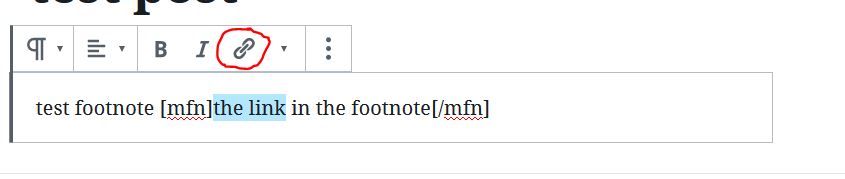
In reply to: [Modern Footnotes] URL in shortcodeYes! You should be able to add this with WordPress’s editing tools by highlighting the text you’d like to make a link and then clicking the Link button. Here’s a screenshot of how that looks in the editor (the Link button is circled in red): https://prismtechstudios.com/modern-footnotes/add-a-link-in-footnotes.jpg
Forum: Plugins
In reply to: [Modern Footnotes] Please makeThank you for the other example, that will be helpful!
Forum: Plugins
In reply to: [Modern Footnotes] MFN not workingHi @kjsbach , I took a quick glance and there’s an error on that page from JavaSript related to Tableau. Can you try the page without Tableau and see if Modern Footnotes works?
- This reply was modified 6 years ago by prismtechstudios.
Forum: Plugins
In reply to: [Modern Footnotes] Please makeThanks for the suggestions @samtulana ! The functionality to have footnotes at the bottom of the article will be coming at some point. I have an issue logged to make this improvement at https://github.com/seankwilliams/modern-footnotes/issues/11.
Forum: Plugins
In reply to: [Modern Footnotes] Footnotes showing as plain text on excerptsThanks! I do see the issue in Twenty Nineteen and will work on a fix. In the meantime, a workaround would be to use the shortcode in your post like
[mfn]esto es foot nuevo parrafo[/mfn]rather than the “Add a footnote” button in the Block Editor toolbar.Forum: Plugins
In reply to: [Modern Footnotes] Footnotes showing as plain text on excerptsHi @celaguero! Can you confirm the name of the default WordPress theme you’re using? I just tested the Twenty Twenty theme and the footnotes are working there on the homepage and category pages.
Forum: Plugins
In reply to: [Modern Footnotes] Print Footnotes at End of Page@vitruvian1man To hide the footnotes when printing, enter this CSS in Settings > Modern Footnotes > Modern Footnotes Custom CSS:
@media print {
  .modern-footnotes-footnote { display: none; }
}
Let me know if that works!