Raam Dev

Forum Replies Created
-
Forum: Plugins
In reply to: [Comet Cache] Scheduled Posts/Articles@phantwiz Yes, Comet Cache automatically handles scheduled posts. It will clear the Home Page cache and any category, tag, and author archive cache for categories/tags/author associated with the post as soon as it goes live.
If you Publish, Edit, or Delete a post, the Home Page cache will be automatically cleared, along with any associated category/tag/author archive view cache associated with that post.
Also, please note: This forum is meant for the free version of Comet Cache and the ww.wp.xz.cn Support Forum guidelines prohibit us from providing support for the Pro version here. Please open a support ticket or post your question in our community forum. Thank you. 🙂
Forum: Plugins
In reply to: [Comet Cache] Home Page cleared daily@doume Good to know. Thanks for the update! 🙂
Forum: Reviews
In reply to: [Comet Cache] Best WordPress Cache we have used, so easy !@treecutter Thanks so much for the great 5-star review! I’m so happy that you’re enjoying Comet Cache.
Forum: Reviews
In reply to: [Comet Cache] Excellent – developer friendly too@jgoldbloom Thanks so much for the great 5-star review! We’ve worked hard over the years to make Comet Cache as easy-to-use and as widely-compatible as possible, so I’m thrilled to hear that you’ve found it lives up to both of those goals. 🙂 Cheers!
Forum: Plugins
In reply to: [Comet Cache] Errors and blank screen@fesarlis Apologies for the delayed reply. I never received a notification for this support thread for some reason and I only saw it now.
We’ve received at least one other report of this same error, so I’ve opened a bug report for this to start tracking this bug. I have yet to reproduce this issue at all, but if you have any additional information that might be helpful, please post a comment here: https://github.com/websharks/comet-cache/issues/880
Forum: Plugins
In reply to: [Comet Cache] Crash from debug.logWe’ve received at least one other report of this same error, so I’ve opened a bug report for this to start tracking this bug. I have yet to reproduce this issue at all, but if you have any additional information that might be helpful, please post a comment here: https://github.com/websharks/comet-cache/issues/880
@yiggory Comet Cache is a page-caching plugin that caches the output of WordPress. To cache static files like videos, you’ll need to use a CDN. Comet Cache Pro includes a Static CDN Filters feature that allows you to integrate with most CDN providers to ensure that all static files are served via the CDN. For more information about how Static CDN Filters work, please see this article.
Forum: Plugins
In reply to: [Comet Cache] Google map not loading flags@dano55 I see that Jason replied to your ticket in our support system, but I’ll reply here reiterating his thoughts for the benefit of others:
A 403 error is generated by the web server to indicate that permission is being denied to something. If you’re running a WordPress security plugin, I recommend temporarily disabling that to see if that’s causing the problem. Otherwise, I recommend reviewing the web server logs for more clues as to what is causing that problem. The most common reason for such issues are permissions issues and server-side security software (like Mod_Security). If you’re not familiar with inspecting web server log files, your web hosting company should be able to help you with that.
Forum: Plugins
In reply to: [Comet Cache] Correct Settings for an e-Com Store (Woocommerce)?@craigrkirkby It’s still possible that this is a caching issue. We’ve worked to integrate Comet Cache with WooCommerce so that it listens for when the item stock changes, but there are all kinds of reasons that integration might not be working for you, including specific WooCommerce plugins you’re running that Comet Cache isn’t aware of, or a change in the WooCommerce Core plugin that we’re unaware of.
The first step to troubleshooting is to reproduce the problem. If you can reproduce the problem, then you can try disabling Comet Cache to see if that solves the problem. If it does, then you can try enabling Comet Cache, excluding the various WooCommerce pages from being cached, and then trying to reproduce the problem again.
Forum: Plugins
In reply to: [Comet Cache] Cached Ransomware?@dleer58 Thanks for the update. 🙂 I’m glad to hear that you figured it out. That was going to be my next suggestion, that you might have a post with “cryptolocker” in it.
Forum: Plugins
In reply to: [Comet Cache] Cached Ransomware?@dleer58 Comet Cache uses the
-tmpextension when using cache locking to write files to the cache. If possible, I recommend excluding the cache directory from your system scanning to prevent false-positives like this one.Forum: Plugins
In reply to: [Comet Cache] Correct Settings for an e-Com Store (Woocommerce)?@craigrkirkby Comet Cache has integration with WooCommerce so there really isn’t anything you need to do. AJAX requests are actually the only type of dynamic request that is cache-compatible, so you shouldn’t need to worry about those. Comet Cache also includes integration to automatically clear the appropriate cache file(s) if, for example, the order quantity changes and the front-end needs to be updated.
Any pages that shouldn’t be cached, WooCommerce will set the
DONOTCACHEPAGEconstant which tells all WordPress caching plugins not to cache that specific page—Comet Cache obeys that standard, so any pages that WooCommerce has deemed not cache-compatible will not be cached.In any case, if you’d prefer, you can certainly exclude whatever pages you’d like using the URI Exclusion Patterns you mentioned (those look good to me).
Forum: Plugins
In reply to: [Comet Cache] Home Page cleared daily@massimod Yes, nearly all WordPress plugins use the WordPress Plugin API. Hooks are one of the best things about WordPress, as it allows one plugin to hook into WordPress without needing to know what other plugins might be running on the site. This allows Comet Cache to attach to a hook, e.g., the
save_posthook, and automatically clear the cache whenever that hook is fired. If there’s another plugin installed on the site that does something with changing the content of a post, it should (if it has been coded properly) end up firing the samesave_posthook, which will then cause Comet Cache to clear the appropriate cache file—this is all possible without Comet Cache having any knowledge of the other plugin, all thanks to the WordPress Plugin API.There are lots of WordPress hooks that Comet Cache listens to (it has to, as it’s a caching plugin, which means that it affects the entire front-end of a site and therefore it needs to listen for any possible changes that might require refreshing the cache for the front-end). Here’s a list of hooks that Comet Cache attaches to. You can review that list and inspect the Comet Cache source code to figure out which hooks might be causing the Home Page cache to be cleared, and then search through the source code for the plugins you’re using to see which plugins might be firing those same hooks.
The other approach would be to disable plugins one-by-one until you find the one that’s causing the Home Page cache to be cleared unnecessarily.
Note that a lot of plugin developers don’t take into consideration the fact that a caching plugin might be installed, so they might unnecessarily call certain hooks, which results in the cache being cleared even when nothing on the front-end changed.
We work hard to improve compatibility in instances where a specific integration is necessary and we’re always happy to review any plugins that seem like they don’t work well with Comet Cache.
Forum: Plugins
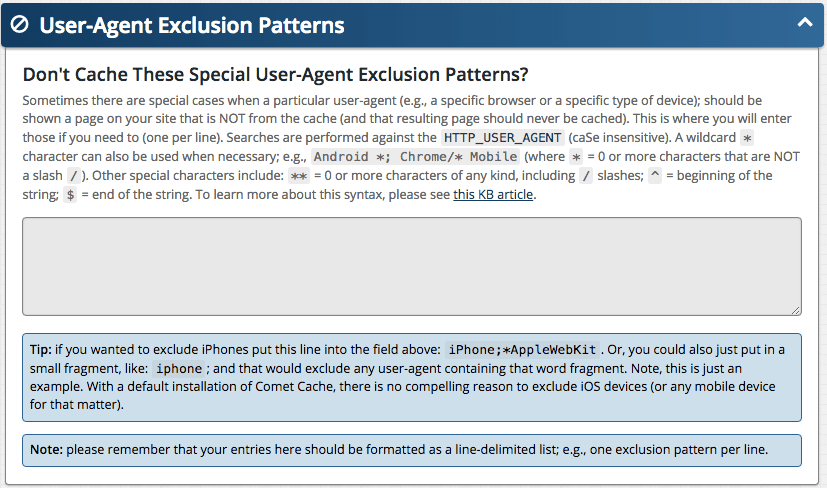
In reply to: [Comet Cache] Prevent caching when site visited by bot@hectornado In Comet Cache, those must be entered one-per-line. So in Comet Cache → Plugin Options → User-Agent Exclusion Patterns you would enter that list as follows:
bot
favicon
crawl
facebook
Face
slurp
spider
Note also that the field supports a special syntax that allows you to add wildcards. For example, if you wanted to match anything that started with
Face, you would enterFace**, which would matchFaceandFacebookandFacebook / Agent. Please review this article to better understand the syntax.- This reply was modified 9 years, 2 months ago by Raam Dev.
Forum: Plugins
In reply to: [Comet Cache] Prevent caching when site visited by bot@hectornado Yes, you can use Comet Cache → Plugin Options → User-Agent Exclusion Patterns (see screenshot) to define the User-Agents that should be excluded from caching. The User-Agent is how you’d identify Web Crawlers and Bots. See also this article: Web Crawlers and User-Agents – Top 10 Most Popular