shift8

Forum Replies Created
-
Forum: Plugins
In reply to: [Shift8 CDN] Cache lengthHello,
Thank you for your added information and assistance with understanding your issue.
There are certain behaviours and practices that will be happening behind the scenes to optimize the process of the CDN. Some of these are best practices , for example :
If an asset is cached in the CDN, there is a time window it will stay held in the cache. If nobody accesses it at all within the window of time, it will naturally expire. This is intended to optimize the network so that we aren’t holding assets that nobody is accessing.
What this really means is the busier your site is, the longer (or permanently) the assets will stay held in the cache. If during after hours, someone doesn’t access an asset for more than an hour (the way the CDN is configured now), it will naturally expire and go stale.
I have facilitated the increase of this behaviour time window to be a bit more generous. Please understand, especially for a free CDN, we have to take these types of precautions to ensure that we dont overload the network. Also understand that this behaviour for a caching system is actually by design and a best practice (so its not just us).
That said , I would consider improving this even further for paid users. Again the default time window has increased from 60 minutes (if nobody accesses an asset at all, it expires), to 180 minutes, for free plan users.
Does this make sense? I think this may be what you were seeing. I dont think the expires was happening in a day but was likely just the content going stale. I would be willing to investigate further if you have other suggestions, of course.
Forum: Plugins
In reply to: [Shift8 CDN] Site in directoryHello!
A plugin update was just pushed out (1.40) to allow for the settings page to accept a site url with a sub folder (i.e. yourdomain.com/folder).
This likely means that you should ensure that the site configured on our shift8 dashboard will match. If it does not, simply delete the site in our dashboard and re-add it.
Hopefully this helps, if you have problems let us know!
Forum: Plugins
In reply to: [Shift8 CDN] Site in directoryHello!
Thank you for the email! I think you have discovered something that perhaps we should update with the plugin. I think the sanitize filter we are using on the site url is causing urls with sub folders to be filtered or stripped out.
I’ll get started on a plugin update fix and confirm it works for you first and then update here to let you know.
Thanks for showing me this again, I feel like we need to accommodate the WordPress plugin for people in your scenario much better.
- This reply was modified 6 years, 1 month ago by shift8.
Forum: Plugins
In reply to: [Shift8 CDN] Site in directoryHello!
In the plugin settings, before you enter anything, it tries to populate a default value which is the WordPress site URL. You can overwrite this of course , but where it really counts is in the Shift8 CDN dashboard where you add your site.
If you add the site in the CDN Dashboard as “site.com/wp” , it will set up the CDN to fetch assets from that url.
In the plugin, the main role of the plugin is to rewrite static assets to go through the CDN (i.e. site.com/wp/style.css goes to <cdn prefix>.wpcdn.shift8cdn.com).
For both of your cases, perhaps just try to ensure that the site URL is the same. Its not ideal to have them different. The site url for the CDN has to be the same as your browser would use to access the elements.
I hope I’m being clear! Does this make sense? Feel free to email [email protected] and perhaps give me your site url so I can check and understand better.
Forum: Plugins
In reply to: [Shift8 CDN] GTMetrix Waterfall WaitingI should also mention that the wait time will be passed to the CDN for the non-cached-yet elements. After the elements are cached (i.e. when you see “X-Shift8CDN-Cache : HIT” in the headers) , then the wait time will improve because the CDN no longer needs to talk to your web server to get the elements for the duration of the cache.
Forum: Plugins
In reply to: [Shift8 CDN] GTMetrix Waterfall WaitingThank you for the kind words first of all!
This problem is interesting. I see that you have turned off the plugin right now so I cannot see if I can reproduce.
What I was able to do was look at the waiting time through the CDN and through your site directly :
https://www.thealtmart.in//wp-content/plugins/shift8-cdn/test/test.png (436ms)
https://1lr5yqo9suaqn.wpcdn.shift8cdn.com/wp-content/plugins/shift8-cdn/test/test.png (33ms)
There is something with the web server hosting your site that is causing the server to wait longer than normal before sending the data (my best guess). This could be caused by a shared host that has too many other users or it really could be so many reasons, its pretty impossible for me to say but hopefully the example above gives a bit better picture as to why this might be happening.
I noticed that the version of the plugin you are running may be a bit out of date, if there is an update I encourage you to apply it to the plugin. This is not the reason for the problem but is just a best practice.
I hope this helps! Maybe reach out to your web host and mention the problem and see what they say?
Forum: Plugins
In reply to: [Shift8 CDN] Cache lengthHello!
We are setting an expires tag as well as cache-control headers for a 1 year expiration. Where a pull will happen is if the query string changes for the requeted file (i.e. style.css?ver=1.0 versus style.css?ver=1.1).
Thats interesting about the 1 day re-pull. Just to clarify you were hitting the same endpoint each time you tested? Its possible you hit another endpoint , but if you were testing from the asia endpoint each time then I can attempt to look into this further.
There may be other factors that caused the cache to refresh but I would want to run some tests to see – is this for every static asset (images, css, js) , or is this for just some? If you could send an email to [email protected] withe the site url , I can look further also.
Forum: Plugins
In reply to: [Shift8 CDN] Asset CleanUp ProCan you post a screenshot of that settings page? I can offer a suggestion once I can see the screenshot.
Forum: Plugins
In reply to: [Shift8 CDN] Test CDN 400 Bad requestHello,
Is it possible to clear w3 total cache, then disable that plugin and check to see if the test url works :
https://qqeedyak4zuk.wpcdn.shift8cdn.com/wp-content/plugins/shift8-cdn/test/test.png
Thank you!
Forum: Plugins
In reply to: [Shift8 CDN] Asset CleanUp ProI am unfamiliar with this plugin. However we have gotten the CDN to work with 3rd party plugins like W3 Total Cache and WP Rocket.
For those plugins, you enable the CDN and put your CDN url that is generated when you add your site.
Your CDN URL will look something like this :
https://<UNIQUE TO YOU>.wpcdn.shift8cdn.com- This reply was modified 6 years, 1 month ago by shift8.
Forum: Plugins
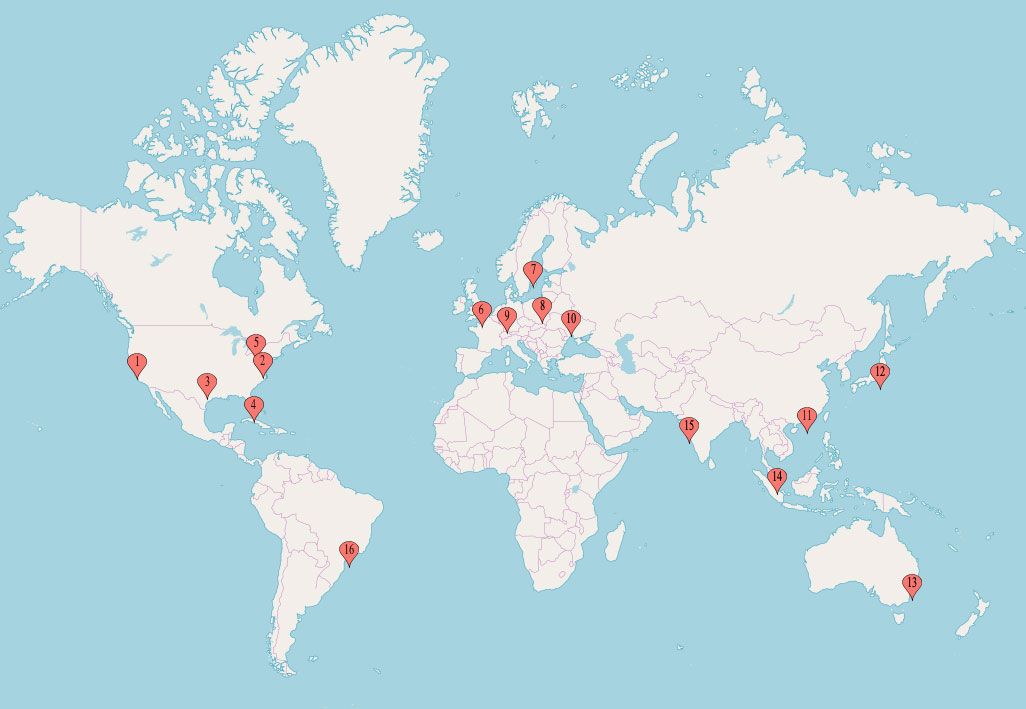
In reply to: [Shift8 CDN] Network Map(Pops Location)You can see an out of date version of the map in the image gallery of the main plugin page here on WordPress :
https://ps.w.org/shift8-cdn/assets/screenshot-1.jpg?rev=2121474
This should give you a rough idea. The map has changed a bit, we have added some new PoPs. We are working to have an up-to-date map on the main site.
If you want to know about a specific country, please let me know here.
Thanks!
Forum: Plugins
In reply to: [Shift8 CDN] Error detected could not find the siteOmitting the “www” is not a solution for everyone , it depends on how your site resolves in your browser. Some people have “Www” in their site , other people have it redirected.
The key to setting the CDN up is to use the end-result of how your website resolves when you browse it. The CDN has to “fetch” assets the same way your browser would in order to cache it.
This means that the CDN will have problems if your site resolves as domain.com , but you enter http://www.domain.com (which your site normally would 301 redirect). The 301 redirect might break the CDN.
Your specific CDN url works for me , the test url works https://qqeedyak4zuk.wpcdn.shift8cdn.com/wp-content/plugins/shift8-cdn/test/test.png
If you enable the CDN and something breaks, please open a new thread and give me a URL that is not working so I can specifically look at it.
Thank you!
Forum: Plugins
In reply to: [Shift8 CDN] Test CDN 400 Bad requestHello,
That link works for me. I tried it also from every endpoint server we have.
Its possible the 400 error was actually returned from your web server? Our endpoint servers would just pass a 400 error from the originating site (your site).
Is it still happening?
Thanks!
Forum: Plugins
In reply to: [Shift8 CDN] Please contact support forHello!
Sorry about this problem! This is because you added the site way early on in the beginning stages and we migrated and updated our system.
If you go back into your dashboard at shift8cdn.com you should now see your site in the dashboard.
Please feel free to email [email protected] if you still have problems.
Thank you!
Forum: Plugins
In reply to: [Shift8 CDN] Test CDN 400 Bad requestGreat! Yeah it takes a few minutes after you first add a site to populate across the network.
Glad its working!