undergroundnetwork

Forum Replies Created
-
Forum: Plugins
In reply to: [Contact Form 7] Server Error 500I am getting the same error… everything worked fine and then after a couple updates it no longer allows me to submit. I get a server 500 error as well. I have disabled all plugins except for contact 7 with the same resulting error.
[Error] Failed to load resource: the server responded with a status of 500 (Internal Server Error) (underground.net, line 0)
http://underground.net scroll down to contact form
Forum: Plugins
In reply to: [Nextend Social Login and Register] Login Error! Safari OnlyI just tried your site on Safari and it looks like it works.. I am using the Flatsome theme as well.. is there something you had to do to make it work?
Thanks!
Charles
Please disregard this.. it still works.. I was doing something wrong. The above code still deactivates photon when you are trying to crop your avatar image in Buddypress. Though it appears that they have come up with a solution to this problem which should address it in a future update.
Sure.. when you have Photon running and Buddypress running as well, when you go to add an avatar for your profile or for a group, you can’t just upload an image or grab one from your library, Buddypress always forces you to CROP the image, so in essence you are forced to edit the image every time. Unfortunately, the second you upload the image Photon has then taken over the URL of the image and you end up at a broken image cropper tool, and you can’t just save the image as Buddypress wants you to crop that image first, then save it.
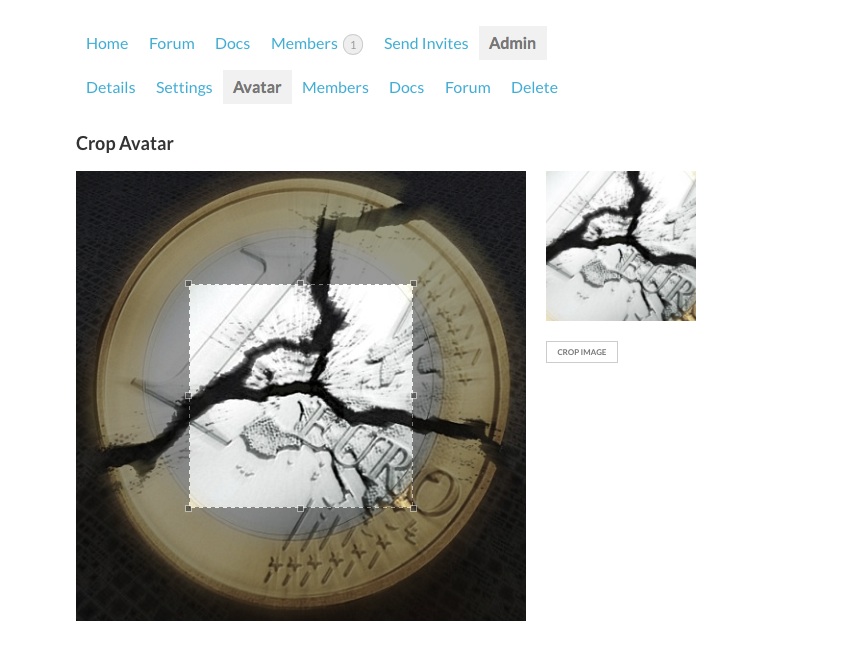
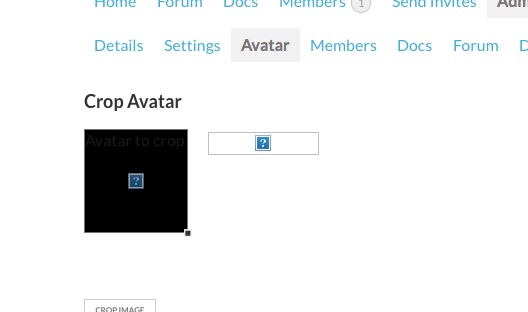
Here are screenshots of what I’m talking about:
Buddypress Group Avatar Add page WITH your SKIP filter running. – Works perfectly.
Buddypress Group Avatar Add page WITH Photon running and NO SKIP filter. – Broken.
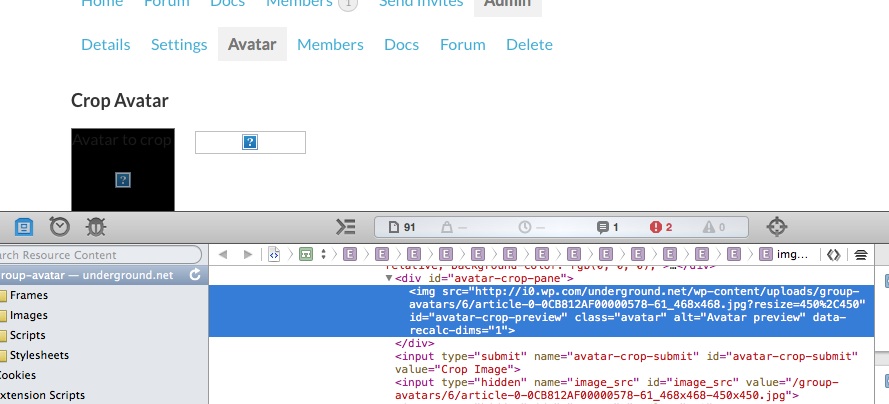
Here is a screenshot of the page source of the image URL of the broken avatar edit screen.
When you guys created Photon, you probably had the same issue happen in the WP- Admin area of WordPress while uploading images, so you probably temporarily disable Photon while in the WP-Admin area, unfortunately, Buddypress stuff occurs on the Front-End of the site, so the WP-Admin disable is not kicking in. (My guess)
Yeah.. I was experiencing the same issue.. it looks like it edits the image but it doesn’t.
Photon (Jetpack’s CDN) has a similar issue with editing Avatars in Buddypress.. but works fine with images in the Admin area, so there is probably a solution buried in their code somewhere. BUT Photon broke Avatar uploading and editing in Buddypress, which we just solved over here.
So I guess Photon is the way to go for now.
Wow, that works perfectly! I can even disable photon on all pages if I want with – is_page() (not sure why you’d do that)… BUT.. and this is the whole reason why I found this issue in the first place, since PHOTON breaks uploading or editing avatars in Buddypress, this solves the problem! By putting the above function in your functions.php (or bp-custom.php one or the other) customized as such:
function jeherve_disable_photon_on_page( $skip, $src ) {

	if ( bp_is_group_admin_page( 'group-avatar' ) || bp_is_change_avatar() ) {
		// Skip the images
		return true;
	}
	return $skip;

}
add_filter( 'jetpack_photon_skip_image', 'jeherve_disable_photon_on_page', 10, 3 );
This fixes the problem with Buddypress and allows you to use Photon on your WordPress site without breaking the avatar functions in Buddypress! Yeah!
Jeremy, do you want to pass this info on to the Buddypress people? Or should I post this solution somewhere to let Buddypress people know this? Or is it good enough being here in the post?
Thanks for your help!
Charles
I’m using is_page above.
I have an if statement with a couple OR alternatives. 2 are single pages (is_single) and I put in an is_page to show that the is_page doesn’t do what it’s supposed to.
I also just tried if (is_page(198)) without the other alternative ORs in the function and the is_page still won’t filter out (disable) Photon.
Charles
Yes.. I had Photon turned off.. sorry about that. I just turned it back on.
I have this in my functions.php right now:
function remove_jetpack_image_downsize() {
	global $post;
	if ( is_single(2282) || is_page(198) || is_single(1614) )
		return true;
	else
       return false;
}
add_filter('jetpack_photon_override_image_downsize', 'remove_jetpack_image_downsize');
You’ll see that the filter has properly turned off Photon for the posts listed:
http://underground.net/?p=2282 & http://underground.net/?p=1614 but not http://underground.net/?p=198
Thanks
CharlesActually, what I was saying is that the filter jetpack_photon_override_image_downsize doesn’t work on Pages. It works on Posts throughout my site, but I cannot get the filter/override to work on pages (that’s WordPress Pages, not WordPress Posts, the jetpack_photon_override_image_downsize filter works fine on posts.)
Did you guys figure out how to add the code to the settings like Jeremy did but using the original Facebook icon, not the fake one? I’ve added to this my site and it works great, but I hate the thought of having to re-edit the plugin files each update!
Thanks!
Charles
http://underground.net is my site.
Forum: Plugins
In reply to: [Collapse-O-Matic] Targtag Attribute Not WorkingI just bought the Pro version and tartag does not work for me either. I am running the latest Safari, Mavericks.. in fact, the targtag example does not even work on your website.
I am trying to put the target text within blockquotes…
Here is an example on my website: http://underground.net/tag-test/
Thanks!
Charles
Cancel this.. it appears that Jetpack was not resizing the image as it was buried in CSS of sorts, I guess… so I tweaked things and it works great:
$style = '';
if ( has_post_thumbnail() ) {
	$thumbnail_url = wp_get_attachment_url( get_post_thumbnail_id() );
	$style = esc_url( $thumbnail_url );
}
?>

<section id="intro" class="marquee"style="background-image: url(<?php echo apply_filters( 'jetpack_photon_url', $style, 'resize=1260%2C700' ); ?>)">
Works great now!
Great! Thanks for fixing that!
On a side note.. it looks like I broke the forum somehow!
OK. I solved it. Not sure if it’s HTML grammatically correct, but I used CSS to put it in the correct place:
To the .infinite-loader CSS I added:
position:fixed;
	bottom:30px;
	left:20px;
Now it’s permanently (while showing) in the lower left corner of the browser.