WFAdam

Forum Replies Created
-
Sorry for the delay in response.
You mentioned that the error message from the auto-updater says:
If there was a fatal error in the update, the previously installed version has been restored.
It’s pretty likely there is a fatal error during the update if this message occurred, and it might be something as simple as running out of memory if you’re near your
memory_limit, or time ifmax_execution_timeis low (as Elementor is large), or it could be a conflict with another plugin that hooks into the WordPress updater.I’d recommend checking the PHP error logs to see if there is an error message at that time, or enabling
WP_DEBUGfor now if it’s not already on, and waiting for the next auto-update.Are you comfortable with running wp-cron from the command line? It could also be useful. PHP’s CLI can have different settings from WP’s, including the
memory_limit.Let me know what you find.
Hello @dreamsite and thanks for reaching out to us!
Can you email lockout @ wordfence . com and mention this. I will assist you there.
Thanks again!
Oh! If you look to the far right of that alert, you should see a “X” to close it. It should not reopen once you click that.
Thanks again!
You could do that just to make sure it resolves. I would recommend deactivating without removing the tables though, that way your settings stay in place.
Forum: Plugins
In reply to: [Wordfence Security - Firewall, Malware Scan, and Login Security] ErrorHello @assistenzacentromercurio and thanks for reaching out to us!
If you look in the .htaccess or .user.ini file, you will see a auto_prepend directive. Just remove that or correct the filepath and it should fix the issue.
This file is used to optimize the Wordfence Firewall.
Thanks again!
Hello @johankoolen and thanks for reaching out to us!
It could be a few different things. Most of the time its due to a special character like “:” or “;”. If this is a common problem, you should be able to disable the XSS pattern block in the Firewall Rules on Wordfence > Firewall > Manage Firewall Rules. I don’t usually recommend that but if its causing a lot of form issues, that is a possible fix.
Thanks again!
Forum: Plugins
In reply to: [Wordfence Security - Firewall, Malware Scan, and Login Security] Scan failedHello @jaginho and thanks for reaching out to us!
Can you do the following so I can get the information I need to help you?
- Stop the existing scan if it is still running (The “Start New Scan” button turns into a “Stop” button while the scan is running).
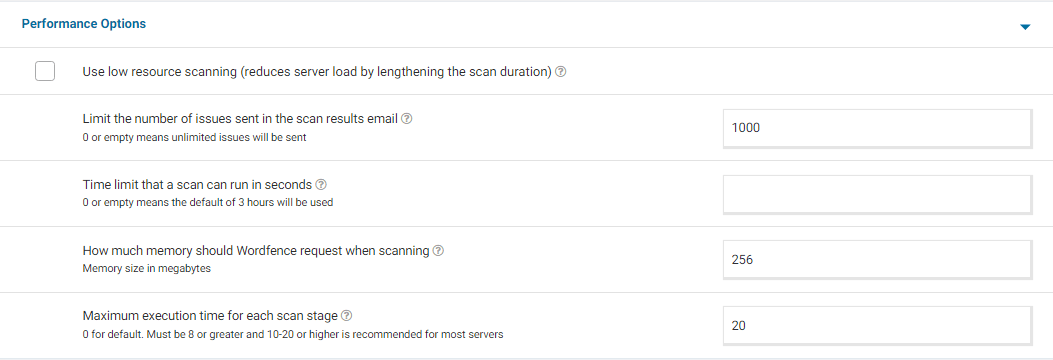
- Go to your Wordfence > Scan > Manage Scan and locate the “Performance Options” section. Set “Maximum execution time for each scan stage” to 20.
- Click to “Save Changes”.
- Go to the Tools > Diagnostics page.
- In the “Debugging Options” section check the circle “Enable debugging mode”.
If “Start scan remotely” is checked, uncheck this option. - Click to “Save Changes”.
- Start a new scan on the Scan page.
- If the scan fails again, copy the last 20 lines or so from the Log (click the “Show Log” link) once the scan finishes and paste them in the post.
On some sites, this will correct the issue. Adding “20” for the “Maximum execution time for each scan stage” tells the scan to pause every 20 seconds and start again where it left off, which makes the scan more performance-friendly for some servers. If this fixes the issue and scans run again, you can leave all the settings above except for “Enable Debugging Mode”.
For a screenshot of my recommended Performance setting options click here.
Thanks again!
That would make sense. I think it might be a password manager that is adding the 2FA code to the username, which in turn is causing the lockout.
I would recommend checking your Safari Password Manager and make sure that the correct username and password is stored there for your site.
Let me know if this fixes the issue for you.
Hello @auntyastro and thanks for reaching out to us!
Are you currently using this feature for the WooCommerce integration and it is showing the message?
Enable this checkbox if you are using WooCommerce and would like Wordfence Login Security features such as the reCAPTCHA and 2FA to work on the WooCommerce Account page. We recommend testing your login pages after enabling this option, to be sure there are no conflicts with other plugins that modify the login page. Currently, the CAPTCHA is not compatible with the WooCommerce option “Allow customers to create an account during checkout” as it is only applied on the default, standalone WooCommerce registration form. However, the CAPTCHA icon can appear on the checkout page if “Allow customers to log into an existing account during checkout is enabled” because it is applied to WooCommerce login forms.
https://www.wordfence.com/help/login-security/#woocommerce-and-custom-integrations
Thanks again!
Hello @noelie33 and thanks for reaching out to us!
It would be on the developer of that plugin to fix the issue. This warning is simply for you to know there is a known issue with the plugin in question.
The best thing you could do is see the version of the plugin that is known to be vulnerable and see if you’re currently running that version or if there is an updated version. We do have firewall rules in place to block these attacks but it would be safe to disable that plugin until the developer fixes the vulnerability.
If you would like more information on a certain plugin, I would recommend reaching out to their support.
Thanks again!
Hello @avefrance and thanks for reaching out to us!
Can you try to send yourself a test email from the site? You can do this by navigating to Wordfence > Tools > Diagnostics > Other Tests > Send a test email from this WordPress server to an email address: and send it to your email.
Let me know if you receive the email. Thanks again.
Hello @cobberas63 and thanks for reaching out to us!
It sounds like a possible javascript issue or the tables arent saving the settings.
Can you try to deactivate Wordfence and then activate it again. See if you’re able to then add IP’s to the blocklist.
Let me know the result. Thanks again!
Hello @hyflex and thanks for reaching out to us!
There isn’t a way to do this in Wordfence itself, but you may be able to use the
wp_mailhook to inspect/modify any outgoing message.The arguments include the subject and message itself, which you could use to identify messages from the Wordfence plugin, before deciding whether to modify the
toaddress: https://developer.ww.wp.xz.cn/reference/hooks/wp_mail/Thanks again!
Is this specifically just for auto-updates or also manual updates of elementor while Wordfence is enabled?
Can you try to enable Learning Mode for the Firewall and see if the update will go through?
From the Wordfence Dashboard click on Manage WAF. Then you will see Basic Firewall Options > Web Application Firewall Status. Change the option to Learning Mode. Now perform the actions that were causing issues. This will help Wordfence learn that these actions are normal and it will allow them in the future. After you have finished performing the actions, switch the WAF from Learning Mode back to Enabled and Protecting. Now test to see if these actions work correctly.
https://www.wordfence.com/help/firewall/learning-mode/ is an amazing resource for learning more about the WAF and learning mode.Thanks for sending that! I am seeing the block page when I visit the wp-admin page so that is working correctly.
It might be possible that some brute force attempts are still coming via XML-RPC. We mention that here with changing the login URL https://www.youtube.com/watch?v=sl4ftvOSOBM