WPCharitable

Forum Replies Created
-
@murraydailymaverick based on your stack trace, that series of actions does sound probable (and it sounds like it does the fatal on the cron and not visible on the site by you or a user?) Has this happened only one time or are you seeing this on a regular basis.
If you are using an active license (doesn’t matter if it’s a new license or a legacy) you are free to open a ticket on this with our support and we might be able to dig deeper and faster. In either case i’ll have our team take a look at this.
@murraydailymaverick thank you for the stack trace. can you also provide some additional information so our team can quickly investigate:
- Can you provide the steps or actions taken that might have resulted in this issue?
- What is your current license status (since the function/area of the code is related to licenses)?
thank you!
I’m going to go ahead and close this thread for now. But if you’d like us to assist further, please feel welcome to continue the conversation.
Thanks!
I’m going to go ahead and close this thread for now. But if you’d like us to assist further, please feel welcome to continue the conversation.
Thanks!
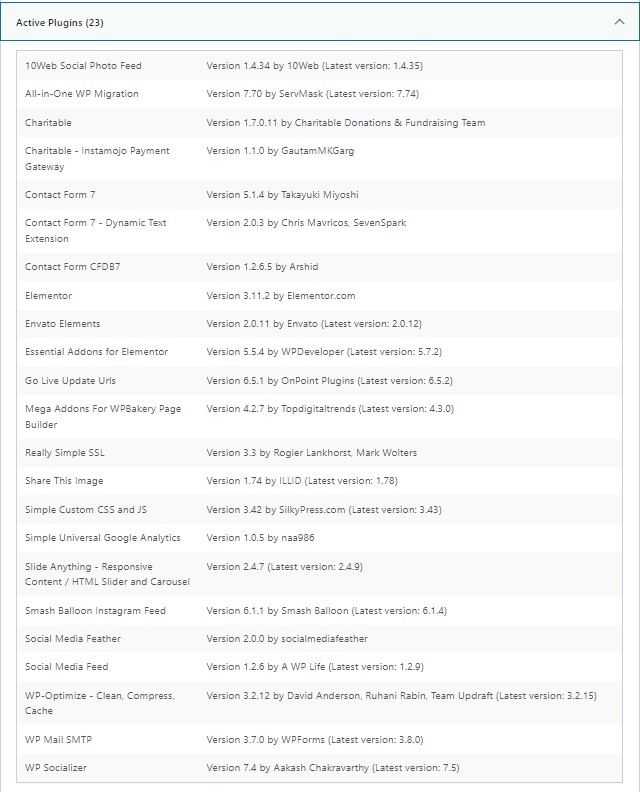
Thanks for reaching out. And yes, this was fixed some time ago after 1.7.0.5 came out.
I would suggest manually downloading and installing the Charitable core plugin form the ww.wp.xz.cn repo (https://ww.wp.xz.cn/plugins/charitable/).
Manually updating via zip is covered here: https://www.wpbeginner.com/beginners-guide/step-by-step-guide-to-install-a-wordpress-plugin-for-beginners/
Do the usual backing up of the site first, but this has been the fastest and most common way of manually updating a plugin and it’s been working for others. Thanks!
Thanks for reaching out. Not sure on what exactly “gateway code” is referring to but it sounds like this has something to with your IPN since we have had customers using PayPal with the latest version with no issues for some time.
See if you can read and follow the suggestions on this doc:
https://www.wpcharitable.com/documentation/paypal-ipn-troubleshooting/Make sure to try all suggestions and read the additional items to check near the bottom. Thanks!
I’m going to go ahead and close this thread for now. But janet if you’d like us to assist further, please feel welcome to continue the conversation.
Thanks!
Glad to hear it. We’ll close this ticket but if you have any similar questions on this please feel free to reach out. Thanks for using Charitable! 🙂
Hey @heidimaria
Thanks for reaching out. Charitable provides a profile shortcode that is a simple way to include a profile form for your donors to manage their details. It sounds like you don’t need this, so you can create a blank page and assign it there if you wish. After you do that, clear any and all cache and your site’s permalinks. Let me know if this initial step resolves the issue (Charitable does prevent comments some appearing on certain pages including the profile page).
Hi @shamanfunk3 – thanks for reaching out.
Our team went to that URL and tested the form with a test CC number and it went through successful. We got to a donation receipt page (donation number 3058) – this would tell us that Charitable and Stripe would be in test mode since that test CC number made it through.
Double check in Charitable Settings in Payment Gateway to see if the box is not checked for testing. You might want to also double check your Stripe account – check both live and test modes (but especially the test mode) to see if any recent test donations came in. If they did, you are in test mode. You can disconnect the connection from Stripe and reconnect it to see if this reconnects in a different mode (this is our initial suggestion since test mode should only be happening if you checked the box then connected with Stripe in Stripe settings in Charitable).
Thanks!
@nwdco Charitable does not support Instamojo gateway in any of our official plugins… but we notice from a previous conversation you shared that you are using a customer or third-party plugin (Instamojo Payment Gateway) to connect Chartiable to Instamojo. We would suggest you reach out to them for this question since our support here would only be able to cover built-in supported gateways (PayPal and Stripe). Thanks!
@imjeanneus thanks for reaching out.
In terms of login/registration: although Charitable CAN provide login and registration shortcodes there isn’t a requirement of Charitable to be a logged in user to view a normal Campaign page and make a donation. If this requirement exists on your site double check to make sure your theme, custom code or existing other plugins aren’t enforcing this requirement (you can switch to a default WordPress theme and deactivate non-Charitable plugins to test this).
The Github resource has moved to WPCode, in the form of snippets although you can still copy and paste any snippet like you could in Github. All code and comments were preserved and freely available: https://library.wpcode.com/profile/wpcharitable/
@nwdco thank you for sharing. The “Donation Unique ID” text and column is likely (probably like “Pan Number”) generated by custom code or a third-party. We suggest going through the 6 items we suggested above since it appears these two fields are added into Charitable’s reporting by something. An addition to these suggestions It might be worth it to download your entire themes and plugin folders and do a keyword search for “Donation Unique ID” to see where (or if) that appears.
@nwdco regarding the “donation unique ID” normally when you export donations CSV on the donations page you have in the (typically first) column “Donation ID” (usually followed by the campaign ID in the second column). Is this is what you referring to?
If so, you should be able to see this same Charitable assigned donation ID when you view all your donations (when you click “donations” in the WordPress menu you see the #XXX FirstName LastName in the list of donations… clicking on any donation has the title “Donation #XXX” near the top of the individual donation page. If you don’t see this, then something is seriously wrong (and wouldn’t be likely to be something associated with the Charitable upgrade as you described).
I would go to our list of already made suggestions (1-5) and see if any one of those results in additional information. Have to assume donation ID and Pan Number are related – the only difference is that donation ID is exported by default in Charitable CSV exports of donations, Pan Number as previously explained is not.
Hi @livingstonewere – we did respond to your request very shortly after we got it yesterday. We did respond and got no bounce backs from it so we assume you got it. We also JUST NOW send the same message again to the email you provided when you reached out to us. So please check spam if you don’t see either of these two responses from us (one about 24 hours ago and one a few minutes ago).
If you don’t see anything send us another message with an alt email address and we will immediately send the message to that as well.