wpdevart

Forum Replies Created
-
Hi @robcabeca.
There is no problem with the refund, but for the premium version support, you should contact us at [email protected].
We will close this topic.
Also, when you send us an email for the refund, also, tell us more details about why the plugin is harder to use than you expected.
Thanks.
Forum: Plugins
In reply to: [Organization chart] Theme CSS ClassHi @ierpe.
Sorry for the late response.
Unfortunately, we didn’t understand your question well, but if you add a custom style using “!important”, it should work.
As you are using the premium version, we should provide future support via email. So contact us at [email protected] and we will provide support.
We will close this topic.
Thanks.
Hi @videodronen.
Okay, as we understand we have already contacted you via email, so we will close this topic.
Thanks.
Hi @videodronen.
If you do not want to display the form and extras, then do not select any forms and extras. for the calendar from the admin panel.
Thanks.
Forum: Plugins
In reply to: [Booking calendar, Appointment Booking System] Calendars Continuously LoadingHi @ntimler.
Sorry for so late response.
Our developers said that there is a JS error on your site and it is not related to our plugin. Due to this JS error, our plugin is not working, so you should fix this error. Unfortunately, we cannot help in this case.
Thanks.
Forum: Plugins
In reply to: [Booking calendar, Appointment Booking System] ThemesDear @artiwoj.
As we provided the solution, we will close this topic.
If you have other questions, then contact us again.
Thanks.
Forum: Plugins
In reply to: [Booking calendar, Appointment Booking System] ThemesDear @artiwoj.
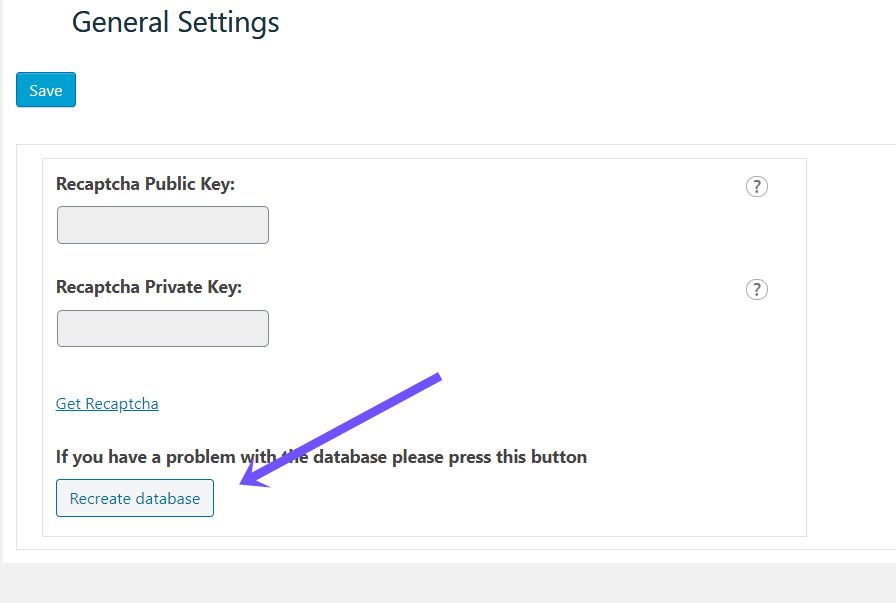
From the left admin menu, open our plugin main menu. Then go to the “Global Settings” page and click on the “Recreate database” button. You can check this screenshot –
https://wpdevart.com/wp-content/uploads/2022/04/database-issue.png
This should fix the problem.
Let us know if this will fix the issue.
Thanks.
Hi @videodronen.
We didn’t understand your request well, so can you send us some screenshots?
Thanks.
Forum: Plugins
In reply to: [Booking calendar, Appointment Booking System] migrate calendersHi @videodronen.
Unfortunately, our plugin doesn’t have such functionality and we can’t add it at this point.
We will add it to the list of future features.
Thanks.
- This reply was modified 4 years, 2 months ago by wpdevart. Reason: the message had a wrong format
Forum: Plugins
In reply to: [Organization chart] If you upgrade do you lose all your infoHi @jlaperuta47.
The old date will be saved if you follow this instruction.
Deactivate and delete the free version from the Plugins page(in this way, you will not lose the old data), and then install the Premium version.
Also, we will close this topic, if you have other questions about the premium version, then contact us at [email protected].
Thanks.
Forum: Plugins
In reply to: [Organization chart] Multiple top levelHi @jlaperuta47.
Yes, you just need to leave empty the main top level of the chart and create two next levels. In this way, the chart will display two next levels as top levels.
thanks.
Forum: Plugins
In reply to: [Booking calendar, Appointment Booking System] Pro Version Language issueHi @kazaam00nix.
If everything is fine in the .po file, then you need to navigate to the Booking Calendar Themes page > Default Texts tab, and enable the option “Use mo”.
This should help.
Also, as you are using the premium version, we should provide future support via email, so if you have other questions, then contact us at [email protected]. We will close this topic.
Thanks.