wpdevelop

Forum Replies Created
-
Forum: Plugins
In reply to: [Booking Calendar] Selecting siteHello.
Please note in the Booking Calendar Business Small or higher versions you can define the different cost for booking resources (calendars) at the Booking > Resources page. Then you can have the selection of booking resources like here https://bm.wpbookingcalendar.com/select-resource/
Please check more about shortcode that you need to use here https://wpbookingcalendar.com/faq/shortcode-booking-resources-selection/In case if you need to set some additional cost for the booking, depending from selected options in the select-boxes or checkboxes in your booking form, so then it’s possible in the Booking Calendar Business Medium or higher versions.
Check more about this feature here: https://wpbookingcalendar.com/overview/#additional-cost
Watch it in this video guide https://wpbookingcalendar.com/help/advanced-costs-video-overview/
Please note, this forum is only about the support Booking Calendar Free version. If you will have any questions about the paid versions, then contact here https://wpbookingcalendar.com/contact/
Thank you.
Forum: Plugins
In reply to: [Booking Calendar] Manually toggle statusHello.
You can make the blank booking for specific date at the Booking > Add booking page to Change the dates status.
Kind Regards.Forum: Plugins
In reply to: [Booking Calendar] CSS problem?Hello.
Glad to hear that you have found solution for this issue.
Such issue exist because of CSS conflict with some other plugin or your theme.
Kind Regards.Forum: Plugins
In reply to: [Booking Calendar] Colors in calendarHello.
1) Probably it’s because of conflict with some other plugin or actual theme.
Please try to deactivate one by one all your active plugins at the WordPress > Plugins menu and make testing after each plugin deactivation.
If it does not help, please deactivate all your plugins and active the default WordPress theme. And then retest it again.
We just need to find the reason for this issue.Otherwise please send the link to your page with booking form, where you are having the issue.
2) Please note, this forum is only about the support of Booking Calendar Free version. If you will have any questions about the paid version, then contact here https://wpbookingcalendar.com/contact/
Kind Regards.
Forum: Plugins
In reply to: [Booking Calendar] How to track submissions with GA4Hello.
Please check more here https://wpbookingcalendar.com/faq/tracking-form-submission/
Kind Regards.Forum: Plugins
In reply to: [Booking Calendar] Can i get rid of the calendar?Hello.
It’s possible to have only the booking form, without the calendar in the Booking Calendar Business Large or higher version. Please check more here https://wpbookingcalendar.com/faq/shortcode-booking-form-no-calendar/The purpose of this shortcode in the Booking Calendar Business Large version is ability to make several bookings for the same date (which you define in the shortcode), until it reach the capacity of the booking resource.
But it’s does not possible to make several specific bookings for the specific time slots. So in your case you will be need to activate this option: “Allow unlimited bookings per same day(s)” at the General Booking Settings page and in the “Advanced section”.Kind Regards.
Forum: Plugins
In reply to: [Booking Calendar] Error cant place bookingHello.
I was able to submit test booking at your wesbite.
But I can see this error message:Error! CAPTCHA requires the GD library activated in your PHP configuration.
Please check with support of your hostign company about ability to activate the GD library in your php at your server.
Please check more here https://wpbookingcalendar.com/faq/captcha-showing-problems/Forum: Plugins
In reply to: [Booking Calendar] Can I sync booking.com and airbnb in same time ?Hello.
1) Booking Calendar plugin is supporting
– import of events via .ics feeds from Google Calendar ( or Airbnb or any other calendar that support .ics format, like iCal application)
– and export bookings to .ics feeds (files), which are possible to import in Google Calendar (or Airbnb, Booking.com, HomeAway, TripAdvisor, VRBO, FlipKey and any other calendar that uses .ics format ).Please read more about this feature here: https://wpbookingcalendar.com/faq/#sync
Import.
Please check about the configuration of import events from .ics feeds in this FAQ instruction here https://wpbookingcalendar.com/faq/import-ics-feeds/ Please note, the import process is working in that case, when some visitor is open your website page with booking import shortcode. So you can configure CRON at your server, for periodically accessing this page with booking import shortcode to start the import process. Or you can insert the import shortcode before booking form shortcode, so firstly the system will start the import process and only then show the booking form, when someone visits your page.In case if you are having some issue of not ability to import new events, then check this troubleshooting instruction: https://wpbookingcalendar.com/faq/ics-importing-issue/
You can define CRON at your server for periodically access pages with import .ics feeds shortcodes and start import process during specific time-intervals, then check this: https://wpbookingcalendar.com/faq/cron-script/
Export.
Please check about the configuration of export .ics feeds in this FAQ instruction here https://wpbookingcalendar.com/faq/export-ics-feeds/Booking Calendar is generated .ics feed with bookings in real time. But how often some services (like airbnb, or booking.com ) access this .ics feed to import the bookings from Booking Calendar into their own system, does not depend on the Booking Calendar. So in other words, Booking Calendar does not force the import process by third party service, when some booking is created. You need to check with support of this service (like airbnb or booking.com), about how often they can access the .ics feed for making imports.2) The ability to have independent calendars possible in all paid versions of Booking Calendar.
Check more here https://wpbookingcalendar.com/overview/#booking-resourcesYou can watch video overview about this feature here https://wpbookingcalendar.com/help/multiple-calendars-video-overview-of-booking-resources-in-booking-calendar/
Please read firstly the general instruction about usage of paid versions of Booking Calendar: https://wpbookingcalendar.com/faq/general-usage-instruction/
You can create the different booking resources (your properties or services – unique calendars) at the Booking > Resources page and then you be able to insert booking forms for each of your booking resources into the posts or pages. Please read more how to insert and configure the booking shortcode into the post or page here https://wpbookingcalendar.com/help/inserting-booking-form/
Kind Regards.
Forum: Plugins
In reply to: [Booking Calendar] Translate stringsYes. Correct.
Forum: Plugins
In reply to: [Booking Calendar] Showing Only CalendarHello.
Yes, it’s possible.You need to insert the Booking Calendar shortcode for only availability calendar without the booking form at your post or page.
Please check here https://wpbookingcalendar.com/faq/shortcode-availability-calendar/
And check more here https://wpbookingcalendar.com/faq/#shortcodes
Kind Regards.
Forum: Plugins
In reply to: [Booking Calendar] Agenda option limited & Agenda ID not availableI do not sure where from exactly that screenshot in your comment (because of non English language).
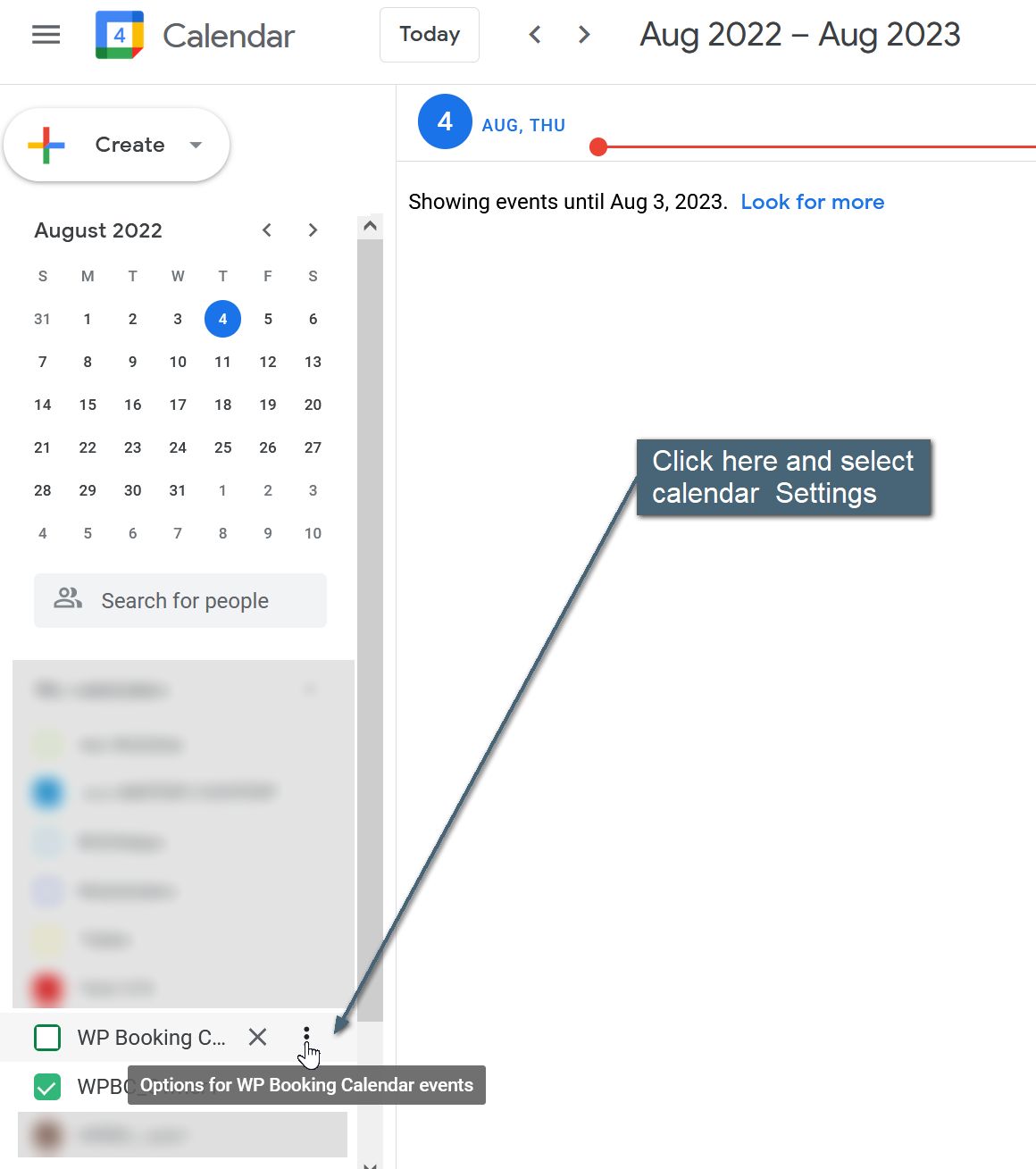
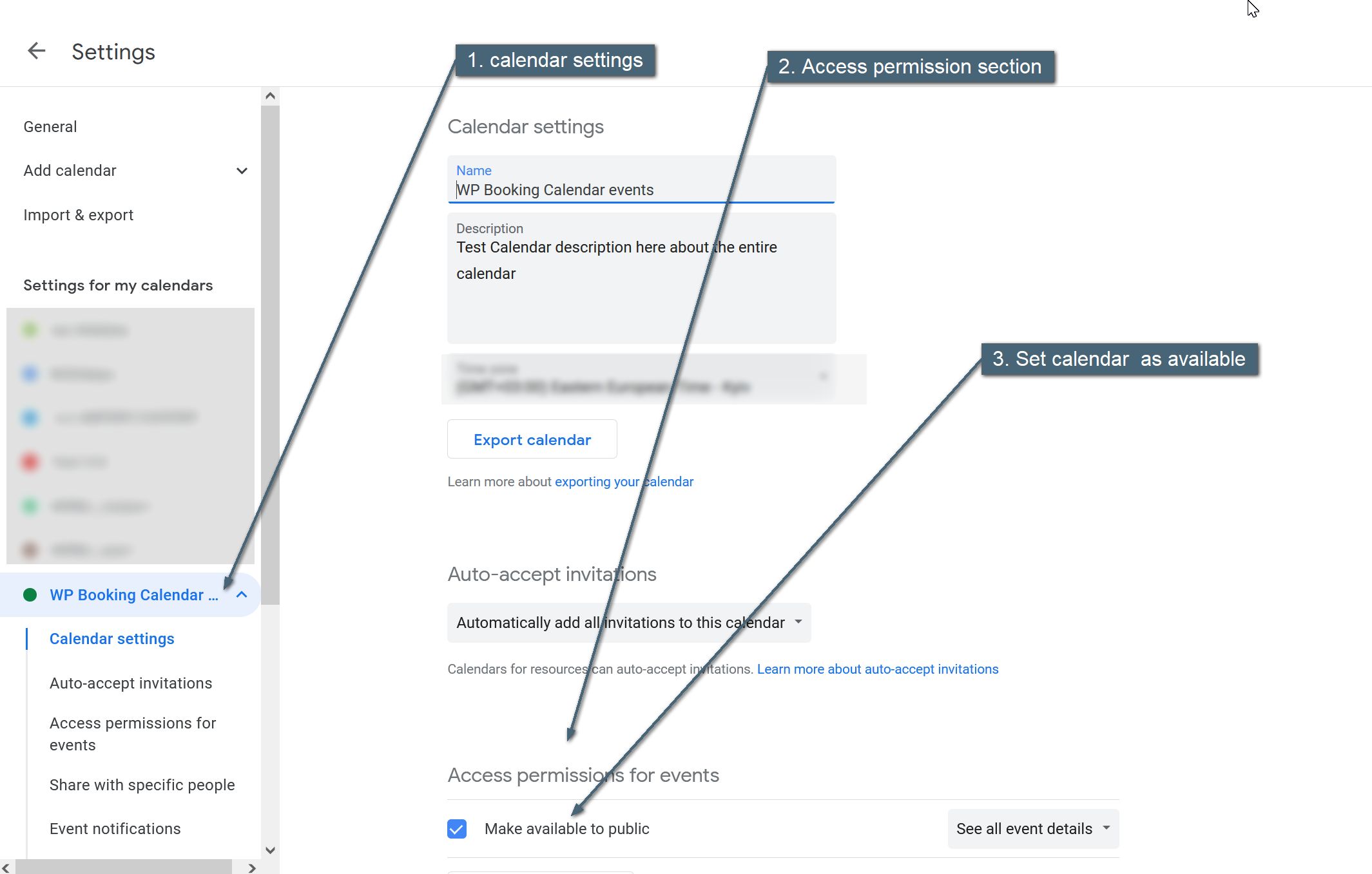
You need to open settings of your Google Calendar (check here https://easycaptures.com/fs/uploaded/1616/4445551731.jpg ) and then make it public as in this screenshot: https://easycaptures.com/fs/uploaded/1616/4942888739.jpg
It’s new screenshots from my actual calendar.
Kind Regards.
Forum: Plugins
In reply to: [Booking Calendar] Agenda option limited & Agenda ID not availableHello.
You need to set as public specific calendar in Google calendar configuration (it’s not in the page that is relative to the Google API Keys).Please check more here https://wpbookingcalendar.com/faq/import-gc-events/#google-calendar-set-public
Kind Regards.
Forum: Plugins
In reply to: [Booking Calendar] Translate stringsHello.
Please check more here https://wpbookingcalendar.com/faq/several-languages/
Also check this info https://wpbookingcalendar.com/faq/#translationIn the Booking Calendar Free version, you can configure labels of booking form at the Booking > Settings > Form page in the and way like this:
First name[lang=de_DE]VornameKind Regards.
Forum: Plugins
In reply to: [Booking Calendar] The calendar is not displayedHello.
I was try to reload the page several times. And each time the image URL of captcha was directed to the same image: 601017131.png
Usually during each time when you reload the page, system direct to the different captcha images.
Such behavior possible when the page is cached. That’s why it’s relative to the same issue that we talked before. You need to resolve issue with the cache.
Kind Regards.Forum: Plugins
In reply to: [Booking Calendar] The calendar is not displayedHello.
Please recheck your error.log in your server configuration, about any relative errors. If you can not find error.log file, please contact support of your hosting company about helping in finding this file.