
Description
Turn Your Website Into an AI-Powered Expert
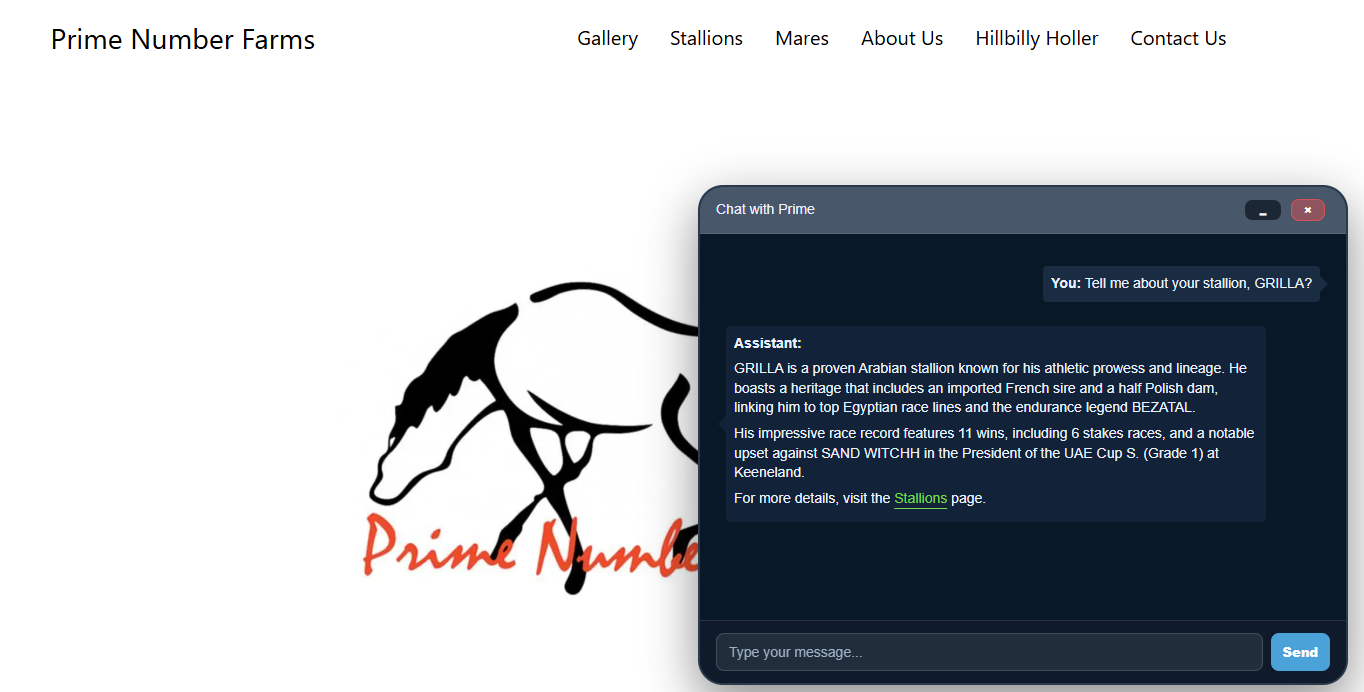
AI Chat by AGIS automatically learns your website content and provides accurate answers to visitor questions 24 hours a day, 7 days a week.
Whether you run a business website, agency, ecommerce store, nonprofit organization, or online community, AGIS helps visitors quickly find the information they need without searching through multiple pages.
Unlike generic chatbots that require extensive training, AGIS automatically learns from your website and uses that knowledge to answer questions specific to your business.
Key Benefits
- Automatically learns your website content
- Answers visitor questions instantly
- Reduces support requests
- Improves customer engagement
- Captures valuable customer interactions
- Review conversation transcripts
- Built-in analytics and reporting
- Manage multiple websites from a single dashboard
- Customize appearance and behavior
- Launch in minutes with minimal setup
Built For Agencies And Multi-Site Management
AGIS is designed for businesses, agencies, web hosts, and organizations managing multiple websites.
From a centralized dashboard you can:
- Manage multiple AI assistants
- Review conversations across websites
- Monitor analytics and engagement
- Customize chatbot behavior
- Fine-tune responses when necessary
What Makes AGIS Different?
Most chatbot plugins simply provide a chat interface.
AGIS provides a complete AI management platform:
- Website crawling and knowledge generation
- AI-powered chat assistance
- Transcript review and management
- Conversation analytics
- Response overrides and fine-tuning
- Multi-site management capabilities
Simple Setup
Install the plugin, connect your website, and allow AGIS to learn your content.
Your AI assistant can be answering visitor questions within minutes.
External Services and Data Usage
The Agis.ai WordPress Plugin relies on certain external scripts hosted on our servers (prod.agis.ai and agis.ai). These scripts are integral to the functionality of the plugin but are not third-party services. Instead, they are hosted by Agis.ai to ensure streamlined updates and consistency across platforms. Below is a detailed breakdown of these files, their purpose, and how they interact with the plugin.
Hosted JavaScript Files and APIs:
https://prod.agis.ai:9081/api/talk
Purpose: This is the primary entry point for our Agis.ai chat system. It handles all communication between the plugin and the Agis.ai server to generate AI-powered responses.
Function: Facilitates real-time AI-powered conversations within the WordPress environment.
https://prod.agis.ai:9081/api/
Purpose: This is the general API collection endpoint used by the plugin for all AI-related activities.
Function: Manages various AI tasks including chatbot functionalities and other features accessed via the plugin.
https://www.agis.ai/agisInstall/agis.js
Purpose: This JavaScript file contains the core code required to create and embed the Agis.ai chat client within the user’s browser.
Function: Provides the front-end chat interface for users interacting with the Agis.ai system.
https://prod.agis.ai/agis_admin/iframes/agis_sites.js
Purpose: Generates the user’s dashboard for managing their Agis.ai settings. This is displayed when users are logged into WordPress or via the Agis.ai backend (accessible through the “My Account” section).
Function: Enables users to configure their AI settings and view chat statistics from within WordPress or the Agis.ai platform.
Legal Considerations and Transparency
These scripts and APIs are hosted by Agis.ai and are not third-party services.
They are used to enhance the performance of the plugin and provide core functionality.
For your reference, our Terms of Service and Privacy Policy outline how data transmitted through these APIs is processed and protected.
We do not sell user data, and all information is used strictly to improve our services.
We ensure that all data sent to our servers is encrypted and processed securely.
By hosting these scripts on our own servers, we are able to provide faster and more efficient updates across platforms without requiring additional actions from users.
TOS:
https://www.agis.ai/terms-of-service
Screenshots


Installation
- Install and activate AI Chat by AGIS.
- Create or log into your AGIS account.
- Add your website to the AGIS dashboard.
- Allow AGIS to crawl and learn your website content.
- Configure the appearance and behavior of your chatbot.
- Launch your AI assistant.
FAQ
-
How much does this cost?
-
AGIS includes a free tier that allows you to experience the platform before upgrading.
-
How does AGIS learn my website?
-
AGIS automatically crawls your website and builds a knowledge base from your content. Visitors receive answers based on information found on your site.
-
Is the chat specific to my website?
-
Yes. Questions are answered using information learned from your website and content.
-
Can I customize the chatbot?
-
Yes. AGIS allows you to customize colors, appearance, behavior, and response settings.
-
Can I review conversations?
-
Yes. AGIS includes transcript management and reporting tools so you can review visitor interactions and improve responses over time.
-
Can I manage multiple websites?
-
Yes. AGIS is built to support agencies, hosting providers, and businesses managing multiple websites from a single account.
Reviews


Contributors & Developers
“AI Chat By AGIS” is open source software. The following people have contributed to this plugin.
Contributors
Translate “AI Chat By AGIS” into your language.
Interested in development?
Browse the code, check out the SVN repository, or subscribe to the development log by RSS.
Changelog
2.1.3
- Admin and chat interface updates synced from latest AGIS admin.
2.1.2
- Removed the audio enablement, which was causing browser permission requests.
2.1.1
- Removed Bootstrap requirement to prevent conflicts with customer websites.
2.1.0
- Speech bubbles support
- User-controlled speech bubble colors
- Hyperlink color customization
- Chat border customization
- Border width and color configuration
- Chat input font color customization
- Mobile chat positioning improvements