
Description
Order Tracking Notification is a super lightweight WooCommerce plugin designed to let store owners quickly add a tracking number and carrier directly to a WooCommerce order.
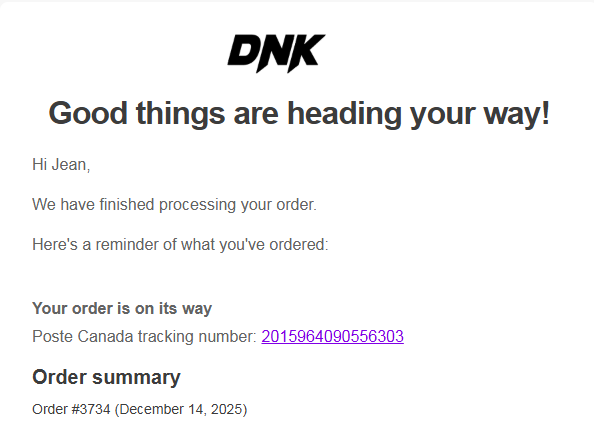
The tracking information is then automatically added to all customer emails (including “Order Completed”) with a clickable tracking link.
No complex setup.
No APIs required.
No heavy UI.
Just simple, fast, clean shipment tracking built for Canadian stores.
Key Features
- Add tracking number + carrier to any WooCommerce order
- Supported carriers: Canada Post, UPS, Purolator, GLS, Canpar, Delivro, Nationex, Loomis, Uni Uni, LivRapide
- Tracking automatically appears in customer emails
- Clickable tracking link to the carrier website
- Compatible with both HPOS and legacy WooCommerce order storage
- Lightweight — no external services, no scripts, no performance impact
- Complete integration with Machool and Ogalo: tracking number and carrier are added to orders automatically
Ultra-light plugin
This plugin adds zero bloat to your store.
One clean UI in the WooCommerce order edit page, and automatic email integration.
Perfect for stores that need quick, reliable tracking without subscribing to complex or expensive shipment tracking solutions.
Screenshots




Installation
- Upload the plugin folder to
/wp-content/plugins/aisp-simple-tracking/ - Activate the plugin through the Plugins menu in WordPress
- Edit any WooCommerce order
- Find the Order Tracking Notification meta box
- Choose your carrier and enter your tracking number
- Save the order — tracking info will automatically appear in the customer emails
FAQ
-
Does this plugin support HPOS?
-
Yes! The plugin is compatible with both WooCommerce HPOS and Legacy order storage.
-
Where do I enter the tracking number?
-
Go to WooCommerce Orders Edit Order.
You will see the meta box Order Tracking Notification with a carrier selector and tracking field. -
Will customers see the tracking number?
-
Yes. The plugin automatically inserts tracking information in all customer-facing WooCommerce emails.
-
Which carriers are supported?
-
- Canada Post
- Purolator
- GLS
- Canpar
- UPS
- Loomis
- Nationex
- Delivro
- Uni Uni
- LivRapide
Reviews
There are no reviews for this plugin.
Contributors & Developers
“Order Tracking Notification for WooCommerce” is open source software. The following people have contributed to this plugin.
Contributors
“Order Tracking Notification for WooCommerce” has been translated into 1 locale. Thank you to the translators for their contributions.
Translate “Order Tracking Notification for WooCommerce” into your language.
Interested in development?
Browse the code, check out the SVN repository, or subscribe to the development log by RSS.
Changelog
1.7.1
- Add: When a shipping label is cancelled, the order is automatically returned to processing to allow a new label to be created and a new tracking email to be sent to the customer.
1.7.0
- Add: Support for Ogalo shipping integration — tracking number and carrier are added to orders automatically.
- Add: Support for the label-created order status sent by external integrations, automatically mapped to completed.
- Improve: External tracking data now reads from both carrier and shipping_provider meta keys for broader compatibility.
- Improve: Internal variable naming refactored from Machool-specific to generic external integration naming.
1.6.1
- Update: Tested up to WordPress 7.0.
1.6.0
- Add: Support for Uni Uni and LivRapide shipping carriers.
- Improve: Shipping carriers are now sorted alphabetically for easier navigation.
1.5.0
- Improve: Centralized all meta keys (carrier, tracking, boxes) as constants in the Helpers class to avoid duplication across files.
- Fix: Moved Settings and Webhook init() calls inside the plugins_loaded hook to ensure WooCommerce is fully loaded before initialization.
- Fix: Removed duplicate init() call at the bottom of the Settings and Webhook class files.
- Fix: Applied wp_kses_post() on the final output string in the email class instead of on the translation string before variable substitution.
- Improve: Added REST API args validation and sanitization (absint on order_id, sanitize_text_field on tracking_number and carrier).
- Improve: Removed unused meta key properties from the Email and Orders Column classes.
- Improve: Refactored the orders column output using a cleaner PHP/HTML structure.
- Improve: Code formatting and consistency in the Settings class.
- Improve: Added admin notice feedback after saving settings and after generating or regenerating the API key.
- Improve: Added inline documentation for backward compatibility with existing filters.
1.4.4
- Fix: Fatal error in REST API webhook due to incorrect helper class and method reference.
- Fix: Webhook stability when processing tracking updates.
- Improve: Box quantity is now optional and only used when manually entered.
- Improve: Simplified tracking settings by removing the need for a global box option.
1.4.3
- Add: Centralized tracking data retrieval via helper function for improved consistency.
- Improve: Reduced code duplication across admin, emails, and order list.
- Improve: Better normalization of carrier names for reliable tracking URLs.
- Improve: Fallback handling when tracking URL is not available.
- Fix: Potential undefined variable issues in tracking display logic.
- Fix: Data consistency between admin panel, emails, and orders column.
1.4.2
- Improve: Security by properly escaping translated strings and dynamic data.
- Improve: Tracking link output in emails for better reliability and safety.
1.4.1
- Add: Carrier normalization for improved tracking detection.
- Improve: Tracking display consistency across emails, admin, and order list.
- Improve: Manual tracking now properly overrides external data.
- Fix: Issues with carrier mapping and missing tracking in order list.
- Fix: Duplicate carrier entries in admin selector.
1.4.0
- Add: Support for Machool tracking meta (shipping_provider / tracking_number).
1.3.0
- Add: Tracking column in the WooCommerce orders list.
- Add: Display of carrier name, tracking number, and number of boxes directly in the orders table.
- Improve: Tracking number is now clickable and opens the carrier tracking page in a new tab.
- Improve: Compatibility with both legacy orders screen and the new WooCommerce Orders interface (HPOS).
- Improve: Admin usability by displaying tracking information without opening the order.
1.2.1
- Improve: Internationalization and escaping in email settings.
1.2.0
- Add: New “Number of boxes” field in the order admin panel. The field is admin-only and is not visible to customers.
1.1.0
- Add: Clickable tracking link in the order admin screen when a carrier and tracking number are provided.
1.0.1
- Fix: Tracking links for Nationex and Canada Post.
1.0.0
- Initial release.