

Description
Adds quick links in the WordPress admin bar for users of Bricks theme.
Main function
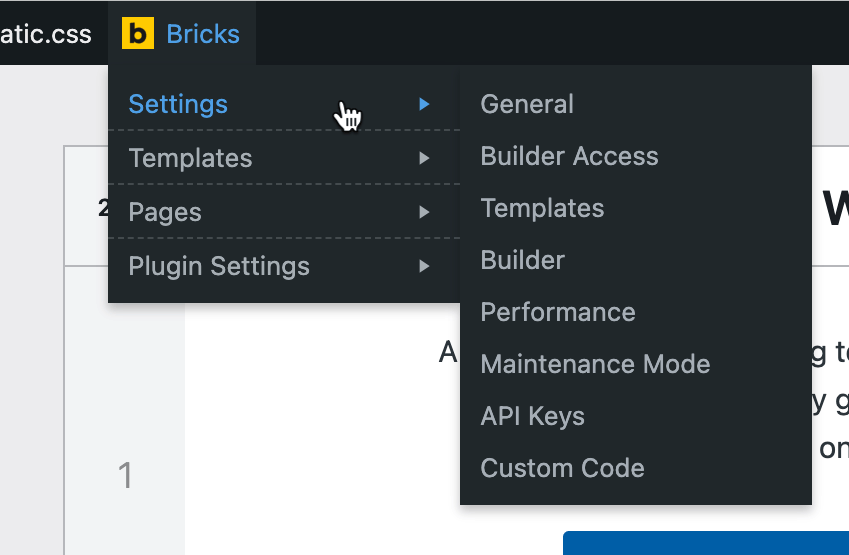
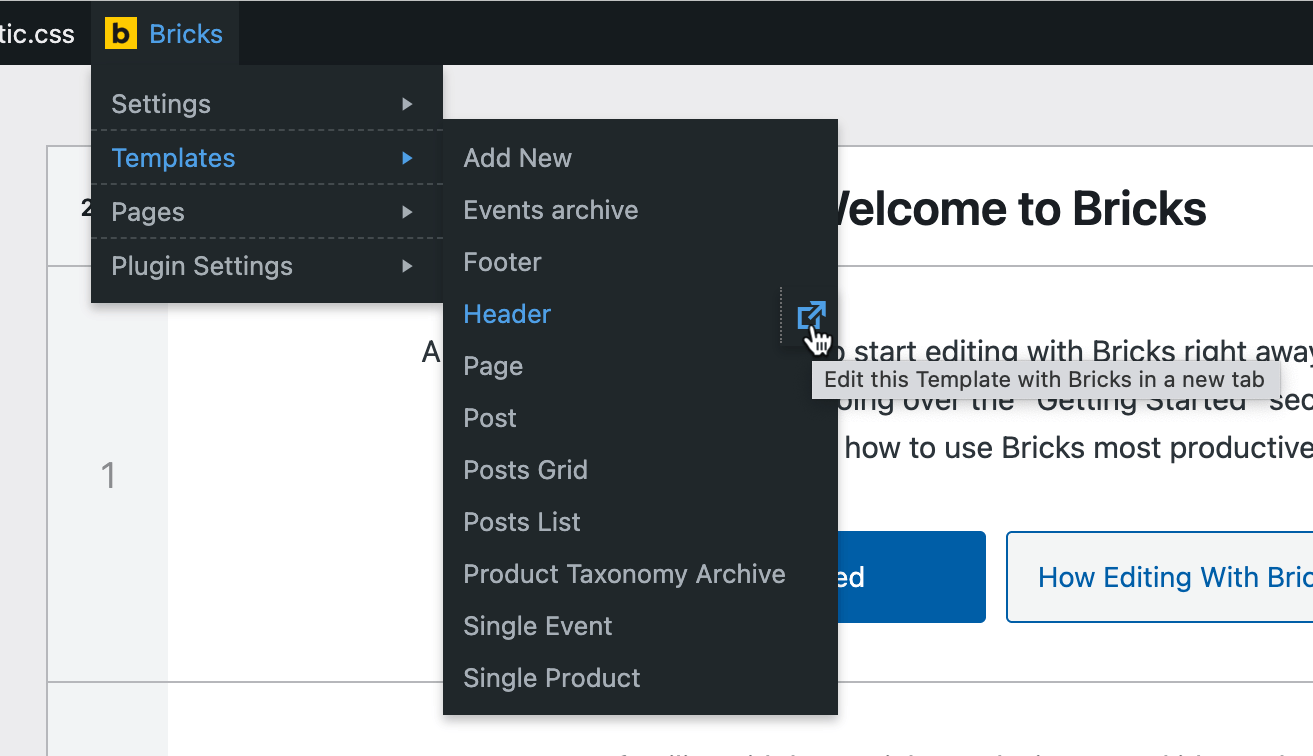
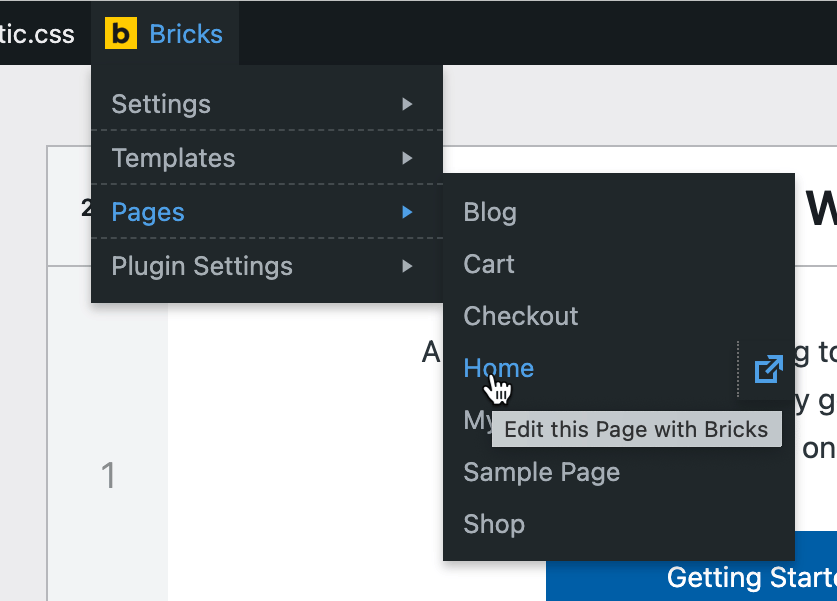
This plugin adds a handy “Bricks” menu item in the WP admin bar for directly editing Pages and Templates with Bricks, as well as quickly navigating to various areas within the site and external sites relevant for the users of Bricks Builder theme.
A very useful feature is being able to directly view the list of all Templates and Pages and edit any of them with Bricks directly with a single click without going to Templates and Pages list screens first.
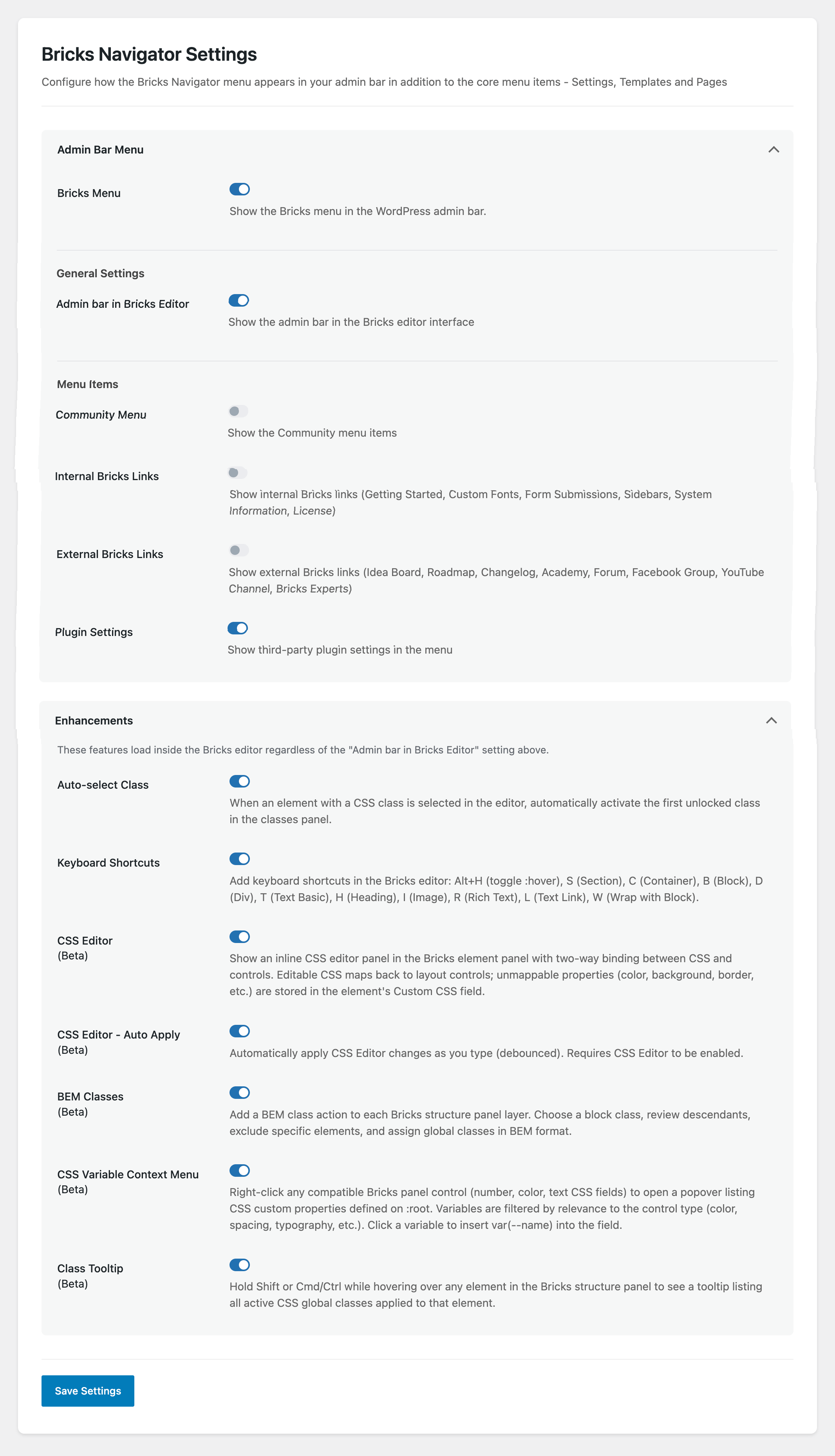
The admin bar can also be enabled in Bricks editor pages via the plugin’s settings page at Bricks Bricks Navigator.
Links to Bricks-specific plugins’ settings page are also provided.
Links to community sites, internal and external Bricks links can be enabled in the plugin’s settings page.
A “new tab” icon is provided for site-specific menu items added by the plugin to open that menu item in a new tab.
All external links open in a new tab.
Built for the Bricks community by Sridhar Katakam of BricksLabs.
Performance Notice: The free version loads all templates and pages in the menu and works best for smaller sites (up to ~20 templates and ~50 pages). For larger sites with extensive content, consider upgrading to our upcoming Pro version for better performance. Note that this only applies for admins and other logged-in users for whom the WP toolbar shows.
Auto-select Class
Provides a checkbox so that when an element with a CSS class is selected in the editor, the first unlocked class in the classes panel is automatically activated.
CSS Editor (Beta)
An inline collapsible CSS editor panel in the Bricks element panel with two-way binding between CSS and controls. Editable CSS maps back to layout controls; unmappable properties are stored in the element’s Custom CSS field.
BEM Classes (Beta)
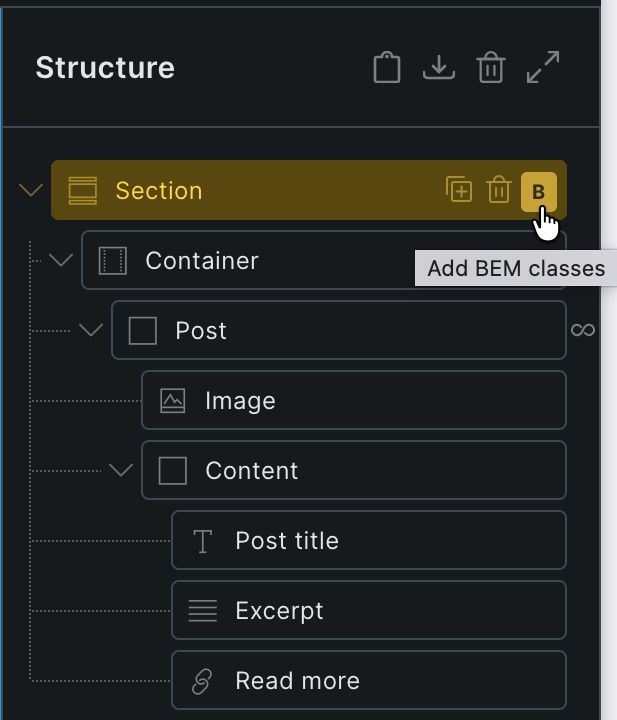
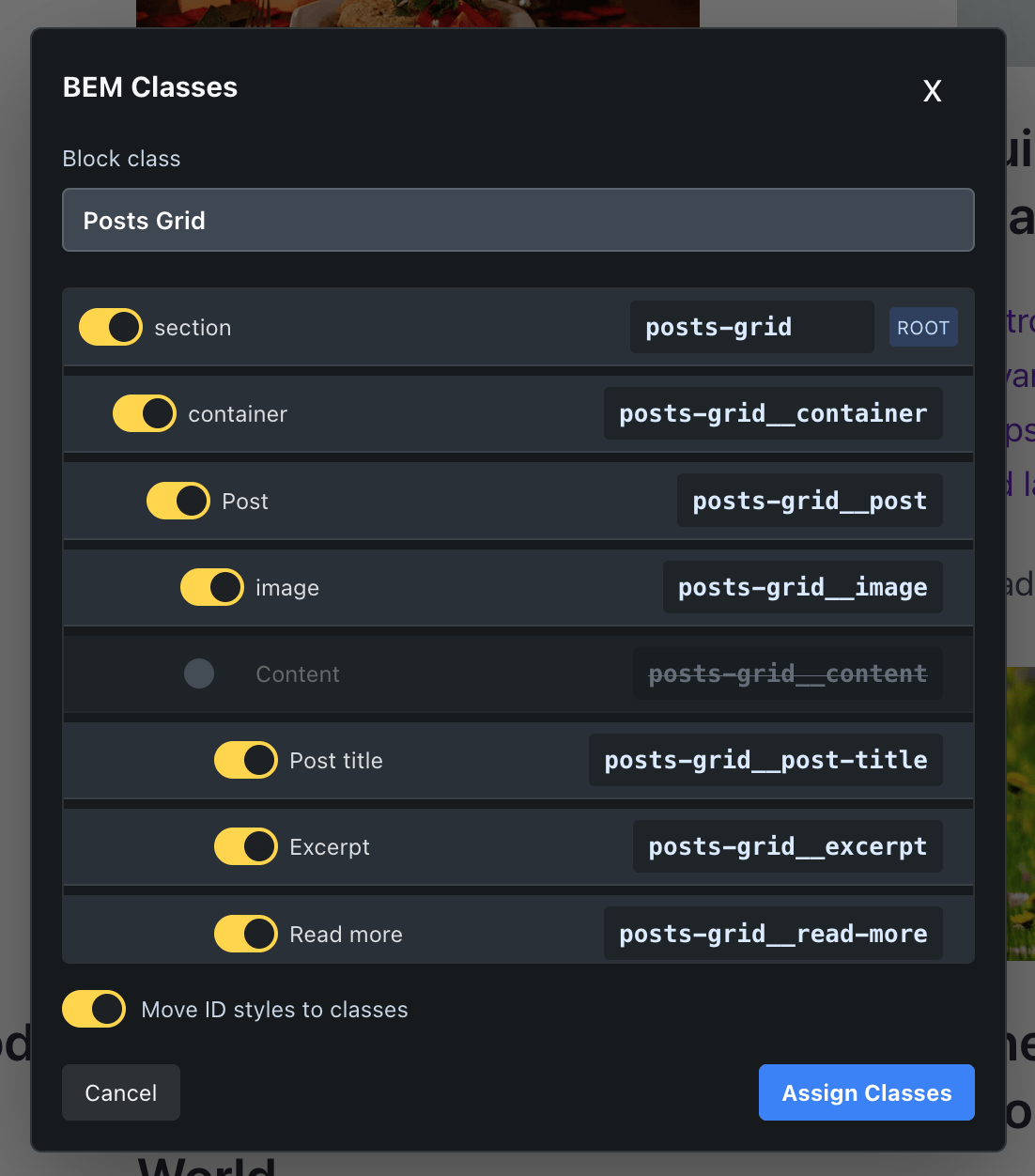
A BEM class action on each structure panel layer to assign global classes in BEM format with a checkbox to move ID styles to the class.
CSS Variables Context Menu (Beta)
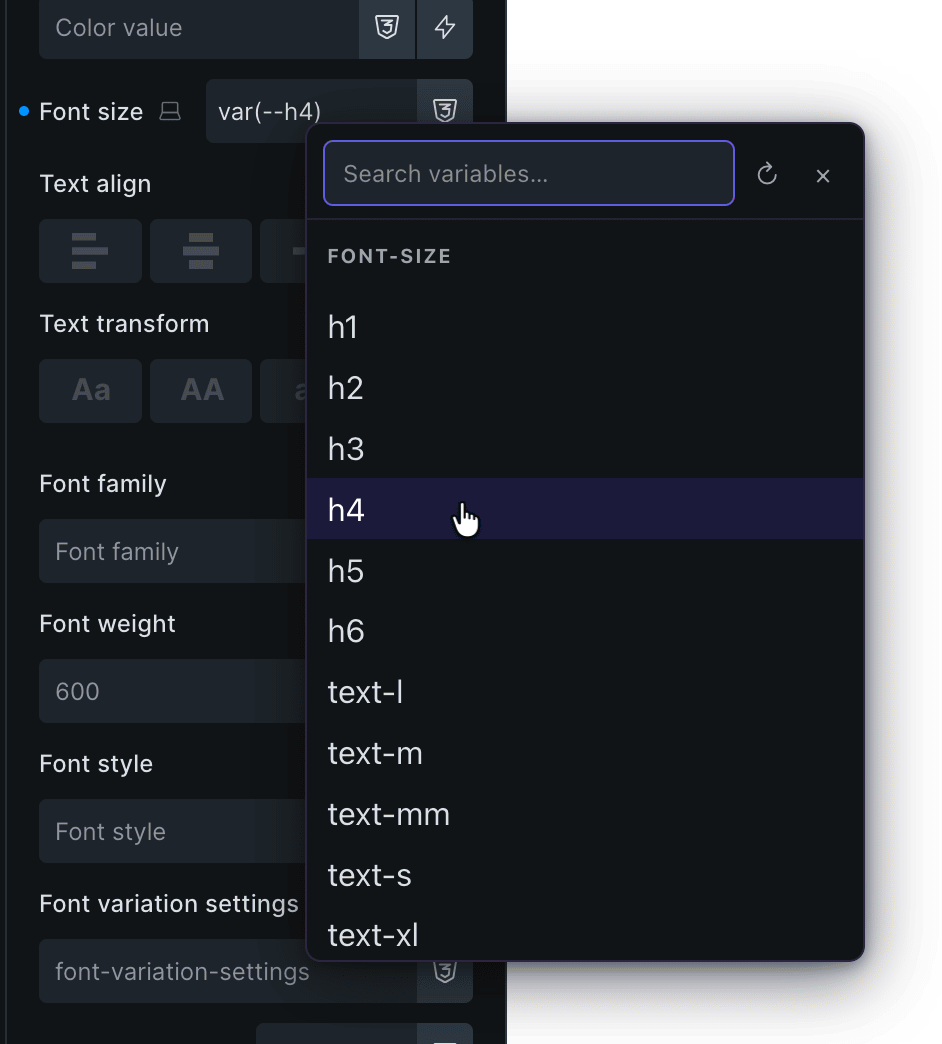
Right-click any CSS value input in the Bricks editor to insert a CSS variable from your registered custom properties – with live preview on hover.
Class Tooltip (Beta)
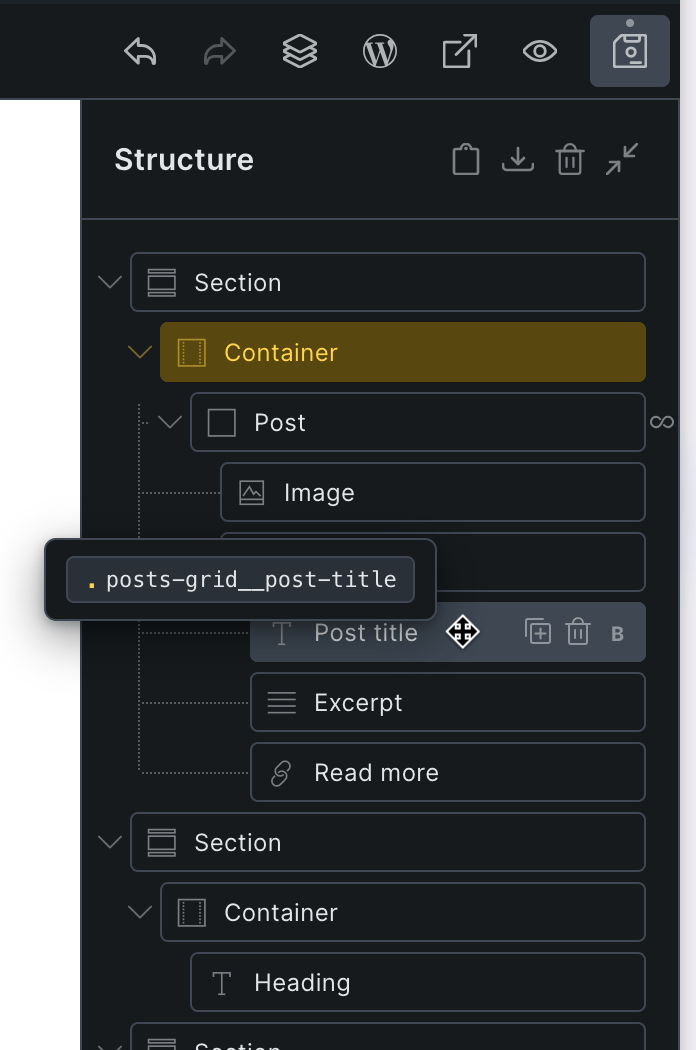
Hold Shift or Cmd/Ctrl while hovering over any element in the Bricks structure panel to see a tooltip listing all active CSS global classes applied to that element. Saves time when writing custom CSS — no need to click elements one by one just to check which classes are applied.
Keyboard Shortcuts
Adding common elements in Bricks editor is now a single key-press away.
- S: Section
- C: Container
- B: Block
- H: Heading
- T: Basic Text
- I: Image
- L: Text Link
- W: Wrap with Block
- R: Rich Text
- D: Div
Alt+H: Toggle :hover
Automatic Installation
Search for bricks navigator from within your WordPress plugins’ Add New page and install.
Manual Installation
- Click on the
Downloadbutton to download the plugin. - Upload the entire
brickslabs-bricks-navigatorfolder to the/wp-content/plugins/directory. - Activate the plugin through the
Pluginsmenu in WordPress.
Screenshots
Reviews


Contributors & Developers
“Bricks Navigator” is open source software. The following people have contributed to this plugin.
Contributors
“Bricks Navigator” has been translated into 4 locales. Thank you to the translators for their contributions.
Translate “Bricks Navigator” into your language.
Interested in development?
Browse the code, check out the SVN repository, or subscribe to the development log by RSS.
Changelog
1.2.0 ( May 26, 2026 )
- Internal Bricks links and external Bricks links now appear under their own submenus.
- Fixed CSS Editor: the CSS editor panel now stays fixed at the bottom of the structure panel at all times. The structure tree scrolls independently above it, so the editor is always accessible regardless of how many elements are on the page. Works correctly with Advanced Themer active.
1.1.9 ( May 25, 2026 )
- Fixed compatibility issues with Advanced Themer.
- Added a setting for Bricks Menu in the WP admin bar.
- Separated Admin Bar Menu and Enhancements into separate accordion sections on the plugin settings page.
- Added full WordPress JavaScript i18n support (wp-i18n) to BEM Classes, CSS Editor, and CSS Variables Context Menu editor enhancements: all user-facing strings are now translatable via standard wp.i18n.__() calls and wp_set_script_translations().
- Fixed .pot file: corrected doubled plugin filename in source-file references (brickslabs-brickslabs-bricks-navigator.php brickslabs-bricks-navigator.php).
1.1.8 ( May 21, 2026 )
- Added Class Tooltip enhancement (Beta): hold Shift or Cmd/Ctrl while hovering over any element in the Bricks structure panel to instantly see a tooltip listing all active CSS global classes on that element — no need to select elements one by one.
- Modernized all JavaScript files to ES6+ syntax: arrow functions,
const/let, optional chaining (?.), nullish coalescing (??), template literals,for...of, destructuring, and spread across all six enhancement modules.
1.1.7 ( May 20, 2026 )
- Improved CSS Variables Context Menu: added “All / Rel” toggle button to switch between relevant-only and all variables; preference is persisted to localStorage so custom design system users only set it once.
- Improved CSS Variables Context Menu: auto-fallback to all variables when category filtering returns no results, ensuring custom-prefixed CSS variables like
--utopia-space-xsand--brand-color-primaryare never silently hidden. - Improved CSS Variables Context Menu: added unanchored regex patterns for color (
-color-,-clr-), spacing (-space-,-spacing-,-gap-), and font-size (-step-) to correctly classify custom-prefixed variables into their categories. - Fixed Auto-select Class: replaced
hasOwnPropertycheck withArray.isArrayto prevent a TypeError crash when_cssGlobalClassesexists on an element but is not an array (e.g. after a malformed JSON import). - Fixed Keyboard Shortcuts: native
<select>dropdowns inside the Bricks panel are now correctly treated as editable targets, preventing shortcuts from firing while a dropdown is focused. - Removed unused internal constant
CACHE_ATTRfrom the CSS Variables Context Menu module.
1.1.6 ( May 20, 2026 )
- Fixed translations not loading: text domain renamed from
bricks-navigatortobrickslabs-bricks-navigatorto match the plugin slug, which is how WordPress names downloaded language pack files. - Fixed translations not loading for users whose profile language differs from the site language:
load_plugin_textdomain()moved fromplugins_loadedtoinit(priority 1) so the effective locale is fully resolved before the translation file is looked up. - Fixed BEM Classes dialog styling in Bricks light mode.
1.1.5 ( May 19, 2026 )
- Fixed plugin internationalization: added
Domain Path: /languagesheader, createdlanguages/directory, and generatedbricks-navigator.potso translations from translate.ww.wp.xz.cn are correctly loaded. - Fixed CSS Variables Context Menu: hovering over a variable now previews the value in the canvas without writing to Bricks undo history (only
inputevent fires on hover;changefires only on click). - Fixed CSS Variables Context Menu: context menu now closes when clicking anywhere on the Bricks canvas.
- Fixed CSS Variables Context Menu: variable scanning now reads from the parent document stylesheets (via
window.parent.document), picking up all CSS custom properties defined on the page rather than only those visible inside the builder iframe. - Fixed external and community admin bar links to include
rel="noopener noreferrer"on alltarget="_blank"links.
1.1.4 ( May 19, 2026 )
- Added CSS Editor enhancement (Beta): inline CSS editor panel in the Bricks element panel with two-way binding between CSS and controls. Editable CSS maps back to layout controls; unmappable properties (color, background, border, etc.) are stored in the element’s Custom CSS field.
- Added BEM Classes enhancement (Beta): adds a BEM class action to each Bricks structure panel layer to choose a block class, review descendants, exclude specific elements, and assign global classes in BEM format. A checkbox to move ID styles to the class is provided.
- Added CSS Variables Context Menu enhancement (Beta): right-click any CSS value input in the Bricks editor to insert a CSS variable from your registered custom properties – live preview on hover.
1.1.3 ( May 14, 2026 )
- Refactored codebase to use OOP with namespaced classes (Settings, Admin_Bar, Editor) replacing procedural include files.
- Added Auto-select Class enhancement: automatically activates the first unlocked class in the classes panel when an element with a class is selected in the editor.
- Added Keyboard Shortcuts enhancement: single-key shortcuts in the Bricks editor to insert elements (S to add Section, C to add Container, B to add Block, D to add Div, T to add Basic Text, H to add Heading, I to add Image, R to add Rich Text, L to add Text Link) and wrap with Block (W); Alt+H to toggle :hover.
- Enhancements section added to the settings page with both new features disabled by default.
- Fixed unwanted gap in the Bricks editor when admin bar was set to show.
- Scoped scrollable overflow CSS to Templates and Pages lists only, fixing Community sub-submenus not opening on hover.
- Settings page styles now loaded via an enqueued stylesheet instead of inline output.
- Editor layout-fix CSS now attached via wp_add_inline_style() instead of a raw echo in wp_head.
- Cached wp_get_theme() and Bricks permission checks for the duration of each request.
- Removed dead inc/pages.php file (legacy kn- prefix, never included).
1.1.2 ( Aug 13, 2025 )
- Fixed the CSS for making long Pages/Templates lists scrollable.
1.1.1 ( Aug 09, 2025 )
- Fixed the plugin settings menu visibility when no third-party plugins are active.
1.1.0 ( Aug 09, 2025 )
- Fixed the CSS for the “Show admin bar in Bricks” setting in Bricks 2.0.
- Improved performance and reliability. Plugin now gracefully degrades when Bricks isn’t available. Resolved cPanel WP Toolkit SSO login issue and prevents similar problems with WP-CLI, automated backups, or any other tools that load WordPress without themes.
- Revamped UI.
- Community, Internal and External Bricks links have been disabled by default. They are now opt-in rather than opt-out.
1.0.3 ( Dec 03, 2023 )
- Fixed the CSS for the “Show admin bar in Bricks” setting for Bricks 1.9.3.
1.0.2 ( Nov 10, 2023 )
- Fixed the CSS for the “Show admin bar in Bricks” setting.
1.0.1 ( Jul 30, 2023 )
- Link to WooCommerce Bricks Settings page now appears only if WooCommerce is active.
- Added “Add New” link under Templates.
- Added “Plugin Settings” node which links to Bricks-specific plugins’ settings pages.
- Added a “Bricks Navigator” Settings page under Bricks admin menu. The Settings page has options to show the admin bar in the editor and hide unwanted items.
- Added a link to plugin’s settings page in the Plugins list screen.
1.0.0 ( May 27, 2022 )
- Initial Release.