Description
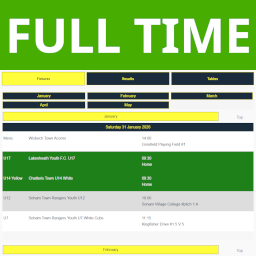
While the FA provide a facility to display your fixtures, results and tables on your website it lacks any kind of decent customisation or ‘prettification’
We utilise that information, already being added by your coaches each week, from FullTime
to show all your teams Fixtures, Results* and Tables* in one place and display it in keeping with your site and club colours.
(* U11 and below do not show Results or Tables)
You will need to be able to log into fulltime admin to configure this.
You only to configure your teams once a season for all your whole club. (OK! maybe twice when you have mini-soccer)
More information about how we get our data may be found on the FA website: Embedding League Tables, Fixtures & Tables (Full-Time Feeds)
Configuration options allow you to show your whole club on one page or each team on their own page.
Allows creation of archives of each season
Docs and support
You can find docs, a FAQ will be created when some FAQ’s become available 🙂
Privacy notices
With the default configuration, this plugin, in itself, does not:
- track users by stealth;
- write any user personal data to the database;
- send any data to external servers;
- use cookies.
It does
* contact fulltime.thefa.com for code snippets and thus the data to drive this plugin on your site
Screenshots


Installation
- Upload the entire
club-statsfolder to the/wp-content/plugins/directory. - Activate the plugin through the Plugins screen (Plugins > Installed Plugins).
You will find the ‘Club Stats’ menu under Settings in your WordPress admin screen.
- Configure a team and then follow the usage guide
** NOTE ** The data updates in the background once it is either expired (24 hours) or it is looking for a result
You may not immediately see any information, a couple of refreshes will fire the background functions and the page will work.
For basic usage, have a look at the plugin’s website, or see the Usage tab in the Settings section
FAQ
Do you have questions or issues with Club Stats? Use these support channels appropriately.
Reviews
There are no reviews for this plugin.
Contributors & Developers
“Club Stats” is open source software. The following people have contributed to this plugin.
Contributors
Translate “Club Stats” into your language.
Interested in development?
Browse the code, check out the SVN repository, or subscribe to the development log by RSS.
Changelog
1.2.2
- Fix – Fixed string not null check as not initialised, needs is_array
- Fix – trace text was not removed from release 1.2.1
1.2.1
- Fix – null check on events caused error if not initialised as a string is returned
1.2.0
- Enhancement – Added Events to show in fixtures
- Enhancement – Hide Fixtures when there are no Fixtures
- Enhancement – Added Processing time to bottom of page.
- Enhancement – Experimenting with straight JSON object for historical processing – historical
1.1.4
- Enhancement – Defined versioning constant for assest versioning to ensure javascript and css is updated along with main plugin
- Fix – Option to force refresh from admin section was lost after 1.1.0 “Settings split”, re-instated option
- Change – Hyperlink to ourselves alongside FA copyright on bottom of page
1.1.3
- Fix – Plugin Check on local machine (WordPress Studio) is a failure (Slow, cached files not current, finds no errors).
Test site found escaping in table layout had been missed.
Escaping fixed.
1.1.2
- Fix – Updated readme.txt to better display updates history as per WordPress semantics
1.1.1
- Fix – Fixed empty historical data display bug
1.1.0
- Enhancement – Added Historical archive option – saves current season for historical display
- Known issue is that you can only display one historical series, i.e. one shortcode per webpage.
- This means you would have to set up page 2025, 2026, 2027, etc if showing all teams (club).
- You can display them but beaware that moving around will fail.
- If you want to display a list of just historical tables or results for a team then it is fine. (no javascript buttons are used to ‘flick’ the display)
- Fix -“Settings” split into smaller settings groups to allow us to create the history
- Fix – admin.php split to reduce file size and increase maintainability, WordPress settings registration moved to seperate file (settings.php)
1.0.3
- Fix – Fixed missing team name from tables menu
- Fix – Fixed css to highlight team in results
- Fix – Fixed tables refresh to reference correct variable ($this->)
1.0.2
- Fix – Cleaned up the frontend code generation
1.0.1
- Enhancement – Added in table refresh when a result is released
1.0.0
= Initial release