
Description
Qaiyo Access Manager extends WordPress’s built-in permission system. Out of the box, WordPress only lets you assign broad roles (editor, author, contributor…). This plugin lets administrators set fine-grained access rules for individual plugins and custom post types, at both the role level and the individual user level — without writing code or touching functions.php.
Hide WooCommerce from editors, give a single freelancer access to one custom post type, stop contributors from seeing a page builder, redirect each role to its own landing page after login, or protect a block of content on the front end with a shortcode. Administrators always keep full access and can never be locked out.
Plugin & content access
- Plugin-level access control — Decide which roles can see and manage each installed plugin. The plugin is hidden from the Plugins screen, its action links are removed, and its admin menu pages are removed and blocked (including direct-URL access) for restricted roles. This governs visibility and admin access; it is not a substitute for a plugin’s own internal capability checks.
- Custom post type access control — Restrict any custom post type (WooCommerce Products, ACF field groups, portfolios, events…) per role, across the admin menu, list/edit queries, single front-end views (with a configurable redirect) and the core REST API. Content types registered with their own capabilities are also enforced at the capability level, so guests and unauthorised roles are blocked, not just hidden.
- Allow / Deny mode per rule — Each rule can either allow only the checked roles, or deny the checked roles and leave everyone else untouched — whichever needs fewer clicks.
- User-level overrides — Allow or deny a specific user regardless of their role. User rules always win over role rules.
- Access Matrix — A bird’s-eye grid of every plugin and post type against every role, so you can audit your whole site at a glance.
- Native capability hints — Next to each plugin and post type, see which roles already hold the relevant WordPress capabilities, so your rules and core roles never silently conflict.
Roles, login & front end
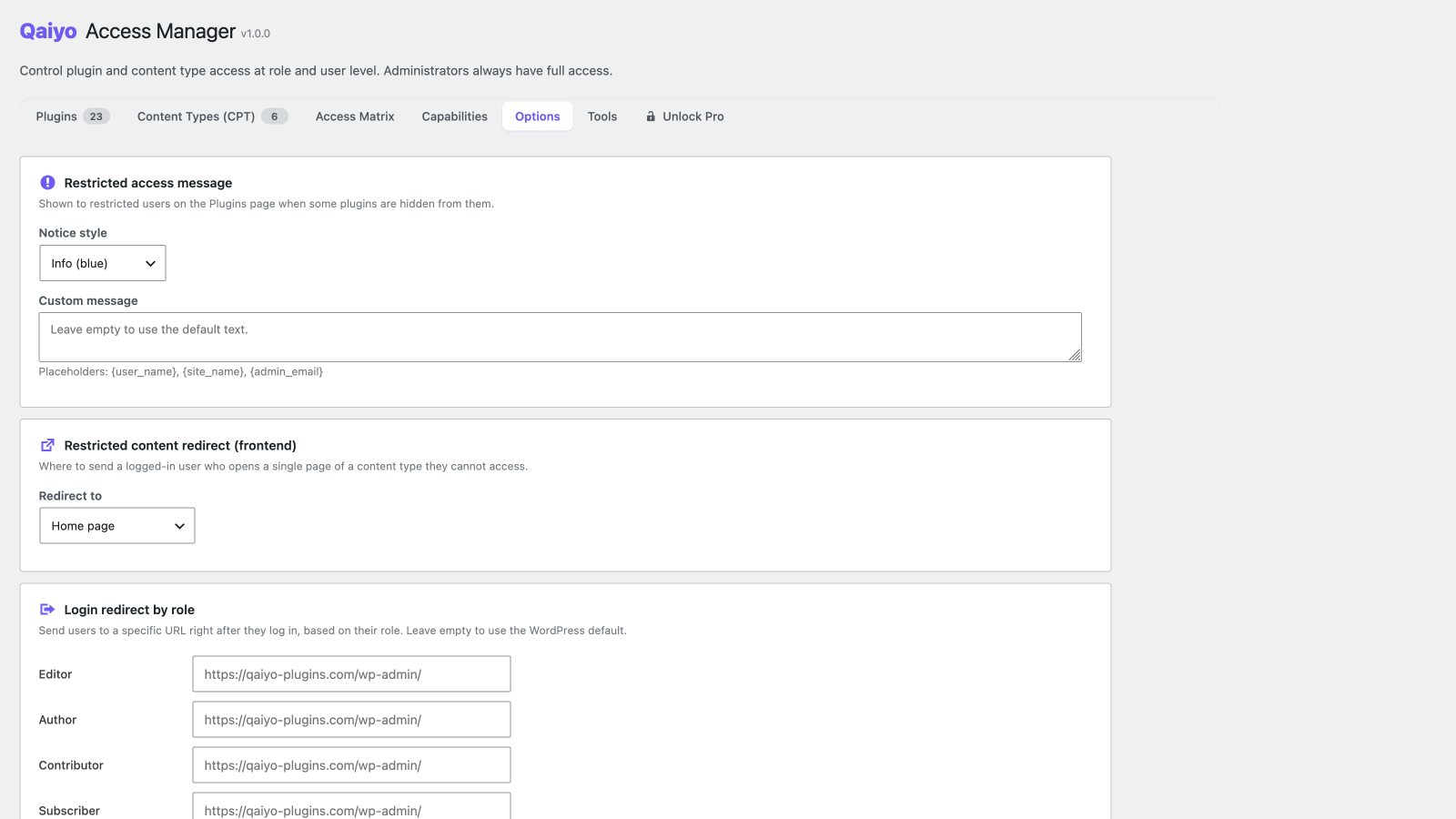
- Login redirect by role — Send each role to its own URL right after login.
- Restricted content redirect — Choose where logged-in users land when they open a single item of a content type they cannot access (home, 404, login or a custom URL).
- Frontend protection shortcode —
[qaiyo_protect role="editor" deny="subscriber" logged_in="yes" cap="edit_posts"]…[/qaiyo_protect]shows or hides content by role, login state or capability, with an optional replacement message. - Customizable restricted notice — Pick the style (info / warning / error / none) and text shown to restricted users, with
{user_name},{site_name}and{admin_email}placeholders.
Admin experience
- Capabilities inspector — A read-only, searchable capability × role matrix that flags core vs plugin capabilities. It never changes your roles — it just shows you what they already hold.
- Dashboard summary widget — A WordPress Dashboard widget showing how many plugins and post types are restricted and how many user-level overrides are active, for an at-a-glance health check.
- Hide the admin bar — Remove the frontend toolbar for selected roles.
- Hide individual admin bar items — Strip specific nodes from the top toolbar per role.
- Hide dashboard widgets — Remove dashboard widgets per role.
- Update permissions — Let non-admin roles update plugins and/or themes without granting full administrator access (applied at runtime, fully reversible).
- JSON import / export — Back up every rule to a JSON file, or migrate your whole configuration to another site.
- Explore Qaiyo plugins — An in-admin overview of the Qaiyo plugin family, with a notice on your Qaiyo screens when a newer version of an installed Qaiyo plugin is available.
Built for the real world
- Administrators are protected — Anyone with
manage_optionsalways has full access and cannot be restricted. - AJAX save — Rules are saved without a page reload.
- Translation ready — Ships with 11 languages: English, Hungarian, German, French, Spanish, Japanese, Portuguese, Italian, Russian, Turkish and Polish.
- Translation-plugin compatible — Plays nicely with WPML, Polylang and TranslatePress; internal translation post types are excluded automatically.
- WordPress standards — Nonce verification, capability checks, sanitized input and escaped output throughout.
Looking for more? Qaiyo Access Manager Pro adds an editable click-to-toggle matrix, rule presets, user groups, bulk actions, temporary (time-limited) access, an activity log, admin page hiding, meta box control and email notifications.
Screenshots



Installation
- Upload the
qaiyo-access-managerfolder to/wp-content/plugins/, or install it from the Plugins Add New screen. - Activate the plugin from the WordPress admin Plugins page.
- Open Access Manager in the admin sidebar.
- Use the Plugins and Post Types tabs to set role and user-level rules, and the Settings tab for login redirects, the restricted notice and admin-bar options.
FAQ
-
What happens if no roles are assigned to a plugin or CPT?
-
It stays accessible to everyone. Rules are opt-in: an item is only restricted once you add a rule for it.
-
Can administrators be restricted?
-
No. Anyone with the
manage_optionscapability always keeps full access, by design, so you can never lock yourself out. -
How does the user-level override work?
-
User rules take priority over role rules. A denied user cannot access the item even if their role is allowed, and an allowed user can access it even if their role is not.
-
What is the difference between Allow and Deny mode?
-
Allow mode means only the checked roles get access. Deny mode means the checked roles lose access and everyone else keeps it. Pick whichever is fewer clicks for your situation.
-
How do I protect content on the front end?
-
Use the shortcode, for example:
[qaiyo_protect role="editor,shop_manager"]Visible only to these roles.[/qaiyo_protect]. Combine the attributesrole(allow list),deny(deny list),logged_in(yes/no),cap(a capability) andmessage(text shown instead when the content is hidden). -
Does the Capabilities tab change my roles?
-
No. It is a read-only inspector. Editing capabilities is intentionally out of scope so WordPress’s core role system stays untouched.
-
Will restricting a custom post type also block it on the front end and in the REST API?
-
Yes. CPT rules are enforced across the admin menu, list and edit queries, single front-end views (with a configurable redirect), and the core (
/wp/v2/) REST API — and guests are blocked too, not just logged-in users. For content types registered with their own capabilities (most plugin CPTs, e.g. WooCommerce Products), the rules are additionally enforced at the WordPress capability level, which also covers custom REST controllers. Content types that share the generic post/page capabilities are enforced through the menu, query, front-end and core REST layers rather than at the capability level, to avoid affecting unrelated content. -
Does plugin-level access fully disable a plugin for a role?
-
It removes the plugin from the Plugins screen and removes and blocks its admin menu pages (including direct-URL access) for the restricted roles, which stops normal use through the dashboard. It does not rewrite that plugin’s own internal capabilities or its private AJAX/REST endpoints. For a hard capability boundary around a specific plugin feature, combine plugin-level rules with the plugin’s own role settings or a capability manager.
-
Is it compatible with WPML, Polylang and TranslatePress?
-
Yes. The plugin excludes the internal post types used by translation plugins and does not interfere with language-based content filtering.
-
What happens when the plugin is uninstalled?
-
By default your rules are preserved so they return if you reinstall. You can opt in (Settings Tools) to delete all rules and settings on uninstall instead.
Reviews
There are no reviews for this plugin.
Contributors & Developers
“Qaiyo Access Manager” is open source software. The following people have contributed to this plugin.
Contributors
“Qaiyo Access Manager” has been translated into 1 locale. Thank you to the translators for their contributions.
Translate “Qaiyo Access Manager” into your language.
Interested in development?
Browse the code, check out the SVN repository, or subscribe to the development log by RSS.
Changelog
1.1.0
- Security: custom post type rules now also block logged-out visitors. Previously guests were treated as allowed, so allow-list rules did not protect single front-end views or the REST API against them.
- Security: plugin-level rules now remove and block (including direct-URL access) a restricted plugin’s own admin menu pages — not just hide it from the Plugins screen. Single-file plugins are covered too.
- Hardening: CPT capability enforcement now applies only to content types with their own custom capabilities, and resolves the real post type from the target object — preventing over- or under-blocking of content types that share the core post/page capabilities.
- Correctness: JSON payloads (rule save, import, options) are now decoded before sanitization instead of after, so multi-line and special characters are preserved.
- UX: added a clear security warning to the plugin/theme update-permissions setting.
- Performance: cached admin-menu ownership resolution and bulk-loaded override users to avoid per-row queries.
- Docs: corrected developer-hook names (qaiyo_access_manager_* prefix) and clarified the scope of plugin- and CPT-level access.
1.0.0
- Initial release.
- Plugin-level access control per role.
- Custom post type access control per role (wp-admin, front end and REST API).
- Allow / Deny mode for every rule.
- User-level overrides (allow/deny per user), taking priority over role rules.
- Access Matrix overview of every plugin and post type against every role.
- Read-only Capabilities inspector (core vs plugin capabilities flagged).
- Native capability hints shown next to each plugin and post type.
- Dashboard summary widget (restricted plugins / post types / active user overrides).
[qaiyo_protect]frontend content protection shortcode (role / deny / logged_in / cap / message).- Login redirect by role.
- Restricted content frontend redirect (home / 404 / login / custom URL).
- Customizable restricted-access notice (style + text with placeholders).
- Hide the frontend admin bar, individual admin bar items and dashboard widgets per role.
- Plugin / theme update permissions for non-admin roles (runtime, reversible).
- JSON import / export of all rules.
- “Explore Qaiyo plugins” overview with update notices for installed Qaiyo plugins.
- 11 bundled languages: English, Hungarian, German, French, Spanish, Japanese, Portuguese, Italian, Russian, Turkish, Polish.
- Compatible with WPML, Polylang and TranslatePress.