
Description
ReplyMind integrates OpenAI (GPT) and Anthropic Claude directly into your WordPress comment workflow. Generate thoughtful, on-topic replies to reader comments without leaving your admin dashboard. Replies are posted as the actual post author — complete with their avatar and name — making every response feel personal and authentic.
Two reply modes:
- Suggestion Mode — The AI drafts a reply. You review it, edit if needed, and publish with one click. Full control, none of the typing.
- Auto Reply Mode — Replies are posted automatically as soon as a new comment is approved. Great for high-volume sites.
Key features:
- Author-aware replies — replies are attributed to the post author (with their avatar and name), not a generic site name
- Supports OpenAI (GPT-4o Mini, GPT-3.5 Turbo, GPT-4o, GPT-4 Turbo, GPT-4) and Anthropic Claude (Haiku 4.5, Sonnet 4.6, Opus 4.6)
- Five reply tones: Professional, Friendly, Casual, Empathetic, Formal
- Three response lengths: Short (2-3 sentences), Medium (1 paragraph), Detailed (2-3 paragraphs)
- Reply language: Auto-detect or choose from 10 supported languages (English, Spanish, French, German, Italian, Portuguese, Hindi, Arabic, Japanese, Chinese)
- Custom system prompt to tailor the AI instructions to your brand voice
- AI Reply column in the Comments list showing draft status, published status, or errors at a glance
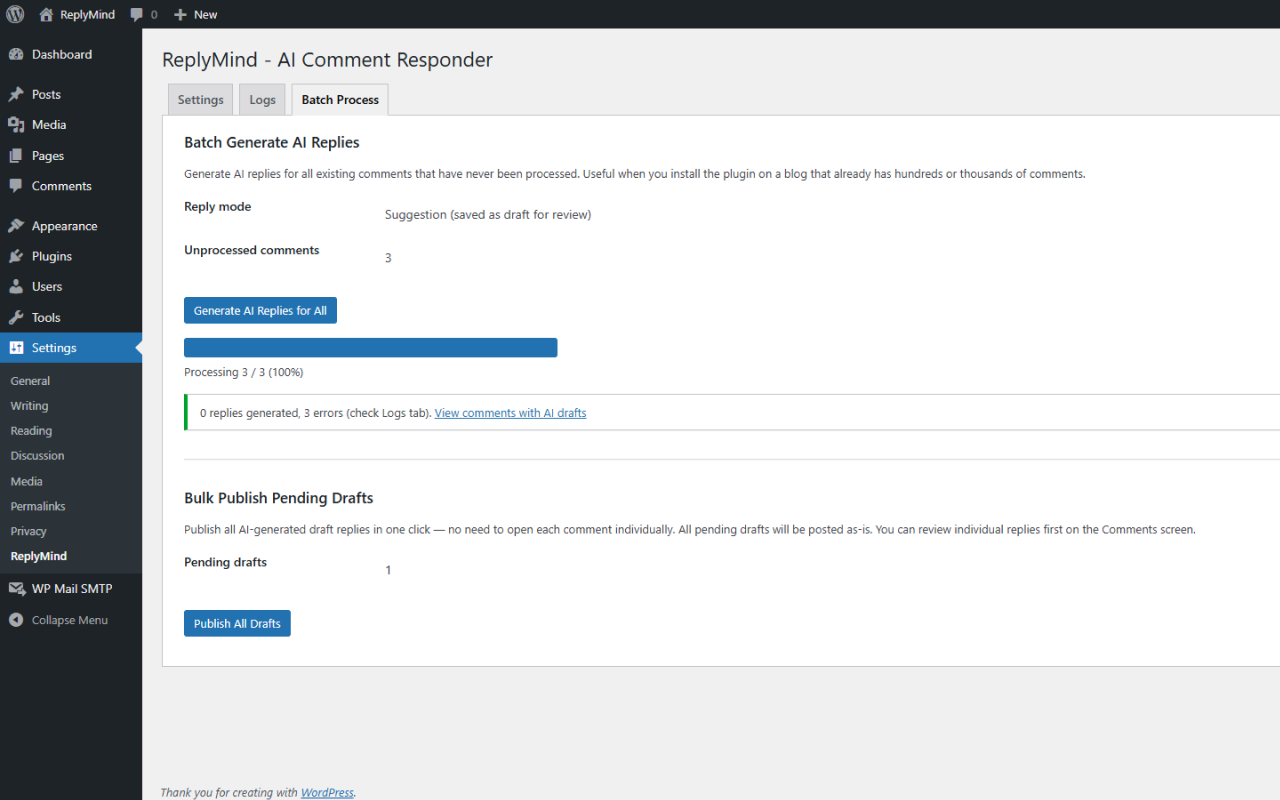
- Batch processing — generate AI replies for hundreds or thousands of existing comments with a live progress bar
- Bulk publish — publish all pending AI drafts in one click (Suggestion Mode)
- Reply log — track every generated reply with timestamp, post, and full reply text
- Developer filter
replymind_send_comment_datato prevent specific comments from being sent to the AI
External Services
This plugin connects to external AI services to generate comment replies. By using this plugin, comment content from your site is sent to the service you configure. Please review the privacy policy of your chosen provider before use.
OpenAI
- Service: OpenAI API (GPT models)
- Data sent: The comment text and post context (title and excerpt) are sent to generate a reply.
- API endpoint: https://api.openai.com/v1/chat/completions
- Terms of Service: https://openai.com/policies/terms-of-use
- Privacy Policy: https://openai.com/policies/privacy-policy
Anthropic Claude
- Service: Anthropic API (Claude models)
- Data sent: The comment text and post context (title and excerpt) are sent to generate a reply.
- API endpoint: https://api.anthropic.com/v1/messages
- Privacy Policy: https://www.anthropic.com/legal/privacy
Data is sent only when an AI reply is generated (manually or via batch processing). No data is stored by the plugin developer. Only the provider you configure in Settings receives data.
Privacy Policy
This plugin sends comment text and post context (title and excerpt) to the AI provider you configure (OpenAI or Anthropic) for the sole purpose of generating a reply. No data is stored by the plugin developer. A WordPress privacy data exporter and eraser are included.
- OpenAI Privacy Policy: https://openai.com/policies/privacy-policy
- Anthropic Privacy Policy: https://www.anthropic.com/legal/privacy
Screenshots




Installation
- Upload the
replymind-ai-comment-responderfolder to/wp-content/plugins/. - Activate the plugin through Plugins > Installed Plugins.
- Go to Settings > ReplyMind.
- Enter your API key (OpenAI or Anthropic), choose your provider, enable the plugin, and save.
- Visit Comments in your admin. Each approved comment now has a Generate AI Reply row action.
Getting an API key:
- OpenAI: https://platform.openai.com/account/api-keys
- Anthropic: https://console.anthropic.com/account/api-keys
FAQ
-
Does this plugin post replies automatically?
-
Only if you choose Auto Reply Mode in Settings. The default is Suggestion Mode, which saves a draft for you to review before anything is posted publicly.
-
Which AI provider should I use?
-
Both work well. OpenAI’s GPT-4o Mini and Anthropic’s Claude Sonnet 4.6 offer the best balance of quality and cost. If you are unsure, start with GPT-4o Mini.
-
Can I edit the reply before it goes live?
-
Yes. In Suggestion Mode, click Edit & Publish on any comment row to open an editable modal pre-filled with the AI draft. Edit freely, then click Publish Reply.
-
What is the Batch Process tab for?
-
If you install the plugin on a site that already has hundreds or thousands of comments, the Batch Process tab lets you generate AI replies for all of them at once with a live progress bar. In Suggestion Mode you can then bulk-publish all drafts from the same tab.
-
Will this break my existing comments?
-
No. The plugin only adds replies as child comments. It never modifies existing comment content.
-
Is comment content sent to a third party?
-
Yes. Comment text is sent to the AI provider you select (OpenAI or Anthropic) to generate a reply. Please review the External Services section above and each provider’s privacy policy. Use the
replymind_send_comment_datafilter to exclude specific comments from being processed. -
Can I use my own system prompt?
-
Yes. The System Prompt field in Settings lets you provide custom instructions the AI follows for every reply. For example: “You are a customer support agent for Acme Co. Always offer to escalate to human support if the customer is frustrated.”
-
How are API costs calculated?
-
Each reply generation is one API call. Token usage depends on comment length, post context, and reply length setting. GPT-4o Mini and Claude Haiku 4.5 are the most cost-effective models.
-
Whose name appears on the AI reply?
-
The reply is attributed to the post author: their WordPress display name, avatar, and email are used. If a post has no author, the reply falls back to the site name and admin email. Multi-author blogs work automatically: a comment on Jane’s post gets a reply from Jane, a comment on John’s post gets a reply from John.
-
I see a provider/model mismatch warning. What do I do?
-
Go to Settings > ReplyMind and make sure the selected Model matches the selected AI Provider. OpenAI models start with
gpt-; Claude models start withclaude-. -
How can I stop a specific comment from being sent to the AI?
-
Use the
replymind_send_comment_datafilter in your theme’s functions.php or a custom plugin:add_filter( 'replymind_send_comment_data', function( $allow, $comment ) { // Return false to skip this comment. if ( (int) $comment->comment_post_ID === 123 ) { return false; } return $allow; }, 10, 2 );
Reviews
There are no reviews for this plugin.
Contributors & Developers
“ReplyMind – AI Comment Responder” is open source software. The following people have contributed to this plugin.
Contributors
Translate “ReplyMind – AI Comment Responder” into your language.
Interested in development?
Browse the code, check out the SVN repository, or subscribe to the development log by RSS.
Changelog
1.0.0
- Initial release.
- Author-aware replies – AI replies attributed to the actual post author with avatar, name, and email.
- OpenAI and Anthropic Claude provider support.
- Suggestion Mode and Auto Reply Mode.
- Five reply tones: Professional, Friendly, Casual, Empathetic, Formal.
- Three response lengths: Short, Medium, Detailed.
- Auto-detect or fixed reply language (10 languages supported).
- Custom system prompt.
- AI Reply column in Comments list with inline draft preview.
- Edit & Publish modal for reviewing drafts before posting.
- Batch Generate – process all existing comments with a progress bar.
- Bulk Publish – publish all pending drafts at once.
- Reply log with full generated text.
- Provider/model mismatch detection.
replymind_send_comment_datafilter for developer control.