
Description
Stop letting interested borrowers leave without a trace. If you run a lending, mortgage, broker, auto-finance or financial-advisory website, your most valuable visitors are the ones quietly working out “how much will this cost me a month?” — and most of them slip away before you ever know they were there.
Smart Loan Calculator turns that moment of high intent into a lead. Visitors get an instant, professional breakdown of their monthly payment, total interest and full repayment schedule — and right when they’re most engaged, you capture their name, email and phone.
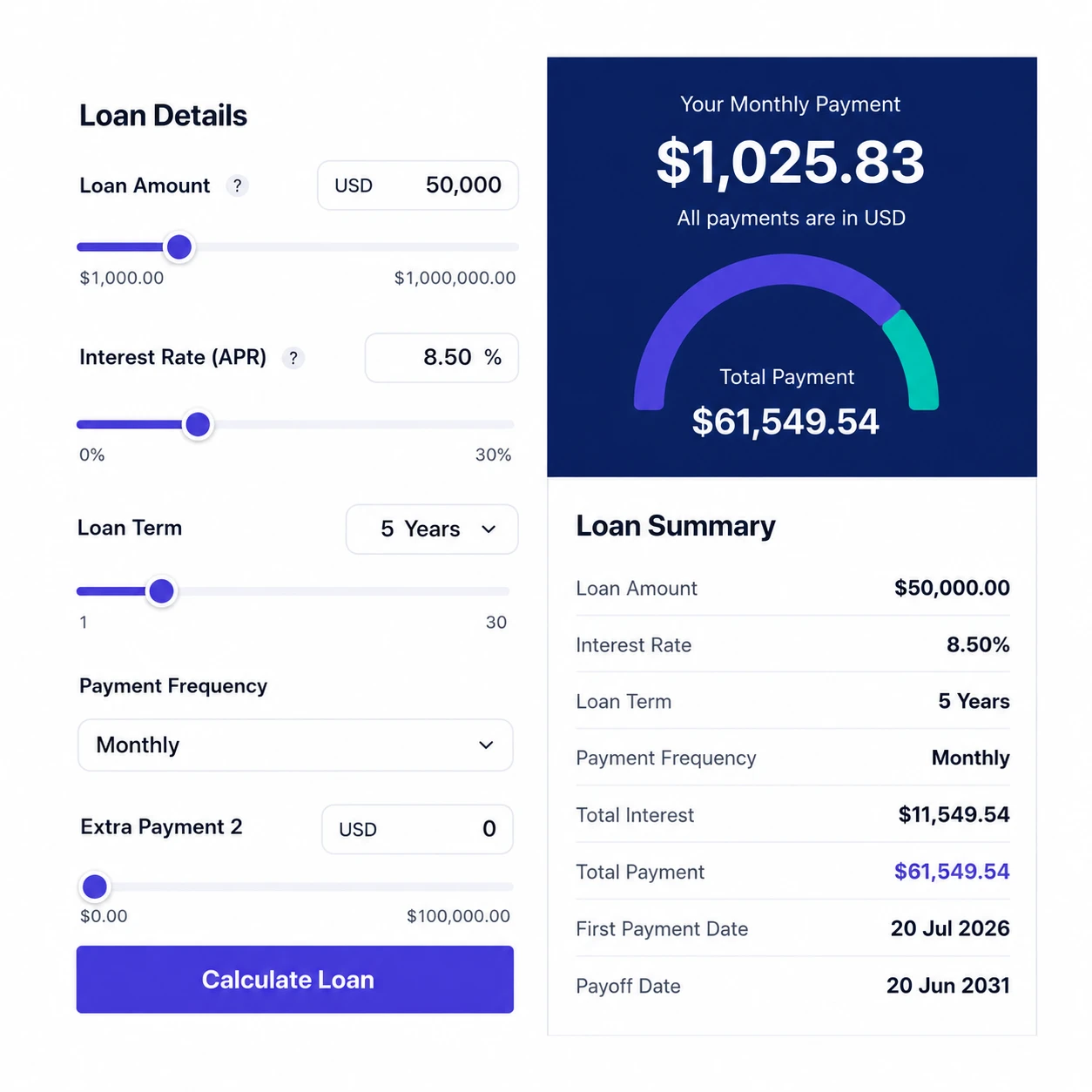
Your visitors enter the loan amount, interest rate (APR), term and payment frequency, then see:
- A bold, clear monthly payment figure
- A total payment breakdown with a clean donut chart
- A full amortization schedule (monthly or yearly view) with an interactive chart
- The option to download, email or share their results
It’s fully responsive, looks great on every device, and is built to match your brand — not stick out like a generic widget.
Why money-lending sites love it
- Capture leads at peak intent. The lead form appears the moment a visitor calculates — when they’re actively shopping for finance. Make it optional or required.
- Every lead, fully owned by you. Names, emails and phone numbers are stored securely in your own WordPress database (encrypted at rest) and can be exported to CSV. No third-party platform, no per-lead fees.
- Get notified instantly. New leads can be emailed straight to your inbox, and results emailed to the visitor — keeping your brand in front of them.
- Looks like part of your site. Match your exact colors, fonts, corner radius, logo and labels so the calculator feels native, not bolted on.
- Speak your customer’s language. Rename every label, placeholder and tooltip — perfect for any niche, region or language.
- Total control of the inputs. Set smart defaults, lock fields, or hide the ones you don’t need so visitors only see what’s relevant to your products.
- Any currency, any format. Pick from a built-in currency list (or add your own), with US and EU number formatting.
Add it to any page, post or widget with a single shortcode:
[smart-loan-calc]
Free
- Full calculator, amortization schedule & charts
- Choose your currency from a built-in list (US number format)
- Lead capture — the first 5 leads are fully visible
Pro
- Match your brand: colors, fonts, layout & logo
- Edit every label, placeholder & tooltip
- Show / hide / lock fields and set custom defaults
- Show or hide the amortization schedule
- Optional or required lead form, with visitor + admin email notifications
- Unlock and export all leads to CSV
- Add your own currency and EU / custom number formats
- Email & shareable result links, and remove branding
Every install starts with a 7-day Pro trial — no card required. When it ends, the calculator simply switches to Free; nothing breaks and your data stays.
Screenshots


Installation
- Upload the plugin to
/wp-content/plugins/and activate it. - Open Loan Calculator Settings to set your currency and (on Pro) your colors, labels, fields and lead form.
- Paste the shortcode
[smart-loan-calc]into any page, post or widget. - Watch your leads roll in under Loan Calculator Leads.
FAQ
-
How do I add the calculator to a page?
-
Just paste the shortcode
[smart-loan-calc]into any page, post, or widget area and publish. It works in the block editor, Classic editor, and most page builders. You can add it to as many pages as you like. -
Can I use my own currency?
-
Yes. You can pick from a built-in list of popular currencies for free. On Pro you can also enter a custom currency symbol and code, and choose US (1,234.56) or EU (1.234,56) number formatting so it matches your region.
-
Can I match the calculator to my website’s design?
-
Absolutely. On Pro you can set your primary and accent colors, button text color, chart colors, font, corner radius and logo. The calculator uses scoped styling, so it won’t clash with your theme and won’t be overridden by it.
-
Can I change the labels and text?
-
Yes. On Pro you can rename every label, placeholder, tooltip, button and table heading — including the lead form text — so the calculator fits your niche and language perfectly.
-
Can I hide or lock some input fields?
-
Yes. On Pro you can hide fields you don’t need, lock fields to a fixed value, and set custom default values and ranges for each input.
-
How does lead capture work?
-
When a visitor clicks “Calculate”, a short form asks for their name, email and (optionally) phone. You decide whether the form is optional (they can skip it) or required (they must submit it to see results). Captured leads appear under Loan Calculator Leads.
-
Where are my leads stored? Do I own them?
-
All leads are stored securely in your own WordPress database. They are 100% yours — there is no third-party lead platform and no per-lead charge. On Pro you can view every lead and export them all to CSV.
-
What’s the difference between Free and Pro leads?
-
On Free, the calculator still captures leads and shows you the first 5 in full; additional leads are saved but their email and phone are masked. Upgrading to Pro instantly unmasks every lead and unlocks CSV export.
-
On Pro, visitors can download a clean results receipt, email their results to themselves, or copy a shareable link that reopens the calculation.
-
Will it slow down or break my site?
-
No. The calculator is lightweight, loads only where the shortcode is used, and is fully responsive on phones, tablets and desktops.
Reviews

Contributors & Developers
“Smart Loan Calculator” is open source software. The following people have contributed to this plugin.
Contributors

Translate “Smart Loan Calculator” into your language.
Interested in development?
Browse the code, check out the SVN repository, or subscribe to the development log by RSS.
Changelog
1.4
- Full redesign: modern UI, amortization charts (monthly/yearly), currency & number-format options, brandable design, editable labels, encrypted lead capture, and downloadable / emailable / shareable results.