

Description
Looking to display your website visitor’s IP address, location, browser details, and other information on your WordPress site? Then “User IP and Location” plugin is exactly what you need!
This plugin is very simple to set up and use. Just install it, and you can start showing visitor information anywhere on your website using easy shortcodes. You can put these shortcodes in your posts, pages, sidebar, footer – anywhere you want!
The best part? We use the reliable and free IP-API service to get all the location data, so the information is always accurate and up-to-date.
Works with Caching Plugins!
Are you using WP-Rocket, W3 Total Cache, or any other caching plugin? No problem at all! The plugin is built to work perfectly with all caching plugins. Your visitors will always see their own correct information, not some cached data from another visitor.
New in Version 5.0.0 – Rebuilt Inside, Same Simple Use
Version 5.0.0 is a full internal rewrite for better reliability and easier maintenance. Everything you already use keeps working exactly the same – the same shortcodes, the same settings, the same developer function and REST API. On top of that, browser detection now correctly recognises modern Edge and Opera, the “Clear Cache” button works on sites using Redis/Memcached object caching, and several smaller issues are fixed. See the changelog for the full list.
Advanced Features:
- Multi-Language Support – Get location names in 8 different languages (English, German, Spanish, Portuguese, French, Japanese, Chinese, Russian)
- PRO API Key Support – Use your premium IP-API key for higher limits and HTTPS security
- Smart Caching System – Built-in server-side caching with customizable expiration times (1 hour to 1 week)
- Conditional Content – Show different content to visitors from specific countries, regions, or cities
- Block Editor Support – Visitor Info and Conditional Content blocks, plus a handy “{” inline insert for dropping values into a sentence
- Developer Tools – PHP functions and REST API endpoints for custom development
- Customizable Output – Change “Yes/No” text to any language or format you prefer
Here are all the shortcodes you can use:
[userip_location type="ip"] - Shows visitor's IP address
[userip_location type="continent"] - Shows continent name
[userip_location type="country"] - Shows country name
[userip_location type="countrycode"] - Shows country code (like IN, US, UK)
[userip_location type="region"] - Shows region code
[userip_location type="regionname"] - Shows region/state name
[userip_location type="city"] - Shows city name
[userip_location type="zip"] - **NEW!** Shows ZIP/postal code
[userip_location type="lat"] - Shows latitude
[userip_location type="lon"] - Shows longitude
[userip_location type="timezone"] - Shows timezone
[userip_location type="currency"] - Shows local currency
[userip_location type="isp"] - Shows internet provider name
[userip_location type="mobile"] - Shows if visitor is on mobile network
[userip_location type="proxy"] - Shows if visitor is using proxy
[userip_location type="hosting"] - Shows if IP is from hosting provider
[userip_location type="browser"] - Shows browser name
[userip_location type="os"] - Shows operating system
[userip_location type="flag" height="auto" width="50px" vertical_align="middle"] - Shows country flag
[userip_localtime] - **NEW!** Shows visitor's current local time
[userip_localdate] - **NEW!** Shows visitor's current local date
Smart Conditional Content:
Show different content to visitors from different places! Perfect for targeted marketing, regional offers, or localized messages.
[userip_conditional country="US,IN"]Content for US and India visitors only[/userip_conditional]
[userip_conditional country_not="CN,RU"]Content for everyone except China and Russia[/userip_conditional]
[userip_conditional region="CA,TX"]Special offers for California and Texas![/userip_conditional]
[userip_conditional city="Mumbai,Delhi"]Mumbai and Delhi exclusive deals[/userip_conditional]
About the Flag Shortcode:
When using the flag shortcode, you can control its size and position. The height, width, and vertical_align options are all optional. By default, height is auto, width is 50px, and it aligns in the middle. You can change these as per your needs.
Block Editor (no shortcode typing needed):
Prefer blocks? In the editor, click the (+) inserter and add:
- Visitor Info – shows a single value (IP, city, country, flag, local time, and more); pick the field from a dropdown.
- Conditional Content – show the inner content only to visitors from the countries, regions, or cities you choose.
Want a value inside a sentence, like “Welcome {country}”? In any paragraph just type { and a menu appears – pick Country, City, IP, Flag, etc. and it is inserted right where you are typing. You can also type a shortcode directly in a paragraph, for example Welcome [userip_location type="country"].
Why Choose User IP and Location Plugin?
- Super Easy Setup – Just install and activate, that’s it!
- Works with All Caching Plugins – WP-Rocket, W3 Total Cache, you name it!
- Fast Loading – Uses modern AJAX technology so it doesn’t slow down your site
- Lots of Information – IP, country, city, flag, browser, OS, ISP, and much more
- Multi-Language Support – Location names in 8 different languages
- PRO API Support – Use premium IP-API keys for higher limits and HTTPS
- Smart Caching – Server-side caching with customizable expiration (1 hour to 1 week)
- New Features – ZIP code and local time shortcodes added
- Smart Content – Show different content to visitors from different countries, regions, or cities
- Always Updated – Uses reliable IP-API service for accurate data
- Developer Friendly – Includes PHP functions and REST API for custom development
- Customizable – Change output text, caching settings, and more from admin panel
Perfect for bloggers, businesses, and developers who want to personalize their website based on visitor location!
Credits
This awesome plugin is created by the talented team at HeySERP .
Want to learn more about WordPress? Check out our website TheGuideX where we share helpful tutorials on:
- How to Get User IP and Location in WordPress
- Common WordPress Errors & How to Fix Them
- Best WordPress Ad Management Plugins
…and many more helpful WordPress tutorials in simple language!
Screenshots

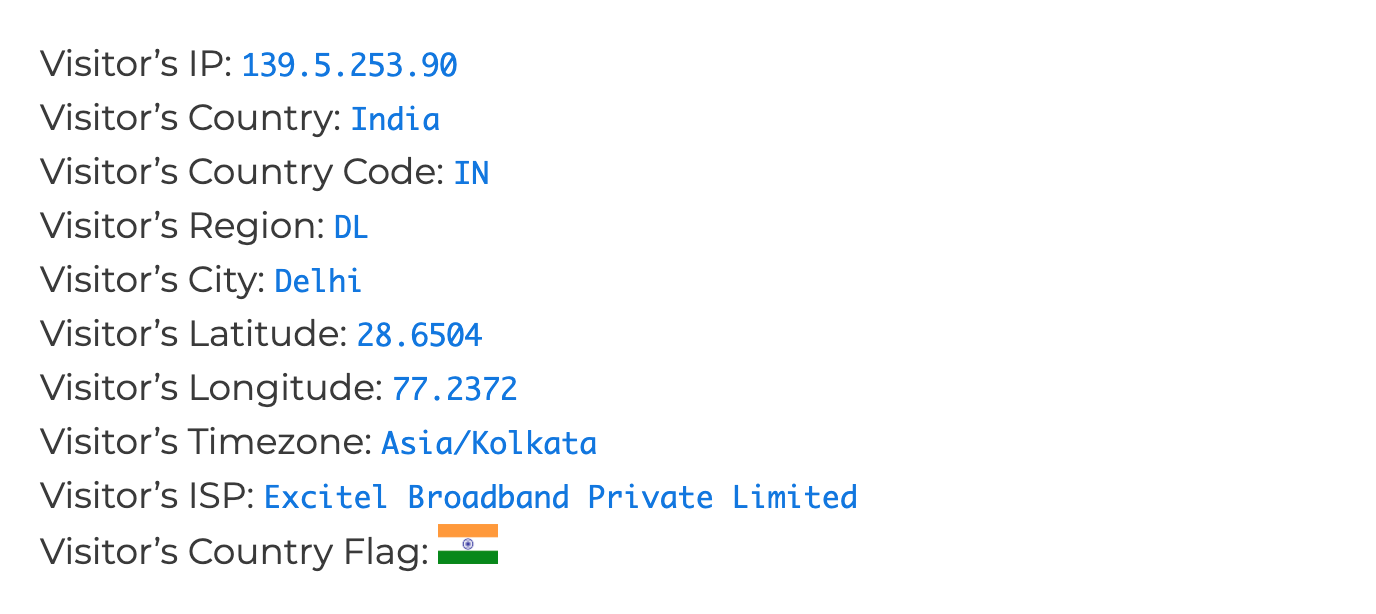
Blocks
This plugin provides 2 blocks.
- Visitor Info
- Conditional Content
Installation
Installing this plugin is very easy! You can do it in two ways:
Method 1: Direct Installation (Recommended) 1. Go to your WordPress admin dashboard 2. Click on ‘Plugins’ ‘Add New’ 3. Search for “User IP and Location” 4. Click “Install Now” and then “Activate” 5. Done! You can now use the shortcodes anywhere on your site
Method 2: Upload Installation 1. Download the plugin zip file 2. Go to ‘Plugins’ ‘Add New’ ‘Upload Plugin’ 3. Choose the zip file and click “Install Now” 4. Click “Activate” after installation 5. That’s it!
Using the Shortcodes: Once activated, you can use any of these shortcodes in your posts, pages, or widgets:
[userip_location type="ip"]
[userip_location type="continent"]
[userip_location type="country"]
[userip_location type="countrycode"]
[userip_location type="region"]
[userip_location type="regionname"]
[userip_location type="city"]
[userip_location type="zip"]
[userip_location type="lat"]
[userip_location type="lon"]
[userip_location type="timezone"]
[userip_location type="currency"]
[userip_location type="isp"]
[userip_location type="mobile"]
[userip_location type="proxy"]
[userip_location type="hosting"]
[userip_location type="browser"]
[userip_location type="os"]
[userip_location type="flag" height="auto" width="50px"]
[userip_localtime]
[userip_localdate]
For advanced settings, go to ‘Settings’ ‘User IP and Location’ in your admin menu.
FAQ
-
Can I show the visitor’s IP address?
-
Yes! Just use
[userip_location type="ip"]shortcode anywhere you want to display the visitor’s IP address. -
How do I show visitor’s location details?
-
Easy! Use these shortcodes to show different location information:
– Country:[userip_location type="country"]
– City:[userip_location type="city"]
– Region:[userip_location type="regionname"]
– And many more! -
Can I detect visitor’s browser and operating system?
-
Absolutely! Use
[userip_location type="browser"]for browser name and[userip_location type="os"]for operating system. -
Does this plugin support country flags?
-
Yes! Use
[userip_location type="flag"]to show the visitor’s country flag. You can also control the size and alignment:
[userip_location type=”flag” width=”30px” height=”20px” vertical_align=”top”] -
Can I show different currency for different countries?
-
Yes! Use
[userip_location type="currency"]to display the local currency code for the visitor’s country. -
Will this plugin work with caching plugins like WP-Rocket?
-
Absolutely! This was a major issue in older versions, but from version 4.x onwards, the plugin works perfectly with all caching plugins. We use modern AJAX technology to ensure visitors always see their own correct information.
-
Can I show visitor’s ZIP code and local time?
-
Yes! These are new features in version 4.x:
– ZIP/Postal code:[userip_location type="zip"]
– Local time:[userip_localtime]
– Local date:[userip_localdate] -
How do I show content only to visitors from specific countries?
-
Use the conditional shortcode like this:
[userip_conditional country=”US,IN,UK”]This content is only for visitors from USA, India, and UK[/userip_conditional]You can also exclude countries:
[userip_conditional country_not=”CN,RU”]This content is for everyone except China and Russia[/userip_conditional]And target specific regions or cities:
[userip_conditional region=”CA,TX”]Special content for California and Texas[/userip_conditional]
[userip_conditional city=”Mumbai,Delhi”]Mumbai and Delhi only content[/userip_conditional] -
Can I get location names in different languages?
-
Absolutely! The plugin supports 8 languages for location names:
– English (default)
– German (Deutsch)
– Spanish (Español)
– Portuguese (Português)
– French (Français)
– Japanese (日本語)
– Chinese (中国)
– Russian (Русский)Just go to Settings User IP and Location API Settings and select your preferred language. This will show country, region, and city names in that language.
-
What is the PRO API Key feature?
-
If you have a premium account with IP-API.com, you can enter your API key in the plugin settings. This gives you:
– Higher request limits (up to 1000 requests per minute)
– HTTPS secure connections instead of HTTP
– Priority support from IP-API
– More accurate dataThe free version works great for most websites, but if you have high traffic, the PRO version is recommended.
-
How does the caching system work?
-
The plugin has a smart caching system that saves API responses to reduce server load and improve speed:
– You can enable/disable caching from plugin settings
– Choose cache expiration time: 1 hour, 6 hours, 1 day, or 1 week
– Cached data is stored securely in your WordPress database
– You can manually clear the cache anytime from settings pageThis means if 100 visitors from the same IP visit your site, the plugin will only make 1 API call instead of 100!
-
Can developers use this plugin in custom code?
-
Yes! We provide several tools for developers:
PHP Function:
if (function_exists('get_user_ip_data')) {
    $location = get_user_ip_data();
    if ($location && $location['countryCode'] === 'IN') {
        echo 'Welcome Indian visitor!';
    }
}
REST API Endpoints:
– Secure endpoint for admins:/wp-json/user-ip/v1/location
– Public endpoint for AJAX:/wp-json/user-ip/v1/dataPerfect for custom themes, plugins, or JavaScript applications!
-
Will this plugin slow down my website?
-
Not at all! The plugin uses AJAX loading, which means the location data is fetched after your page has already loaded. Your website speed remains fast.
-
Is the location data accurate?
-
It is as accurate as IP-based geolocation can be, which is approximate by nature. Country and region are usually correct, but the city can be off — often by tens of miles, and sometimes more on mobile/4G networks, because the IP maps to your ISP’s routing location rather than your exact position. This is true of every IP geolocation service, not just this plugin. If you need pinpoint accuracy, IP location alone is not the right tool.
-
My shortcode doesn’t show inside a form field, or it breaks my form (e.g. Ninja Forms)?
-
By default the plugin fills shortcodes after the page loads (AJAX), which can clash with form fields that store the shortcode as a default value. Switch that shortcode to server-side rendering and it will print the plain value instead: add
ajax="false", for example[userip_location type="ip" ajax="false"]. You can also make server-side the default for the whole site under Settings → Rendering. -
Can I use the plugin without JavaScript, or in RSS feeds / AMP pages?
-
Yes. Set the render mode to “Server-side” under Settings → Rendering (or add
ajax="false"to a shortcode). In this mode the value is written directly into the content, so it works without JavaScript. Note: if you use server-side mode together with a page cache, visitors may see a cached value from another visitor — keep AJAX mode if your pages are cached. -
How do I use it in the Block Editor (and write “Welcome {country}”)?
-
Three easy ways:
– Blocks: click the (+) inserter and add the Visitor Info block (pick a field) or the Conditional Content block (show content by location).
– Inline in a sentence: in any paragraph, type{and choose a field from the menu — it drops the value right into your text, so you can write “Welcome {country}”.
– Shortcodes: type a shortcode anywhere in a paragraph, e.g.Welcome [userip_location type="country"].
Reviews


Contributors & Developers
“User IP and Location” is open source software. The following people have contributed to this plugin.
Contributors

Translate “User IP and Location” into your language.
Interested in development?
Browse the code, check out the SVN repository, or subscribe to the development log by RSS.
Changelog
5.0.0
- REWRITE: Re-architected the plugin internals with a namespaced, autoloaded structure for easier maintenance. All shortcodes, the
get_user_ip_data()function, REST endpoints, and saved settings continue to work exactly as before. - NEW: Block editor support — a “Visitor Info” block (pick any field, including the flag and local time/date) and a “Conditional Content” block (show inner content by country/region/city). No more hunting for shortcode syntax; the classic shortcodes still work too.
- NEW: Server-side rendering mode for shortcodes. Set it globally under Settings → Rendering, or per shortcode with
ajax="false". The value is printed directly into the page, which fixes shortcodes used inside form fields (e.g. Ninja Forms), RSS feeds, and AMP, and works even without JavaScript. AJAX stays the default, so cached sites are unaffected. - FIX: The API rate limiter now counts failed attempts too, so an upstream outage can no longer trigger unbounded outbound requests.
- DEV: New extension points for add-ons — a
Location_Providerinterface (swap the data source via theuser_ip_location_providerfilter) plususer_ip_location_pre_fetch,user_ip_location_data, anduser_ip_location_valid_typesfilters and auser_ip_location_lookup_failedaction. Block editor strings are now translatable, and persistent caching is enabled by default on new installs. - FIX: Corrected the post-activation notice link so it points to the settings page.
- FIX: Browser detection now correctly identifies Chromium-based Microsoft Edge and modern Opera (previously reported as Chrome).
- FIX: Removed PHP 8 “undefined array key” notices when the API omits mobile/proxy/hosting fields.
- IMPROVEMENT: “Clear Cache” now works reliably on sites using a persistent object cache (Redis/Memcached).
- IMPROVEMENT: Forwarded proxy IP headers are now validated for public addresses, with a
user_ip_location_trust_proxy_headersfilter to opt out. - IMPROVEMENT: When the API rate limit is reached, the plugin now serves the last known cached value instead of failing.
- IMPROVEMENT: Added an uninstall routine that cleans up all plugin data on deletion.
- DEV: Debug logging is now gated behind WP_DEBUG.
4.0.2 – 15 July 2025
- NEW: Added
[userip_localdate]shortcode to display visitor’s current local date - FIX: Improved JavaScript compatibility with dynamic content loading
- FIX: Enhanced MutationObserver to handle AJAX-loaded forms and content
- IMPROVEMENT: Optimized API caching to prevent multiple requests on the same page
- CACHING: Fix cache issue with some plugins.
4.0.1 – 13 July 2025
- MAJOR UPDATE: Complete rewrite using AJAX technology – now fully compatible with all caching plugins (WP-Rocket, W3 Total Cache, etc.)
- NEW: Added
[userip_location type="zip"]shortcode to show visitor’s ZIP/postal code - NEW: Added
[userip_localtime]shortcode to display visitor’s current local time - NEW: Added
vertical_alignattribute to flag shortcode for better text alignment - NEW: Added quick ‘Settings’ link on the main plugins page
- FIX: Added timeout to API calls to prevent website slowdowns or 504 errors
- FIX: Fixed issue where some shortcodes (IP, country code, region name) were not displaying properly
- SECURITY: Improved code security and performance optimizations
3.2 – 24 April 2024
- Code optimization for better performance
- Tested compatibility with WordPress 6.5.2
2.2.1 – 26 April 2023
- Performance improvements and code optimization
- Important security fixes
2.2 – 26 February 2023
- Code optimization for better performance
- Added support for mobile network, proxy, and hosting provider detection
2.0 – 19 June 2022
- Added browser and operating system detection features
- More shortcodes added for better functionality
- Overall code optimization
1.7 – 27th January 2022
- Updated code to work with latest WordPress version
1.4 – 6th June 2021
- Fixed important bug where server IP was showing instead of visitor’s IP