

Description
Zoobbe is a complete project management, Kanban board, and task management plugin for WordPress. A modern, drag-and-drop work management tool built right into wp-admin — manage projects, organize todo lists, track tasks on Kanban boards, run time-tracking timers, and collaborate with your team without ever leaving WordPress.
Whether you’re a freelancer juggling client work, an agency running multiple projects, or a team that lives in WordPress, Zoobbe brings task management, time tracking, and team collaboration into a single focused workspace — no more switching between tabs and disconnected SaaS tools.
Try it without an account. Click “Try Demo” right after activation to explore a fully-loaded sandbox workspace — no signup required. When you’re ready, connect your Zoobbe account to keep your data.
Features
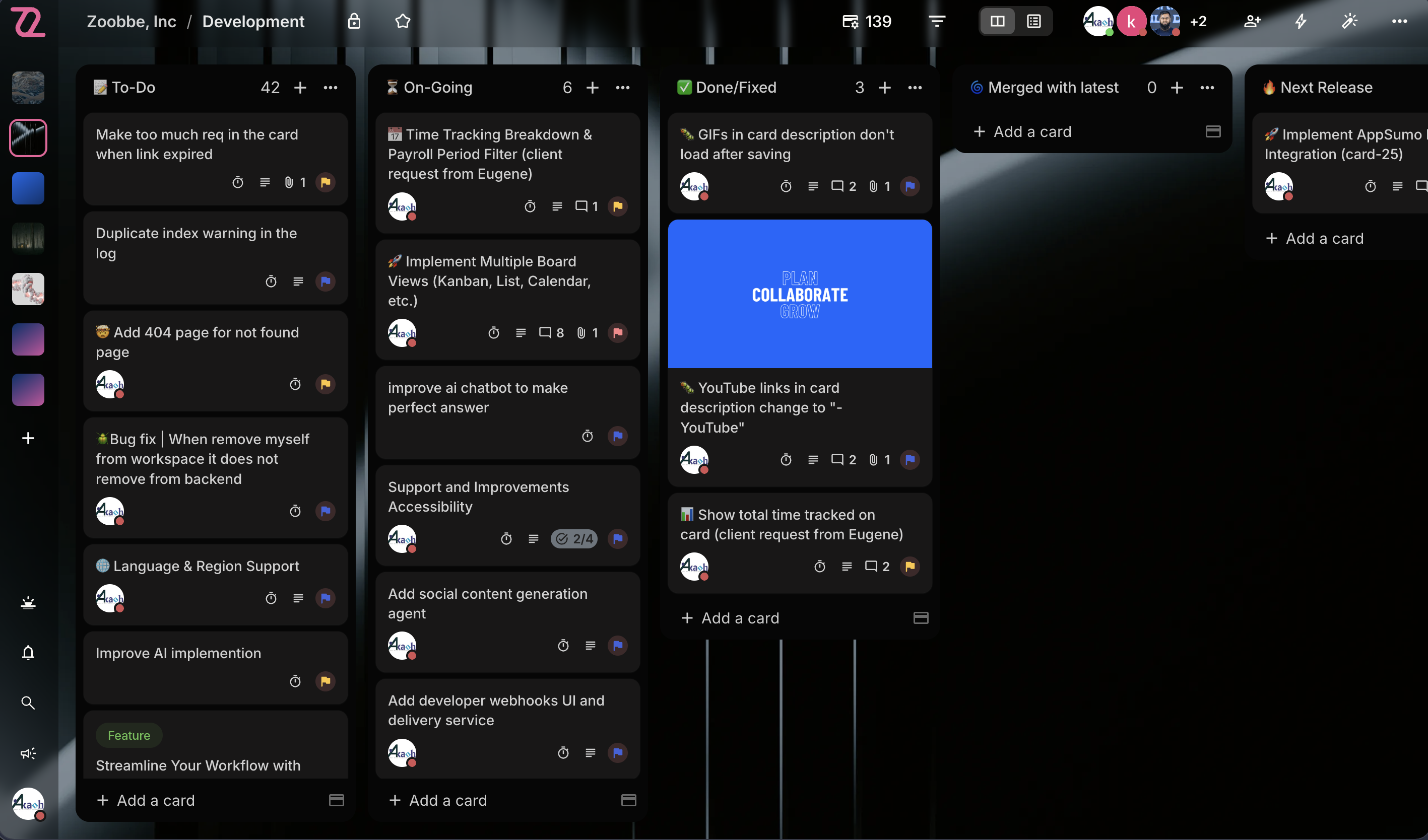
Boards & Views
- Kanban Boards — Full drag-and-drop board view with smooth column reordering and card movement
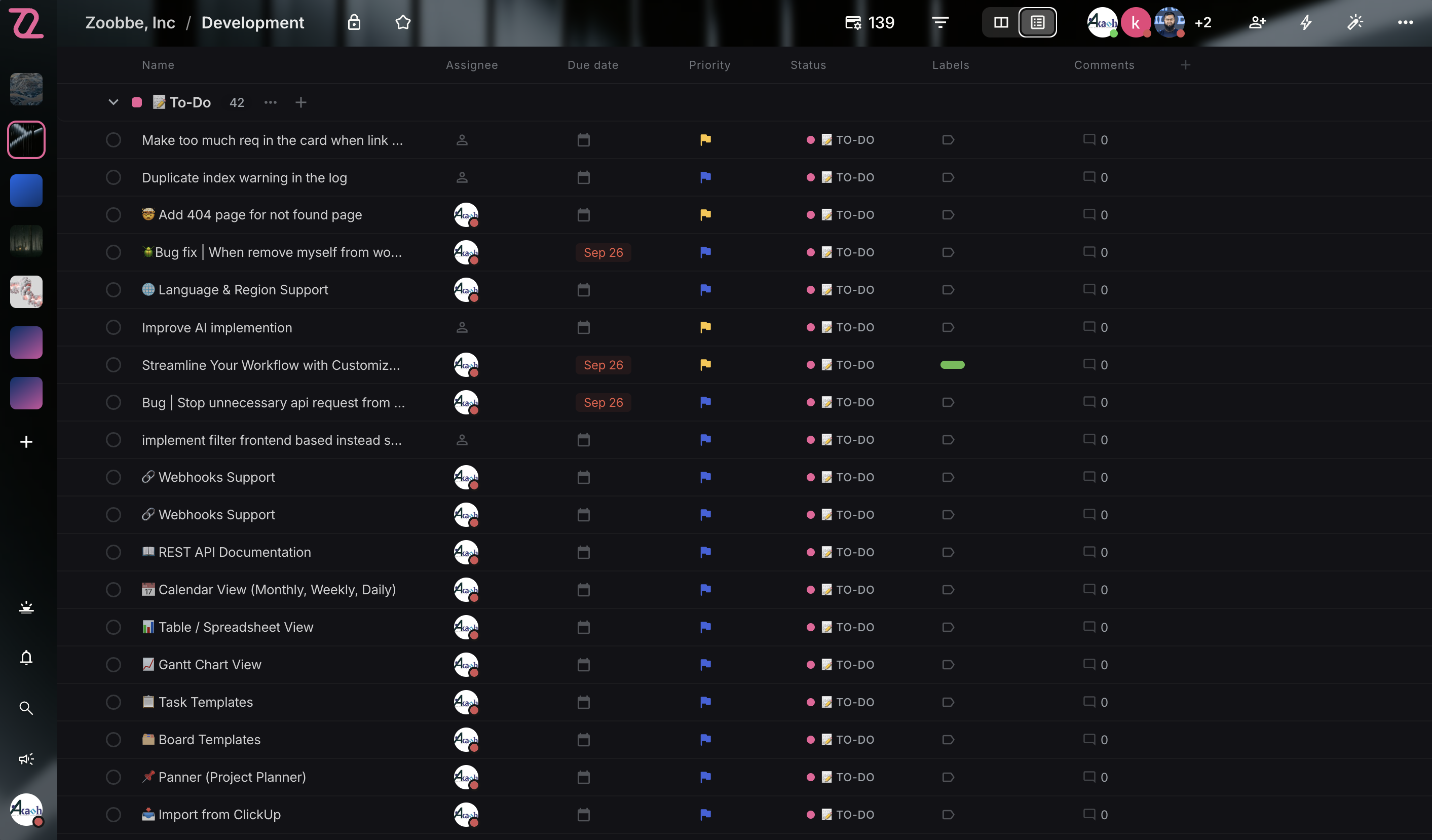
- List View — Spreadsheet-style linear view with sortable columns and inline editing
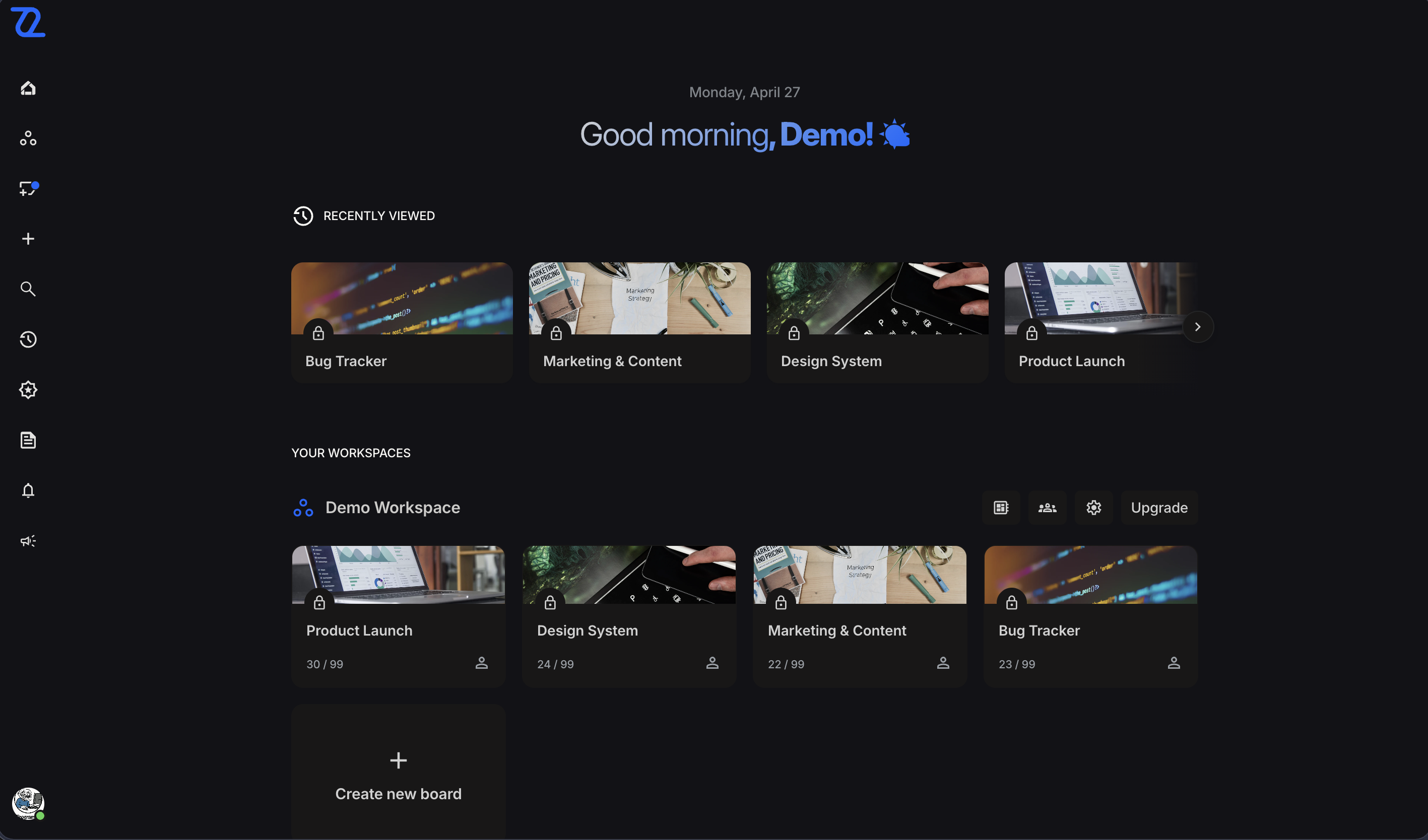
- Dashboard — Personalized greeting, starred boards, and a recently-viewed boards carousel
- Starred Boards — Pin favorite boards for one-click access from grid, list, and dashboard
- Board Members & Roles — Member management with roles (admin, member, observer) directly from the plugin
Cards
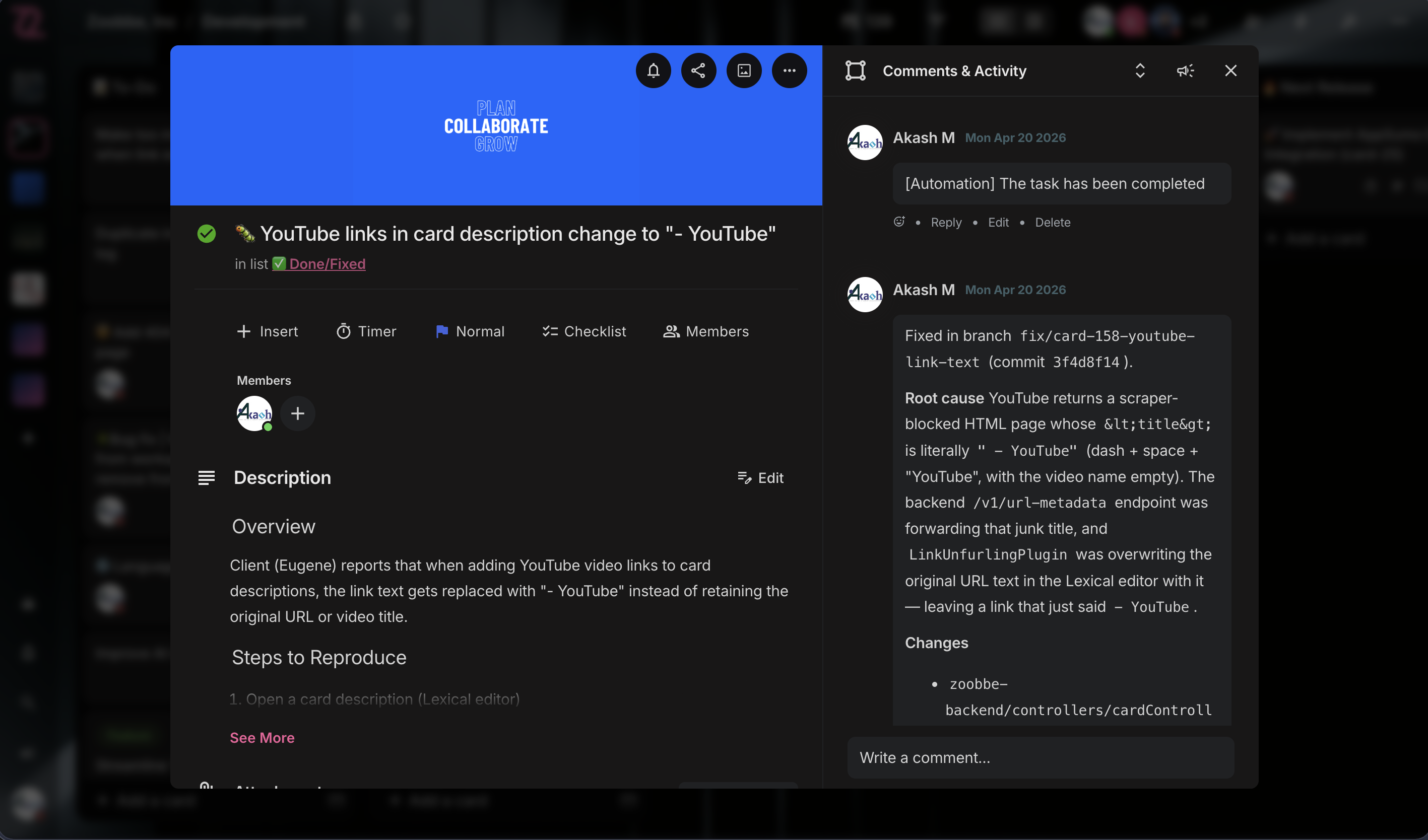
- Card Management — Create, edit, move, archive, and delete cards from any view
- Rich Text Description — Full Lexical editor with mentions, images, code blocks, and slash commands
- Comments & Activity — Threaded comments and full activity log per card
- Labels & Priorities — Color labels plus priority levels with quick filters
- Due Dates & Reminders — Date picker with overdue indicators and reminder settings
- Checklists — Multi-checklist support with progress tracking
- Attachments — File uploads with image previews via signed S3 URLs
- Watchers & Assignees — Assign multiple members; watchers receive notifications
Productivity
- My Day — Personal daily task view with priority sorting, progress tracking, and reorder support
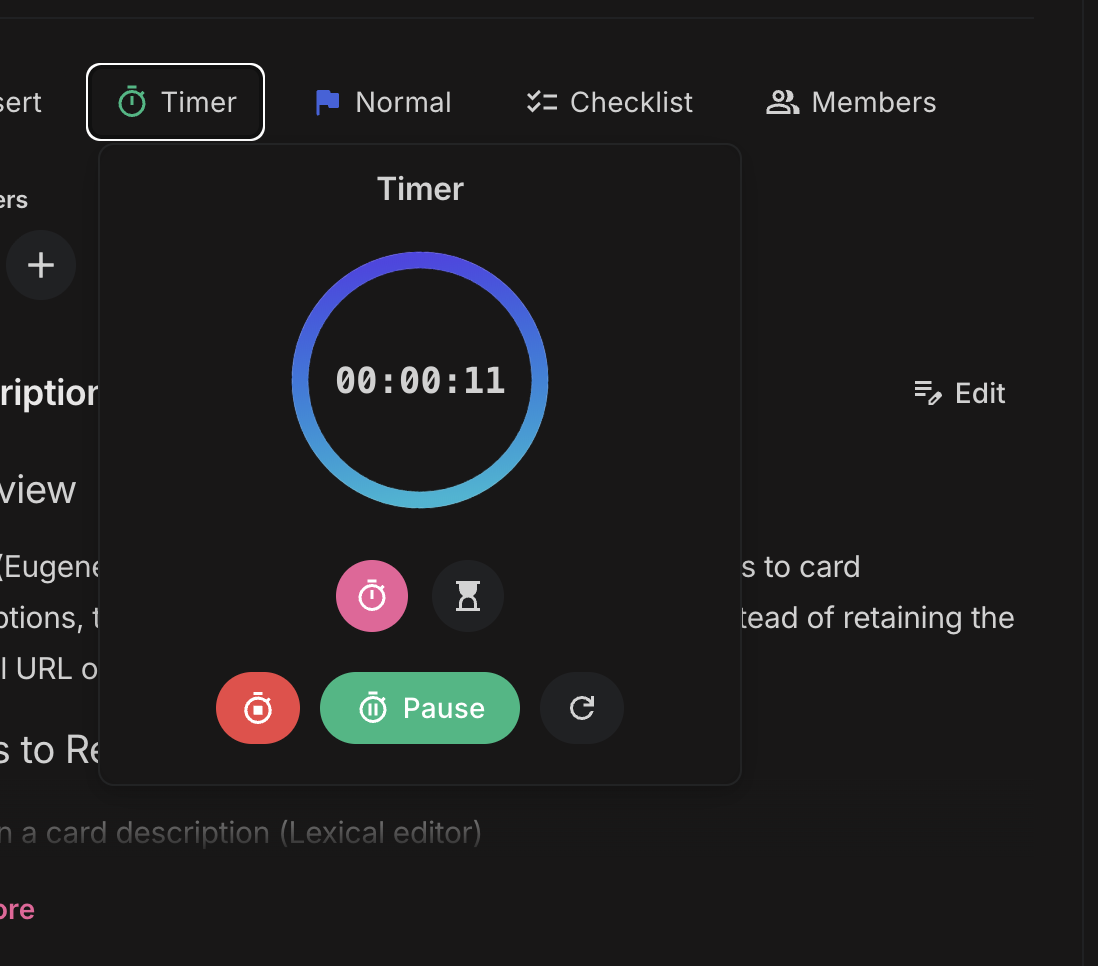
- Timer / Stopwatch — Per-card built-in timer that survives page reloads
- Global Search — Cmd/Ctrl+K modal for instant search across boards and cards
- Notifications — Real-time notification feed plus admin-bar bell icon — never miss a mention or due date
- Keyboard Shortcuts — Power-user navigation throughout the plugin
Collaboration & Team Access
- Team Management — Admin invites WordPress users to access Zoobbe through the plugin
- Auto-Membership Boards — Team members automatically see Zoobbe boards they belong to — no manual sharing
- Workspace Scoping — Team members are scoped to the admin’s workspaces for clean access boundaries
- Per-User Authentication — Each WordPress user connects their own Zoobbe account independently
Demo & Onboarding
- Try Demo Mode — Explore the plugin with a pre-populated sandbox workspace before signing up
- Activation Redirect — Land directly on the Zoobbe setup page after activation — zero hunting through menus
- Clean Demo Disconnect — End the demo and switch to your real account in one click
Look & Feel
- Light & Dark Theme — Auto-respects your WordPress admin color scheme; manual toggle available
- Custom Dropdowns — Polished native-feeling controls throughout (no jarring browser selects)
- Optimized for wp-admin — Hides distracting WP chrome on Zoobbe pages for a focused workspace
Security
- OAuth 2.0 with PKCE — Industry-standard authorization flow (RFC 7636), no secrets stored in the browser
- AES-256-CBC Encrypted Tokens — Access and refresh tokens encrypted at rest in
wp_usermeta - Per-User Tokens — Each user has their own credential — no shared accounts
- Auto Token Refresh — Background refresh on 401 keeps sessions seamless
How it works
- Install and activate the plugin
- Click “Try Demo” to explore right away, OR click “Connect with Zoobbe” to use your account
- Authorize the plugin (OAuth) — the consent page shows exactly which boards will be accessible
- Start managing your projects from WordPress
Team access
Admins can invite WordPress users from Zoobbe > Settings. Team members connect their own Zoobbe accounts via OAuth and automatically see boards from the admin’s workspaces where they are a member — no manual board sharing required.
Requirements
- WordPress 6.0+
- PHP 7.4+
- A Zoobbe account (free at zoobbe.com) — or use Try Demo mode without one
External Service
This plugin relies on Zoobbe, a third-party project management service, to provide all of its functionality. The plugin acts as a client that communicates with the Zoobbe API at https://api.zoobbe.com. A free Zoobbe account is required (or use Try Demo mode).
When data is sent:
- On every page load within the plugin (fetching boards, cards, lists, notifications)
- When you create, update, move, or delete cards, comments, checklists, and other project data
- During authentication (OAuth 2.0 login flow)
- When starting a Try Demo session (provisions an isolated demo workspace on Zoobbe’s servers)
Service links:
Privacy
This plugin connects to the Zoobbe API (zoobbe.com) to provide project management functionality. The following data is transmitted:
- Authentication: Your Zoobbe account credentials are used to authenticate via OAuth 2.0. Access and refresh tokens are stored encrypted (AES-256-CBC) in your WordPress database.
- Project data: Board, card, list, and comment data is fetched from and sent to Zoobbe’s servers. No project data is stored in WordPress.
- User profile: Your Zoobbe user profile (name, email, avatar) is cached locally for display purposes.
- Demo mode: When using Try Demo, an ephemeral demo account is provisioned on Zoobbe’s servers and wiped when the session ends. No payment or sign-up information is collected.
No data is shared with third parties beyond the Zoobbe service. No tracking or analytics scripts are included in the plugin.
For details, see:
Screenshots
Installation
- Upload the
zoobbefolder to/wp-content/plugins/, or install via Plugins > Add New - Activate the plugin through the ‘Plugins’ menu
- You’ll be redirected to the Zoobbe setup page automatically
- Click “Try Demo” to explore, or “Connect with Zoobbe” to use your real account
- If connecting: authorize via OAuth, then start using Zoobbe from your WordPress dashboard
Adding team members:
- Go to Zoobbe > Settings
- In the Team panel, click “Add” and select a WordPress user
- The team member opens Zoobbe in their own session and connects their Zoobbe account
- They’ll see boards from your workspaces where they’re a member — fully automatic
FAQ
-
Can I run Kanban boards inside WordPress with this plugin?
-
Yes. Zoobbe gives you full Kanban boards — with lists, cards, drag-and-drop, labels, due dates, checklists, and comments — directly inside the WordPress admin. If you’ve used a modern Kanban tool before, Zoobbe will feel instantly familiar, with the bonus that everything stays in WordPress.
-
Can I use Zoobbe as a task manager or todo list inside WordPress?
-
Absolutely. The “My Day” view is a personal todo list with priority sorting and progress tracking, and every Kanban card is a task with due dates, reminders, checklists, and assignees. You can run a full task management workflow without any other tool.
-
Does this plugin support team collaboration?
-
Yes. Admins invite WordPress users to the team, and each member connects their own Zoobbe account. Boards, cards, comments, mentions, and notifications are all real-time and scoped to the admin’s workspaces, so collaboration is automatic and secure.
-
Does Zoobbe include time tracking?
-
Yes. Every card has a built-in timer / stopwatch that survives page reloads, so you can track time spent on any task without installing a separate time-tracking plugin.
-
Do I need a Zoobbe account?
-
You can try the plugin in Demo mode without one. To save your work and collaborate with your team, you’ll need a free Zoobbe account at zoobbe.com.
-
What is Demo mode?
-
Demo mode gives you an isolated, pre-populated sandbox workspace so you can explore every feature before signing up. Your demo data is wiped when the session ends — no production data is touched.
-
Where is my data stored?
-
All project data is stored on Zoobbe’s secure servers. The plugin connects to your Zoobbe account via the Zoobbe API — no project data is stored locally in WordPress. Only your encrypted authentication tokens are kept in WordPress.
-
How does team access work?
-
When an admin connects the plugin, their workspace scope is saved. When team members connect their own Zoobbe accounts, they automatically see boards from the admin’s workspaces where they are a member. No manual board sharing is needed.
-
Is the connection secure?
-
Yes. The plugin uses OAuth 2.0 with PKCE (Proof Key for Code Exchange, RFC 7636) for authentication. Access and refresh tokens are encrypted with AES-256-CBC before being stored in WordPress. Tokens are never exposed to the browser.
-
Does this work with multisite?
-
Yes. Each site on a multisite network connects independently, and each user connects their own Zoobbe account.
-
Can I switch from Demo to my real account?
-
Yes. The “Disconnect Demo” button cleanly ends the demo session, wipes the demo data, and returns you to the connect screen.
-
Is the plugin free?
-
The plugin is free. You only need a Zoobbe account, which has free and paid tiers.
Reviews
There are no reviews for this plugin.
Contributors & Developers
“Zoobbe – Project Management & Kanban Boards” is open source software. The following people have contributed to this plugin.
Contributors
Translate “Zoobbe – Project Management & Kanban Boards” into your language.
Interested in development?
Browse the code, check out the SVN repository, or subscribe to the development log by RSS.
Changelog
1.0.7
- New: Inline card rename — hover a card on the Kanban board and click the pencil icon in the quick-action row to rename without opening the modal
- New: BoardHeader member avatars now open a profile-card popover (name, email, avatar) — click any avatar in the stack
- New: Empty-state CTAs in Card modal — “Add members”, “Add labels”, “Add a checklist” pills surface the actions when the card has none
- Improved: Share Board modal redesigned — orjja-styled with brand-tinted icon header, hairline borders, backdrop blur, brand-glow Done button; search results now render in a popover anchored to the input so the modal layout never reflows; modal anchors to top with a max-height (no more vertically-centered overflow); role selects render as bordered form fields
- Improved: List View popover edits (priority, due date, labels, members, title) now toast on failure and roll back the optimistic patch — every async mutation has visible feedback
- Improved: List View shows per-list skeleton rows while a list’s cards are still being fetched in the background, instead of “No cards to display”
- Fixed: Kanban list drag-and-drop drop event was never firing — Pragmatic DnD’s drop-target registry is a WeakMap keyed by element, and registering two drop targets on the same column silently overwrote the first. Consolidated into a single drop target that branches on
source.data.type - Fixed: List reorder is now persisted via the new
/v1/boards/{boardId}/orderproxy — order survives refresh
1.0.6
- New: Calendar view — month grid of cards with due dates; drag a card between days to reschedule, click any day to add a card on that date, and the filter bar (members, labels, priority) applies to calendar pills too
- New: Admin bar Quick-Add — capture a card from anywhere in wp-admin without leaving the page
- New: Saved Filters — name and recall favorite filter combinations per board (stored per-user per-board in localStorage)
- Tested with WordPress 7.0
1.0.5
- New: Share Board modal — invite members, change roles, remove with confirmation
- New: “Drop here” indicator when dragging cards into empty columns
- New: Themed error banner with friendlier rate-limit message (uses Retry-After)
- Improved: Dropdown menus now render as portal popovers — no clipping, no first-open blink
- Improved: Board view skeleton mirrors the real column layout
- Improved: Softer, layered shadows across cards, modals, and popovers (light + dark)
- Improved: Cleaner board header — removed SaaS-only Automations and AI Assistant icons
- Fixed: Drag-and-drop into empty columns now works reliably
- Fixed: 401 / 429 responses keep their real HTTP status instead of becoming 500
- Fixed: Real server error messages now surface in the UI, with a global toast on rate-limit
1.0.4
- New: Plugin Check (wp.org submission) compliance — added a CI workflow running WordPress/plugin-check-action on every push and PR
- Improved: Plugin display name is now “Zoobbe – Project Management & Kanban Boards” for better discoverability on wp.org
- Improved: Refreshed readme — rewritten short/long description, expanded FAQ (Kanban, todo lists, team collaboration, etc.), and updated tags (project management, kanban, task management, todo list, productivity)
- Improved: Replaced raw cURL multi handles with WordPress core’s
WpOrg\Requests::request_multiple(with a\Requestsfallback) for parallel API requests — fully WP-native HTTP, no direct cURL usage - Fixed: Plugin always connects to the live Zoobbe API (api.zoobbe.com); removed the WP_DEBUG branch that previously pointed the plugin at a local dev backend
- Fixed: All
error_log()debug calls now guarded byWP_DEBUG/WP_DEBUG_LOG, so production sites stay quiet - Fixed: Annotated direct
$wpdbqueries on the custom cache table, escaped table name withesc_sql(), and prefixed a global inuninstall.php— clears remaining Plugin Check warnings
1.0.3
- New: Client-side cache layer with persistent storage for boards, cards, notifications, and dashboard data — instant load on revisit
- New: Webhook receiver endpoint for server-driven cache invalidation, so changes from the Zoobbe app reflect in WP without a hard refresh
- New: Cache settings panel under Settings — view cache stats and clear cache on demand
- Improved: Boards, Card modal, Dashboard, My Day, and Notifications views now hydrate from cache and refresh in the background
- Improved: API client and
useApihook updated to integrate with the new cache + invalidation pipeline
1.0.2
- New: Try Demo mode — explore a fully-loaded sandbox workspace without signing up
- New: Activation redirect — land directly on the Zoobbe setup page after activating the plugin
- New: Clean Demo Disconnect button — end the demo and wipe sandbox data in one click
- New: Dashboard greeting + recently-viewed boards carousel on the Boards page
- New: Star (favorite) boards from the boards grid and list views; starred boards section on the dashboard
- Improved: Replaced native
<select>controls with a polished custom Dropdown component throughout the UI - Improved: Hide starred / recent sections during initial load instead of flashing skeletons
- Improved: Minor Kanban view polish and bug fixes
- Improved: Plugin now requires WordPress 6.0+ (was 5.8)
- Security: OAuth consent screen now displays the redirect URI host and binds the session token to the originating flow (defense-in-depth on the auth server)
1.0.1
- Improved OAuth connection error messages — server-side error details are now surfaced instead of a generic “Failed to connect” toast
1.0.0
- Initial release
- OAuth 2.0 connection with PKCE security
- Kanban board view with drag-and-drop
- List view for boards
- Card management (create, edit, comments, checklists, labels, priorities, due dates)
- My Day personal task view
- Team management — invite WordPress users with auto-membership board access
- Notifications in admin bar
- Global search across boards and cards
- Rich text editor (Lexical) for descriptions and comments
- AES-256-CBC encrypted token storage